
Remove lock from folders and files

nabilalk

New member
Power User
Local time
12:23 PM
Messages
299
I am copying over documents and media backup from my old hard drive (Win XP SP3) to my new Win 7 install. I have read about the permissions issue. I followed these instructions and added the registry key to add take full control and permissions to the context menu. After taking ownership and permissions, every file and folder has a lock icon. This is visually unappealing. How can I remove the lock icon, but retain access to my files? Thank you!

Take and Grant Full Control Permissions and Ownership in Windows 7 or Vista Right Click Menu My Digital Life
 

My Computer My Computer

At a glance

Win 7 Professional 32-bitIntel Core 2 Duo CPU T5750 @ 2.00 GHz3GB
Computer Manufacturer/Model Number
Gateway M6827
OS
Win 7 Professional 32-bit
CPU
Intel Core 2 Duo CPU T5750 @ 2.00 GHz
Memory
3GB
Monitor(s) Displays
ViewSonic Vx900
Screen Resolution
1280x1024
Hard Drives
150GB Hard Drive
Hi nabilalk.
I had a headache with this not long ago.
For example, if you have a padlock icon on files in C:\SF\nabilalk
First you will need to set sufficient privileges in the ACL for C:\SF and include permissions to inherit from parent dir (C:) and to replace child objects (C:\SF\nabilalk).
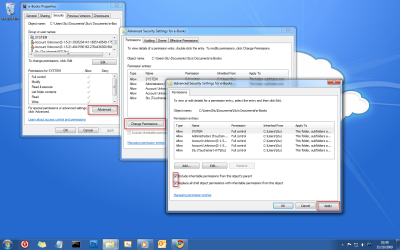
then in the ACL for C:\SF\nabilalk set permissions to inherit and replace also.
This worked a treat for me.
See this screeny for a better idea of what i mean. (ignore folder names!)

12.png

Ownership doesn't seem to alter anything.

If you need to me to clarify anything, please ask.
 

My Computer My Computer

At a glance

Windows 7 Ultimate x64AMD Turion(tm) 64 X2 Mobile Technology TL-563GB Nanya PC2-6400 DDR2-SDRAM SO-DIM (400MHz)NVIDIA GeForce Go 7600 256MB GDDR3 SDRAM
Computer Manufacturer/Model Number
HP Touchsmart IQ771.uk
OS
Windows 7 Ultimate x64
CPU
AMD Turion(tm) 64 X2 Mobile Technology TL-56
Motherboard
ASUS Pheonix
Memory
3GB Nanya PC2-6400 DDR2-SDRAM SO-DIM (400MHz)
Graphics Card(s)
NVIDIA GeForce Go 7600 256MB GDDR3 SDRAM
Sound Card
High Definition Intergrated NVIDIA MCP51
Monitor(s) Displays
46" Sony Bravia HDTV
Screen Resolution
1600x1200
Hard Drives
1.5TB Samsug
320GB Seagate ST3320820AS - SATA 3Gb/s 8MB
500GB Maxtor Basics STM305003EHD301-RK
Internet Speed
↓6.32 Mb/s ↑0.35 Mb/s ↔26ms
Other Info
BIOS - American Megatrends Inc. 5.07
Ethernet Port - NVIDIA nForce 10/100/1000 Mbps
DVD Drive - TSSTcorp DVDR/RW TS-T632L
Hi, rsvr85.
Can I open file with padlock icon at another PC?
I had some file's with this icon, and I'm afraid if I can't open these file's at another PC :(
 

My Computer My Computer

At a glance

Windows 7 Ultimate x86AMD Turion X2NVIDIA GeForce 9100m G
Computer Manufacturer/Model Number
Acer Aspire 4530
OS
Windows 7 Ultimate x86
CPU
AMD Turion X2
Graphics Card(s)
NVIDIA GeForce 9100m G
Sound Card
realtek
Monitor(s) Displays
1280x800
Hard Drives
250Gb
Hi mkharisecario & welcome :)That depends on your folder permissions, refer to the ACL of the folder to confirm whether another user account/computer can access the files.

Let us know if you need any more help :)
 

My Computer My Computer

At a glance

Windows 7 Ultimate x64AMD Turion(tm) 64 X2 Mobile Technology TL-563GB Nanya PC2-6400 DDR2-SDRAM SO-DIM (400MHz)NVIDIA GeForce Go 7600 256MB GDDR3 SDRAM
Computer Manufacturer/Model Number
HP Touchsmart IQ771.uk
OS
Windows 7 Ultimate x64
CPU
AMD Turion(tm) 64 X2 Mobile Technology TL-56
Motherboard
ASUS Pheonix
Memory
3GB Nanya PC2-6400 DDR2-SDRAM SO-DIM (400MHz)
Graphics Card(s)
NVIDIA GeForce Go 7600 256MB GDDR3 SDRAM
Sound Card
High Definition Intergrated NVIDIA MCP51
Monitor(s) Displays
46" Sony Bravia HDTV
Screen Resolution
1600x1200
Hard Drives
1.5TB Samsug
320GB Seagate ST3320820AS - SATA 3Gb/s 8MB
500GB Maxtor Basics STM305003EHD301-RK
Internet Speed
↓6.32 Mb/s ↑0.35 Mb/s ↔26ms
Other Info
BIOS - American Megatrends Inc. 5.07
Ethernet Port - NVIDIA nForce 10/100/1000 Mbps
DVD Drive - TSSTcorp DVDR/RW TS-T632L
actually, it's happen when I upgrade my 7 pro to Ultimate
All files that come from old installed 7 is no padlock icon, and some file (like picture that I download with "save picture as") is not have padlock icon.
Still, when I download picture with download manager, downloaded picture become have padlock icon.
Why this happen?

also, when I read some other post, it says that I can share it to anyone, but when I right click and choose share with, I cant find anyone. Just nobody (with padlock icon), homegroup (read), and homegroup(read/write)

I'm still little confused with this :confused:
 

My Computer My Computer

At a glance

Windows 7 Ultimate x86AMD Turion X2NVIDIA GeForce 9100m G
Computer Manufacturer/Model Number
Acer Aspire 4530
OS
Windows 7 Ultimate x86
CPU
AMD Turion X2
Graphics Card(s)
NVIDIA GeForce 9100m G
Sound Card
realtek
Monitor(s) Displays
1280x800
Hard Drives
250Gb

My Computer My Computer

At a glance

Windows 7 Ultimate x64AMD Turion(tm) 64 X2 Mobile Technology TL-563GB Nanya PC2-6400 DDR2-SDRAM SO-DIM (400MHz)NVIDIA GeForce Go 7600 256MB GDDR3 SDRAM
Computer Manufacturer/Model Number
HP Touchsmart IQ771.uk
OS
Windows 7 Ultimate x64
CPU
AMD Turion(tm) 64 X2 Mobile Technology TL-56
Motherboard
ASUS Pheonix
Memory
3GB Nanya PC2-6400 DDR2-SDRAM SO-DIM (400MHz)
Graphics Card(s)
NVIDIA GeForce Go 7600 256MB GDDR3 SDRAM
Sound Card
High Definition Intergrated NVIDIA MCP51
Monitor(s) Displays
46" Sony Bravia HDTV
Screen Resolution
1600x1200
Hard Drives
1.5TB Samsug
320GB Seagate ST3320820AS - SATA 3Gb/s 8MB
500GB Maxtor Basics STM305003EHD301-RK
Internet Speed
↓6.32 Mb/s ↑0.35 Mb/s ↔26ms
Other Info
BIOS - American Megatrends Inc. 5.07
Ethernet Port - NVIDIA nForce 10/100/1000 Mbps
DVD Drive - TSSTcorp DVDR/RW TS-T632L
All it means is that the drive, folder, file etc. is not shared. It`s nothing to worry about. Don`t go crazy changing a bunch of things you don`t need to.

If you share the drive, folder, file etc. the lock should dissappear.
 
Last edited:

My Computer My Computer

At a glance

Windows 10 Pro x64Intel Core i7 6700KGSkill TridentZ RGB 16GB 3600 16-16-16-36EVGA GTX 980 Ti SC x2
Computer type
PC/Desktop
Computer Manufacturer/Model Number
Skylake Special #666
OS
Windows 10 Pro x64
CPU
Intel Core i7 6700K
Motherboard
Asus Sabertooth Z170 Mark 1
Memory
GSkill TridentZ RGB 16GB 3600 16-16-16-36
Graphics Card(s)
EVGA GTX 980 Ti SC x2
Sound Card
Realtek High Definition
Monitor(s) Displays
AOC G2460PG
Screen Resolution
1920 x 1080 144Hz
Hard Drives
Samsung 860 Pro 256GB, Seagate Barracuda 4TB x2
PSU
EVGA 1000 P2, EVGA White Custom Braided Cables
Case
Corsair Vengeance C70 Gunmetal Black
Cooling
Corsair H100i v2, Corsair ML120 x2, Thermal Grizzly Kryonaut
Keyboard
Logitech G910 Orion Spectrum
Mouse
Logitech G700s
Internet Speed
Verizon Fios Quantum Gateway 75/75
Antivirus
Windows Defender, Malwarebytes Free 3.8.3
Browser
Chrome
Other Info
Corsair SP120 x4, LG Blu-ray Drive, Durabrand HT-395 100 Watt Dolby Digital Amp, Corsair H2100 Wireless 7.1 Headset
From above.

How to remove lock icon from folders?

It states users without admin rights cannot edit them. It`s a good thing.

It also states you must take ownership of those folders again. But as you can see here when I highlite "share with" it shows the lock next to nobody meaning it`s unshared. Sorry for the picture of Newt, I am watching Aliens on the Bravia.
 
Last edited:

My Computer My Computer

At a glance

Windows 10 Pro x64Intel Core i7 6700KGSkill TridentZ RGB 16GB 3600 16-16-16-36EVGA GTX 980 Ti SC x2
Computer type
PC/Desktop
Computer Manufacturer/Model Number
Skylake Special #666
OS
Windows 10 Pro x64
CPU
Intel Core i7 6700K
Motherboard
Asus Sabertooth Z170 Mark 1
Memory
GSkill TridentZ RGB 16GB 3600 16-16-16-36
Graphics Card(s)
EVGA GTX 980 Ti SC x2
Sound Card
Realtek High Definition
Monitor(s) Displays
AOC G2460PG
Screen Resolution
1920 x 1080 144Hz
Hard Drives
Samsung 860 Pro 256GB, Seagate Barracuda 4TB x2
PSU
EVGA 1000 P2, EVGA White Custom Braided Cables
Case
Corsair Vengeance C70 Gunmetal Black
Cooling
Corsair H100i v2, Corsair ML120 x2, Thermal Grizzly Kryonaut
Keyboard
Logitech G910 Orion Spectrum
Mouse
Logitech G700s
Internet Speed
Verizon Fios Quantum Gateway 75/75
Antivirus
Windows Defender, Malwarebytes Free 3.8.3
Browser
Chrome
Other Info
Corsair SP120 x4, LG Blu-ray Drive, Durabrand HT-395 100 Watt Dolby Digital Amp, Corsair H2100 Wireless 7.1 Headset
I just want to stop my laptop from locking my files. Everytime try to access these files it says "Access Denied" "You do not have access to these files". Yet they are the same files I access yesterday before I had to format my hard drive due to a virus. This also happens when I change laptops. Yet I have never set any locks to any files.
Is there a way I can just turn the security off, or delete it enitrely?
 

Attachments

  • Capture.PNG
    Capture.PNG
    16.9 KB · Views: 31

My Computer My Computer

At a glance

Windows 7 Home Premium x64
Computer type
Laptop
OS
Windows 7 Home Premium x64
Because you reformatted, you have to take ownership of the files. How on earth are you getting viruses ? Aren`t you scanning everything before you open it ?
What anti-virus are you using ?

Hope this helps, it`s the only tutorial I could find.

http://www.sevenforums.com/tutorials/1911-take-ownership-shortcut.html

The User Account Control may also have something to do with it, I always turn it off, never had a problem and I`ve never had a problem accessing my data after an install.

I don`t recommend you turn it off, but you could temporarily, and see if you still get the message.

I really think taking ownership will do the trick. There is a tutorial here, you just have to dig it up. I believe Brink wrote it.
 

My Computer My Computer

At a glance

Windows 10 Pro x64Intel Core i7 6700KGSkill TridentZ RGB 16GB 3600 16-16-16-36EVGA GTX 980 Ti SC x2
Computer type
PC/Desktop
Computer Manufacturer/Model Number
Skylake Special #666
OS
Windows 10 Pro x64
CPU
Intel Core i7 6700K
Motherboard
Asus Sabertooth Z170 Mark 1
Memory
GSkill TridentZ RGB 16GB 3600 16-16-16-36
Graphics Card(s)
EVGA GTX 980 Ti SC x2
Sound Card
Realtek High Definition
Monitor(s) Displays
AOC G2460PG
Screen Resolution
1920 x 1080 144Hz
Hard Drives
Samsung 860 Pro 256GB, Seagate Barracuda 4TB x2
PSU
EVGA 1000 P2, EVGA White Custom Braided Cables
Case
Corsair Vengeance C70 Gunmetal Black
Cooling
Corsair H100i v2, Corsair ML120 x2, Thermal Grizzly Kryonaut
Keyboard
Logitech G910 Orion Spectrum
Mouse
Logitech G700s
Internet Speed
Verizon Fios Quantum Gateway 75/75
Antivirus
Windows Defender, Malwarebytes Free 3.8.3
Browser
Chrome
Other Info
Corsair SP120 x4, LG Blu-ray Drive, Durabrand HT-395 100 Watt Dolby Digital Amp, Corsair H2100 Wireless 7.1 Headset
I use Norton 360 Premier, and Microsoft Security Essentials, but I do a lot of downloads from "The Pirate Bay" 200gb/mth. Mostly just American tv and movies.
Somehow, my system just starts acting up. 5 minutes for "fast bootup", files suddenly wont allow me to move them or will take 5-10 minutes to move 200mb file, external hard drives inaccessible, music mp3 files wont play, etc...
I don't know enough to work out what is wrong. Best thing just reboot. 3 hours later and I am up and running as normal.
Surely there's way to turn off ownership?
From what I have been reading, many, many, many many, other people hate this security.
 

My Computer My Computer

At a glance

Windows 7 Home Premium x64
Computer type
Laptop
OS
Windows 7 Home Premium x64
What are you using for your reinstalls, it could be corrupted.

Just my opinion, but Norton is garbage, it may be part of the problem. :sarc:

OK, I`m out, hitting the sac, Nite All :)
 

My Computer My Computer

At a glance

Windows 10 Pro x64Intel Core i7 6700KGSkill TridentZ RGB 16GB 3600 16-16-16-36EVGA GTX 980 Ti SC x2
Computer type
PC/Desktop
Computer Manufacturer/Model Number
Skylake Special #666
OS
Windows 10 Pro x64
CPU
Intel Core i7 6700K
Motherboard
Asus Sabertooth Z170 Mark 1
Memory
GSkill TridentZ RGB 16GB 3600 16-16-16-36
Graphics Card(s)
EVGA GTX 980 Ti SC x2
Sound Card
Realtek High Definition
Monitor(s) Displays
AOC G2460PG
Screen Resolution
1920 x 1080 144Hz
Hard Drives
Samsung 860 Pro 256GB, Seagate Barracuda 4TB x2
PSU
EVGA 1000 P2, EVGA White Custom Braided Cables
Case
Corsair Vengeance C70 Gunmetal Black
Cooling
Corsair H100i v2, Corsair ML120 x2, Thermal Grizzly Kryonaut
Keyboard
Logitech G910 Orion Spectrum
Mouse
Logitech G700s
Internet Speed
Verizon Fios Quantum Gateway 75/75
Antivirus
Windows Defender, Malwarebytes Free 3.8.3
Browser
Chrome
Other Info
Corsair SP120 x4, LG Blu-ray Drive, Durabrand HT-395 100 Watt Dolby Digital Amp, Corsair H2100 Wireless 7.1 Headset
I have used Norton for 8+ years with no issues, but I would use only Internet Security, not 360. MSE and Norton may not like each other either.
 

My Computer My Computer

At a glance

Windows 7 Ultimate X64 SP1Intel i5-2550K, Differing ~4.4-4.8GHz No buil...16GB G.Skill Sniper 1866MHz @ 2133MHz 2x8GBASUS GTX650TIB-DC2OC-2GD5, (650TI Boost)
Computer type
PC/Desktop
Computer Manufacturer/Model Number
Home Built Desktop By DataTech
OS
Windows 7 Ultimate X64 SP1
CPU
Intel i5-2550K, Differing ~4.4-4.8GHz No built in GPU
Motherboard
ASUS P8Z68-V PRO/GEN3
Memory
16GB G.Skill Sniper 1866MHz @ 2133MHz 2x8GB
Graphics Card(s)
ASUS GTX650TIB-DC2OC-2GD5, (650TI Boost)
Sound Card
Onboard Realtek 5-1
Monitor(s) Displays
Samsung P2570HD
Screen Resolution
1920x1080
Hard Drives
Samsung 840 Pro 256GB SSD for OS, 500GB Seagate Constellation (Enterprise drive) for Data
PSU
Corsair HX650W
Case
Inwin Dragon Rider
Cooling
Hyper 212 EVO w/two Noctua fans, push-pull, @1300 RPM
Keyboard
E-Z Eyes, bright yellow keys with large characters
Mouse
steelseries SENSEI Laser Pro Gaming
Internet Speed
48-51Mbs Mbs down, 11 Mbs up Xfinity Cable
Antivirus
Norton Internet Security 2013
Browser
IE 10, Opera, Pale Moon if needed
Other Info
4 case fans, LG BluRay-RE, ASUS DVD-RW, Mr. Fusion power supply, 1.21 gigawatts.
My reinstalls are loaded in the laptop. I just hit F9. If Norton is garbage, what is the best?
More importantly, how do I delete these Win 7 security settings on my files.
 

My Computer My Computer

At a glance

Windows 7 Home Premium x64
Computer type
Laptop
OS
Windows 7 Home Premium x64
This is what happens when I try to take ownership of my own files.
 

Attachments

  • 1.JPG
    1.JPG
    67.2 KB · Views: 3

My Computer My Computer

At a glance

Windows 7 Home Premium x64
Computer type
Laptop
OS
Windows 7 Home Premium x64
Back
Top