Aero Peek not working

donnyb

New member
Member
VIP
Local time
2:13 PM
Messages
153
Every way I have tried to enable AeroPeek is not working. By not working, I mean that the check mark is greyed out. For example, right clicking the show desktop box in lower right corner shows the check box greyed out. The box is checked, but it still does not work.
Any ideas what causes this? BTW, I also tried regedit and the taskbar properties, all with no joy.
 

My Computer My Computer

At a glance

Win 7 x64i7 920 @ 4Ghz6 GbATI 4770
OS
Win 7 x64
CPU
i7 920 @ 4Ghz
Motherboard
Asus P6T Deluxe v2
Memory
6 Gb
Graphics Card(s)
ATI 4770
Hard Drives
1 ea 750 GB
1 ea 1TB
1 ea 750 GB
1 ea 750 GB
No Raid, all SATA
PSU
Corsair TX750
Case
Coolermaster ATCS 840
Cooling
Prolimatech Megahalem
Internet Speed
30
Last edited by a moderator:

My Computer My Computer

At a glance

windows 7 home premium 64bitintel core2quad q82006gbati radeon hd4350
Computer Manufacturer/Model Number
hp pavilion p6045uk
OS
windows 7 home premium 64bit
CPU
intel core2quad q8200
Motherboard
asus ipibl-lb
Memory
6gb
Graphics Card(s)
ati radeon hd4350
Sound Card
realtek hd audio
Monitor(s) Displays
hp 2159m
Screen Resolution
1920x1080
Hard Drives
1 tb
PSU
300
Keyboard
basic hp wireless
Mouse
basic hp wireless
Internet Speed
up to 20mb(in reality 5mb) wireless
They are all enabled.
Forgot to mention that I have win7-64 bit. Would that make a difference?
Also, I have 6GB of memory and an ATI 4770 vid card.
 

My Computer My Computer

At a glance

Win 7 x64i7 920 @ 4Ghz6 GbATI 4770
OS
Win 7 x64
CPU
i7 920 @ 4Ghz
Motherboard
Asus P6T Deluxe v2
Memory
6 Gb
Graphics Card(s)
ATI 4770
Hard Drives
1 ea 750 GB
1 ea 1TB
1 ea 750 GB
1 ea 750 GB
No Raid, all SATA
PSU
Corsair TX750
Case
Coolermaster ATCS 840
Cooling
Prolimatech Megahalem
Internet Speed
30
are you using an aero theme.right click desktop,personalise
 

My Computer My Computer

At a glance

windows 7 home premium 64bitintel core2quad q82006gbati radeon hd4350
Computer Manufacturer/Model Number
hp pavilion p6045uk
OS
windows 7 home premium 64bit
CPU
intel core2quad q8200
Motherboard
asus ipibl-lb
Memory
6gb
Graphics Card(s)
ati radeon hd4350
Sound Card
realtek hd audio
Monitor(s) Displays
hp 2159m
Screen Resolution
1920x1080
Hard Drives
1 tb
PSU
300
Keyboard
basic hp wireless
Mouse
basic hp wireless
Internet Speed
up to 20mb(in reality 5mb) wireless
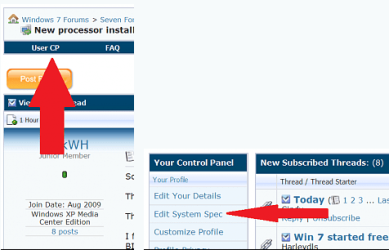
donnyb: Just in case for future issues, it will help others to help you if you fillin detailed system specs. Thanks and welcome to seven forums. Fabe usercp 1.png
 

My Computer My Computer

At a glance

Windows 7 ultimate 64 bit / XP Home sp3intel Core 2 Duo E8400 3.0ghz8 gigs 1066 OCZ Fata1tyEVGA GTX 580 Call of Duty Black Ops Edition
Computer Manufacturer/Model Number
Self Built
OS
Windows 7 ultimate 64 bit / XP Home sp3
CPU
intel Core 2 Duo E8400 3.0ghz
Motherboard
Asus P5ND bios 1401
Memory
8 gigs 1066 OCZ Fata1ty
Graphics Card(s)
EVGA GTX 580 Call of Duty Black Ops Edition
Sound Card
Creative Soundblaster Audigy 2zs
Monitor(s) Displays
Asus 24in LCD's 2MS X2
Screen Resolution
1920x1080p @60Hz
Hard Drives
WD Caviar 500 Black/ WD Caviar 200 Blue
PSU
OCZ 700W GameXtreme
Case
NZXT Apollo
Cooling
Corsair H50 CPU/120mm x3 /60mm x2 /Corsair Dominator Ram
Keyboard
Logitech Bluetooth Wireless MX5000
Mouse
Logitech Bluetooth Wireless MX1000
Internet Speed
Download 19.83 Upload 0.97
Other Info
Logitech Z2300 Speakers/ Bose Noise Cancelling Headphones/Avermedia PCI-e Hybrid TV Bravo/Epson NX415 all in one/ 4 Port Powered USB Hub/ LG 10x Bluray Burner /TSST Corp DVDRW External

My Computer My Computer

At a glance

Windows 7 ultimate 64 bit / XP Home sp3intel Core 2 Duo E8400 3.0ghz8 gigs 1066 OCZ Fata1tyEVGA GTX 580 Call of Duty Black Ops Edition
Computer Manufacturer/Model Number
Self Built
OS
Windows 7 ultimate 64 bit / XP Home sp3
CPU
intel Core 2 Duo E8400 3.0ghz
Motherboard
Asus P5ND bios 1401
Memory
8 gigs 1066 OCZ Fata1ty
Graphics Card(s)
EVGA GTX 580 Call of Duty Black Ops Edition
Sound Card
Creative Soundblaster Audigy 2zs
Monitor(s) Displays
Asus 24in LCD's 2MS X2
Screen Resolution
1920x1080p @60Hz
Hard Drives
WD Caviar 500 Black/ WD Caviar 200 Blue
PSU
OCZ 700W GameXtreme
Case
NZXT Apollo
Cooling
Corsair H50 CPU/120mm x3 /60mm x2 /Corsair Dominator Ram
Keyboard
Logitech Bluetooth Wireless MX5000
Mouse
Logitech Bluetooth Wireless MX1000
Internet Speed
Download 19.83 Upload 0.97
Other Info
Logitech Z2300 Speakers/ Bose Noise Cancelling Headphones/Avermedia PCI-e Hybrid TV Bravo/Epson NX415 all in one/ 4 Port Powered USB Hub/ LG 10x Bluray Burner /TSST Corp DVDRW External
Mine still does not work. I tried all the suggestions including the downloaded reg update, no joy. I even went back and found an Acronis True Image backup or image that I made after I first installed Win7 and it had the same thing. That is, all were greyed out. Also, under Performance options where there is a long list of check boxes - I do not see a choice for "Enable Aero Peek". Could it be that I do not have the current Win7?
I downloaded one of the betas, but I thought it was the same as the current retail version. It was 7600.16385-1255. I downloaded it and then built my new system (specs are now updated) and just lately started to install the OS. I will be getting an activation key in a few days for attending the Microsoft event and wanted to start a bit early before I actually get the key. Is my version the same as the retail version?
Edit: I just formatted an old drive with W7x86 and AeroPeek seems to work fine, it's just my main drive with W7-64bit that doesn't work.
 
Last edited:

My Computer My Computer

At a glance

Win 7 x64i7 920 @ 4Ghz6 GbATI 4770
OS
Win 7 x64
CPU
i7 920 @ 4Ghz
Motherboard
Asus P6T Deluxe v2
Memory
6 Gb
Graphics Card(s)
ATI 4770
Hard Drives
1 ea 750 GB
1 ea 1TB
1 ea 750 GB
1 ea 750 GB
No Raid, all SATA
PSU
Corsair TX750
Case
Coolermaster ATCS 840
Cooling
Prolimatech Megahalem
Internet Speed
30
Anyone?
 

My Computer My Computer

At a glance

Win 7 x64i7 920 @ 4Ghz6 GbATI 4770
OS
Win 7 x64
CPU
i7 920 @ 4Ghz
Motherboard
Asus P6T Deluxe v2
Memory
6 Gb
Graphics Card(s)
ATI 4770
Hard Drives
1 ea 750 GB
1 ea 1TB
1 ea 750 GB
1 ea 750 GB
No Raid, all SATA
PSU
Corsair TX750
Case
Coolermaster ATCS 840
Cooling
Prolimatech Megahalem
Internet Speed
30
Can you try uninstalling your current gpu driver, use driver sweeper in safe mode to clean up, reboot back into safe mode and install the newest drivers? Then update your chipset and BIOS drivers. Have you overclocked any parts of your PC?
 

My Computer My Computer

At a glance

Windows 7 Ultimate x86-64[email protected] 1066MHz FSB6GB DDR3 1066MHz9300M GS 256MB Dedicated (Speed) + Intel4500M...
Computer Manufacturer/Model Number
Sony Vaio Z46GDU
OS
Windows 7 Ultimate x86-64
CPU
[email protected] 1066MHz FSB
Motherboard
Sony branded
Memory
6GB DDR3 1066MHz
Graphics Card(s)
9300M GS 256MB Dedicated (Speed) + Intel4500MHD (Stamina)
Sound Card
Realtek HD Audio
Monitor(s) Displays
13.1' WXGA
Screen Resolution
1600x900
Hard Drives
320GB 7200RPM w/ 16MB cache
Internet Speed
1MB/s
Here is what I did to make it work - I saw this somewhere else: I added another user with admin priviliges. Then I deleted the old user. The new user has a working aero peek. Can anyone explain why this worked, as it is totally baffling to me.

BTW Frostmourne - This is a brand new system and I downloaded all new drivers, chipset drivers, bios's, and also, the Aero peek worked on my Win7-x86 system (which is the same computer, just loaded on another HDD).
 

My Computer My Computer

At a glance

Win 7 x64i7 920 @ 4Ghz6 GbATI 4770
OS
Win 7 x64
CPU
i7 920 @ 4Ghz
Motherboard
Asus P6T Deluxe v2
Memory
6 Gb
Graphics Card(s)
ATI 4770
Hard Drives
1 ea 750 GB
1 ea 1TB
1 ea 750 GB
1 ea 750 GB
No Raid, all SATA
PSU
Corsair TX750
Case
Coolermaster ATCS 840
Cooling
Prolimatech Megahalem
Internet Speed
30
Fix to Aero Peek

Go into Performance Options and make sure "Save taskbar thumbnail previews" is checked. If you were playing with the settings and then set them back to"Let Windows choose..." it will not check this one by default. Once this is checked, your Aero peek will work.
 

My Computer My Computer

At a glance

Windows 7Core i7
Computer Manufacturer/Model Number
HP Pavillion dv6
OS
Windows 7
CPU
Core i7
hi,

use this tips, for win7 ultimate SP1 user's

step1: Go To "Control Panel\All Control Panel Items\System"
step2: Left Margin Link Liist SEE ALSO category "Performance Information and Tools" Click.
OR Go to :>"Control Panel\All Control Panel Items\Performance Information and Tools"
step3: Click "Adjust Visual Effects" at Left Margin
step4: Select Radio Button "Adjust best Appearance" / Checked the "Enable Aero Peek" then "OK"

Now U See the Aero Peek Run on ur PC/LapTop..................

:rolleyes::rolleyes::rolleyes::rolleyes::rolleyes::rolleyes::rolleyes::rolleyes::rolleyes::rolleyes::rolleyes::rolleyes::rolleyes::rolleyes::rolleyes::rolleyes::rolleyes::rolleyes::rolleyes::rolleyes::rolleyes::rolleyes::rolleyes::rolleyes::rolleyes::rolleyes::rolleyes::rolleyes::rolleyes::rolleyes::rolleyes::rolleyes::rolleyes::rolleyes:
 

My Computer My Computer

At a glance

Windows 7 Ultimate x64 SP1Intel Pentium B960 2.20 GHz4.00GB (3.84 GB Usable)Intel HD Graphics 128MB
Computer type
Laptop
Computer Manufacturer/Model Number
Acer
OS
Windows 7 Ultimate x64 SP1
CPU
Intel Pentium B960 2.20 GHz
Motherboard
Intel HM70
Memory
4.00GB (3.84 GB Usable)
Graphics Card(s)
Intel HD Graphics 128MB
Antivirus
Kaspersky Internet Security
Browser
Firefox, Ie Ver11
thanks for your efforts balajir ,but if donnyb hasnt sorted it out in 4 years then there is no hope for him.
welcome to seven forums :D
 

My Computer My Computer

At a glance

Microsoft Windows 7 Home Premium 64-bit 7600IIx4 amd athelon 635 processor2x2gbati radeon HD 5450
Computer Manufacturer/Model Number
Hewlett packard/p6512uk
OS
Microsoft Windows 7 Home Premium 64-bit 7600
CPU
IIx4 amd athelon 635 processor
Motherboard
FOXCONN 2AA9
Memory
2x2gb
Graphics Card(s)
ati radeon HD 5450
Sound Card
(1) Realtek High Definition Audio (2) AMD High Definition
Monitor(s) Displays
samsung lcd tv 32"
Screen Resolution
1360x 768
Hard Drives
(1) WDC WD10 01FAES-60Z2A0 SATA Disk Device (2) Maxtor OneTouch USB Device (3) ST310003 33AS USB Device (4) WD My Book 1111 USB Device
PSU
?
Cooling
air!
Keyboard
wireless hp
Mouse
wireless Hp,optical
Internet Speed
1.10mb/s
Antivirus
MSE
Browser
Firefox
I have a different resolution and it is only if you have Lenovo Power Manager installed:

Open the Lenovo Power Battery Manager > Click the "Battery" tab > Battery Maintenance > Then change the radio dialog option to "Always fully charge"

To me it seems very unrelated but it worked for me. I tried to leave it set to "Optimize for Battery Health" and unchecking "Show Power Manager Gauge in task bar" but that didn't work.
 

My Computer My Computer

At a glance

Windows 7 Enterprise 32bit
Computer type
PC/Desktop
Computer Manufacturer/Model Number
Lenovo T440s
OS
Windows 7 Enterprise 32bit
Back
Top