Ethernet Issue

MattGarner

New member
Local time
12:10 AM
Messages
15
Hey everyone,

Today I decided to connect my Windows 7 PC up to my router via Ethernet. I would have thought it would have been a simple task but it seems it can't connect. It says it’s connected to an "Unidentified Network" and not my "NETGEAR" one. I have looked at ipconfig and it does seem my IPv4 address or whatever it is these days is wrong. I don't know what I can do to fix it but I have tried a few solutions already on the internet but have failed. Could anyone please help me?


Thanks,
 

My Computer My Computer

At a glance

Windows 7 Home Premium x64AMD Athlon 64 - Dual Core Processor 5600+ @ 2...6GB DDR2 RamNvidia GeForce 9400GT with 1GB
OS
Windows 7 Home Premium x64
CPU
AMD Athlon 64 - Dual Core Processor 5600+ @ 2.9Ghz
Motherboard
ASRock K10N78FullHD-HSLI R3.0
Memory
6GB DDR2 Ram
Graphics Card(s)
Nvidia GeForce 9400GT with 1GB
Monitor(s) Displays
Dell 22" WideScreen Monitor with VGA & DVI (S2209W)
Hard Drives
2x500GB Internal Hard Drives
Set a static ip for IPv4/NIC.

Ip address = same as router config page, only change last part to anything between 2-255 that is not in use on network. 150 is fine choice.

Subnet mask = 255.255.255.0

Default gateway = same ip as router config page, usually 192.168.1.1 or 192.168.0.1

Preferred dns = 192.168.0.1 or 192.168.1.1 = router's config page
 

My Computer My Computer

At a glance

7600.20510 x86P4 550 3.4 GHz HT running at 3.5 GHzOCZ 2 GB(2x1GB) DDR400mHz running @ 414 mHzHIS Radeon HD 3850 IceQ 3 Turbo HDMI Dual DL-...
Computer Manufacturer/Model Number
self built
OS
7600.20510 x86
CPU
P4 550 3.4 GHz HT running at 3.5 GHz
Motherboard
MSI PM8M3-V (MS-7211 v1.x) Micro-ATX mainboard
Memory
OCZ 2 GB(2x1GB) DDR400mHz running @ 414 mHz
Graphics Card(s)
HIS Radeon HD 3850 IceQ 3 Turbo HDMI Dual DL-DVI AGP
Sound Card
MOTU Traveler firewire studio interface 192 kHz 24 bit
Monitor(s) Displays
22" widescreen Acer X223W LCD, 17" Compaq P75 CRT
Screen Resolution
1680x1050 and 1280x1024
Hard Drives
SATA I x2 WD, 400 GB and 120 GB, SATA 2 WD Caviar Black 1 TB
PSU
350W generic
Case
Cybertronpc, it glows blue
Cooling
stock cpu fan, Ice-Q 3 gpu and system, many case fans
Keyboard
Logitch Classical Keyboard 200
Mouse
Logitech Mediaplay cordless
Internet Speed
1792/448 kbits/sec
Other Info
SATA II PCI fake RAID adapter, 1 GB Readyboost, original ATI Remote Wonder (even works with WMC perfectly), Logitech Rumblepad 2 game controller x2
It's now found "NETGEAR" but won't give me the internet access.
 

My Computer My Computer

At a glance

Windows 7 Home Premium x64AMD Athlon 64 - Dual Core Processor 5600+ @ 2...6GB DDR2 RamNvidia GeForce 9400GT with 1GB
OS
Windows 7 Home Premium x64
CPU
AMD Athlon 64 - Dual Core Processor 5600+ @ 2.9Ghz
Motherboard
ASRock K10N78FullHD-HSLI R3.0
Memory
6GB DDR2 Ram
Graphics Card(s)
Nvidia GeForce 9400GT with 1GB
Monitor(s) Displays
Dell 22" WideScreen Monitor with VGA & DVI (S2209W)
Hard Drives
2x500GB Internal Hard Drives
Set a static ip for IPv4/NIC.

Ip address = same as router config page, only change last part to anything between 2-255 that is not in use on network. 150 is fine choice.

Subnet mask = 255.255.255.0

Default gateway = same ip as router config page, usually 192.168.1.1 or 192.168.0.1

Preferred dns = 192.168.0.1 or 192.168.1.1 = router's config page
Sorry to be so dumb, but how do you do this? in DOS?
 

My Computer My Computer

At a glance

Win 7 HP (upgrade from XP Pro SP3)Intel(R) Pentium(R) 4 CPU 3.00GHz4 GBATI Radeon HD 3800 Series
Computer Manufacturer/Model Number
Custom built, McGyver style ;)
OS
Win 7 HP (upgrade from XP Pro SP3)
CPU
Intel(R) Pentium(R) 4 CPU 3.00GHz
Motherboard
Intel D865GBF
Memory
4 GB
Graphics Card(s)
ATI Radeon HD 3800 Series
Sound Card
CMI8738/C3DX PCI Audio Device
Monitor(s) Displays
Acer H233H
Screen Resolution
1920X1080
Hard Drives
Drive: C:
Free Space: 84.4 GB
Total Space: 84.4 GB
File System: NTFS
Model: Maxtor 6Y080P0

Drive: D:
Free Space: 42.3 GB
Total Space: 58.6 GB
File System: NTFS
Model: Maxtor 4D060H3

Drive: G: (Win7HP drive)
Free Spa
Case
Antec
Cooling
some fans, in cool dry basement
Keyboard
Logitech MK700 wireless
Mouse
HID-compliant MX500 Optical Mouse and wireless MK700 mouse
Internet Speed
100.0 Mbps
Set a static ip for IPv4/NIC.

Ip address = same as router config page, only change last part to anything between 2-255 that is not in use on network. 150 is fine choice.

Subnet mask = 255.255.255.0

Default gateway = same ip as router config page, usually 192.168.1.1 or 192.168.0.1

Preferred dns = 192.168.0.1 or 192.168.1.1 = router's config page
Sorry to be so dumb, but how do you do this? in DOS?

Can be, but no.

Network and Sharing center. Click on local area connection.Then properties. Double click IPv4 line.
 

My Computer My Computer

At a glance

7600.20510 x86P4 550 3.4 GHz HT running at 3.5 GHzOCZ 2 GB(2x1GB) DDR400mHz running @ 414 mHzHIS Radeon HD 3850 IceQ 3 Turbo HDMI Dual DL-...
Computer Manufacturer/Model Number
self built
OS
7600.20510 x86
CPU
P4 550 3.4 GHz HT running at 3.5 GHz
Motherboard
MSI PM8M3-V (MS-7211 v1.x) Micro-ATX mainboard
Memory
OCZ 2 GB(2x1GB) DDR400mHz running @ 414 mHz
Graphics Card(s)
HIS Radeon HD 3850 IceQ 3 Turbo HDMI Dual DL-DVI AGP
Sound Card
MOTU Traveler firewire studio interface 192 kHz 24 bit
Monitor(s) Displays
22" widescreen Acer X223W LCD, 17" Compaq P75 CRT
Screen Resolution
1680x1050 and 1280x1024
Hard Drives
SATA I x2 WD, 400 GB and 120 GB, SATA 2 WD Caviar Black 1 TB
PSU
350W generic
Case
Cybertronpc, it glows blue
Cooling
stock cpu fan, Ice-Q 3 gpu and system, many case fans
Keyboard
Logitch Classical Keyboard 200
Mouse
Logitech Mediaplay cordless
Internet Speed
1792/448 kbits/sec
Other Info
SATA II PCI fake RAID adapter, 1 GB Readyboost, original ATI Remote Wonder (even works with WMC perfectly), Logitech Rumblepad 2 game controller x2
It's now found "NETGEAR" but won't give me the internet access.

Check router for settings that disallow internet access based on mac address. Add your NIC's mac address to allow list if there is one.

Completely remove Bonjour service if it's on your pc. To check, look for presence of mdnsresponder.exe in task manager.
 

My Computer My Computer

At a glance

7600.20510 x86P4 550 3.4 GHz HT running at 3.5 GHzOCZ 2 GB(2x1GB) DDR400mHz running @ 414 mHzHIS Radeon HD 3850 IceQ 3 Turbo HDMI Dual DL-...
Computer Manufacturer/Model Number
self built
OS
7600.20510 x86
CPU
P4 550 3.4 GHz HT running at 3.5 GHz
Motherboard
MSI PM8M3-V (MS-7211 v1.x) Micro-ATX mainboard
Memory
OCZ 2 GB(2x1GB) DDR400mHz running @ 414 mHz
Graphics Card(s)
HIS Radeon HD 3850 IceQ 3 Turbo HDMI Dual DL-DVI AGP
Sound Card
MOTU Traveler firewire studio interface 192 kHz 24 bit
Monitor(s) Displays
22" widescreen Acer X223W LCD, 17" Compaq P75 CRT
Screen Resolution
1680x1050 and 1280x1024
Hard Drives
SATA I x2 WD, 400 GB and 120 GB, SATA 2 WD Caviar Black 1 TB
PSU
350W generic
Case
Cybertronpc, it glows blue
Cooling
stock cpu fan, Ice-Q 3 gpu and system, many case fans
Keyboard
Logitch Classical Keyboard 200
Mouse
Logitech Mediaplay cordless
Internet Speed
1792/448 kbits/sec
Other Info
SATA II PCI fake RAID adapter, 1 GB Readyboost, original ATI Remote Wonder (even works with WMC perfectly), Logitech Rumblepad 2 game controller x2
Set a static ip for IPv4/NIC.

Ip address = same as router config page, only change last part to anything between 2-255 that is not in use on network. 150 is fine choice.

Subnet mask = 255.255.255.0

Default gateway = same ip as router config page, usually 192.168.1.1 or 192.168.0.1

Preferred dns = 192.168.0.1 or 192.168.1.1 = router's config page
Sorry to be so dumb, but how do you do this? in DOS?

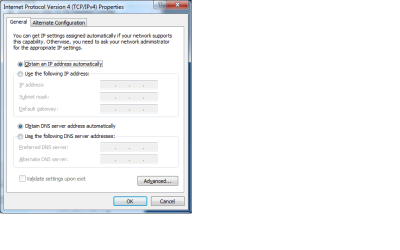
Start->Control Panel->Network and Sharing Center->Change adapter settings->select Local Aera Connection->right click, select properties
select Internet Protocol Version 4(TCP/IPv4), and select properties.

Local-Area-Connection-Properties.png

protocol-ip4-properties.png

There you can choose the correct settings manually.
 

My Computer My Computer

At a glance

Windows 7 Home Premium x64Intel 1720 Core 2 Duo 2.00GHz,800,2M4GB 667MHz DDR2 SDRAM (2x2048)NVIDIA Geforce Go 8600M GT 256MB DDR2
Computer Manufacturer/Model Number
Dell Inpspiron 1720
OS
Windows 7 Home Premium x64
CPU
Intel 1720 Core 2 Duo 2.00GHz,800,2M
Memory
4GB 667MHz DDR2 SDRAM (2x2048)
Graphics Card(s)
NVIDIA Geforce Go 8600M GT 256MB DDR2
Sound Card
SigmaTel
Monitor(s) Displays
17.0" Widescreen WXGA+ (1440x900) TFT with TrueLife
Screen Resolution
1440x900
Hard Drives
2x160GB 5400RPM Serial ATA
Mouse
Logitech
My friend tried a few things and made it so the router is forcing me on .150. Although windows doesn't think it is. :S
 

My Computer My Computer

At a glance

Windows 7 Home Premium x64AMD Athlon 64 - Dual Core Processor 5600+ @ 2...6GB DDR2 RamNvidia GeForce 9400GT with 1GB
OS
Windows 7 Home Premium x64
CPU
AMD Athlon 64 - Dual Core Processor 5600+ @ 2.9Ghz
Motherboard
ASRock K10N78FullHD-HSLI R3.0
Memory
6GB DDR2 Ram
Graphics Card(s)
Nvidia GeForce 9400GT with 1GB
Monitor(s) Displays
Dell 22" WideScreen Monitor with VGA & DVI (S2209W)
Hard Drives
2x500GB Internal Hard Drives
Where is the router config page?:confused:
 

My Computer My Computer

At a glance

Win 7 HP (upgrade from XP Pro SP3)Intel(R) Pentium(R) 4 CPU 3.00GHz4 GBATI Radeon HD 3800 Series
Computer Manufacturer/Model Number
Custom built, McGyver style ;)
OS
Win 7 HP (upgrade from XP Pro SP3)
CPU
Intel(R) Pentium(R) 4 CPU 3.00GHz
Motherboard
Intel D865GBF
Memory
4 GB
Graphics Card(s)
ATI Radeon HD 3800 Series
Sound Card
CMI8738/C3DX PCI Audio Device
Monitor(s) Displays
Acer H233H
Screen Resolution
1920X1080
Hard Drives
Drive: C:
Free Space: 84.4 GB
Total Space: 84.4 GB
File System: NTFS
Model: Maxtor 6Y080P0

Drive: D:
Free Space: 42.3 GB
Total Space: 58.6 GB
File System: NTFS
Model: Maxtor 4D060H3

Drive: G: (Win7HP drive)
Free Spa
Case
Antec
Cooling
some fans, in cool dry basement
Keyboard
Logitech MK700 wireless
Mouse
HID-compliant MX500 Optical Mouse and wireless MK700 mouse
Internet Speed
100.0 Mbps

My Computer My Computer

At a glance

Windows 7 Home Premium x64AMD Athlon 64 - Dual Core Processor 5600+ @ 2...6GB DDR2 RamNvidia GeForce 9400GT with 1GB
OS
Windows 7 Home Premium x64
CPU
AMD Athlon 64 - Dual Core Processor 5600+ @ 2.9Ghz
Motherboard
ASRock K10N78FullHD-HSLI R3.0
Memory
6GB DDR2 Ram
Graphics Card(s)
Nvidia GeForce 9400GT with 1GB
Monitor(s) Displays
Dell 22" WideScreen Monitor with VGA & DVI (S2209W)
Hard Drives
2x500GB Internal Hard Drives
My friend tried a few things and made it so the router is forcing me on .150. Although windows doesn't think it is. :S
You didn't set a static ip as I've outlined then.
 

My Computer My Computer

At a glance

7600.20510 x86P4 550 3.4 GHz HT running at 3.5 GHzOCZ 2 GB(2x1GB) DDR400mHz running @ 414 mHzHIS Radeon HD 3850 IceQ 3 Turbo HDMI Dual DL-...
Computer Manufacturer/Model Number
self built
OS
7600.20510 x86
CPU
P4 550 3.4 GHz HT running at 3.5 GHz
Motherboard
MSI PM8M3-V (MS-7211 v1.x) Micro-ATX mainboard
Memory
OCZ 2 GB(2x1GB) DDR400mHz running @ 414 mHz
Graphics Card(s)
HIS Radeon HD 3850 IceQ 3 Turbo HDMI Dual DL-DVI AGP
Sound Card
MOTU Traveler firewire studio interface 192 kHz 24 bit
Monitor(s) Displays
22" widescreen Acer X223W LCD, 17" Compaq P75 CRT
Screen Resolution
1680x1050 and 1280x1024
Hard Drives
SATA I x2 WD, 400 GB and 120 GB, SATA 2 WD Caviar Black 1 TB
PSU
350W generic
Case
Cybertronpc, it glows blue
Cooling
stock cpu fan, Ice-Q 3 gpu and system, many case fans
Keyboard
Logitch Classical Keyboard 200
Mouse
Logitech Mediaplay cordless
Internet Speed
1792/448 kbits/sec
Other Info
SATA II PCI fake RAID adapter, 1 GB Readyboost, original ATI Remote Wonder (even works with WMC perfectly), Logitech Rumblepad 2 game controller x2
Ok found my router config page.

The default gateway addy is way different, and listed under WAN. I don't have wireless...or does this mean wired? I'm so confused.
 

My Computer My Computer

At a glance

Win 7 HP (upgrade from XP Pro SP3)Intel(R) Pentium(R) 4 CPU 3.00GHz4 GBATI Radeon HD 3800 Series
Computer Manufacturer/Model Number
Custom built, McGyver style ;)
OS
Win 7 HP (upgrade from XP Pro SP3)
CPU
Intel(R) Pentium(R) 4 CPU 3.00GHz
Motherboard
Intel D865GBF
Memory
4 GB
Graphics Card(s)
ATI Radeon HD 3800 Series
Sound Card
CMI8738/C3DX PCI Audio Device
Monitor(s) Displays
Acer H233H
Screen Resolution
1920X1080
Hard Drives
Drive: C:
Free Space: 84.4 GB
Total Space: 84.4 GB
File System: NTFS
Model: Maxtor 6Y080P0

Drive: D:
Free Space: 42.3 GB
Total Space: 58.6 GB
File System: NTFS
Model: Maxtor 4D060H3

Drive: G: (Win7HP drive)
Free Spa
Case
Antec
Cooling
some fans, in cool dry basement
Keyboard
Logitech MK700 wireless
Mouse
HID-compliant MX500 Optical Mouse and wireless MK700 mouse
Internet Speed
100.0 Mbps
I'm not sure how to make a static IP but heres what I took a screenshot of:

2qthkp1.png
 

My Computer My Computer

At a glance

Windows 7 Home Premium x64AMD Athlon 64 - Dual Core Processor 5600+ @ 2...6GB DDR2 RamNvidia GeForce 9400GT with 1GB
OS
Windows 7 Home Premium x64
CPU
AMD Athlon 64 - Dual Core Processor 5600+ @ 2.9Ghz
Motherboard
ASRock K10N78FullHD-HSLI R3.0
Memory
6GB DDR2 Ram
Graphics Card(s)
Nvidia GeForce 9400GT with 1GB
Monitor(s) Displays
Dell 22" WideScreen Monitor with VGA & DVI (S2209W)
Hard Drives
2x500GB Internal Hard Drives

Attachments

  • Untitled-1.jpg
    Untitled-1.jpg
    89.2 KB · Views: 7

My Computer My Computer

At a glance

7600.20510 x86P4 550 3.4 GHz HT running at 3.5 GHzOCZ 2 GB(2x1GB) DDR400mHz running @ 414 mHzHIS Radeon HD 3850 IceQ 3 Turbo HDMI Dual DL-...
Computer Manufacturer/Model Number
self built
OS
7600.20510 x86
CPU
P4 550 3.4 GHz HT running at 3.5 GHz
Motherboard
MSI PM8M3-V (MS-7211 v1.x) Micro-ATX mainboard
Memory
OCZ 2 GB(2x1GB) DDR400mHz running @ 414 mHz
Graphics Card(s)
HIS Radeon HD 3850 IceQ 3 Turbo HDMI Dual DL-DVI AGP
Sound Card
MOTU Traveler firewire studio interface 192 kHz 24 bit
Monitor(s) Displays
22" widescreen Acer X223W LCD, 17" Compaq P75 CRT
Screen Resolution
1680x1050 and 1280x1024
Hard Drives
SATA I x2 WD, 400 GB and 120 GB, SATA 2 WD Caviar Black 1 TB
PSU
350W generic
Case
Cybertronpc, it glows blue
Cooling
stock cpu fan, Ice-Q 3 gpu and system, many case fans
Keyboard
Logitch Classical Keyboard 200
Mouse
Logitech Mediaplay cordless
Internet Speed
1792/448 kbits/sec
Other Info
SATA II PCI fake RAID adapter, 1 GB Readyboost, original ATI Remote Wonder (even works with WMC perfectly), Logitech Rumblepad 2 game controller x2
I can't find anything like that within my router control panel unless my eyes are playing tricks on me. I also unticked what you said and its just like this:

2cichly.png


I will try what you said regarding the DNS.
 

My Computer My Computer

At a glance

Windows 7 Home Premium x64AMD Athlon 64 - Dual Core Processor 5600+ @ 2...6GB DDR2 RamNvidia GeForce 9400GT with 1GB
OS
Windows 7 Home Premium x64
CPU
AMD Athlon 64 - Dual Core Processor 5600+ @ 2.9Ghz
Motherboard
ASRock K10N78FullHD-HSLI R3.0
Memory
6GB DDR2 Ram
Graphics Card(s)
Nvidia GeForce 9400GT with 1GB
Monitor(s) Displays
Dell 22" WideScreen Monitor with VGA & DVI (S2209W)
Hard Drives
2x500GB Internal Hard Drives
Cool. I'd also try a reboot since when you have set the ip as static.

I also notice you're set to only 10 mbps in the left screenshot. Check the driver through the device manager to set that to at least 100 or gigabit depending on your onboard capabilities. Auto negotiation should do well unless the router is set wrong too.
 

Attachments

  • Untitled-1.jpg
    Untitled-1.jpg
    74.9 KB · Views: 5

My Computer My Computer

At a glance

7600.20510 x86P4 550 3.4 GHz HT running at 3.5 GHzOCZ 2 GB(2x1GB) DDR400mHz running @ 414 mHzHIS Radeon HD 3850 IceQ 3 Turbo HDMI Dual DL-...
Computer Manufacturer/Model Number
self built
OS
7600.20510 x86
CPU
P4 550 3.4 GHz HT running at 3.5 GHz
Motherboard
MSI PM8M3-V (MS-7211 v1.x) Micro-ATX mainboard
Memory
OCZ 2 GB(2x1GB) DDR400mHz running @ 414 mHz
Graphics Card(s)
HIS Radeon HD 3850 IceQ 3 Turbo HDMI Dual DL-DVI AGP
Sound Card
MOTU Traveler firewire studio interface 192 kHz 24 bit
Monitor(s) Displays
22" widescreen Acer X223W LCD, 17" Compaq P75 CRT
Screen Resolution
1680x1050 and 1280x1024
Hard Drives
SATA I x2 WD, 400 GB and 120 GB, SATA 2 WD Caviar Black 1 TB
PSU
350W generic
Case
Cybertronpc, it glows blue
Cooling
stock cpu fan, Ice-Q 3 gpu and system, many case fans
Keyboard
Logitch Classical Keyboard 200
Mouse
Logitech Mediaplay cordless
Internet Speed
1792/448 kbits/sec
Other Info
SATA II PCI fake RAID adapter, 1 GB Readyboost, original ATI Remote Wonder (even works with WMC perfectly), Logitech Rumblepad 2 game controller x2
I did have two advanced tabs. One like the above screenshot then the other linked to the Nvidia control panel. Any one know how to get it back?
 

My Computer My Computer

At a glance

Windows 7 Home Premium x64AMD Athlon 64 - Dual Core Processor 5600+ @ 2...6GB DDR2 RamNvidia GeForce 9400GT with 1GB
OS
Windows 7 Home Premium x64
CPU
AMD Athlon 64 - Dual Core Processor 5600+ @ 2.9Ghz
Motherboard
ASRock K10N78FullHD-HSLI R3.0
Memory
6GB DDR2 Ram
Graphics Card(s)
Nvidia GeForce 9400GT with 1GB
Monitor(s) Displays
Dell 22" WideScreen Monitor with VGA & DVI (S2209W)
Hard Drives
2x500GB Internal Hard Drives
Have you tried resetting your modem?
 

My Computer My Computer

At a glance

Windows 7 Ultimate 32bit SP1Intel(R) Core(TM)2 Quad CPU @ 2.40GHz, 2400 MHz4 GBATI Radeon HD 2600 Pro
Computer type
PC/Desktop
Computer Manufacturer/Model Number
Bruce ... somewhere in his 40's
OS
Windows 7 Ultimate 32bit SP1
CPU
Intel(R) Core(TM)2 Quad CPU @ 2.40GHz, 2400 MHz
Motherboard
INTEL/D975XBX2
Memory
4 GB
Graphics Card(s)
ATI Radeon HD 2600 Pro
Monitor(s) Displays
Samsung SyncMaster 914v
Screen Resolution
1280 x 1024
Hard Drives
2/500GB each ... ST3500630AS ATA Device.
One is not connected
PSU
Rocketfish 700 W
Case
G.Skill Gigabyte Chassis
Keyboard
Standard PS/2 Keyboard
Mouse
Microsoft PS/2 Mouse
Internet Speed
DSL
Antivirus
Avira Internet Security
Browser
IE 11
Other Info
ATI HDMI Audio
If the Op would have had his computer hooked up to the internet during the Win 7 installation all this stuff would have taken place automatically. :)
 

My Computer My Computer

At a glance

Windows 7 Ult, Windows 8.1 Pro,Q9650-4.275GHz, E8600 4.5GHz, E6750-3.8GHzG.Skill PC2 9600 1200Mhz 5 5 5 15 2TGTX480
Computer type
PC/Desktop
Computer Manufacturer/Model Number
Home built
OS
Windows 7 Ult, Windows 8.1 Pro,
CPU
Q9650-4.275GHz, E8600 4.5GHz, E6750-3.8GHz
Motherboard
Evga 780i FTW
Memory
G.Skill PC2 9600 1200Mhz 5 5 5 15 2T
Graphics Card(s)
GTX480
Sound Card
Asus Xonar D2
Monitor(s) Displays
HannsG
Screen Resolution
1680X1050
Hard Drives
GSkill Phoenix Pro 120GB SSD
PSU
ThermalTake Toughpower 1000Watt modular
Case
ThermalTake XaserV
Cooling
Xigmatek S1283
Keyboard
Logitech G15
Mouse
Logitech G9
Internet Speed
T1
If the Op would have had his computer hooked up to the internet during the Win 7 installation all this stuff would have taken place automatically. :)
I was using WiFi during the installation and have used it since today. I then switched over to ethernet. So you’re telling me, if I reinstall Windows 7 this should be all working fine?


Update: I have changed it so its 100mbps FULL and even half via the Nvidia panel but then it tells me that the cable is unplugged. The router light for the 4th port then like comes on then goes off every so often. (green) but when on the auto option it flashes orange while the other computers are green.
 

My Computer My Computer

At a glance

Windows 7 Home Premium x64AMD Athlon 64 - Dual Core Processor 5600+ @ 2...6GB DDR2 RamNvidia GeForce 9400GT with 1GB
OS
Windows 7 Home Premium x64
CPU
AMD Athlon 64 - Dual Core Processor 5600+ @ 2.9Ghz
Motherboard
ASRock K10N78FullHD-HSLI R3.0
Memory
6GB DDR2 Ram
Graphics Card(s)
Nvidia GeForce 9400GT with 1GB
Monitor(s) Displays
Dell 22" WideScreen Monitor with VGA & DVI (S2209W)
Hard Drives
2x500GB Internal Hard Drives
Back
Top