
Solved My user folder is gone from explorer

fbernaus

New member
Local time
8:00 AM
Messages
6
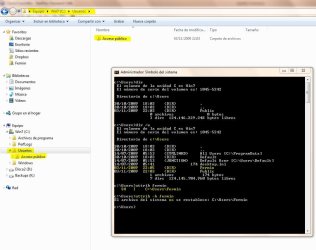
Help please. My user folder 'fermin' is gone from the c:\users folder. I can only see the 'public' folder. I know it is there and besides begin invisible everything is working fine: I can go to my Libraries and if I type 'c:\users\fermin' at the address bar in Windows Explorer I get access to all its subfolders: pictures, contacts, my documents, etc.

The problem is I am sure this folder was visible some weeks ago, I can not tell when and why it dissapeared. From the command line I can see attributes S, H and I set. I've tried to remove the H attribute by issuing the 'attrib -h fermin' command as a superuser but it won't execute it.

Here is a screenshot.
user_folder.JPG

Anyone has gone through a similar problem? what causes this annoying behavior? I had a similar problem with my Windows Vista installation - it was worse then, since the system could not index its contents making windows search useless - at least this is working under 7.

Now I am on Win7 it appears again... it must be some of the applications I use that causes this but I do not know which one is.
 

My Computer My Computer

At a glance

Windows 7
Computer Manufacturer/Model Number
Dell Dimension E520
OS
Windows 7
Do you have a system restore point or sytem image from a point prior to the problem; if so, use it? You can get back to the point prior to your problem.

If you do not have many applications, if you can go back with system image or system restore to a point prior to all the applications. Install one at a time. Use it for a while. If you are sure that it is not the cause of your problem, install another. When you find the cause, you can decide if you want to keep it installed or maybe, you can change it in some way.
 

My Computer My Computer

At a glance

Windows 10, Home Clean InstallIntel Core2 processsor Q8200(2.33Ghz 1333FSB)...6 gbATI Radeon 256MB HD3650
Computer type
PC/Desktop
Computer Manufacturer/Model Number
Dell XPS 420
OS
Windows 10, Home Clean Install
CPU
Intel Core2 processsor Q8200(2.33Ghz 1333FSB) Quad Core Tech
Motherboard
Dell
Memory
6 gb
Graphics Card(s)
ATI Radeon 256MB HD3650
Sound Card
Intergrated 7.1 Channel Audio
Monitor(s) Displays
Dell SP2009W 20"
Hard Drives
640 GB Serial ATA Hard drive
Cooling
Fan
Keyboard
Dell USB Keyboard
Mouse
Dell Premium Optical USB
Internet Speed
DSL 2.85
Hello Fnernus,

In your Fermin account, use a elevated (run as administrator) command prompt with attrib +r -h %USERPROFILE% or attrib +r -h C:\Users\Fermin instead to see if that may help after a restart.

If it doesn't work either, then you will need to do a system restore as Rich posted. :(

Hope this helps,
Shawn
 

My Computer My Computer

At a glance

64-bit Windows 11 Pro for WorkstationsIntel i7-8700K OC'd to 5 GHz64 GB (4x16GB) G.SKILL TridentZ RGB DDR4 3600...ASUS ROG-STRIX-GTX1080TI-O11G-GAMING
Computer type
PC/Desktop
Computer Manufacturer/Model Number
Self built custom
OS
64-bit Windows 11 Pro for Workstations
CPU
Intel i7-8700K OC'd to 5 GHz
Motherboard
ASUS ROG Maximus XI Formula Z390
Memory
64 GB (4x16GB) G.SKILL TridentZ RGB DDR4 3600 MHz
Graphics Card(s)
ASUS ROG-STRIX-GTX1080TI-O11G-GAMING
Sound Card
Integrated
Monitor(s) Displays
2 x Samsung Odyssey G7 27"
Screen Resolution
2560x1440
Hard Drives
1TB Samsung 990 PRO M.2,
4TB Samsung 990 PRO PRO M.2,
TerraMaster F8 SSD Plus NAS
PSU
Seasonic Prime Titanium 850W
Case
Thermaltake Core P3
Cooling
Corsair Hydro H115i
Keyboard
Logitech wireless K800
Mouse
Logitech MX Master 4
Internet Speed
2 Gb/s Download and 100 Mb/s Upload
Antivirus
Malwarebyte Anti-Malware Premium
Browser
Google Chrome
Other Info
Logitech Z625 speaker system,
Logitech BRIO 4K Pro webcam,
HP Color LaserJet Pro MFP M477fdn,
APC SMART-UPS RT 1000 XL - SURT1000XLI,
Galaxy S23 Plus phone
Thank you to both of you. By the time I posted this help message I had already tried setting the proper attributes using an elevated command prompt but it won't work. Yes of course I have a restore point to which I can go back. But since this problem is not really affecting the system in any other way (as long as I know) I think I've decided to keep it like it is. Do you think it can cause any problem?

Thank you so much for your help.
 

My Computer My Computer

At a glance

Windows 7
Computer Manufacturer/Model Number
Dell Dimension E520
OS
Windows 7
Question is.............

I assume you can log into this account, correct?
 

My Computer My Computer

At a glance

Windows 7 Pro & Vista Home PremiumAthlon 64 3800+ (Orleans) 2.40GHz2GB DDR2 RAM DIMMNVIDIA GeForce 8500 GT 512 MB memory HDMI out
Computer Manufacturer/Model Number
Cheap $399.00 E-Machine
OS
Windows 7 Pro & Vista Home Premium
CPU
Athlon 64 3800+ (Orleans) 2.40GHz
Motherboard
Winfast
Memory
2GB DDR2 RAM DIMM
Graphics Card(s)
NVIDIA GeForce 8500 GT 512 MB memory HDMI out
Sound Card
creative X-Fi Exteme 7..1 channel
Monitor(s) Displays
Acer V223W 22" widescreen DVI
Screen Resolution
1680x1050
Hard Drives
WDC WD5 500GB
WDC WD25 250GB
PSU
OCZ 550 watt
Case
Gateway
Cooling
2 fans
Keyboard
Dell
Mouse
Sony Vaio
Internet Speed
18MB/s down - .72MB /s up
Yes I can, I've experienced no problems so far.
 

My Computer My Computer

At a glance

Windows 7
Computer Manufacturer/Model Number
Dell Dimension E520
OS
Windows 7
"Show All Folders" Option...

I was confused by this problem until I came across the solution by accident. In the left pane in Explorer, find an empty space near the top (should be below Favorites) and right-click. Check the "Show All Folders" option. That should restore your user folder, in addition to the remainder of the missing folders.

http://www.sevenforums.com/tutorials/853-navigation-pane-show-all-folders.html
 
Last edited by a moderator:

My Computer My Computer

At a glance

Windows 7 Home
OS
Windows 7 Home
That's great! thanks, quite a hidden option they created...
 

My Computer My Computer

At a glance

Windows 7
Computer Manufacturer/Model Number
Dell Dimension E520
OS
Windows 7
Thank you!

Oh my god! You guys are LIFESAVERS!!

I had this problem and tried a system restore and it did NOTHING. I was afraid I had a nasty virus or something horrible. Any time I would try to get to my user files I couldn't see anything. It was like the folder was empty or not there at all.

I went to "organize" then "Folder and search Options" and found the "Show all folders" unchecked!

I think this must have happened when I was trying to show the hidden folders...

Again Thank you so much!!!
 

My Computer My Computer

At a glance

windows 7
OS
windows 7
Back
Top