I want calculator to steal focus!

mikedz

New member
Local time
9:35 AM
Messages
7
I have a microsoft keyboard with a calculator button above the numpad. When i run calc.exe form the start menu it pops up in front and in focus. However, when i run calc by hitting the keyboard button, calculator starts in the background behind whatever im working on - i have to then use alt-tab or click on the taskbar icon to bring it forward.
Whats going on and how can I get calculator to open in foreground?

Thanks.
 

My Computer My Computer

At a glance

windows 7 64 ultimate
OS
windows 7 64 ultimate
I don't know what the problem is, but then I'm on a Logitech keyboard, and it pops right out on top like it should, either by keyboard or start menu.
 

My Computer My Computer

At a glance

W7x64 Pro, SuSe 12.1/** W7 x64 Pro, XP MCEPhenom II 1090T w/Noctua NH-D14 /**4400+ X2 w...2 x 2GB Patriot PGS34g1600LLKA/**4x1GB Corsai...EVGA GTX460 SC/**EVGA 8800GTS
Computer Manufacturer/Model Number
DIY
OS
W7x64 Pro, SuSe 12.1/** W7 x64 Pro, XP MCE
CPU
Phenom II 1090T w/Noctua NH-D14 /**4400+ X2 w/CM Hyper TX 3
Motherboard
ASRock 890FX Deluxe 4/**A8N-SLI
Memory
2 x 2GB Patriot PGS34g1600LLKA/**4x1GB Corsair VS
Graphics Card(s)
EVGA GTX460 SC/**EVGA 8800GTS
Sound Card
Asus Xonar D2X/**Xonar D1
Monitor(s) Displays
Acer X233H, Dell E152FPc /**LG M237-WD
Screen Resolution
1920x1080 & 1024x768/**1980x1080
Hard Drives
WDC 2TB, 1.5TB, 1TB, 500GB,Seagate 500GB , Maxtor 80GB /**500GB Seagate & WDC 1TB Black
PSU
CM RS600 w/ APC BX1000G/**Antec 500 TP w/ APC BX1000
Case
HAF922/**Antec 1040IIB
Cooling
3x200mm, 1x140 and 1x120mm/**5x80mm fans
Keyboard
Logitech Media USB/**Saitek Eclipse
Mouse
Cordless Trackman Wheel/**Ditto
Internet Speed
3.3Mbps
Other Info
SB 560 5.1 w/ Sennheiser RS140/**Creative T20 speakers, Dvico FusionHDTV7 Gold RT, Cisco E3000, HP 5510V AIO, Linksys E3000, Belkin F5U237 hub and **F5D8055 adapter
(** = 2nd rig)

My Computer My Computer

At a glance

Windows 7 Pro 64-bitAMD Phenom II X2 550 BEA-Data DDR3 1600 4gbHIS Radeon HD 4670
Computer Manufacturer/Model Number
Custom Built
OS
Windows 7 Pro 64-bit
CPU
AMD Phenom II X2 550 BE
Motherboard
ASUS M4A79XTD EVO
Memory
A-Data DDR3 1600 4gb
Graphics Card(s)
HIS Radeon HD 4670
Sound Card
VIA VT1708S (8 channel onboard)
Monitor(s) Displays
Dell 23" S2309W
Screen Resolution
1920 x 1080
Hard Drives
WD 320,750gb, Seagate 500gb External Backup
PSU
Rosewill Green Series 430W
Case
Coolermaster
Cooling
Scythe SCKTN-3000
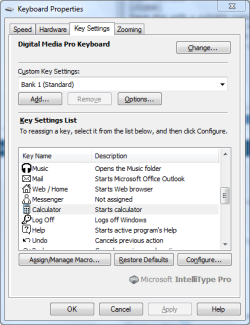
I'm running windows 7 64 ultimate and using the latest win 7 64 keyboard drivers: IntelliType Pro 7.0 64-bit for Windows 7. Using the microsoft "digital media pro keyboard".

I've tried its default config and even assigned the key manually to open calc.exe in both the sysWOW64 and system32 folders.

Also noticed that it always open behind the current window, so if i have 5 windows open, it will appear behind the front one. This is inexplicable. Are there any operators I can type at the end of the file path that will make it open in focus?
 

My Computer My Computer

At a glance

windows 7 64 ultimate
OS
windows 7 64 ultimate
Does your keyboard have a driver that permits you to assign function to your hotkeys? If so, and all else fails, you could download a different calculator and point the calculator key to it.
 

My Computer My Computer

At a glance

W7x64 Pro, SuSe 12.1/** W7 x64 Pro, XP MCEPhenom II 1090T w/Noctua NH-D14 /**4400+ X2 w...2 x 2GB Patriot PGS34g1600LLKA/**4x1GB Corsai...EVGA GTX460 SC/**EVGA 8800GTS
Computer Manufacturer/Model Number
DIY
OS
W7x64 Pro, SuSe 12.1/** W7 x64 Pro, XP MCE
CPU
Phenom II 1090T w/Noctua NH-D14 /**4400+ X2 w/CM Hyper TX 3
Motherboard
ASRock 890FX Deluxe 4/**A8N-SLI
Memory
2 x 2GB Patriot PGS34g1600LLKA/**4x1GB Corsair VS
Graphics Card(s)
EVGA GTX460 SC/**EVGA 8800GTS
Sound Card
Asus Xonar D2X/**Xonar D1
Monitor(s) Displays
Acer X233H, Dell E152FPc /**LG M237-WD
Screen Resolution
1920x1080 & 1024x768/**1980x1080
Hard Drives
WDC 2TB, 1.5TB, 1TB, 500GB,Seagate 500GB , Maxtor 80GB /**500GB Seagate & WDC 1TB Black
PSU
CM RS600 w/ APC BX1000G/**Antec 500 TP w/ APC BX1000
Case
HAF922/**Antec 1040IIB
Cooling
3x200mm, 1x140 and 1x120mm/**5x80mm fans
Keyboard
Logitech Media USB/**Saitek Eclipse
Mouse
Cordless Trackman Wheel/**Ditto
Internet Speed
3.3Mbps
Other Info
SB 560 5.1 w/ Sennheiser RS140/**Creative T20 speakers, Dvico FusionHDTV7 Gold RT, Cisco E3000, HP 5510V AIO, Linksys E3000, Belkin F5U237 hub and **F5D8055 adapter
(** = 2nd rig)
Yeh, the firmware allows me to assign any function to the key. By default, the radio button is set to 'Starts Calculator' but you can set the radio button to 'Start a program, Web page, or file' - which is the setting I used to manually point to calc.exe.

I'd rather use the windows calculator if possible though - there must be some reason why it starts in the background - any uber geeks here that can explain it?
 

My Computer My Computer

At a glance

windows 7 64 ultimate
OS
windows 7 64 ultimate
UPDATE - found some more forums with similar threads. A workaround is to right-click on calc.exe and apply a keyboard shortcut ie. Ctrl + Alt + C. Go to the keyboard config and set the button to 'keystroke' and use the same keyboard shortcut.

IMPORTANT - You must apply the shortcut to the keyboard button FIRST, then apply the shortcut to calc.exe SECOND. Otherwise, when you try to tap the keyboard shortcut into the keyboard config box, calc will pop up and prevent you from applying the shortcut.
 

My Computer My Computer

At a glance

windows 7 64 ultimate
OS
windows 7 64 ultimate
This works great. One little note I had to figure out myself. You have to right-click on the shortcut in accessories in the start menu and apply the keyboard shortcut. When you go to C:\Windows\Syswow64\calc.exe there is no option to create a keyboard shortcut. I instead right-clicked on the shortcut in my start menu and made the ctrl-alt-c keyboard short cut...Thanks Mikedz, worked great!!
 

My Computer My Computer

At a glance

Windows 7 64Intel Xeon E5-2680 2.70 8 Core32 GBNVidia GTX 680
Computer Manufacturer/Model Number
HP Z820
OS
Windows 7 64
CPU
Intel Xeon E5-2680 2.70 8 Core
Memory
32 GB
Graphics Card(s)
NVidia GTX 680
Sound Card
Creative Xi-Fi
Monitor(s) Displays
Dual 23" Apple Cinema Displays
Hard Drives
Intel 520 SSD
As far as I can see, the problem does not lie with calc.exe itself.

I'm using IntelliType Pro 7.0 / Windows 7 Ultimate / Microsoft Digital Media Keyboard 1.0A.

I tried assigning calc.exe to one of the 5 generic shortcut keys at the top of the keyboard. It successfully opened the calculator on top of everything else, with focus as it should.

It is only when I use the special Calculator key with the wee picture of a calculator on it that there are issues.

  1. For me it also appears behind the front window - not at the back, but just one space too far back!
  2. When I am using Remote Desktop and I press the calculator button, it opens it both on the remote machine and on my machine. This has been a quirk of the Calculator button i've observed in the past. The five generic shortcut keys don't exhibit this behaviour, though. I've not tested "Log Off" and "Sleep" just in case!
My suspicion is that this is maybe even an issue with the keyboard itself. I think I was able to use the Calculator button before even installing IntelliType. Maybe IntelliType only handles the generic custom shortcut keys.

Does anyone have any thoughts to confirm/deny this?

- Ken
 

My Computer My Computer

At a glance

Windows 7 Ultimate (64-bit)Intel i712 GBNVIDIA GeForce GTX 260
Computer Manufacturer/Model Number
Gateway FX6802
OS
Windows 7 Ultimate (64-bit)
CPU
Intel i7
Memory
12 GB
Graphics Card(s)
NVIDIA GeForce GTX 260
Sound Card
Realtek High Definition Audio
Monitor(s) Displays
2x Samsung SyncMaster 2233
Screen Resolution
1680x1050
Keyboard
Microsoft Digital Media Keyboard 1.0A
Mouse
Gateway MODYUO
I'm not at my regular machine at the moment so can't test, but I have experienced calc opening behind the frontmost page - not right at the back. I havent tested using the other config buttons to open calc. It must be a firmware issue that the boffins havent gotten round to sorting yet.
 

My Computer My Computer

At a glance

windows 7 64 ultimate
OS
windows 7 64 ultimate
This is just the phenomenon I experienced today. I too have a Microsoft keyboard (Wireless Media Desktop set), and the calculator button pops up the Windows Calculator, but it doesn't get focus. IntelliType installed, Windows 7 Ultimate x64. Strange behavior, if you ask me.
 

My Computer My Computer

At a glance

Windows 7 Ultimate x64AMD Athlon 64 X2 6000+4Gb DDR2Gigabyte GTX260
OS
Windows 7 Ultimate x64
CPU
AMD Athlon 64 X2 6000+
Motherboard
Gigabyte GA-M52L-S3
Memory
4Gb DDR2
Graphics Card(s)
Gigabyte GTX260
Monitor(s) Displays
22" Benq G2200HDA
Hard Drives
Hitachi 500Gb
Keyboard
Microsoft Wireless Media Desktop 1000
I have the same problem. Every app is starting under active. Fluses few times and stay until I bring it to front. (Windows 7 x64).
 

My Computer My Computer

At a glance

win 7 x64
OS
win 7 x64
I discovered that when I hold and push again calc button it apears as active and only then other buttons function properly bringing all apps to the foreground. You have to do it once and to another system restart works fine. But it isn't working the other way (media button - hold - push...).
 

My Computer My Computer

At a glance

win 7 x64
OS
win 7 x64
I have made some progress on this issue, it seems that without IntelliType software, it works OK. Only after installing the software does this happen. Pressing the calculator button a second time makes the window get focus, so just tap it twice, if you want the calculator :)
 

My Computer My Computer

At a glance

Windows 7 Ultimate x64AMD Athlon 64 X2 6000+4Gb DDR2Gigabyte GTX260
OS
Windows 7 Ultimate x64
CPU
AMD Athlon 64 X2 6000+
Motherboard
Gigabyte GA-M52L-S3
Memory
4Gb DDR2
Graphics Card(s)
Gigabyte GTX260
Monitor(s) Displays
22" Benq G2200HDA
Hard Drives
Hitachi 500Gb
Keyboard
Microsoft Wireless Media Desktop 1000
Try the following batch file. View attachment calculator.bat Note that you will need to right-click, select Properties and then click Unblock.
Code:
@echo off
cd c:\windows\system32
start calc.exe
Save this with a suitable name (I suggest Calculator) and give it a .bat file extension. You can save the file where you like, but if you wish to save it in the System32 directory, you will need to provide administrative credentials.

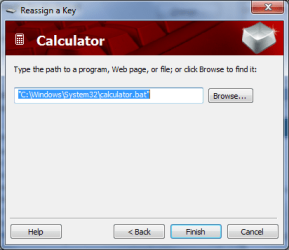
Now point the calculator key to this file.
Capture.PNG Capture1.PNG Capture2.png

When you press the key now, the command window will briefly flash, but the calculator will appear and will have focus.
 
Last edited:

My Computer My Computer

At a glance

Windows 8.1 Pro RTM x64Intel Core-i5-3570K 4-core @ 3.4GHz (Ivy Brid...4 x 4GB DDR3-1600 Corsair Vengeance CMZ8GX3M2...MSI GeForce GTX770 Gaming OC 2GB
Computer type
PC/Desktop
Computer Manufacturer/Model Number
Dwarf Dwf/11/2012 r09/2013
OS
Windows 8.1 Pro RTM x64
CPU
Intel Core-i5-3570K 4-core @ 3.4GHz (Ivy Bridge) (OC 4.4GHz)
Motherboard
ASRock Z77 Extreme4-M
Memory
4 x 4GB DDR3-1600 Corsair Vengeance CMZ8GX3M2A1600C9B (16GB)
Graphics Card(s)
MSI GeForce GTX770 Gaming OC 2GB
Sound Card
Realtek High Definition on board solution (ALC 898)
Monitor(s) Displays
ViewSonic VA1912w Widescreen (VGA)
Screen Resolution
1440x900
Hard Drives
OCZ Agility 3 SSD 120GB SATA III x2 (RAID 0)
Samsung HD501LJ 500GB SATA II x2
Hitachi HDS721010CLA332 1TB SATA II
Iomega 1.5TB Ext USB 2.0
WD 2.0TB Ext USB 3.0
PSU
XFX Pro Series 850W Semi-Modular
Case
Gigabyte IF233
Cooling
1 x 120mm Front Inlet 1 x 120mm Rear Exhaust
Keyboard
Microsoft Comfort Curve Keyboard 3000 (USB)
Mouse
Microsoft Comfort Mouse 3000 for Business (USB)
Internet Speed
NetGear DG834Gv3 ADSL Modem/Router (Ethernet) ~4.0 Mb/s (O2)
Antivirus
Avast! 8.0.1497
Browser
IE 11
Other Info
Optical Drive: HL-DT-ST BD-RE BH10LS30 SATA Bluray
Lexmark S305 Printer/Scanner/Copier (USB)
WEI Score: 8.1/8.1/8.5/8.5/8.25
Asus Eee PC 1011PX Netbook (Windows 7 x86 Starter)
calc.exe to the front

if you create a shortcut to the .bat file and right click and set it to run minimized, then use the path to the shortcut, the cmd window will never show up.
 

My Computer My Computer

At a glance

windows 7 32bite66004GBNVIDIA GEFORCE 7600GS
OS
windows 7 32bit
CPU
e6600
Motherboard
ASUS
Memory
4GB
Graphics Card(s)
NVIDIA GEFORCE 7600GS
Monitor(s) Displays
22"
Hard Drives
1.25TGB
Calculator to front

I also had this problem with the calculator button on my Microsoft Comfort Curve Keyboard 2000. I uninstalled Microsoft IntelliType Pro 7 and the calculator now opens in front with focus when I push the calculator button.
 

My Computer My Computer

At a glance

Windows 7 Home Premium 64 bit
OS
Windows 7 Home Premium 64 bit
Windows Update fixes this now!

Hi everyone,

I was just downloading some updates from Windows Update this morning and noticed one in the "Optional" category called "Microsoft - Other hardware - Microsoft Hardware USB Keyboard".

The "More information" link sends you to here:

Winqual Help

(Note: This only works on IE. Boo!)

It basically explains it's just a new driver, BUT I noticed this could be something special when it started to install a new version of Intellitype as well. I tested the Calculator button first of all to see if it still exhibited the same behaviour. Sure enough - it appeared behind the front window, but not at the back of the pile.

I then installed the new version of the Intellitype software and tried again. This time - success! The calculator appeared at the front as it should. If you look very closely you can see it briefly appears behind the front window and then comes to the front. I only noticed because of the position of my two Notepad windows I was using to test it.

Anyway, that's it. It works now!

My device manager is now showing my keyboard as having driver version 8.0.219.0 which is dated June 29th, 2010. Too bad it took me a few months to notice the optional update!

Hopefully this has been helpful to someone. Happy calculator usage!

- Ken

 

My Computer My Computer

At a glance

Windows 7 Ultimate (64-bit)Intel i712 GBNVIDIA GeForce GTX 260
Computer Manufacturer/Model Number
Gateway FX6802
OS
Windows 7 Ultimate (64-bit)
CPU
Intel i7
Memory
12 GB
Graphics Card(s)
NVIDIA GeForce GTX 260
Sound Card
Realtek High Definition Audio
Monitor(s) Displays
2x Samsung SyncMaster 2233
Screen Resolution
1680x1050
Keyboard
Microsoft Digital Media Keyboard 1.0A
Mouse
Gateway MODYUO
This was my problem / solution

Had this problem intermittently with every program launched from keyboard. (when I was the most busy, of course)

Specifies the time, following user input, during which the system keeps applications from moving into the foreground.

Default: 200000

ForegroundLockTimeout


Edit : (did not help :()
 

My Computer My Computer

At a glance

QCTransistoTransistoTransisto
Computer Manufacturer/Model Number
Transisto
OS
QC
CPU
Transisto
Motherboard
Transisto
Memory
Transisto
Graphics Card(s)
Transisto
Sound Card
Transisto
Monitor(s) Displays
Transisto
Hard Drives
Transisto
PSU
Transisto
Case
Transisto
Cooling
Transisto
Back
Top