Win7/Win7 Dual Boot drive letter trouble

spleener

New member
Local time
11:37 PM
Messages
15
Location
Arizona
Hello all...

My goal is to run a Win7/Win7 dual boot system with one installation for day to day operations (MAIN) and then second installation strictly for gaming (GAMER).

I have successfully installed Win7 twice. During clean install i created 30GB partition (C: ) and put MAIN there. No problems. I loaded that up and from within Disk Management created a second partition on the same physical drive and named it (D: ).

I booted from the Win7 install DVD and then installed GAMER to the (D: ) partition. No problems. I am able to boot into each installation (MAIN and GAMER) from the boot manager without any troubles.

When I boot into the MAIN installation, the system path/partition is (C: ) and the os files for the second installation, GAMER, can be seen on (D: ) just fine.

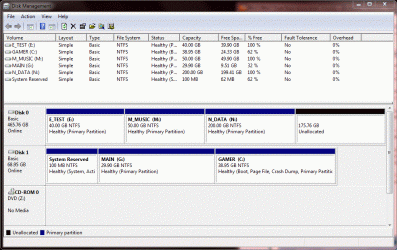
However, when i boot into the GAMER installation, its system path is also (C: ) and the partition for MAIN somehow got renamed to (G: )

I would like it so that when I boot into MAIN (which was installed to C: ), that partition stays named (C: ) and when i boot into GAMER (which was installed to D: ), that partition stays named (D: ). Eventhough both installations see themselves as (C: ) when i boot into them, it does not seem to cause any problems.

So how should I do my second Win7 installation to a partition named (D: ) and force it to keep that name when i boot into it?

Thanks,
Jeff
 

My Computer My Computer

At a glance

Windows 7 64-bitIntel Core 2 Quad Q9550 @ 2.83GHz (no OC)OCZ Reaper HPC 4GB (2 x 2GB) DDR2 1066 (PC2 8...2x EVGA GeForce GTX 260 in SLI
Computer Manufacturer/Model Number
Self-built
OS
Windows 7 64-bit
CPU
Intel Core 2 Quad Q9550 @ 2.83GHz (no OC)
Motherboard
EVGA nForce 780i SLI
Memory
OCZ Reaper HPC 4GB (2 x 2GB) DDR2 1066 (PC2 8500)
Graphics Card(s)
2x EVGA GeForce GTX 260 in SLI
Sound Card
onboard Realtek
Monitor(s) Displays
Dell 24" 2405FPW
Screen Resolution
1920x1200
Hard Drives
Disk 1: WD Raptor 34GB x2 in RAID0
Disk 2: WD Caviar Blue 500GB 7200 RPM 16MB Cache SATA 3.0Gb
PSU
Rosewill Xtreme Series RX950 950W
Case
Antec Twelve Hundred Black Steel ATX Full Tower
Cooling
Air
Hello Jeff

So you have two Window7 installs on two different partitions??

Did you have any USB devices plugged in?

Can you boot into Windows at all?

Could you Post a screen shot of Disk Management?
 

My Computer My Computer

At a glance

Windows 7 Pro & Vista Home PremiumAthlon 64 3800+ (Orleans) 2.40GHz2GB DDR2 RAM DIMMNVIDIA GeForce 8500 GT 512 MB memory HDMI out
Computer Manufacturer/Model Number
Cheap $399.00 E-Machine
OS
Windows 7 Pro & Vista Home Premium
CPU
Athlon 64 3800+ (Orleans) 2.40GHz
Motherboard
Winfast
Memory
2GB DDR2 RAM DIMM
Graphics Card(s)
NVIDIA GeForce 8500 GT 512 MB memory HDMI out
Sound Card
creative X-Fi Exteme 7..1 channel
Monitor(s) Displays
Acer V223W 22" widescreen DVI
Screen Resolution
1680x1050
Hard Drives
WDC WD5 500GB
WDC WD25 250GB
PSU
OCZ 550 watt
Case
Gateway
Cooling
2 fans
Keyboard
Dell
Mouse
Sony Vaio
Internet Speed
18MB/s down - .72MB /s up
Yes, two Win7 installs on two different partitions (C and D)
No USB devices
I can boot into each installation without any problems...they are running just fine.

The problem is when i boot into the installation that was installed to D, it sees itself as C and the other partition gets automatically renamed to G.

Here is the capture from disk management after booting into the installation that was originally installed onto the D partition (GAMER). Notice how it sees itself as being on C and the other installation (MAIN) sees itself as being on G.

My goal is to have one installation on C: that sees itself on C: and one installation on D:
that sees itself on D:

Perhaps i should install the second one from within the first after booting into it (as opposed to booting from the DVD)
 

Attachments

  • Capture.GIF
    Capture.GIF
    132.2 KB · Views: 155

My Computer My Computer

At a glance

Windows 7 64-bitIntel Core 2 Quad Q9550 @ 2.83GHz (no OC)OCZ Reaper HPC 4GB (2 x 2GB) DDR2 1066 (PC2 8...2x EVGA GeForce GTX 260 in SLI
Computer Manufacturer/Model Number
Self-built
OS
Windows 7 64-bit
CPU
Intel Core 2 Quad Q9550 @ 2.83GHz (no OC)
Motherboard
EVGA nForce 780i SLI
Memory
OCZ Reaper HPC 4GB (2 x 2GB) DDR2 1066 (PC2 8500)
Graphics Card(s)
2x EVGA GeForce GTX 260 in SLI
Sound Card
onboard Realtek
Monitor(s) Displays
Dell 24" 2405FPW
Screen Resolution
1920x1200
Hard Drives
Disk 1: WD Raptor 34GB x2 in RAID0
Disk 2: WD Caviar Blue 500GB 7200 RPM 16MB Cache SATA 3.0Gb
PSU
Rosewill Xtreme Series RX950 950W
Case
Antec Twelve Hundred Black Steel ATX Full Tower
Cooling
Air
Since you installed Games last,. it took over the C: partition,..

Take dive N yo O because you have no D: drive and keep changing letters until you get it right,.''You will never be able to change Drive C: however,.
 

My Computer My Computer

At a glance

Windows 7 Pro & Vista Home PremiumAthlon 64 3800+ (Orleans) 2.40GHz2GB DDR2 RAM DIMMNVIDIA GeForce 8500 GT 512 MB memory HDMI out
Computer Manufacturer/Model Number
Cheap $399.00 E-Machine
OS
Windows 7 Pro & Vista Home Premium
CPU
Athlon 64 3800+ (Orleans) 2.40GHz
Motherboard
Winfast
Memory
2GB DDR2 RAM DIMM
Graphics Card(s)
NVIDIA GeForce 8500 GT 512 MB memory HDMI out
Sound Card
creative X-Fi Exteme 7..1 channel
Monitor(s) Displays
Acer V223W 22" widescreen DVI
Screen Resolution
1680x1050
Hard Drives
WDC WD5 500GB
WDC WD25 250GB
PSU
OCZ 550 watt
Case
Gateway
Cooling
2 fans
Keyboard
Dell
Mouse
Sony Vaio
Internet Speed
18MB/s down - .72MB /s up
This is normal for dual booting.

I recommend to leave it as it is, everything will run better. If you force a partition letter change you will likely have problems.

If you have a good reason to change the drive letters, just post it here and we'll try to find a solution for you.
 

My Computer My Computer

At a glance

Windows 7 Ult x64 - SP1/ Windows 8 Pro x64Intel Core i5-3570K 4.6GHz8GB (2X4GB) DDR3 1600 Corsair Vengeance CL8 1.5vSapphire HD 7770 Vapor-X OC 1GB DDR5
Computer type
PC/Desktop
Computer Manufacturer/Model Number
76~2.0
OS
Windows 7 Ult x64 - SP1/ Windows 8 Pro x64
CPU
Intel Core i5-3570K 4.6GHz
Motherboard
Gigabyte GA-Z77X UD3H, f18
Memory
8GB (2X4GB) DDR3 1600 Corsair Vengeance CL8 1.5v
Graphics Card(s)
Sapphire HD 7770 Vapor-X OC 1GB DDR5
Sound Card
Onboard VIA VT2021
Monitor(s) Displays
22" LCD Dell
Screen Resolution
1680x1050
Hard Drives
Samsung 840Pro 128GB SSD,
Seagate Barracuda 500GB SATA2 7200rpm 32MB cache, Seagate Barracuda 1TB SATA2 7200rpm 32MB cache,
PSU
Corsair HX650W
Case
Cooler Master Storm Scout
Cooling
Corsair H80 2x12cm Noctua NF P12 , 2x14cm case fans
Keyboard
Logitech Wave
Mouse
CM Sentinel
Internet Speed
Dismal
Antivirus
Avast
Browser
Opera Next
Other Info
Haswell laptop: HP Envy 17t-j, i7-4700MQ, GeForce 740M 2GB DDR3, 17.3" Full HD 1920x1080, 16GB RAM, Samsung 840 Pro 128GB, 1TB Hitachi 7200 HDD,
Desktop: eSATA ports,
External eSATA Seagate 500GB SATA2 7200rpm,
External WD USB 500GB
Yes,. that's true,. unless its just data file,. but if her] starts screwing around with programs, they won';y match up in the registry and may Boy work,. That;s the error message you receive when you try to change drive letters.

Sorry about that spleener
 

My Computer My Computer

At a glance

Windows 7 Pro & Vista Home PremiumAthlon 64 3800+ (Orleans) 2.40GHz2GB DDR2 RAM DIMMNVIDIA GeForce 8500 GT 512 MB memory HDMI out
Computer Manufacturer/Model Number
Cheap $399.00 E-Machine
OS
Windows 7 Pro & Vista Home Premium
CPU
Athlon 64 3800+ (Orleans) 2.40GHz
Motherboard
Winfast
Memory
2GB DDR2 RAM DIMM
Graphics Card(s)
NVIDIA GeForce 8500 GT 512 MB memory HDMI out
Sound Card
creative X-Fi Exteme 7..1 channel
Monitor(s) Displays
Acer V223W 22" widescreen DVI
Screen Resolution
1680x1050
Hard Drives
WDC WD5 500GB
WDC WD25 250GB
PSU
OCZ 550 watt
Case
Gateway
Cooling
2 fans
Keyboard
Dell
Mouse
Sony Vaio
Internet Speed
18MB/s down - .72MB /s up
Even though it's really just a cosmetic issue since both installations are running properly, I'd still like to try and get them both set up on partitions with unchanging drive letters. Maybe I'm neurotic?!

I have had my previous 3 boxes setup this way and would like to maintain it for consistency. In fact, my previous build had 3 installations (day to day, gaming, and testing). But that might have to wait until i get this figured out.

I'm beginning to wonder if I should install the second Win7 from within the first instead of booting from the install DVD. Will this make a difference? That is install 1st Win7 to C partition, boot, disk management, create D partition in Win7, launch install DVD for second Win7 and install to D.

Thanks for the suggestions and help,
Jeff
 

My Computer My Computer

At a glance

Windows 7 64-bitIntel Core 2 Quad Q9550 @ 2.83GHz (no OC)OCZ Reaper HPC 4GB (2 x 2GB) DDR2 1066 (PC2 8...2x EVGA GeForce GTX 260 in SLI
Computer Manufacturer/Model Number
Self-built
OS
Windows 7 64-bit
CPU
Intel Core 2 Quad Q9550 @ 2.83GHz (no OC)
Motherboard
EVGA nForce 780i SLI
Memory
OCZ Reaper HPC 4GB (2 x 2GB) DDR2 1066 (PC2 8500)
Graphics Card(s)
2x EVGA GeForce GTX 260 in SLI
Sound Card
onboard Realtek
Monitor(s) Displays
Dell 24" 2405FPW
Screen Resolution
1920x1200
Hard Drives
Disk 1: WD Raptor 34GB x2 in RAID0
Disk 2: WD Caviar Blue 500GB 7200 RPM 16MB Cache SATA 3.0Gb
PSU
Rosewill Xtreme Series RX950 950W
Case
Antec Twelve Hundred Black Steel ATX Full Tower
Cooling
Air
Beginning with the RTM, as I recall, Win7 began seeing itself in many cases as C no matter what other drives show when you are in them.

This was nice but disconcerting at first because of the concern that programs pointing to a certain drive would fail to see the relative lettering.

As it has turned out, this was all taken into consideration when Win7 made this change as it affects performance not in the slightest.
 
Back
Top