Not able to play gta4 pc online :(

Is GAME FOR WINDOWS LIVE supported by WIN 7 ?

  • Nope, not Yet !

    Votes: 0 0.0%

  • Total voters
    6
  • Poll closed .

hector17

New member
NOT ABLE TO PLAY GTA4 PC ONLINE :( right after i switched from XP to WIN 7 ULTIMATE 64BIT :(
Not able to Sign in on GAMES FOR WINDOWS LIVE :mad: ( when i log in it says Downloading profile after 10-20 seconds it says Problem with my connection or Winfirewall interfering, & when i look in Details :
IP ADDRESS NOT SIGNED IN
UPnP : NOT SIGNED IN :(
searched all the possibilities,but still no luck ! forwarded all the ports, even set my MTU to 1500 & that lousy customer support is totally waste
Most of all is GAMES FOR WINDOWS LIVE SUPPORTED BY WINDOWS 7 ?
Please somebody here help me !
Thnx in Advance .
 

My Computer

Computer type
PC/Desktop
Computer Manufacturer/Model Number
Custom Build
OS
WINDOWS 7 ULTIMATE X64
CPU
Intel Core i5 2500k
Motherboard
AsusP8Z68-V
Memory
8GB Gskill DDR3 1600mhz
Graphics Card(s)
Zotac GTX 460
Sound Card
Asus Xonar DX
Monitor(s) Displays
View sonic VA1926w
Screen Resolution
1400*900
Hard Drives
SEGATE - SATA II 1TB
PSU
CORSAIR -VX 450w
Case
NZXT LEXA S
Cooling
Cooler master Hyper 212+
Keyboard
razer lycosa
Mouse
razer Death adder Dragon Age edition
Internet Speed
2mbps
Antivirus
Avast
Browser
Firefox
Hi hector17 welcome to the forums.
ok, lets review the problem shall we.

  1. You said that the game worked before on xp right? if it so, then is not a blocked port on your router.
  2. Can you uninstall GFWL and GFWL redistributable from your computer and then install the latest version from here.
  3. Make sure your game is up-to-date too latest patch from here.
  4. Check if this rules are enabled (green check) in your firewall:

  • C:\Program Files\Rockstar Games\Grand Theft Auto IV\LaunchGTAIV.exe (UDP)
  • C:\Program Files\Rockstar Games\Grand Theft Auto IV\LaunchGTAIV.exe (TCP)
  • C:\Program Files\Rockstar Games\Grand Theft Auto IV\gtaiv.exe (UDP)
  • C:\Program Files\Rockstar Games\Grand Theft Auto IV\gtaiv.exe (TCP)
  • C:\Program Files\Rockstar Games\Rockstar Games Social Club\RGSCLauncher.exe (UDP)
  • C:\Program Files\Rockstar Games\Rockstar Games Social Club\RGSCLauncher.exe (TCP)
Note: this is the default installation folder, if you installed the game in other directory just put the full directory before the bold lines.

You can check this tutorial to learn how to add or remove an exception in windows firewall.

If this can solve the problem please let me know.
 

My Computer

Computer type
PC/Desktop
OS
Windows 7 Ultimate x64
CPU
Intel Core i5-2500K @4.5Ghz
Motherboard
Asus Maximus V GENE
Memory
x2 Kingston KHX1600C9D3/4G
Graphics Card(s)
NVIDIA GeForce GTS 250 - 1024MB
Sound Card
SupremeFX III built-in 8-Channel High Definition Audio
Monitor(s) Displays
Samsung Syncmaster P2270
Screen Resolution
1920x1080
Hard Drives
x1 Seagate Barracuda ST3160811AS
x2 Seagate Barracuda ST380817AS
PSU
Corsair TX750
Case
Cooler Master HAF 922 Side Window Model
Cooling
Stock Intel Cooler + Tuniq TX2
Keyboard
Dell SK-8135
Mouse
Logitech G5
Internet Speed
2 Mbps
Other Info
x2 Xbox 360 Wireless Controller for Windows
Logitech Z-5550
Sennheiser HD555
Thanks for the reply mate :)
Much Appreciated :)
But can u please be more specific bout these :

  • C:\Program Files\Rockstar Games\Grand Theft Auto IV\LaunchGTAIV.exe (UDP)
  • C:\Program Files\Rockstar Games\Grand Theft Auto IV\LaunchGTAIV.exe (TCP)
  • C:\Program Files\Rockstar Games\Grand Theft Auto IV\gtaiv.exe (UDP)
  • C:\Program Files\Rockstar Games\Grand Theft Auto IV\gtaiv.exe (TCP)
  • C:\Program Files\Rockstar Games\Rockstar Games Social Club\RGSCLauncher.exe (UDP)
  • C:\Program Files\Rockstar Games\Rockstar Games Social Club\RGSCLauncher.exe (TCP) ?
I KINDA didn get this part :( those UDP/TCP i didn find any or such so on the firewall please post a screen shot :)
 

My Computer

Computer type
PC/Desktop
Computer Manufacturer/Model Number
Custom Build
OS
WINDOWS 7 ULTIMATE X64
CPU
Intel Core i5 2500k
Motherboard
AsusP8Z68-V
Memory
8GB Gskill DDR3 1600mhz
Graphics Card(s)
Zotac GTX 460
Sound Card
Asus Xonar DX
Monitor(s) Displays
View sonic VA1926w
Screen Resolution
1400*900
Hard Drives
SEGATE - SATA II 1TB
PSU
CORSAIR -VX 450w
Case
NZXT LEXA S
Cooling
Cooler master Hyper 212+
Keyboard
razer lycosa
Mouse
razer Death adder Dragon Age edition
Internet Speed
2mbps
Antivirus
Avast
Browser
Firefox
Thanks for the reply mate :)
Much Appreciated :)
But can u please be more specific bout these :

  • C:\Program Files\Rockstar Games\Grand Theft Auto IV\LaunchGTAIV.exe (UDP)
  • C:\Program Files\Rockstar Games\Grand Theft Auto IV\LaunchGTAIV.exe (TCP)
  • C:\Program Files\Rockstar Games\Grand Theft Auto IV\gtaiv.exe (UDP)
  • C:\Program Files\Rockstar Games\Grand Theft Auto IV\gtaiv.exe (TCP)
  • C:\Program Files\Rockstar Games\Rockstar Games Social Club\RGSCLauncher.exe (UDP)
  • C:\Program Files\Rockstar Games\Rockstar Games Social Club\RGSCLauncher.exe (TCP) ?
I KINDA didn get this part :( those UDP/TCP i didn find any or such so on the firewall please post a screen shot :)

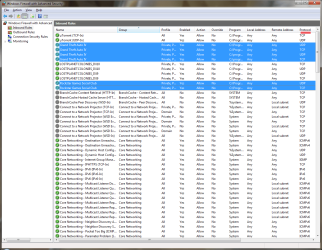
Sure there u go.

firewall.png

As you can see the UDP and TCP values are under protocol column, for more information about how to add or remove exceptions to windows firewall please take a look at this tutorial.

If that doesn't help either please let me know ok.
 
Last edited:

My Computer

Computer type
PC/Desktop
OS
Windows 7 Ultimate x64
CPU
Intel Core i5-2500K @4.5Ghz
Motherboard
Asus Maximus V GENE
Memory
x2 Kingston KHX1600C9D3/4G
Graphics Card(s)
NVIDIA GeForce GTS 250 - 1024MB
Sound Card
SupremeFX III built-in 8-Channel High Definition Audio
Monitor(s) Displays
Samsung Syncmaster P2270
Screen Resolution
1920x1080
Hard Drives
x1 Seagate Barracuda ST3160811AS
x2 Seagate Barracuda ST380817AS
PSU
Corsair TX750
Case
Cooler Master HAF 922 Side Window Model
Cooling
Stock Intel Cooler + Tuniq TX2
Keyboard
Dell SK-8135
Mouse
Logitech G5
Internet Speed
2 Mbps
Other Info
x2 Xbox 360 Wireless Controller for Windows
Logitech Z-5550
Sennheiser HD555
Thanks for the reply mate :)
i did as u said, but no luck :(
Any other alternative ? PLEASE !
 

My Computer

Computer type
PC/Desktop
Computer Manufacturer/Model Number
Custom Build
OS
WINDOWS 7 ULTIMATE X64
CPU
Intel Core i5 2500k
Motherboard
AsusP8Z68-V
Memory
8GB Gskill DDR3 1600mhz
Graphics Card(s)
Zotac GTX 460
Sound Card
Asus Xonar DX
Monitor(s) Displays
View sonic VA1926w
Screen Resolution
1400*900
Hard Drives
SEGATE - SATA II 1TB
PSU
CORSAIR -VX 450w
Case
NZXT LEXA S
Cooling
Cooler master Hyper 212+
Keyboard
razer lycosa
Mouse
razer Death adder Dragon Age edition
Internet Speed
2mbps
Antivirus
Avast
Browser
Firefox
Ok lets try this.


  1. Go to Control Panel and then go to Credential Manager. (if you can see it press the "view by" button and select large icons)
  2. Under Generic Credentials just push the down button and then select remove from vault.
  3. Do this till it says "No Generic Credentials".
  4. Launch GTA4 and at the start menu press the "Home key".
  5. Now put your account user name and password.
Let me know if now you can connect to LIVE or not.
 

My Computer

Computer type
PC/Desktop
OS
Windows 7 Ultimate x64
CPU
Intel Core i5-2500K @4.5Ghz
Motherboard
Asus Maximus V GENE
Memory
x2 Kingston KHX1600C9D3/4G
Graphics Card(s)
NVIDIA GeForce GTS 250 - 1024MB
Sound Card
SupremeFX III built-in 8-Channel High Definition Audio
Monitor(s) Displays
Samsung Syncmaster P2270
Screen Resolution
1920x1080
Hard Drives
x1 Seagate Barracuda ST3160811AS
x2 Seagate Barracuda ST380817AS
PSU
Corsair TX750
Case
Cooler Master HAF 922 Side Window Model
Cooling
Stock Intel Cooler + Tuniq TX2
Keyboard
Dell SK-8135
Mouse
Logitech G5
Internet Speed
2 Mbps
Other Info
x2 Xbox 360 Wireless Controller for Windows
Logitech Z-5550
Sennheiser HD555
Thanks :)
But even the credentials tweak failed :(
Am still not able to log in :(
 

My Computer

Computer type
PC/Desktop
Computer Manufacturer/Model Number
Custom Build
OS
WINDOWS 7 ULTIMATE X64
CPU
Intel Core i5 2500k
Motherboard
AsusP8Z68-V
Memory
8GB Gskill DDR3 1600mhz
Graphics Card(s)
Zotac GTX 460
Sound Card
Asus Xonar DX
Monitor(s) Displays
View sonic VA1926w
Screen Resolution
1400*900
Hard Drives
SEGATE - SATA II 1TB
PSU
CORSAIR -VX 450w
Case
NZXT LEXA S
Cooling
Cooler master Hyper 212+
Keyboard
razer lycosa
Mouse
razer Death adder Dragon Age edition
Internet Speed
2mbps
Antivirus
Avast
Browser
Firefox
So, go to your Anti virus/ firewall if there the same. There should be a "allow a program through" or something like that. if youre using the windows firewall, it can be found in the control panel ---> system and security. Anyway, then find the .exe of the game and allow it. Also find the "games for windows live" .exe and allow that one too. Its should work now.
 

My Computer

Computer Manufacturer/Model Number
Acer Veriton m261 (modded)
OS
Win 7 pro 64-bit, Ubuntu 9.10 64-bit
CPU
Intel Core 2 Duo 2.60 Ghz
Motherboard
Whatever came with the system
Memory
4 gb ddr2 667 Mhz
Graphics Card(s)
NVidia Geforce 9400 GS 1 gb ddr2 550 mhz GPU
Sound Card
Intergrated
Monitor(s) Displays
samsung SyncMaster 2494 24"
Screen Resolution
1080p
Hard Drives
80gb - IDE
750gb - SATA II
PSU
whatever came with the system
Case
whatever came with the system
Cooling
whatever came with the system
Keyboard
Apple Aluminium (Awesome)
Mouse
Some awesome Dell mouse, really good.
Internet Speed
100mbps
Hi hector17,

Please DO NOT keep bumping your threads.
 

My Computer

Computer type
PC/Desktop
Computer Manufacturer/Model Number
Dwarf Dwf/11/2012 r09/2013
OS
Windows 8.1 Pro RTM x64
CPU
Intel Core-i5-3570K 4-core @ 3.4GHz (Ivy Bridge) (OC 4.4GHz)
Motherboard
ASRock Z77 Extreme4-M
Memory
4 x 4GB DDR3-1600 Corsair Vengeance CMZ8GX3M2A1600C9B (16GB)
Graphics Card(s)
MSI GeForce GTX770 Gaming OC 2GB
Sound Card
Realtek High Definition on board solution (ALC 898)
Monitor(s) Displays
ViewSonic VA1912w Widescreen (VGA)
Screen Resolution
1440x900
Hard Drives
OCZ Agility 3 SSD 120GB SATA III x2 (RAID 0)
Samsung HD501LJ 500GB SATA II x2
Hitachi HDS721010CLA332 1TB SATA II
Iomega 1.5TB Ext USB 2.0
WD 2.0TB Ext USB 3.0
PSU
XFX Pro Series 850W Semi-Modular
Case
Gigabyte IF233
Cooling
1 x 120mm Front Inlet 1 x 120mm Rear Exhaust
Keyboard
Microsoft Comfort Curve Keyboard 3000 (USB)
Mouse
Microsoft Comfort Mouse 3000 for Business (USB)
Internet Speed
NetGear DG834Gv3 ADSL Modem/Router (Ethernet) ~4.0 Mb/s (O2)
Antivirus
Avast! 8.0.1497
Browser
IE 11
Other Info
Optical Drive: HL-DT-ST BD-RE BH10LS30 SATA Bluray
Lexmark S305 Printer/Scanner/Copier (USB)
WEI Score: 8.1/8.1/8.5/8.5/8.25
Asus Eee PC 1011PX Netbook (Windows 7 x86 Starter)
Lets see if this Help:

  1. Uninstall GFWL and GFWL redistributable. (Yes again)
  2. Go to C:\Users\username\AppData\Local\Microsoft and delete the Xlive folder. (If you cant see the AppData folder go to this tutorial to learn more about)
  3. After restarting, reinstall GFWL, you can find the latest version here.
  4. Now launch GTA and see if that work.
Just a question how's your PC is connected to internet? directly or through a network?
 

My Computer

Computer type
PC/Desktop
OS
Windows 7 Ultimate x64
CPU
Intel Core i5-2500K @4.5Ghz
Motherboard
Asus Maximus V GENE
Memory
x2 Kingston KHX1600C9D3/4G
Graphics Card(s)
NVIDIA GeForce GTS 250 - 1024MB
Sound Card
SupremeFX III built-in 8-Channel High Definition Audio
Monitor(s) Displays
Samsung Syncmaster P2270
Screen Resolution
1920x1080
Hard Drives
x1 Seagate Barracuda ST3160811AS
x2 Seagate Barracuda ST380817AS
PSU
Corsair TX750
Case
Cooler Master HAF 922 Side Window Model
Cooling
Stock Intel Cooler + Tuniq TX2
Keyboard
Dell SK-8135
Mouse
Logitech G5
Internet Speed
2 Mbps
Other Info
x2 Xbox 360 Wireless Controller for Windows
Logitech Z-5550
Sennheiser HD555
I have the same issue in Gears of War (PC). None of the above solutions worked for me :/ Still getting 'Not signed in' in Internet IP and UPnP fields, and cannot connect to LIVE still. I tried it in my backup XP partition and it works even without newest GfW L software...
 

My Computer

OS
Windows 7 x64 / Windows XP SP3 32-bit
CPU
Athlon 64 3200+
Motherboard
Gigabyte M56S-S3
Memory
2x2GB Patriot
Graphics Card(s)
nVidia GeForce 7800GT
Sound Card
Creative Audigy
Monitor(s) Displays
LG W2242T
Screen Resolution
1680x1050
Hard Drives
Samsung HD160JJ
Samsung HD300LJ
WDC WD400BB-00DEA0
0,5 TB Total
PSU
Tagan 380W
Mouse
Logitech G1

My Computer

Computer type
PC/Desktop
Computer Manufacturer/Model Number
Custom Build
OS
WINDOWS 7 ULTIMATE X64
CPU
Intel Core i5 2500k
Motherboard
AsusP8Z68-V
Memory
8GB Gskill DDR3 1600mhz
Graphics Card(s)
Zotac GTX 460
Sound Card
Asus Xonar DX
Monitor(s) Displays
View sonic VA1926w
Screen Resolution
1400*900
Hard Drives
SEGATE - SATA II 1TB
PSU
CORSAIR -VX 450w
Case
NZXT LEXA S
Cooling
Cooler master Hyper 212+
Keyboard
razer lycosa
Mouse
razer Death adder Dragon Age edition
Internet Speed
2mbps
Antivirus
Avast
Browser
Firefox
Lets see if this Help:

  1. Uninstall GFWL and GFWL redistributable. (Yes again)
  2. Go to C:\Users\username\AppData\Local\Microsoft and delete the Xlive folder. (If you cant see the AppData folder go to this tutorial to learn more about)
  3. After restarting, reinstall GFWL, you can find the latest version here.
  4. Now launch GTA and see if that work.
Just a question how's your PC is connected to internet? directly or through a network?
Sure ill try & let u know ASAP :)
 

My Computer

Computer type
PC/Desktop
Computer Manufacturer/Model Number
Custom Build
OS
WINDOWS 7 ULTIMATE X64
CPU
Intel Core i5 2500k
Motherboard
AsusP8Z68-V
Memory
8GB Gskill DDR3 1600mhz
Graphics Card(s)
Zotac GTX 460
Sound Card
Asus Xonar DX
Monitor(s) Displays
View sonic VA1926w
Screen Resolution
1400*900
Hard Drives
SEGATE - SATA II 1TB
PSU
CORSAIR -VX 450w
Case
NZXT LEXA S
Cooling
Cooler master Hyper 212+
Keyboard
razer lycosa
Mouse
razer Death adder Dragon Age edition
Internet Speed
2mbps
Antivirus
Avast
Browser
Firefox
Dude my pc is connected directly am not using a wireless ! & also i changed my service provider 3 months back & since then am facing this problem :( help me mate !
 

My Computer

Computer type
PC/Desktop
Computer Manufacturer/Model Number
Custom Build
OS
WINDOWS 7 ULTIMATE X64
CPU
Intel Core i5 2500k
Motherboard
AsusP8Z68-V
Memory
8GB Gskill DDR3 1600mhz
Graphics Card(s)
Zotac GTX 460
Sound Card
Asus Xonar DX
Monitor(s) Displays
View sonic VA1926w
Screen Resolution
1400*900
Hard Drives
SEGATE - SATA II 1TB
PSU
CORSAIR -VX 450w
Case
NZXT LEXA S
Cooling
Cooler master Hyper 212+
Keyboard
razer lycosa
Mouse
razer Death adder Dragon Age edition
Internet Speed
2mbps
Antivirus
Avast
Browser
Firefox
What he means is, do you have modem or does the ethernet cable go straight to the wall?
Also try my fix on page 1 please. let me know.
 

My Computer

Computer Manufacturer/Model Number
Acer Veriton m261 (modded)
OS
Win 7 pro 64-bit, Ubuntu 9.10 64-bit
CPU
Intel Core 2 Duo 2.60 Ghz
Motherboard
Whatever came with the system
Memory
4 gb ddr2 667 Mhz
Graphics Card(s)
NVidia Geforce 9400 GS 1 gb ddr2 550 mhz GPU
Sound Card
Intergrated
Monitor(s) Displays
samsung SyncMaster 2494 24"
Screen Resolution
1080p
Hard Drives
80gb - IDE
750gb - SATA II
PSU
whatever came with the system
Case
whatever came with the system
Cooling
whatever came with the system
Keyboard
Apple Aluminium (Awesome)
Mouse
Some awesome Dell mouse, really good.
Internet Speed
100mbps
Don't worry m8 we are here to help.

What I want to know now is if your PC is in a home network, let me explain
in my case my brother and me share the internet connection his computer(XP) got the internet and mine(Seven) is just connected to his pc trough a ethernet cable. If this is your case let me know it and I explain what you need to do.

If not, try resetting the modem (turn off/on)?

One more question did you upgrade to Seven or is it a fresh installation?
 
Last edited:

My Computer

Computer type
PC/Desktop
OS
Windows 7 Ultimate x64
CPU
Intel Core i5-2500K @4.5Ghz
Motherboard
Asus Maximus V GENE
Memory
x2 Kingston KHX1600C9D3/4G
Graphics Card(s)
NVIDIA GeForce GTS 250 - 1024MB
Sound Card
SupremeFX III built-in 8-Channel High Definition Audio
Monitor(s) Displays
Samsung Syncmaster P2270
Screen Resolution
1920x1080
Hard Drives
x1 Seagate Barracuda ST3160811AS
x2 Seagate Barracuda ST380817AS
PSU
Corsair TX750
Case
Cooler Master HAF 922 Side Window Model
Cooling
Stock Intel Cooler + Tuniq TX2
Keyboard
Dell SK-8135
Mouse
Logitech G5
Internet Speed
2 Mbps
Other Info
x2 Xbox 360 Wireless Controller for Windows
Logitech Z-5550
Sennheiser HD555
got it mate :)
Nope, am the only one using the connection & its not shared :)
& it is connected to a modem thats it :)
& one more thing : u knw like before when i used to play GTA4 online, i was using a diffrenet service provider, but now its changed could this be the problem ? in point of the PORTS ?
 

My Computer

Computer type
PC/Desktop
Computer Manufacturer/Model Number
Custom Build
OS
WINDOWS 7 ULTIMATE X64
CPU
Intel Core i5 2500k
Motherboard
AsusP8Z68-V
Memory
8GB Gskill DDR3 1600mhz
Graphics Card(s)
Zotac GTX 460
Sound Card
Asus Xonar DX
Monitor(s) Displays
View sonic VA1926w
Screen Resolution
1400*900
Hard Drives
SEGATE - SATA II 1TB
PSU
CORSAIR -VX 450w
Case
NZXT LEXA S
Cooling
Cooler master Hyper 212+
Keyboard
razer lycosa
Mouse
razer Death adder Dragon Age edition
Internet Speed
2mbps
Antivirus
Avast
Browser
Firefox
Maybe, but in any case u could try to call your internet provider and ask them.

be sure to have the following ports available.
TCP-Ports 80 , 88 , 443 ,3074.
UDP-Ports 80, 88, 443 , 3074.

btw, I was looking for some extra help and found this page hope it helps.

Best of wishes.
 

My Computer

Computer type
PC/Desktop
OS
Windows 7 Ultimate x64
CPU
Intel Core i5-2500K @4.5Ghz
Motherboard
Asus Maximus V GENE
Memory
x2 Kingston KHX1600C9D3/4G
Graphics Card(s)
NVIDIA GeForce GTS 250 - 1024MB
Sound Card
SupremeFX III built-in 8-Channel High Definition Audio
Monitor(s) Displays
Samsung Syncmaster P2270
Screen Resolution
1920x1080
Hard Drives
x1 Seagate Barracuda ST3160811AS
x2 Seagate Barracuda ST380817AS
PSU
Corsair TX750
Case
Cooler Master HAF 922 Side Window Model
Cooling
Stock Intel Cooler + Tuniq TX2
Keyboard
Dell SK-8135
Mouse
Logitech G5
Internet Speed
2 Mbps
Other Info
x2 Xbox 360 Wireless Controller for Windows
Logitech Z-5550
Sennheiser HD555
^ dude, thanks for the info :) i have opened/Forwarded all the necessary ports :( but still no luck am on static ip to :(
 

My Computer

Computer type
PC/Desktop
Computer Manufacturer/Model Number
Custom Build
OS
WINDOWS 7 ULTIMATE X64
CPU
Intel Core i5 2500k
Motherboard
AsusP8Z68-V
Memory
8GB Gskill DDR3 1600mhz
Graphics Card(s)
Zotac GTX 460
Sound Card
Asus Xonar DX
Monitor(s) Displays
View sonic VA1926w
Screen Resolution
1400*900
Hard Drives
SEGATE - SATA II 1TB
PSU
CORSAIR -VX 450w
Case
NZXT LEXA S
Cooling
Cooler master Hyper 212+
Keyboard
razer lycosa
Mouse
razer Death adder Dragon Age edition
Internet Speed
2mbps
Antivirus
Avast
Browser
Firefox
^ dude, thanks for the info :) i have opened/Forwarded all the necessary ports :( but still no luck am on static ip to :(

have you tried to disable your antivirus and firewall and launch GTA?
if that doesn't help make sure to re-enable them before using your web browser.

One more question did you upgrade to Windows 7 or its a fresh installation?.
 

My Computer

Computer type
PC/Desktop
OS
Windows 7 Ultimate x64
CPU
Intel Core i5-2500K @4.5Ghz
Motherboard
Asus Maximus V GENE
Memory
x2 Kingston KHX1600C9D3/4G
Graphics Card(s)
NVIDIA GeForce GTS 250 - 1024MB
Sound Card
SupremeFX III built-in 8-Channel High Definition Audio
Monitor(s) Displays
Samsung Syncmaster P2270
Screen Resolution
1920x1080
Hard Drives
x1 Seagate Barracuda ST3160811AS
x2 Seagate Barracuda ST380817AS
PSU
Corsair TX750
Case
Cooler Master HAF 922 Side Window Model
Cooling
Stock Intel Cooler + Tuniq TX2
Keyboard
Dell SK-8135
Mouse
Logitech G5
Internet Speed
2 Mbps
Other Info
x2 Xbox 360 Wireless Controller for Windows
Logitech Z-5550
Sennheiser HD555
Back
Top