JavaScript is disabled. For a better experience, please enable JavaScript in your browser before proceeding.
You are using an out of date browser. It may not display this or other websites correctly.
You should upgrade or use an
alternative browser .
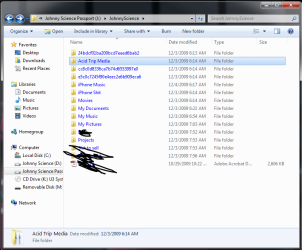
Why is the text on my Passport showing blue?
I think this just started happening, but why is the text to all of my files on my passport showing up as blue instead of the normal black?
Untitled.png
36.8 KB
· Views: 37
Windows 7 64 & Ubuntu 64 Intel Quad Core Q6600 2.40GHz 8g Nvidia 9600 GT & 9800 GT Built it myself Windows 7 64 & Ubuntu 64 Intel Quad Core Q6600 2.40GHz Asus 8g Nvidia 9600 GT & 9800 GT Turtle Beach 5.1 Three 19" Dell's & one 46" Samsung 750
An Angry Old Man
Guru
VIP
SF Team
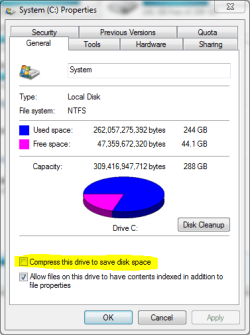
File or folder name written in blue normally means the item or the drive is compressed or encrypted.
compress_drive.PNG
14.6 KB
· Views: 18
Windows 10 Pro x64 EN-GB 1.6 GHz Intel Core i7-720QM Processor 6 GB ATI Mobility Radeon HD 5850 Graphics Laptop HP ENVY 17-1150eg Windows 10 Pro x64 EN-GB 1.6 GHz Intel Core i7-720QM Processor 6 GB ATI Mobility Radeon HD 5850 Graphics Beats sound system with integrated subwoofer 17" laptop display, 22" LED and 32" Full HD TV through HDMI 1600*900 (1), 1920*1080 (2&3) Internal: 2 x 500 GB SATA Hard Disk Drive 7200 rpm As Envy runs a bit warm, I have it on a Cooler Master pad Logitech diNovo Media Desktop Laser (bluetooth) Logitech Performance Mouse MX 50/10 Mbps VDSL Windows Defender 4.3.9431.0 Maxthon 3.5.2., IE11
New member
Power User
Thread Starter
File or folder name written in blue normally means the item or the drive is compressed or encrypted.
probably encrypted I guess?
But I dont think I set a password?
How can I see if there is a password set for it & if not, create one?
Windows 7 64 & Ubuntu 64 Intel Quad Core Q6600 2.40GHz 8g Nvidia 9600 GT & 9800 GT Built it myself Windows 7 64 & Ubuntu 64 Intel Quad Core Q6600 2.40GHz Asus 8g Nvidia 9600 GT & 9800 GT Turtle Beach 5.1 Three 19" Dell's & one 46" Samsung 750
An Angry Old Man
Guru
VIP
SF Team
Check first if Passport is compressed. Right click the drive in Computer window, is the the
Compress this drive to save disk space checked?
If it's compressed (Bitlocker etc.) and you don't have the password you are screwed (pardon my French)
Kari
Windows 10 Pro x64 EN-GB 1.6 GHz Intel Core i7-720QM Processor 6 GB ATI Mobility Radeon HD 5850 Graphics Laptop HP ENVY 17-1150eg Windows 10 Pro x64 EN-GB 1.6 GHz Intel Core i7-720QM Processor 6 GB ATI Mobility Radeon HD 5850 Graphics Beats sound system with integrated subwoofer 17" laptop display, 22" LED and 32" Full HD TV through HDMI 1600*900 (1), 1920*1080 (2&3) Internal: 2 x 500 GB SATA Hard Disk Drive 7200 rpm As Envy runs a bit warm, I have it on a Cooler Master pad Logitech diNovo Media Desktop Laser (bluetooth) Logitech Performance Mouse MX 50/10 Mbps VDSL Windows Defender 4.3.9431.0 Maxthon 3.5.2., IE11
New member
Power User
Thread Starter
yeah it is clicked & is on.
Windows 7 64 & Ubuntu 64 Intel Quad Core Q6600 2.40GHz 8g Nvidia 9600 GT & 9800 GT Built it myself Windows 7 64 & Ubuntu 64 Intel Quad Core Q6600 2.40GHz Asus 8g Nvidia 9600 GT & 9800 GT Turtle Beach 5.1 Three 19" Dell's & one 46" Samsung 750
An Angry Old Man
Guru
VIP
SF Team
Just uncheck the compression. Should be fine then.
Windows 10 Pro x64 EN-GB 1.6 GHz Intel Core i7-720QM Processor 6 GB ATI Mobility Radeon HD 5850 Graphics Laptop HP ENVY 17-1150eg Windows 10 Pro x64 EN-GB 1.6 GHz Intel Core i7-720QM Processor 6 GB ATI Mobility Radeon HD 5850 Graphics Beats sound system with integrated subwoofer 17" laptop display, 22" LED and 32" Full HD TV through HDMI 1600*900 (1), 1920*1080 (2&3) Internal: 2 x 500 GB SATA Hard Disk Drive 7200 rpm As Envy runs a bit warm, I have it on a Cooler Master pad Logitech diNovo Media Desktop Laser (bluetooth) Logitech Performance Mouse MX 50/10 Mbps VDSL Windows Defender 4.3.9431.0 Maxthon 3.5.2., IE11
New member
Power User
Thread Starter
Now that I've unchecked it, how do I add password encryption?
Windows 7 64 & Ubuntu 64 Intel Quad Core Q6600 2.40GHz 8g Nvidia 9600 GT & 9800 GT Built it myself Windows 7 64 & Ubuntu 64 Intel Quad Core Q6600 2.40GHz Asus 8g Nvidia 9600 GT & 9800 GT Turtle Beach 5.1 Three 19" Dell's & one 46" Samsung 750
An Angry Old Man
Guru
VIP
SF Team
Now that I've unchecked it, how do I add password encryption?
If you are using Seven Ultimate, you could use Bitlocker. Right click the drive in Computer window, choose Turn on Bitlocker.
Be sure to print the encryption key sheet!
Kari
Windows 10 Pro x64 EN-GB 1.6 GHz Intel Core i7-720QM Processor 6 GB ATI Mobility Radeon HD 5850 Graphics Laptop HP ENVY 17-1150eg Windows 10 Pro x64 EN-GB 1.6 GHz Intel Core i7-720QM Processor 6 GB ATI Mobility Radeon HD 5850 Graphics Beats sound system with integrated subwoofer 17" laptop display, 22" LED and 32" Full HD TV through HDMI 1600*900 (1), 1920*1080 (2&3) Internal: 2 x 500 GB SATA Hard Disk Drive 7200 rpm As Envy runs a bit warm, I have it on a Cooler Master pad Logitech diNovo Media Desktop Laser (bluetooth) Logitech Performance Mouse MX 50/10 Mbps VDSL Windows Defender 4.3.9431.0 Maxthon 3.5.2., IE11
New member
Guru
Gold Member
VIP
Before using Bitlocker-to-go on the drive, take off all the data and backup it up!
Windows 10 Pro (x64) Intel Core i7-3930K (3.2GHz - 4.5GHz) 4x Samsung 4GB PC3-12800 DDR3 (16GB 1600MHz) Nvidia Geforce GTX 690 PC/Desktop Alienware Aurora ALX R4 Windows 10 Pro (x64) Intel Core i7-3930K (3.2GHz - 4.5GHz) Alienware Aurora-R4 x79 4x Samsung 4GB PC3-12800 DDR3 (16GB 1600MHz) Nvidia Geforce GTX 690 SteelSeries Siberia Elite Dell UltraSharp U3011 2560x1600 Samsung 850 Pro 256 GB, Seagate 1TB Desktop Hybrid HDD, 2x Western Digital 4TB Green HDD 875W Some Dell PSU <.< Alienware Aurora ALX Custom Liquid Cooling (EK CPU & GPU blocks) dual EK 480RAD Logitech G710+ Mechanical Logitech G700s Verizon Fios (50 mbps average) Server: Intel NUC D54250WYK: i5-4250U, 16GB, 256 GB mSATA, Windows Server 2012 R2
An Angry Old Man
Guru
VIP
SF Team
Before using Bitlocker-to-go on the drive, take off all the data and backup it up!
+1
Backup is always important. Especially so before making some major adjustments or changes like encrypting a whole drive.
Kari
Windows 10 Pro x64 EN-GB 1.6 GHz Intel Core i7-720QM Processor 6 GB ATI Mobility Radeon HD 5850 Graphics Laptop HP ENVY 17-1150eg Windows 10 Pro x64 EN-GB 1.6 GHz Intel Core i7-720QM Processor 6 GB ATI Mobility Radeon HD 5850 Graphics Beats sound system with integrated subwoofer 17" laptop display, 22" LED and 32" Full HD TV through HDMI 1600*900 (1), 1920*1080 (2&3) Internal: 2 x 500 GB SATA Hard Disk Drive 7200 rpm As Envy runs a bit warm, I have it on a Cooler Master pad Logitech diNovo Media Desktop Laser (bluetooth) Logitech Performance Mouse MX 50/10 Mbps VDSL Windows Defender 4.3.9431.0 Maxthon 3.5.2., IE11
New member
Power User
Thread Starter
Now that I've unchecked it, how do I add password encryption?
If you are using Seven Ultimate, you could use Bitlocker. Right click the drive in Computer window, choose Turn on Bitlocker.
Be sure to print the encryption key sheet!
Kari
I dont see this when you right click?
Do I need to go into properties? (I did, but I just didnt know where to go/didnt see anything?)
Windows 7 64 & Ubuntu 64 Intel Quad Core Q6600 2.40GHz 8g Nvidia 9600 GT & 9800 GT Built it myself Windows 7 64 & Ubuntu 64 Intel Quad Core Q6600 2.40GHz Asus 8g Nvidia 9600 GT & 9800 GT Turtle Beach 5.1 Three 19" Dell's & one 46" Samsung 750
An Angry Old Man
Guru
VIP
SF Team
You should see the Bitlocker option when you right click the drive icon. Notice that Bitlocker is included only in Ultimate edition, Home and Professional editions don't have Bitlocker.
Bitlocker1.PNG
53.3 KB
· Views: 9
Windows 10 Pro x64 EN-GB 1.6 GHz Intel Core i7-720QM Processor 6 GB ATI Mobility Radeon HD 5850 Graphics Laptop HP ENVY 17-1150eg Windows 10 Pro x64 EN-GB 1.6 GHz Intel Core i7-720QM Processor 6 GB ATI Mobility Radeon HD 5850 Graphics Beats sound system with integrated subwoofer 17" laptop display, 22" LED and 32" Full HD TV through HDMI 1600*900 (1), 1920*1080 (2&3) Internal: 2 x 500 GB SATA Hard Disk Drive 7200 rpm As Envy runs a bit warm, I have it on a Cooler Master pad Logitech diNovo Media Desktop Laser (bluetooth) Logitech Performance Mouse MX 50/10 Mbps VDSL Windows Defender 4.3.9431.0 Maxthon 3.5.2., IE11
New member
Power User
Thread Starter
You should see the Bitlocker option when you right click the drive icon. Notice that Bitlocker is included only in Ultimate edition, Home and Professional editions don't have Bitlocker.
Yeah I only have Pro, so no bitlocker I guess?
What other 3rd party options do I have for top ofthe line security?
Windows 7 64 & Ubuntu 64 Intel Quad Core Q6600 2.40GHz 8g Nvidia 9600 GT & 9800 GT Built it myself Windows 7 64 & Ubuntu 64 Intel Quad Core Q6600 2.40GHz Asus 8g Nvidia 9600 GT & 9800 GT Turtle Beach 5.1 Three 19" Dell's & one 46" Samsung 750