No 1440x900 res with Nvidia PCX 5750 on Win7

Diesel Laws

New member
Local time
9:31 AM
Messages
8
Well, I installed Windows 7 and installed the video cards needed. I wasn't able to use AERO, it said that my graphics card has compatibility issues. However iw as using 1440 x 900 resolution.

After about 2 weeks I really wanted to see if I could get a workaround for getting the Aero theme. After installing and reinstalling a few drivers, I am now able to get the Aero styles, however I cannot get back 1440 x 900 resolution. My highest setting on the Viewsonic VA1912wb is 1280 x 1024. I'm stuck with 1280x800 for the time being and its killing me!

Can anyone help me revert it back to the first setup I had (I don't care now if Aero doesnt work).

Here are some system specs (not sure if its all you need)

Display Devices
---------------
Card name: NVIDIA GeForce PCX 5750
Manufacturer: NVIDIA
Chip type: GeForce PCX 5750
DAC type: Integrated RAMDAC
Display Memory: 397 MB
Dedicated Memory: 126 MB
Shared Memory: 271 MB
Current Mode: 1280 x 800 (32 bit) (60Hz)
Monitor Name: ViewSonic VA1912w Series
Monitor Model: VA1912w-3
Monitor Id: VSC711C
Native Mode: 1440 x 900(p) (59.887Hz)
Output Type: DVI
Driver Name: nvd3dum.dll
Driver File Version: 7.15.0010.9685 (English)
Driver Version: 9.6.8.5
DDI Version: 9Ex
Driver Model: WDDM 1.0
 

My Computer My Computer

At a glance

Windows 7
OS
Windows 7
Hello Diesel Laws & welcome to Seven Forums :)
Are you running x86 or x64 Windows 7?

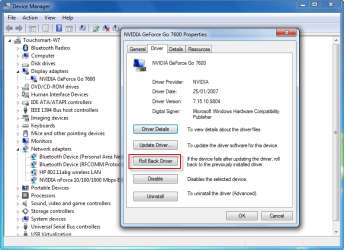
Have you tried rolling back the driver through device manager?

1.png
 

My Computer My Computer

At a glance

Windows 7 Ultimate x64AMD Turion(tm) 64 X2 Mobile Technology TL-563GB Nanya PC2-6400 DDR2-SDRAM SO-DIM (400MHz)NVIDIA GeForce Go 7600 256MB GDDR3 SDRAM
Computer Manufacturer/Model Number
HP Touchsmart IQ771.uk
OS
Windows 7 Ultimate x64
CPU
AMD Turion(tm) 64 X2 Mobile Technology TL-56
Motherboard
ASUS Pheonix
Memory
3GB Nanya PC2-6400 DDR2-SDRAM SO-DIM (400MHz)
Graphics Card(s)
NVIDIA GeForce Go 7600 256MB GDDR3 SDRAM
Sound Card
High Definition Intergrated NVIDIA MCP51
Monitor(s) Displays
46" Sony Bravia HDTV
Screen Resolution
1600x1200
Hard Drives
1.5TB Samsug
320GB Seagate ST3320820AS - SATA 3Gb/s 8MB
500GB Maxtor Basics STM305003EHD301-RK
Internet Speed
↓6.32 Mb/s ↑0.35 Mb/s ↔26ms
Other Info
BIOS - American Megatrends Inc. 5.07
Ethernet Port - NVIDIA nForce 10/100/1000 Mbps
DVD Drive - TSSTcorp DVDR/RW TS-T632L
No, I am now running Windows 7. Let me know what else I can supply to help out with this odd issue.

I also have rolled back the driver, reinstalled the driver, reinstalled the XP, VISTA and WINDOWS 7 drivers also all to no avail. It seems it let me install an XP/VISTA one the first time, but now it mentions that my operating system does not connect with XP/VISTA drivers. (sorry about being vague)
 

My Computer My Computer

At a glance

Windows 7
OS
Windows 7
No, I am now running Windows 7. Let me know what else I can supply to help out with this odd issue.

Are you running x86 Windows 7 or x64 Windows 7?
Have you tried rolling back the driver?
 

My Computer My Computer

At a glance

Windows 7 Ultimate x64AMD Turion(tm) 64 X2 Mobile Technology TL-563GB Nanya PC2-6400 DDR2-SDRAM SO-DIM (400MHz)NVIDIA GeForce Go 7600 256MB GDDR3 SDRAM
Computer Manufacturer/Model Number
HP Touchsmart IQ771.uk
OS
Windows 7 Ultimate x64
CPU
AMD Turion(tm) 64 X2 Mobile Technology TL-56
Motherboard
ASUS Pheonix
Memory
3GB Nanya PC2-6400 DDR2-SDRAM SO-DIM (400MHz)
Graphics Card(s)
NVIDIA GeForce Go 7600 256MB GDDR3 SDRAM
Sound Card
High Definition Intergrated NVIDIA MCP51
Monitor(s) Displays
46" Sony Bravia HDTV
Screen Resolution
1600x1200
Hard Drives
1.5TB Samsug
320GB Seagate ST3320820AS - SATA 3Gb/s 8MB
500GB Maxtor Basics STM305003EHD301-RK
Internet Speed
↓6.32 Mb/s ↑0.35 Mb/s ↔26ms
Other Info
BIOS - American Megatrends Inc. 5.07
Ethernet Port - NVIDIA nForce 10/100/1000 Mbps
DVD Drive - TSSTcorp DVDR/RW TS-T632L
Sorry, I replied to one answer then edited it to include the other answer lol

I also have rolled back the driver, reinstalled the driver, reinstalled the XP, VISTA and WINDOWS 7 drivers also all to no avail. It seems it let me install an XP/VISTA one the first time, but now it mentions that my operating system does not connect with XP/VISTA drivers. (sorry about being vague)

How can I check which version (x86 Windows 7 or x64 Windows 7) - I assume its the 32bit version.
 

My Computer My Computer

At a glance

Windows 7
OS
Windows 7
Have you tried uninstalling the driver & rebooting. Windows update will likely find a working one for you.

To check your architecture;

Start > Right click Computer > Properties

It'll tell which version in the system area.
 

My Computer My Computer

At a glance

Windows 7 Ultimate x64AMD Turion(tm) 64 X2 Mobile Technology TL-563GB Nanya PC2-6400 DDR2-SDRAM SO-DIM (400MHz)NVIDIA GeForce Go 7600 256MB GDDR3 SDRAM
Computer Manufacturer/Model Number
HP Touchsmart IQ771.uk
OS
Windows 7 Ultimate x64
CPU
AMD Turion(tm) 64 X2 Mobile Technology TL-56
Motherboard
ASUS Pheonix
Memory
3GB Nanya PC2-6400 DDR2-SDRAM SO-DIM (400MHz)
Graphics Card(s)
NVIDIA GeForce Go 7600 256MB GDDR3 SDRAM
Sound Card
High Definition Intergrated NVIDIA MCP51
Monitor(s) Displays
46" Sony Bravia HDTV
Screen Resolution
1600x1200
Hard Drives
1.5TB Samsug
320GB Seagate ST3320820AS - SATA 3Gb/s 8MB
500GB Maxtor Basics STM305003EHD301-RK
Internet Speed
↓6.32 Mb/s ↑0.35 Mb/s ↔26ms
Other Info
BIOS - American Megatrends Inc. 5.07
Ethernet Port - NVIDIA nForce 10/100/1000 Mbps
DVD Drive - TSSTcorp DVDR/RW TS-T632L
It says Windows 7 Ultimate - then the copyright info -

Processor Intel Core Duo CPU E6550 @ 2.33GHz
Installed RAM 5GB (3.5GB usable)
System type: 32 Bit operating system

No mention of anything other than 32 bit.
 

My Computer My Computer

At a glance

Windows 7
OS
Windows 7
also, I did reboot after every update/reinstall as it told me too.
 

My Computer My Computer

At a glance

Windows 7
OS
Windows 7
It says Windows 7 Ultimate - then the copyright info -

Processor Intel Core Duo CPU E6550 @ 2.33GHz
Installed RAM 5GB (3.5GB usable)
System type: 32 Bit operating system

No mention of anything other than 32 bit.

x86 is 32bit, sorry i should have made myself clearer.

Also, what i mean is, uninstall the driver completely, reboot and use Windows update to try and find a driver for you.
 

My Computer My Computer

At a glance

Windows 7 Ultimate x64AMD Turion(tm) 64 X2 Mobile Technology TL-563GB Nanya PC2-6400 DDR2-SDRAM SO-DIM (400MHz)NVIDIA GeForce Go 7600 256MB GDDR3 SDRAM
Computer Manufacturer/Model Number
HP Touchsmart IQ771.uk
OS
Windows 7 Ultimate x64
CPU
AMD Turion(tm) 64 X2 Mobile Technology TL-56
Motherboard
ASUS Pheonix
Memory
3GB Nanya PC2-6400 DDR2-SDRAM SO-DIM (400MHz)
Graphics Card(s)
NVIDIA GeForce Go 7600 256MB GDDR3 SDRAM
Sound Card
High Definition Intergrated NVIDIA MCP51
Monitor(s) Displays
46" Sony Bravia HDTV
Screen Resolution
1600x1200
Hard Drives
1.5TB Samsug
320GB Seagate ST3320820AS - SATA 3Gb/s 8MB
500GB Maxtor Basics STM305003EHD301-RK
Internet Speed
↓6.32 Mb/s ↑0.35 Mb/s ↔26ms
Other Info
BIOS - American Megatrends Inc. 5.07
Ethernet Port - NVIDIA nForce 10/100/1000 Mbps
DVD Drive - TSSTcorp DVDR/RW TS-T632L
found it! ACPI x86-based PC (in the device manager)
 

My Computer My Computer

At a glance

Windows 7
OS
Windows 7
No no no!!!, do not uninstall that (not that you can i don't think??)

uninstall your Display adapter driver in device manager, reboot Windows, and use Windows update to hopefully find a working driver for you.
 

My Computer My Computer

At a glance

Windows 7 Ultimate x64AMD Turion(tm) 64 X2 Mobile Technology TL-563GB Nanya PC2-6400 DDR2-SDRAM SO-DIM (400MHz)NVIDIA GeForce Go 7600 256MB GDDR3 SDRAM
Computer Manufacturer/Model Number
HP Touchsmart IQ771.uk
OS
Windows 7 Ultimate x64
CPU
AMD Turion(tm) 64 X2 Mobile Technology TL-56
Motherboard
ASUS Pheonix
Memory
3GB Nanya PC2-6400 DDR2-SDRAM SO-DIM (400MHz)
Graphics Card(s)
NVIDIA GeForce Go 7600 256MB GDDR3 SDRAM
Sound Card
High Definition Intergrated NVIDIA MCP51
Monitor(s) Displays
46" Sony Bravia HDTV
Screen Resolution
1600x1200
Hard Drives
1.5TB Samsug
320GB Seagate ST3320820AS - SATA 3Gb/s 8MB
500GB Maxtor Basics STM305003EHD301-RK
Internet Speed
↓6.32 Mb/s ↑0.35 Mb/s ↔26ms
Other Info
BIOS - American Megatrends Inc. 5.07
Ethernet Port - NVIDIA nForce 10/100/1000 Mbps
DVD Drive - TSSTcorp DVDR/RW TS-T632L
lol I didnt uninstall that. As I said in the first post, I installed and reinstalled the display drivers numerous times, each with a shut down, and each time it came back on I tried the xp version again, then after the next shutdown i tried the vista one etc.

I will try one more time (make it the 6th time) to uninstall the DISPLAY drivers - reboot - and let windows find a device for me.
 

My Computer My Computer

At a glance

Windows 7
OS
Windows 7
Have u try reinstall windows with clean install?
 

My Computer My Computer

At a glance

Windows 7 Build 7600 64 bitAMD Phenom II X4 920Kingston HyperX 8GB-With Cooling Fan!Nvidia 280
Computer Manufacturer/Model Number
AMD-ATI
OS
Windows 7 Build 7600 64 bit
CPU
AMD Phenom II X4 920
Motherboard
TA 790GX 128M
Memory
Kingston HyperX 8GB-With Cooling Fan!
Graphics Card(s)
Nvidia 280
Sound Card
Realtek® HD
Monitor(s) Displays
SyncMaster Samsung 24 Inc and 19 Inc
Hard Drives
Sata 1TB ,Maxtor 250GB x1
PSU
1000W
Case
Cooler Master
Cooling
XpressCool
Keyboard
Logitech
Mouse
Logitech
Internet Speed
Connection 1GBPS but slow
Well, I decided after much research that the best option was to get an updated graphics card - cost 70bux but was worth it. Thanks so much for taking the time tho.
 

My Computer My Computer

At a glance

Windows 7
OS
Windows 7
Back
Top