How do you know if you have USB 2.0 installed?

Flowright138

New member
Local time
9:51 AM
Messages
18
Location
Australia
Hello there,

Recently I've bought a printer USB cable that says USB 2.0 supported. However when I plugged it between my Canon printer to my PC, it did not detect the printer. When I try with a HP USB brand cable, it did.

At the same time, I am currently running on a new motherboard - DG31PR - which says that it has 8 x USB 2.0 port. Now can anyone tell me how to check if I have USB 2.0 installed? I went to Device manager and to the 'Universal Serial Bus controllers' root but I can't find anything that says USB 2.0 ...

Instead I have what I have on my screenshots.
3804d1260760074-how-do-you-know-if-you-have-usb-2-0-installed-capture.png


So can anyone comfirm if my USB ports are up to date?

In Win XP, I can check it when I plug in a USB device and look it up in the property, but apparently Win 7 removed this...
 

My Computer My Computer

At a glance

Microsoft Windows 7 Ultimate 64-bit 7601 Mult...Intel(R) Core(TM) i5 CPU 650 @ 3.20GHz12.00 GBNVIDIA GeForce GTX 570
Computer type
PC/Desktop
Computer Manufacturer/Model Number
Custom build
OS
Microsoft Windows 7 Ultimate 64-bit 7601 Multiprocessor Free Service Pack 1
CPU
Intel(R) Core(TM) i5 CPU 650 @ 3.20GHz
Motherboard
Gigabyte Technology Co., Ltd. P55A-UD3
Memory
12.00 GB
Graphics Card(s)
NVIDIA GeForce GTX 570
Sound Card
(1) High Definition Audio Device (2) High Definition Audio
Monitor(s) Displays
BenQ 21"
Screen Resolution
1920 x 1080 x 32 bits (4294967296 colors) @ 60 Hz
Hard Drives
(1) WDC WD15EARS-00S8B1 ATA Device (2) WDC WD20EARS-00MVWB0 ATA Device (3) Samsung SSD 840 Series SCSI Disk Device
If you built that PC, the motherboard manual will tell you. My Gigabyte MA 790GPT-UD3H has 6 on the back panel and all are USB 2.0 / 1.1
 

My Computer My Computer

At a glance

Windows 7 Ultimate x86-64[email protected] 1066MHz FSB6GB DDR3 1066MHz9300M GS 256MB Dedicated (Speed) + Intel4500M...
Computer Manufacturer/Model Number
Sony Vaio Z46GDU
OS
Windows 7 Ultimate x86-64
CPU
[email protected] 1066MHz FSB
Motherboard
Sony branded
Memory
6GB DDR3 1066MHz
Graphics Card(s)
9300M GS 256MB Dedicated (Speed) + Intel4500MHD (Stamina)
Sound Card
Realtek HD Audio
Monitor(s) Displays
13.1' WXGA
Screen Resolution
1600x900
Hard Drives
320GB 7200RPM w/ 16MB cache
Internet Speed
1MB/s
Hello Flowright,

Any new motherboard these days will at least have USB 2.0 now. There are even some just released with USB 3.0 now.

According to your motherboard specs below, you have 8 USB 2.0 ports. :)

Intel Desktop Board DG31PR - Overview

Hope this helps,
Shawn
 

My Computer My Computer

At a glance

64-bit Windows 11 Pro for WorkstationsIntel i7-8700K OC'd to 5 GHz64 GB (4x16GB) G.SKILL TridentZ RGB DDR4 3600...ASUS ROG-STRIX-GTX1080TI-O11G-GAMING
Computer type
PC/Desktop
Computer Manufacturer/Model Number
Self built custom
OS
64-bit Windows 11 Pro for Workstations
CPU
Intel i7-8700K OC'd to 5 GHz
Motherboard
ASUS ROG Maximus XI Formula Z390
Memory
64 GB (4x16GB) G.SKILL TridentZ RGB DDR4 3600 MHz
Graphics Card(s)
ASUS ROG-STRIX-GTX1080TI-O11G-GAMING
Sound Card
Integrated
Monitor(s) Displays
2 x Samsung Odyssey G7 27"
Screen Resolution
2560x1440
Hard Drives
1TB Samsung 990 PRO M.2,
4TB Samsung 990 PRO PRO M.2,
TerraMaster F8 SSD Plus NAS
PSU
Seasonic Prime Titanium 850W
Case
Thermaltake Core P3
Cooling
Corsair Hydro H115i
Keyboard
Logitech wireless K800
Mouse
Logitech MX Master 4
Internet Speed
2 Gb/s Download and 100 Mb/s Upload
Antivirus
Malwarebyte Anti-Malware Premium
Browser
Google Chrome
Other Info
Logitech Z625 speaker system,
Logitech BRIO 4K Pro webcam,
HP Color LaserJet Pro MFP M477fdn,
APC SMART-UPS RT 1000 XL - SURT1000XLI,
Galaxy S23 Plus phone
Hello Flowright,

Any new motherboard these days will at least have USB 2.0 now. There are even some just released with USB 3.0 now.

According to your motherboard specs below, you have 8 USB 2.0 ports. :)

Intel Desktop Board DG31PR - Overview

Hope this helps,
Shawn

I am aware that there is 8, but is it preinstalled? Or do drivers/something needs to be installed to make it run as a USB 2.0? Cause right now, I am copying a file from a CF card or 10 photos, and I have a copying speed of 200 kB/sec -- which is very slow.

So looking at the attachment, do I seem to have USB 2.0?

I know I have 8, but in fact I only have 6 working one right now. I am not a pro PC builder, so I only connected whatever cables I can find correctly.

Could connecting the wrong cable on the mobbo be a problem?
 

My Computer My Computer

At a glance

Microsoft Windows 7 Ultimate 64-bit 7601 Mult...Intel(R) Core(TM) i5 CPU 650 @ 3.20GHz12.00 GBNVIDIA GeForce GTX 570
Computer type
PC/Desktop
Computer Manufacturer/Model Number
Custom build
OS
Microsoft Windows 7 Ultimate 64-bit 7601 Multiprocessor Free Service Pack 1
CPU
Intel(R) Core(TM) i5 CPU 650 @ 3.20GHz
Motherboard
Gigabyte Technology Co., Ltd. P55A-UD3
Memory
12.00 GB
Graphics Card(s)
NVIDIA GeForce GTX 570
Sound Card
(1) High Definition Audio Device (2) High Definition Audio
Monitor(s) Displays
BenQ 21"
Screen Resolution
1920 x 1080 x 32 bits (4294967296 colors) @ 60 Hz
Hard Drives
(1) WDC WD15EARS-00S8B1 ATA Device (2) WDC WD20EARS-00MVWB0 ATA Device (3) Samsung SSD 840 Series SCSI Disk Device
If you had connected the front panel USB to the IEEE 1394 or something else besides USB hub.....you would have bigger problems than you have now.

The speeds you are seeing probably have to do with the USB devices you have, not the USB performance from your board. The ICH7 supports 8 "full speed" USB ports (between the back panel and front of case) If there are more, they may be "sharing" bandwidth.

Also, you can still see any device plugged into USB port in "device manager" some devices are "hidden" and you have to "unhide" them. I think you have to go to "view" at the top and press "show hidden devices"
 

My Computer My Computer

At a glance

Windows 7 Professional x64Intel Core i7 8604GB DDR3 Mushkin 1600Mhz @ 7-8-7-20MSI GTS250 1GB DDR3 Twin Frozr
Computer Manufacturer/Model Number
Keeps changing - (Custom)
OS
Windows 7 Professional x64
CPU
Intel Core i7 860
Motherboard
Gigabyte GA-P55-UD4P
Memory
4GB DDR3 Mushkin 1600Mhz @ 7-8-7-20
Graphics Card(s)
MSI GTS250 1GB DDR3 Twin Frozr
Sound Card
Onboard realtek
Monitor(s) Displays
Samsung SyncMaster 24" P2450 + Samsung 20" 2033
Screen Resolution
1920 X 1080 and 1600 X 900 (#2 system 1440 X 900)
Hard Drives
Patriot Inferno 120GB SSD + 3 WD Blue 640GB drives
PSU
Corsair 750 HX Modular
Case
Lancool PC-K62
Cooling
Cooler Master TX3 CPU cooler and 4-140mm and 1-120mm case
Keyboard
Gigabyte USB keyboard
Mouse
Microsoft wireless laser mouse 5000
Internet Speed
7 Mb down 1.5 up
Other Info
System #2: AMD Phenom II X6 1055T (Freezer 7 Pro cooler) - Gigabyte 880GMA-UD2H - WD 500GB Black - 9500GT (1GB) 500W OCZ modular PSU - Antec 200 case. System #3 (LapTop) Core 2 Duo T6670 - 320GB 7200RPM HD - 4GB DDR3 RAM.
In your attachment it says "...USB2 Enhanced host controller...", that indicates that you have USB2.
BTW, only one entry for that is normal.
 

My Computer My Computer

At a glance

Windows 10 Pro x64, Windows 8.1 Pro x64, Wind...INTEL i9-7920X LGA 206664 GB (4 X 16 GB) G-Skill V Series DDR4 3200 ...EVGA GTX 1060 SC 3 GB
Computer type
PC/Desktop
Computer Manufacturer/Model Number
Custom Built
OS
Windows 10 Pro x64, Windows 8.1 Pro x64, Windows 7 Ultimate x64 SP1,
CPU
INTEL i9-7920X LGA 2066
Motherboard
Gigabyte X299-WU8 F3
Memory
64 GB (4 X 16 GB) G-Skill V Series DDR4 3200 Quad Channel
Graphics Card(s)
EVGA GTX 1060 SC 3 GB
Sound Card
Realtek Onboard ALC1220
Monitor(s) Displays
2 x Samsung S27E310
Screen Resolution
1920x1080
Hard Drives
Samsung 2 x 970 EVO Plus 500 GB NVMe
1 x 6TB WD 6003FZBX SATA
1 x 6TB WD 60EFRX SATA
12 x 3TB WD 30EFRX SATA
PSU
Seasonic X-1050
Case
Thermaltake Armor+
Cooling
Corsair H80i V2 Liquid AOI Cooler
Keyboard
Logitech G510s
Mouse
Logitech MX Master 2S
Internet Speed
200 Mb/s
Antivirus
ESET NOD32 13.1
Browser
EDGE (Dev, Canary, Beta), Chrome
Other Info
ASUS RT-AC68U router
Malwarebytes 4.0.4
If you had connected the front panel USB to the IEEE 1394 or something else besides USB hub.....you would have bigger problems than you have now.

The speeds you are seeing probably have to do with the USB devices you have, not the USB performance from your board. The ICH7 supports 8 "full speed" USB ports (between the back panel and front of case) If there are more, they may be "sharing" bandwidth.

Also, you can still see any device plugged into USB port in "device manager" some devices are "hidden" and you have to "unhide" them. I think you have to go to "view" at the top and press "show hidden devices"

I am sorry. I don't know what's a IEEE 1394. The USB slow USB speed cannot be from the device itself. The CF flash card of my camera can copy paste from another computer at 10 MB/sec. I am going at 200 kB/sec. It's definately not the device that is the problem. I am pretty sure it's the board.


In your attachment it says "...USB2 Enhanced host controller...", that indicates that you have USB2.
BTW, only one entry for that is normal.

Perhaps this is the problem. I wanted somebody to hint it out for me. So Enhanced host = USB 2.0 ey? Well, you have said that only ONE is normal , why aren't the others all written as Enhanced host as well?
 

My Computer My Computer

At a glance

Microsoft Windows 7 Ultimate 64-bit 7601 Mult...Intel(R) Core(TM) i5 CPU 650 @ 3.20GHz12.00 GBNVIDIA GeForce GTX 570
Computer type
PC/Desktop
Computer Manufacturer/Model Number
Custom build
OS
Microsoft Windows 7 Ultimate 64-bit 7601 Multiprocessor Free Service Pack 1
CPU
Intel(R) Core(TM) i5 CPU 650 @ 3.20GHz
Motherboard
Gigabyte Technology Co., Ltd. P55A-UD3
Memory
12.00 GB
Graphics Card(s)
NVIDIA GeForce GTX 570
Sound Card
(1) High Definition Audio Device (2) High Definition Audio
Monitor(s) Displays
BenQ 21"
Screen Resolution
1920 x 1080 x 32 bits (4294967296 colors) @ 60 Hz
Hard Drives
(1) WDC WD15EARS-00S8B1 ATA Device (2) WDC WD20EARS-00MVWB0 ATA Device (3) Samsung SSD 840 Series SCSI Disk Device
Flowright,

You might also see if downloading and installing the latest 9.​1.​1.​1020 chipset driver for your Intel DG31PR motherboard may help any from the link at Intel below.

http://downloadcenter.intel.com/SearchResult.aspx?lang=eng&ProductFamily=Desktop+Boards&ProductLine=Intel%c2%ae+3+Series+Chipset+Boards&ProductProduct=Intel%c2%ae+Desktop+Board+DG31PR


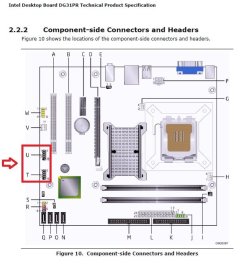
IEEE 1394 is for firewire. Looking at your motherboard specs and motherboard screenshot below, you do not have a firewire port on your motherboard. Instead, you have two USB ports ( U and T below). You might try the other port.

motherboard.jpg
 

My Computer My Computer

At a glance

64-bit Windows 11 Pro for WorkstationsIntel i7-8700K OC'd to 5 GHz64 GB (4x16GB) G.SKILL TridentZ RGB DDR4 3600...ASUS ROG-STRIX-GTX1080TI-O11G-GAMING
Computer type
PC/Desktop
Computer Manufacturer/Model Number
Self built custom
OS
64-bit Windows 11 Pro for Workstations
CPU
Intel i7-8700K OC'd to 5 GHz
Motherboard
ASUS ROG Maximus XI Formula Z390
Memory
64 GB (4x16GB) G.SKILL TridentZ RGB DDR4 3600 MHz
Graphics Card(s)
ASUS ROG-STRIX-GTX1080TI-O11G-GAMING
Sound Card
Integrated
Monitor(s) Displays
2 x Samsung Odyssey G7 27"
Screen Resolution
2560x1440
Hard Drives
1TB Samsung 990 PRO M.2,
4TB Samsung 990 PRO PRO M.2,
TerraMaster F8 SSD Plus NAS
PSU
Seasonic Prime Titanium 850W
Case
Thermaltake Core P3
Cooling
Corsair Hydro H115i
Keyboard
Logitech wireless K800
Mouse
Logitech MX Master 4
Internet Speed
2 Gb/s Download and 100 Mb/s Upload
Antivirus
Malwarebyte Anti-Malware Premium
Browser
Google Chrome
Other Info
Logitech Z625 speaker system,
Logitech BRIO 4K Pro webcam,
HP Color LaserJet Pro MFP M477fdn,
APC SMART-UPS RT 1000 XL - SURT1000XLI,
Galaxy S23 Plus phone
Back
Top