Help with fingerprint reader

ComputerUser

New member
Hi, I got a laptop with DigitalPersona software for the fingerprint reader. Now it works great with logging in and stuff. But it gives me problems with firefox in general. Also when I want to use it to log into facebook, I would try set it up, but it would always select the wrong username fields, and doesnt recognise the password field. HELP!! If you go to the facebook login, you will notice there is the username and password aread at the top, and the fields for becoming a member at the bottom.. IT ALWAYS SELECTS THE BOTTOM FIELDS, so its a bit weird. Please help!
 

My Computer

Computer Manufacturer/Model Number
HP HDX16 Laptop
OS
Windows 7 Home Premium 64-bit
CPU
Intel Core 2 duo 2.53Ghz
Motherboard
Not sure
Memory
2 x 2GB
Graphics Card(s)
512 MB Geforce 9600
Monitor(s) Displays
16" HD Laptop screen
Screen Resolution
1920 x 1080
Hard Drives
320GB HHD
With Facebook, you have to be a bit creative to add its login to DigitalPersona fingerprint system. You have to do this only once, afterwards you can then use your fingerprint to login.

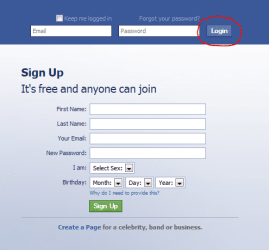
First, leave email and password fields empty and click Login.
FB1.PNG

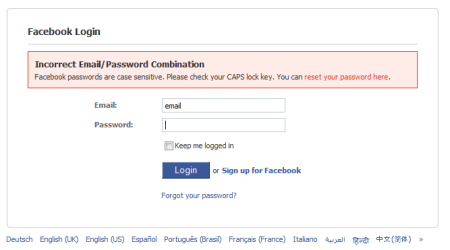
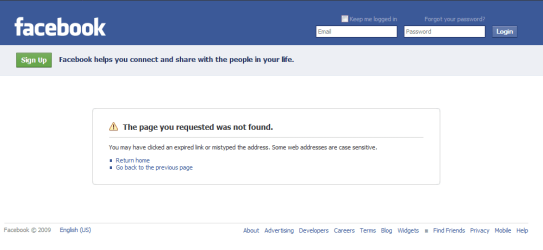
New window opens telling about incorrect login credentials.
FB2.PNG

On this page you can setup fingerprint login normally.

Kari
 

My Computer

Computer type
Laptop
Computer Manufacturer/Model Number
HP ENVY 17-1150eg
OS
Windows 10 Pro x64 EN-GB
CPU
1.6 GHz Intel Core i7-720QM Processor
Memory
6 GB
Graphics Card(s)
ATI Mobility Radeon HD 5850 Graphics
Sound Card
Beats sound system with integrated subwoofer
Monitor(s) Displays
17" laptop display, 22" LED and 32" Full HD TV through HDMI
Screen Resolution
1600*900 (1), 1920*1080 (2&3)
Hard Drives
Internal: 2 x 500 GB SATA Hard Disk Drive 7200 rpm
External: 2TB for backups, 3TB USB3 network drive for media
Cooling
As Envy runs a bit warm, I have it on a Cooler Master pad
Keyboard
Logitech diNovo Media Desktop Laser (bluetooth)
Mouse
Logitech Performance Mouse MX
Internet Speed
50/10 Mbps VDSL
Antivirus
Windows Defender 4.3.9431.0
Browser
Maxthon 3.5.2., IE11
Hi, great for the help, but then still each time i would have to go to the screen of the second screenshot you sent to log in? Because i did what you had said, but it still doesnt work at the regular facebook homepage, or did I do something wrong?

Thanks for the help
 

My Computer

Computer Manufacturer/Model Number
HP HDX16 Laptop
OS
Windows 7 Home Premium 64-bit
CPU
Intel Core 2 duo 2.53Ghz
Motherboard
Not sure
Memory
2 x 2GB
Graphics Card(s)
512 MB Geforce 9600
Monitor(s) Displays
16" HD Laptop screen
Screen Resolution
1920 x 1080
Hard Drives
320GB HHD
OK, let's try this:

  • Login to Facebook normally
  • Click Profile
    FB.PNG
  • Copy the address from browser's addressbar
  • Logout from Facebook
  • Paste the copied address to the addressbar, hit Enter
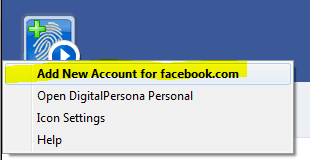
  • Now you should arrive to a normal login screen. Click DigitalPersona symbol (top left) and choose Add New Account for facebook.com:
    DP_FB.PNG
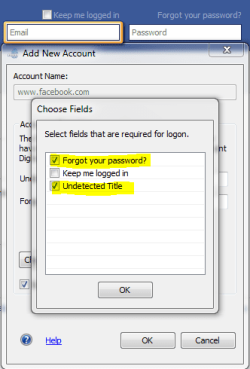
  • Click Choose Fields
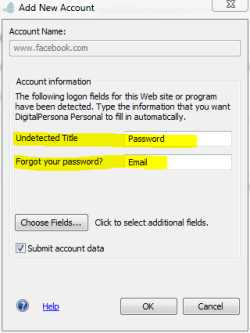
  • Choose the fields marked yellow in this image (illogical, I know):
    DP.PNG
  • Click OK. Type your username (email) to field Forgot your password and your password to field Undetected Title:
    FB_logon_credentials.PNG
  • Click OK
Please notice Facebook seems to use two different login pages, depending on how you enter Facebook. You should register both ways to DigitalPersona. Do as I told in my earlier post to register fingerprint for this login page:
FB_login2.PNG

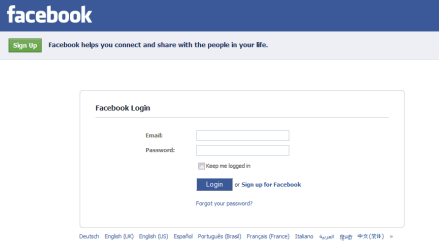
Doing as I told in this post post you also have registered your fingerprint when this login page appears:
FB_login1.PNG

Good luck!

Kari

P.S. Because of you, I did something I had sworn never to do: I registered a Facebook account, to be able to test this. Though the account is already deleted, I feel I need a whisky or two to overcome this feeling and to forgive you...;)
 

My Computer

Computer type
Laptop
Computer Manufacturer/Model Number
HP ENVY 17-1150eg
OS
Windows 10 Pro x64 EN-GB
CPU
1.6 GHz Intel Core i7-720QM Processor
Memory
6 GB
Graphics Card(s)
ATI Mobility Radeon HD 5850 Graphics
Sound Card
Beats sound system with integrated subwoofer
Monitor(s) Displays
17" laptop display, 22" LED and 32" Full HD TV through HDMI
Screen Resolution
1600*900 (1), 1920*1080 (2&3)
Hard Drives
Internal: 2 x 500 GB SATA Hard Disk Drive 7200 rpm
External: 2TB for backups, 3TB USB3 network drive for media
Cooling
As Envy runs a bit warm, I have it on a Cooler Master pad
Keyboard
Logitech diNovo Media Desktop Laser (bluetooth)
Mouse
Logitech Performance Mouse MX
Internet Speed
50/10 Mbps VDSL
Antivirus
Windows Defender 4.3.9431.0
Browser
Maxthon 3.5.2., IE11
Wow Kari, great thanks!! It works perfectly. I only need to scan my fingerprint in twice to get it to do it, im happy that it works! great! The first one enters my email address whilst my second fingerprint enters my password! So how did you know how to fix it?
 

My Computer

Computer Manufacturer/Model Number
HP HDX16 Laptop
OS
Windows 7 Home Premium 64-bit
CPU
Intel Core 2 duo 2.53Ghz
Motherboard
Not sure
Memory
2 x 2GB
Graphics Card(s)
512 MB Geforce 9600
Monitor(s) Displays
16" HD Laptop screen
Screen Resolution
1920 x 1080
Hard Drives
320GB HHD
Nice it works for you.

Like I told in my earlier post, I created an account in Facebook, to check how to create this fingerprint login. When I was sure it works, I deleted the account and posted he results.

Kari
 

My Computer

Computer type
Laptop
Computer Manufacturer/Model Number
HP ENVY 17-1150eg
OS
Windows 10 Pro x64 EN-GB
CPU
1.6 GHz Intel Core i7-720QM Processor
Memory
6 GB
Graphics Card(s)
ATI Mobility Radeon HD 5850 Graphics
Sound Card
Beats sound system with integrated subwoofer
Monitor(s) Displays
17" laptop display, 22" LED and 32" Full HD TV through HDMI
Screen Resolution
1600*900 (1), 1920*1080 (2&3)
Hard Drives
Internal: 2 x 500 GB SATA Hard Disk Drive 7200 rpm
External: 2TB for backups, 3TB USB3 network drive for media
Cooling
As Envy runs a bit warm, I have it on a Cooler Master pad
Keyboard
Logitech diNovo Media Desktop Laser (bluetooth)
Mouse
Logitech Performance Mouse MX
Internet Speed
50/10 Mbps VDSL
Antivirus
Windows Defender 4.3.9431.0
Browser
Maxthon 3.5.2., IE11
Back
Top