A Samsung TV

mjwilson94

New member
I have just bought the Samsung LE32B350F1W television.

I know there is the Audio Output (Red & White/ Left & Right) but i was wondering if the was just a normal headphone socket as I can't seem to locate one on the TV it self.
The reason I ask is because i have wireless headphones and when I plug them into the Audio Output mentioned above nothing seems to work. I know the headphones work as I have tried them in various appliances around my house.

Any help would be very thankfull.

(Is there a headphone socket on the Samsung LE32B350F1W)
How can I fix the problem of not hearing anything if there is no headphone socket

Thanks so much guys:)
 

My Computer

Computer Manufacturer/Model Number
Acer Aspire 5745P
OS
Window 7 Home Premium 64-Bit
CPU
Intel Core i3
Memory
3GB
Hard Drives
WD Scorpio Blue 300Gb
I think you can buy an adapter for the Audio Output.
 

My Computer

Computer Manufacturer/Model Number
Zen Productions
OS
Windows 7 Ultimate x64
CPU
Intel i7-860
Motherboard
Gigabyte GA-P55A-UD4P
Memory
Corsair Dominator 1600Mhz, 8-8-8-24 1.65v 2x2GB
Graphics Card(s)
ATI Radeon 5770 HD
Sound Card
Intel High Definition Sound
Monitor(s) Displays
Samsung P2570HD
Screen Resolution
1920x1080
Hard Drives
Western Digital Caviar Black 500gb
PSU
Corsair CMPSU-750HX 750W
Case
Antec p183
Cooling
Corsair H50 Water Cooler
Keyboard
Logitech G110
Mouse
Logitech MX Revolution
Internet Speed
768 mb/s
I have just bought the Samsung LE32B350F1W television.

I know there is the Audio Output (Red & White/ Left & Right) but i was wondering if the was just a normal headphone socket as I can't seem to locate one on the TV it self.
The reason I ask is because i have wireless headphones and when I plug them into the Audio Output mentioned above nothing seems to work. I know the headphones work as I have tried them in various appliances around my house.

Any help would be very thankfull.

(Is there a headphone socket on the Samsung LE32B350F1W)
How can I fix the problem of not hearing anything if there is no headphone socket

Thanks so much guys:)

I feel sure it is not for headphones. They don't have a red/white plug. My guess would be an output for a surround-sound system. I have a pretty expensive TV and it does not have a headphone jack. Not all of them do.
 

My Computer

Computer type
PC/Desktop
Computer Manufacturer/Model Number
Custom Build
OS
Windows 7 Home Premium 32-Bit - Build 7600 SP1
CPU
Intel Core i3-2120 3.30Ghz
Motherboard
Asus P8Z68-V LX Intel Z68 Socket H2 ATX
Memory
Kingston 4 GB DDR3 1333 mhz
Graphics Card(s)
AMD Radeon HD6670
Sound Card
Sound Blaster Audigy SE 24-Bit
Monitor(s) Displays
Asus VE228
Screen Resolution
1440 X 900
Hard Drives
OCZ Vertex 3 120 GB Sata 3 SSD ==
Kingston SH103/S3 120 G Hyper X 120 GB SSD ==
Western Digital 500 GB Caviar Green 7200 RPM ==
PSU
Corsair CX600M == 600 Watt
Case
NZXT Apollo - Silver with Clear Side Panel
Cooling
Three 120 mm Fans
Keyboard
Microsoft Natural 4000
Mouse
Microsoft Custom Optical 3000
Internet Speed
AT&T Fiber Optic Wireless Network
Antivirus
Microsoft Security Essentials
Browser
Chrome
Other Info
120 mm Blue LED Fan -- Three Blue LED Lazer Light Sticks
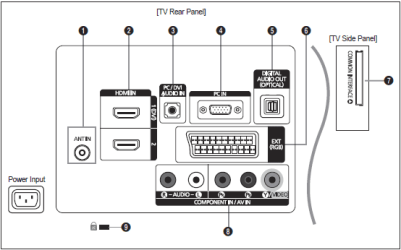
There are two audio outputs on this TV. The first is the digital optical (5) and the second is obtainable from the SCART socket (6).
Capture.PNG
To get audio output from the SCART socket (note that only TV or DTV output is available) you will need a suitable adapter. Have a look at this: SCART adaptor, 3.5mm socket audio out: Amazon.co.uk: Electronics & Photo
You might also need 6.35 1/4" stereo socket to 3.5 Stereo jack adaptor: Amazon.co.uk: Electronics & Photo if the plug on your headphones is 6.3mm and not 3.5mm.
 

My Computer

Computer type
PC/Desktop
Computer Manufacturer/Model Number
Dwarf Dwf/11/2012 r09/2013
OS
Windows 8.1 Pro RTM x64
CPU
Intel Core-i5-3570K 4-core @ 3.4GHz (Ivy Bridge) (OC 4.4GHz)
Motherboard
ASRock Z77 Extreme4-M
Memory
4 x 4GB DDR3-1600 Corsair Vengeance CMZ8GX3M2A1600C9B (16GB)
Graphics Card(s)
MSI GeForce GTX770 Gaming OC 2GB
Sound Card
Realtek High Definition on board solution (ALC 898)
Monitor(s) Displays
ViewSonic VA1912w Widescreen (VGA)
Screen Resolution
1440x900
Hard Drives
OCZ Agility 3 SSD 120GB SATA III x2 (RAID 0)
Samsung HD501LJ 500GB SATA II x2
Hitachi HDS721010CLA332 1TB SATA II
Iomega 1.5TB Ext USB 2.0
WD 2.0TB Ext USB 3.0
PSU
XFX Pro Series 850W Semi-Modular
Case
Gigabyte IF233
Cooling
1 x 120mm Front Inlet 1 x 120mm Rear Exhaust
Keyboard
Microsoft Comfort Curve Keyboard 3000 (USB)
Mouse
Microsoft Comfort Mouse 3000 for Business (USB)
Internet Speed
NetGear DG834Gv3 ADSL Modem/Router (Ethernet) ~4.0 Mb/s (O2)
Antivirus
Avast! 8.0.1497
Browser
IE 11
Other Info
Optical Drive: HL-DT-ST BD-RE BH10LS30 SATA Bluray
Lexmark S305 Printer/Scanner/Copier (USB)
WEI Score: 8.1/8.1/8.5/8.5/8.25
Asus Eee PC 1011PX Netbook (Windows 7 x86 Starter)
Hi there
Just an 'Elf 'n safety warning -- but this one makes sense.

SCART output is usally at LINE Output level - this will be at too high a level and could damage your EARS (as well as your phones) so don't test by plugging the phones into this source directly.

If you can plug the audio into your Wireless device and then use the phones you should be fine as you will be able to adjust the volume presumably.

Cheers
jimbo
 

My Computer

Computer type
PC/Desktop
Computer Manufacturer/Model Number
Custom built, several laptops HP/ASUS
OS
Linux CENTOS 7 / various Windows OS'es and servers
CPU
Intel i7 Intel i5
Memory
8GB, 16GB
Graphics Card(s)
On Motherboard
Sound Card
Realtek HD audio
Monitor(s) Displays
Apple Cinema display, Samsung LCD
Screen Resolution
1920 X 1080
Hard Drives
4 X 1TB SATA
Mouse
Toshiba wireless laser
Internet Speed
> 20MB up
Back
Top