Video Encoding Problem

Arc

٩͡[๏̯͡๏]۶
I use handbreak to condvrt my dvds to .avi format to store in PC, as it requires less space. But sometimes the pc restarts unpredictably when this program is running, not always. Have any solution?
 

My Computer

Computer type
PC/Desktop
Computer Manufacturer/Model Number
Self Assembled
OS
Microsoft Windows 10 Pro Insider Preview 64-bit
CPU
Intel(R) Core(TM) i3-4130 CPU @ 3.40GHz
Motherboard
Gigabyte Technology Co., Ltd. B85M-D3H
Memory
Corsair Vengence 4GB x2 (8.00GB Dual-Channel DDR3 @ 798MHz)
Graphics Card(s)
2047MB GeForce GTS 450 (ZOTAC International)
Sound Card
Onboard (Realtek High Definition Audio)
Monitor(s) Displays
LG Flatron E2040T
Screen Resolution
1600x900
Hard Drives
Western Digital 1 TB
Seagate 500 GB
PSU
Corsair VS550
Case
Cooler Master K380
Cooling
Cooler Master Seidon 120V Plus
Keyboard
Logitech MK260r
Mouse
Logitech MK260r
Internet Speed
PMPL Broadband
Antivirus
Windows Defender + MBAM
Browser
Firefox
Other Info
Dell Studio 15" Laptop
What is your RAM size ?

* Alternatively, you can just give 'High Priority' for the application, using the task manager !!!
 

My Computer

Computer Manufacturer/Model Number
Dell Inspiron N5010
OS
Windows 7 Ultimate x64 SP1
CPU
Intel Core i3
Memory
4 GB DDR3
Screen Resolution
1366 X 768
Hard Drives
Seagate 500 GB
Internet Speed
4 MBPS
What is your RAM size ?

* Alternatively, you can just give 'High Priority' for the application, using the task manager !!!

Ram is 2 GB. The program runs in high priority, too.
 

My Computer

Computer type
PC/Desktop
Computer Manufacturer/Model Number
Self Assembled
OS
Microsoft Windows 10 Pro Insider Preview 64-bit
CPU
Intel(R) Core(TM) i3-4130 CPU @ 3.40GHz
Motherboard
Gigabyte Technology Co., Ltd. B85M-D3H
Memory
Corsair Vengence 4GB x2 (8.00GB Dual-Channel DDR3 @ 798MHz)
Graphics Card(s)
2047MB GeForce GTS 450 (ZOTAC International)
Sound Card
Onboard (Realtek High Definition Audio)
Monitor(s) Displays
LG Flatron E2040T
Screen Resolution
1600x900
Hard Drives
Western Digital 1 TB
Seagate 500 GB
PSU
Corsair VS550
Case
Cooler Master K380
Cooling
Cooler Master Seidon 120V Plus
Keyboard
Logitech MK260r
Mouse
Logitech MK260r
Internet Speed
PMPL Broadband
Antivirus
Windows Defender + MBAM
Browser
Firefox
Other Info
Dell Studio 15" Laptop
Please know that encoding process requires high RAM/resource usage. Hence, I would advice you not to run any other applications during the encoding process. Sometimes, it might be a bug of the application !!!

Hope this info is helpful :)

Cheers ♠
 

My Computer

Computer Manufacturer/Model Number
Dell Inspiron N5010
OS
Windows 7 Ultimate x64 SP1
CPU
Intel Core i3
Memory
4 GB DDR3
Screen Resolution
1366 X 768
Hard Drives
Seagate 500 GB
Internet Speed
4 MBPS
Please know that encoding process requires high RAM/resource usage. Hence, I would advice you not to run any other applications during the encoding process. Sometimes, it might be a bug of the application !!!

Hope this info is helpful :)

Cheers ♠

Thanx ! See what happens next time.
 

My Computer

Computer type
PC/Desktop
Computer Manufacturer/Model Number
Self Assembled
OS
Microsoft Windows 10 Pro Insider Preview 64-bit
CPU
Intel(R) Core(TM) i3-4130 CPU @ 3.40GHz
Motherboard
Gigabyte Technology Co., Ltd. B85M-D3H
Memory
Corsair Vengence 4GB x2 (8.00GB Dual-Channel DDR3 @ 798MHz)
Graphics Card(s)
2047MB GeForce GTS 450 (ZOTAC International)
Sound Card
Onboard (Realtek High Definition Audio)
Monitor(s) Displays
LG Flatron E2040T
Screen Resolution
1600x900
Hard Drives
Western Digital 1 TB
Seagate 500 GB
PSU
Corsair VS550
Case
Cooler Master K380
Cooling
Cooler Master Seidon 120V Plus
Keyboard
Logitech MK260r
Mouse
Logitech MK260r
Internet Speed
PMPL Broadband
Antivirus
Windows Defender + MBAM
Browser
Firefox
Other Info
Dell Studio 15" Laptop
Its also possible there could be a hardware/stability issue while the PC is under heavy stress.
And video encoding can at times show these instabilities where as normal PC use will not.

You can try a stress test to find out. If it restarts/BSODS under a stress test then you'll know for sure. At which time you can begin pinpointing the culprit.

If this is the case, it could be anything from instable overclock (IF OCing), a bad RAM module, power supply ...
 

My Computer

Computer Manufacturer/Model Number
Custom (Self Build)
OS
Windows 7 Home Premium 64bit
CPU
Intel Core i7 2700k
Motherboard
eVGA P67 SLI
Memory
8GB Mushkin Redline Ridgebacks @1866
Graphics Card(s)
EVGA GTX570 SC
Sound Card
XiFi Titanium HD
Monitor(s) Displays
LG W2453V
Screen Resolution
1920x1080
Hard Drives
Intel 320 80GB -- Intel X25-V 40GB --WD Black 1TB x2 -- WD Blue 640GB
PSU
Seasonic x750
Case
Corsair 600T SE White
Cooling
eVGA Superclocked CPU Cooler
Keyboard
Saitek Cyborg
Antivirus
Kaspersky
Browser
IE
Other Info
LG BD/DVD
Hi Wishmaster. Thanks for your advice. Can u plz make me know how can I get a stress test?
 

My Computer

Computer type
PC/Desktop
Computer Manufacturer/Model Number
Self Assembled
OS
Microsoft Windows 10 Pro Insider Preview 64-bit
CPU
Intel(R) Core(TM) i3-4130 CPU @ 3.40GHz
Motherboard
Gigabyte Technology Co., Ltd. B85M-D3H
Memory
Corsair Vengence 4GB x2 (8.00GB Dual-Channel DDR3 @ 798MHz)
Graphics Card(s)
2047MB GeForce GTS 450 (ZOTAC International)
Sound Card
Onboard (Realtek High Definition Audio)
Monitor(s) Displays
LG Flatron E2040T
Screen Resolution
1600x900
Hard Drives
Western Digital 1 TB
Seagate 500 GB
PSU
Corsair VS550
Case
Cooler Master K380
Cooling
Cooler Master Seidon 120V Plus
Keyboard
Logitech MK260r
Mouse
Logitech MK260r
Internet Speed
PMPL Broadband
Antivirus
Windows Defender + MBAM
Browser
Firefox
Other Info
Dell Studio 15" Laptop
Hi Wishmaster. Thanks for your advice. Can u plz make me know how can I get a stress test?

What CPU do have? Are you overclocking?


Intel Burn test is likely the fastest and most accurate.
Run it for 5-10 passes at MAX stress. If there's is a instability causing your problems, it will find it.

Read the Notes about the program!!
IntelBurnTest v2.3 download from Guru3D.com

Also, watch your TEMPs closely!!! IBT will produce much higher Tempratures than you will ever see in any real world situation.
However, TEMPS should never reach the danger zone.
If they do... STOP IBT immediatly. Theres other issues that need to be addressed.


If your PC can survive IBT, then stabilty shouldn't be the problem.
 

My Computer

Computer Manufacturer/Model Number
Custom (Self Build)
OS
Windows 7 Home Premium 64bit
CPU
Intel Core i7 2700k
Motherboard
eVGA P67 SLI
Memory
8GB Mushkin Redline Ridgebacks @1866
Graphics Card(s)
EVGA GTX570 SC
Sound Card
XiFi Titanium HD
Monitor(s) Displays
LG W2453V
Screen Resolution
1920x1080
Hard Drives
Intel 320 80GB -- Intel X25-V 40GB --WD Black 1TB x2 -- WD Blue 640GB
PSU
Seasonic x750
Case
Corsair 600T SE White
Cooling
eVGA Superclocked CPU Cooler
Keyboard
Saitek Cyborg
Antivirus
Kaspersky
Browser
IE
Other Info
LG BD/DVD

My Computer

Computer Manufacturer/Model Number
HP, Dell, Gateway, Toshiba - 4 laptops and 2 desktops
OS
Vista, Windows7, Mint Mate, Zorin, Windows 8
CPU
from 1.6GHz Duo to i7
Monitor(s) Displays
2x HP w2207
Hard Drives
5x HDD, 7x SSD, 12x Externals
Keyboard
with trackball - no mices
Mouse
Trackball mice
Internet Speed
DSL 6000
Never use any encoders in High priority. Depending on the setup of your rips, the encoder itself will calculate the encoding speed and changing the priority won't speed up the rip, all that happens is needless stress on the RAM and CPU. You should realize that setting up an encoding of any video requires that the encoder has a lot of knowledge about the video, so setting the encoder to a lower priority is actually more efficient because it allows more time for the encoder to scan every aspect of the video and calculate exactly how it should be compressed: B-frames, reference frames, frame structure, motion prediction, motion estimation, color, amount of blocking and deblocking it should use, amount of noise and denoising it should use, and one of the most important things: are the frames interlaced and how, also which is the best way to deinterlace those frames.

Try free Format Factory for the conversions ( Format Factory - Free media file format converter ). It never gave me a problem and does an excellent job in terms of speed and quality.

Never use a software that doesn't allow you to set up at least some of these options no matter how free or cheap it is and no matter how much other people tell you it's good; the resulting quality of the video will never be as good as with programs that allow these settings to be tweaked and optimized to your liking.
Handbrake is my best choice, but I'm sidestepping the answer here. Just lower the priority of the encoder, you don't need and shouldn't change it... ever!
 

My Computer

Computer type
Laptop
Computer Manufacturer/Model Number
Custom
OS
Windows 7 Home Premium x64
CPU
Intel Core i5 2500K
Motherboard
MSI MS-7750
Memory
8GB DDR3
Graphics Card(s)
nVidia GeForce GTX650 Ti BOOST
Sound Card
Realtek
Monitor(s) Displays
21' Philips
Screen Resolution
Full HD
Hard Drives
1TB
PSU
500W
Hi Wishmaster. Thanks for your advice. Can u plz make me know how can I get a stress test?

What CPU do have? Are you overclocking?


Intel Burn test is likely the fastest and most accurate.
Run it for 5-10 passes at MAX stress. If there's is a instability causing your problems, it will find it.

Read the Notes about the program!!
IntelBurnTest v2.3 download from Guru3D.com

Also, watch your TEMPs closely!!! IBT will produce much higher Tempratures than you will ever see in any real world situation.
However, TEMPS should never reach the danger zone.
If they do... STOP IBT immediatly. Theres other issues that need to be addressed.


If your PC can survive IBT, then stabilty shouldn't be the problem.

My motherboard is Asus M2N MX SE PLUS, AMD Athlon 64X2 Dual Core Processor 4200+ 2.21GHz Processor And 2 GB of ram (1.87 gb usible). Would be I able to run intel burn test?
 

My Computer

Computer type
PC/Desktop
Computer Manufacturer/Model Number
Self Assembled
OS
Microsoft Windows 10 Pro Insider Preview 64-bit
CPU
Intel(R) Core(TM) i3-4130 CPU @ 3.40GHz
Motherboard
Gigabyte Technology Co., Ltd. B85M-D3H
Memory
Corsair Vengence 4GB x2 (8.00GB Dual-Channel DDR3 @ 798MHz)
Graphics Card(s)
2047MB GeForce GTS 450 (ZOTAC International)
Sound Card
Onboard (Realtek High Definition Audio)
Monitor(s) Displays
LG Flatron E2040T
Screen Resolution
1600x900
Hard Drives
Western Digital 1 TB
Seagate 500 GB
PSU
Corsair VS550
Case
Cooler Master K380
Cooling
Cooler Master Seidon 120V Plus
Keyboard
Logitech MK260r
Mouse
Logitech MK260r
Internet Speed
PMPL Broadband
Antivirus
Windows Defender + MBAM
Browser
Firefox
Other Info
Dell Studio 15" Laptop
Never use any encoders in High priority. Depending on the setup of your rips, the encoder itself will calculate the encoding speed and changing the priority won't speed up the rip, all that happens is needless stress on the RAM and CPU. You should realize that setting up an encoding of any video requires that the encoder has a lot of knowledge about the video, so setting the encoder to a lower priority is actually more efficient because it allows more time for the encoder to scan every aspect of the video and calculate exactly how it should be compressed: B-frames, reference frames, frame structure, motion prediction, motion estimation, color, amount of blocking and deblocking it should use, amount of noise and denoising it should use, and one of the most important things: are the frames interlaced and how, also which is the best way to deinterlace those frames.

Try free Format Factory for the conversions ( Format Factory - Free media file format converter ). It never gave me a problem and does an excellent job in terms of speed and quality.
Never use a software that doesn't allow you to set up at least some of these options no matter how free or cheap it is and no matter how much other people tell you it's good; the resulting quality of the video will never be as good as with programs that allow these settings to be tweaked and optimized to your liking.
Handbrake is my best choice, but I'm sidestepping the answer here. Just lower the priority of the encoder, you don't need and shouldn't change it... ever!

Hi Sopolias! Handbreak is also my choice. Under the same situation it worked fine when I used XP, But now this problem occurs. I cant think that I dont use it. I used a lot of converters including format factory, but handbreak gave me the best result

As per your suggestion, I am changing the priority from normal to lower.
 

My Computer

Computer type
PC/Desktop
Computer Manufacturer/Model Number
Self Assembled
OS
Microsoft Windows 10 Pro Insider Preview 64-bit
CPU
Intel(R) Core(TM) i3-4130 CPU @ 3.40GHz
Motherboard
Gigabyte Technology Co., Ltd. B85M-D3H
Memory
Corsair Vengence 4GB x2 (8.00GB Dual-Channel DDR3 @ 798MHz)
Graphics Card(s)
2047MB GeForce GTS 450 (ZOTAC International)
Sound Card
Onboard (Realtek High Definition Audio)
Monitor(s) Displays
LG Flatron E2040T
Screen Resolution
1600x900
Hard Drives
Western Digital 1 TB
Seagate 500 GB
PSU
Corsair VS550
Case
Cooler Master K380
Cooling
Cooler Master Seidon 120V Plus
Keyboard
Logitech MK260r
Mouse
Logitech MK260r
Internet Speed
PMPL Broadband
Antivirus
Windows Defender + MBAM
Browser
Firefox
Other Info
Dell Studio 15" Laptop
Please post back if the issue occurs again. I don't suppose I should advise to turn off any screensaver and power saver options (don't want the HDD to turn off in the middle of encoding XD), you already know it, right? :D
 

My Computer

Computer type
Laptop
Computer Manufacturer/Model Number
Custom
OS
Windows 7 Home Premium x64
CPU
Intel Core i5 2500K
Motherboard
MSI MS-7750
Memory
8GB DDR3
Graphics Card(s)
nVidia GeForce GTX650 Ti BOOST
Sound Card
Realtek
Monitor(s) Displays
21' Philips
Screen Resolution
Full HD
Hard Drives
1TB
PSU
500W
Ok . Let me see what happens next time with low priority :D
 

My Computer

Computer type
PC/Desktop
Computer Manufacturer/Model Number
Self Assembled
OS
Microsoft Windows 10 Pro Insider Preview 64-bit
CPU
Intel(R) Core(TM) i3-4130 CPU @ 3.40GHz
Motherboard
Gigabyte Technology Co., Ltd. B85M-D3H
Memory
Corsair Vengence 4GB x2 (8.00GB Dual-Channel DDR3 @ 798MHz)
Graphics Card(s)
2047MB GeForce GTS 450 (ZOTAC International)
Sound Card
Onboard (Realtek High Definition Audio)
Monitor(s) Displays
LG Flatron E2040T
Screen Resolution
1600x900
Hard Drives
Western Digital 1 TB
Seagate 500 GB
PSU
Corsair VS550
Case
Cooler Master K380
Cooling
Cooler Master Seidon 120V Plus
Keyboard
Logitech MK260r
Mouse
Logitech MK260r
Internet Speed
PMPL Broadband
Antivirus
Windows Defender + MBAM
Browser
Firefox
Other Info
Dell Studio 15" Laptop
yes IBT will run on a AMD.

This test will only tell you if the issues your having is because of a hardware fault, such as the CPU or RAM or other instabilities. It will NOT tell you if its due improper encoder settings.


I'm unfamiliar with handbrake, and not sure what options it gives, but i believe its based on the x264 encoder, correct?


On top of what Sopolias Falst has suggested, I would also add:
Do NOT change the number of threads either. This will not speed anything up, and will do more harm than good. leave it on auto and let x264 choose the appropriate settings. It will adjust itself accordingly.

If your attempting to speed the encoding process, there's sadly only 2 choices:
1. Lower encoder settings, (or fast encode type settings) which result in poorer quality video but faster encode times.
2. A CPU with alot more power adept at crunching numbers quickly, such as a quad core

Better off IMO, set the encoder to the target quality you want, and wait it out.

To help spped things up however, a couple tips i have learned if it interests you:

M.E. Algorithm = Multi-Hex (I have found this setting to be just right. Anything higher, significantly increases encoding time with no noticeable gain)
Subpixel refinement = 7 ( setting of 9 will yield the most noticeable result, however will also slow the encoding process significantly. 7 is a good balance between speed and quality)
M.E. range (16 or 24) Anything higher increases encode times for little to no gain in quality
No fast Pskip = slows encode time slightly but not drastically, and worth the trade IMO. helps reduce gradients in some scenes such as sky


Any other tips others have experienced Id love to hear as well :)
But im WAY off topic here :P
 
Last edited:

My Computer

Computer Manufacturer/Model Number
Custom (Self Build)
OS
Windows 7 Home Premium 64bit
CPU
Intel Core i7 2700k
Motherboard
eVGA P67 SLI
Memory
8GB Mushkin Redline Ridgebacks @1866
Graphics Card(s)
EVGA GTX570 SC
Sound Card
XiFi Titanium HD
Monitor(s) Displays
LG W2453V
Screen Resolution
1920x1080
Hard Drives
Intel 320 80GB -- Intel X25-V 40GB --WD Black 1TB x2 -- WD Blue 640GB
PSU
Seasonic x750
Case
Corsair 600T SE White
Cooling
eVGA Superclocked CPU Cooler
Keyboard
Saitek Cyborg
Antivirus
Kaspersky
Browser
IE
Other Info
LG BD/DVD
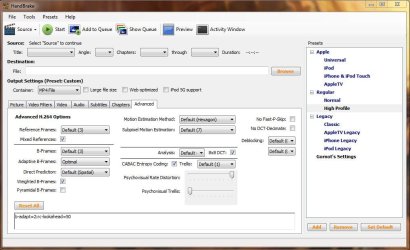
Yes, Handbrake is a GUI for using solely with an h264 encoder, mainly targeted for Apple users, but is very popular among Win users as well...
I already listed some advanced video options that Handbrake let's you tweak, but here's a screenshot of the tab with the High Profile loaded (which I don't use obviously :P)

Handbrake.JPG
 

My Computer

Computer type
Laptop
Computer Manufacturer/Model Number
Custom
OS
Windows 7 Home Premium x64
CPU
Intel Core i5 2500K
Motherboard
MSI MS-7750
Memory
8GB DDR3
Graphics Card(s)
nVidia GeForce GTX650 Ti BOOST
Sound Card
Realtek
Monitor(s) Displays
21' Philips
Screen Resolution
Full HD
Hard Drives
1TB
PSU
500W
Hi Wishmaster!
Dont Know why, but the Intel Burn Test is not downloading for me.... I will try it again as early as possible and give you the feedback. Now, as per sopolias's guidance , I set everything to low priority, and encoding a movie using H264 codec. 1st pass completed, 2nd pass is about 45% done... and I am here in between. Let me see what happens, Ill inform you after completion.
+
 

My Computer

Computer type
PC/Desktop
Computer Manufacturer/Model Number
Self Assembled
OS
Microsoft Windows 10 Pro Insider Preview 64-bit
CPU
Intel(R) Core(TM) i3-4130 CPU @ 3.40GHz
Motherboard
Gigabyte Technology Co., Ltd. B85M-D3H
Memory
Corsair Vengence 4GB x2 (8.00GB Dual-Channel DDR3 @ 798MHz)
Graphics Card(s)
2047MB GeForce GTS 450 (ZOTAC International)
Sound Card
Onboard (Realtek High Definition Audio)
Monitor(s) Displays
LG Flatron E2040T
Screen Resolution
1600x900
Hard Drives
Western Digital 1 TB
Seagate 500 GB
PSU
Corsair VS550
Case
Cooler Master K380
Cooling
Cooler Master Seidon 120V Plus
Keyboard
Logitech MK260r
Mouse
Logitech MK260r
Internet Speed
PMPL Broadband
Antivirus
Windows Defender + MBAM
Browser
Firefox
Other Info
Dell Studio 15" Laptop
Encoding completed without any trouble. Nice audio and video quality as usual... hope there would not be any further trouble.

Now I'll try to download and run the IBT and see what happens :)
 

My Computer

Computer type
PC/Desktop
Computer Manufacturer/Model Number
Self Assembled
OS
Microsoft Windows 10 Pro Insider Preview 64-bit
CPU
Intel(R) Core(TM) i3-4130 CPU @ 3.40GHz
Motherboard
Gigabyte Technology Co., Ltd. B85M-D3H
Memory
Corsair Vengence 4GB x2 (8.00GB Dual-Channel DDR3 @ 798MHz)
Graphics Card(s)
2047MB GeForce GTS 450 (ZOTAC International)
Sound Card
Onboard (Realtek High Definition Audio)
Monitor(s) Displays
LG Flatron E2040T
Screen Resolution
1600x900
Hard Drives
Western Digital 1 TB
Seagate 500 GB
PSU
Corsair VS550
Case
Cooler Master K380
Cooling
Cooler Master Seidon 120V Plus
Keyboard
Logitech MK260r
Mouse
Logitech MK260r
Internet Speed
PMPL Broadband
Antivirus
Windows Defender + MBAM
Browser
Firefox
Other Info
Dell Studio 15" Laptop

My Computer

Computer Manufacturer/Model Number
Samsung NP550P5C-S02IN
OS
Windows 7 Ultimate - 64-bit | Windows 8 Pro - 64-bit
CPU
Intel® Core™ i7 Processor 3,610QM (2.30Hz, 6MB L3 Cach
Memory
8 GB
Graphics Card(s)
NVIDIA® GeForce® GT 650M 2GB Graphics, Optimus™ techno
Sound Card
SoundAlive™ JBL 3 Speakers (With sub-Woofer)
Monitor(s) Displays
39.62cm (15.6) SuperBright 300nit HD+ LED Display
Screen Resolution
1,600 x 900, Anti-Reflective
Hard Drives
1TB S-ATA II Hard Drive (5,400RPM)
Encoding completed without any trouble. Nice audio and video quality as usual... hope there would not be any further trouble.

Now I'll try to download and run the IBT and see what happens :)

I am almost certain it won't ever happen again ;)

Hi Arc,

You could try AutoGK

Yuck!
What was the point of that post, lol
 

My Computer

Computer type
Laptop
Computer Manufacturer/Model Number
Custom
OS
Windows 7 Home Premium x64
CPU
Intel Core i5 2500K
Motherboard
MSI MS-7750
Memory
8GB DDR3
Graphics Card(s)
nVidia GeForce GTX650 Ti BOOST
Sound Card
Realtek
Monitor(s) Displays
21' Philips
Screen Resolution
Full HD
Hard Drives
1TB
PSU
500W
Back
Top