Problem with Write Caching :(

pablobiernik

New member
I have a problem.
Isn't available policy of Performance Disk, and... write caching not working.
And I can not find its way to activate it from other side.
In the device manager, into the options of the disk, Performance Policy not appears. Before it was available in previous betas, but in this case it is impossible for me to activate the option.
Some form of activity? Thank you. :)
 

My Computer

OS
Windows 7
It is available on my rig. Running Win7 7048 x86.

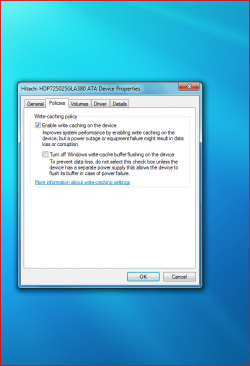
Right click a drive in explorer. Select Hardware. Highlight relevant drive in the window and click properties. Under the Policies tab are the write caching options.
 

My Computer

OS
Windows Seven 7068 x64
CPU
Core Duo e6300 @ 2.8ghz
Motherboard
Gigabyte GA-P965-DS3
Memory
3gb DDR2 800
Graphics Card(s)
9600GT
Sound Card
XFi extrememusic
Monitor(s) Displays
22" LCD WIDE
Screen Resolution
1680x1050
Hard Drives
2 Diamondmax 80 GB
PSU
400W PSU
Case
Coolermaster Mystique
Cooling
Stock cooling
Keyboard
Logitech Illuminated
Mouse
Logitech MX Revolution
Internet Speed
2Mb
But, this tab not exist.
Policies tab with performance options not working. I have only: General - Volumes - Driver - Details.
My problem is that this option does not appear. :(
I'm using Windows 7 beta 7057 x86.​
 

My Computer

OS
Windows 7
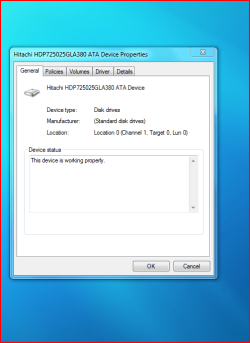
Capturey.PNGHi, Is this what you mean?

Captureu.PNG
 

My Computer

Computer Manufacturer/Model Number
Self Build 64bit
OS
Vista Ult64, Win7600
CPU
Intel Core 2 Quad Q6600 @ 2400 MHz 64bit OS
Motherboard
Asus P5E3 Deluxe WiFi @p 64 bit OS
Memory
4096 MB DDR3-SDRAM
Graphics Card(s)
ATI Radeon HD 3870 Series x2 Crossfired
Sound Card
Realtek on board
Monitor(s) Displays
Samsung SyncMaster - 23 inches
Screen Resolution
1680x1050 pixels at 60 Hz in True Colors
Hard Drives
Hitachi (250 GB)/Samsung 750 GB. /Barracuda 160 GB.
My Book 1 TB external..
PSU
Cooler Master 1000w
Case
Cooler Master Cosmos 1000.
Cooling
Fans and fresh air,
Keyboard
Wireless
Mouse
Wireless
Internet Speed
Never fast enough
Other Info
I use a Magnum.
Sorry,was away. that is strange ,Hope someone else can throw some light on this,and you say, that the policies tab was available in previous builds.?
 

My Computer

Computer Manufacturer/Model Number
Self Build 64bit
OS
Vista Ult64, Win7600
CPU
Intel Core 2 Quad Q6600 @ 2400 MHz 64bit OS
Motherboard
Asus P5E3 Deluxe WiFi @p 64 bit OS
Memory
4096 MB DDR3-SDRAM
Graphics Card(s)
ATI Radeon HD 3870 Series x2 Crossfired
Sound Card
Realtek on board
Monitor(s) Displays
Samsung SyncMaster - 23 inches
Screen Resolution
1680x1050 pixels at 60 Hz in True Colors
Hard Drives
Hitachi (250 GB)/Samsung 750 GB. /Barracuda 160 GB.
My Book 1 TB external..
PSU
Cooler Master 1000w
Case
Cooler Master Cosmos 1000.
Cooling
Fans and fresh air,
Keyboard
Wireless
Mouse
Wireless
Internet Speed
Never fast enough
Other Info
I use a Magnum.
Yes, in my anterior's builds performance tab worked correctly.
Now, i have 4 partitions.
The problem will be for this? :confused:
 

My Computer

OS
Windows 7
I have just installed 7057 x86 and the policies and write caching option are still there as they should be.
 

My Computer

OS
Windows Seven 7068 x64
CPU
Core Duo e6300 @ 2.8ghz
Motherboard
Gigabyte GA-P965-DS3
Memory
3gb DDR2 800
Graphics Card(s)
9600GT
Sound Card
XFi extrememusic
Monitor(s) Displays
22" LCD WIDE
Screen Resolution
1680x1050
Hard Drives
2 Diamondmax 80 GB
PSU
400W PSU
Case
Coolermaster Mystique
Cooling
Stock cooling
Keyboard
Logitech Illuminated
Mouse
Logitech MX Revolution
Internet Speed
2Mb
Missing on my SSD but not on my other drives.
 

My Computer

Computer type
PC/Desktop
OS
Windows 11 Workstation
Friends, the problem is resolved. In the end, what I did was change the connection of the IDE cable. The hard drive was like a slave.
What strange is that before, maintaining the same connection, in previous builds, I had no problems with write caching.
See you later :D :p
 

My Computer

OS
Windows 7
Well Iam glad that you sorted that out .
 

My Computer

Computer Manufacturer/Model Number
Self Build 64bit
OS
Vista Ult64, Win7600
CPU
Intel Core 2 Quad Q6600 @ 2400 MHz 64bit OS
Motherboard
Asus P5E3 Deluxe WiFi @p 64 bit OS
Memory
4096 MB DDR3-SDRAM
Graphics Card(s)
ATI Radeon HD 3870 Series x2 Crossfired
Sound Card
Realtek on board
Monitor(s) Displays
Samsung SyncMaster - 23 inches
Screen Resolution
1680x1050 pixels at 60 Hz in True Colors
Hard Drives
Hitachi (250 GB)/Samsung 750 GB. /Barracuda 160 GB.
My Book 1 TB external..
PSU
Cooler Master 1000w
Case
Cooler Master Cosmos 1000.
Cooling
Fans and fresh air,
Keyboard
Wireless
Mouse
Wireless
Internet Speed
Never fast enough
Other Info
I use a Magnum.
Back
Top