Dual monitor issue, secondary monitor is undetectable

roborob301

New member
Local time
1:38 AM
Messages
1
I have just did a clean install of Windows 7 ultimate from XP and I am unable to get my dual monitors to work like they did in XP.

I have a DVI Radeon graphics card plugged into the agp slot, and a Nvidia geforce vga adapter plugged into a pci slot of my dell optiplex 755. When I am in the screen resolution settings the second monitor cannot be detected.

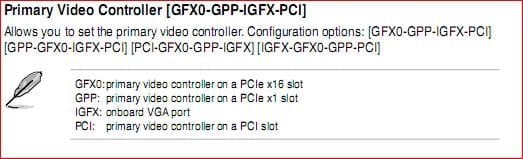
In bios I have 2 options under primary video adapter and they are auto, and onboard card. When set to auto the Nvidia card gets a signal but the Radeon does not. There are no conflicts in the device manager, and all of the drivers are up to date.

When I change the bios option to onboard card the Radeon adapter gets a signal but the other monitor cannot be detected and in device manager there is a yellow exclamation mark next to Standard VGA adapter and a code 10 error that states the device could not be started.

I have powered down, and unplugged every cable, I also tried to use the integrated VGA adapter to the Intel G31/G33/Q33/Q35 Graphics Controller but the computer will not even boot. I get
"System Halted
Attention Unsupported Video Configuration Detected"

I have two monitors, both work fine as standalones but Windows will not detect either as a secondary.

Please help me someone, I am so used to having my helpdesk email open in one monitor and all of my other work in the other monitor.
 

My Computer My Computer

At a glance

Windows 7 ultimate
OS
Windows 7 ultimate
Welcome!

Try updating your card drivers. Go into Device Manager and right-click on your display adapter.

I suspect that the cards are too old, though. We will see.

~Jonathan
 

My Computer My Computer

At a glance

Windows 7 Professional x64Intel i7 2600K OC'd @ 4620 MHz16GB GSkill Sniper 2133 Mhz (4x4GB)EVGA GeForce GTX 480 SuperClocked+
Computer Manufacturer/Model Number
Custom
OS
Windows 7 Professional x64
CPU
Intel i7 2600K OC'd @ 4620 MHz
Motherboard
Asus P8Z68-V Pro
Memory
16GB GSkill Sniper 2133 Mhz (4x4GB)
Graphics Card(s)
EVGA GeForce GTX 480 SuperClocked+
Sound Card
Realtek High Definition Audio
Monitor(s) Displays
2x Acer S273HLbmii 27"
Screen Resolution
2 x 1920x1080
Hard Drives
64GB Crucial M4 SSD

Storage: Hitachi 1TB 5400RPM, Samsung 1.5TB 5400RPM
PSU
Corsair HW Series 750w (modular)
Case
Cooler Master HAF 932 Advanced Blue Edition
Cooling
CM Hyper 212+ CPU cooler, 3x 230mm + 1x 140mm case fans
Keyboard
Logitech MK320 (wireless)
Mouse
Logitech MK320 (wireless)
Internet Speed
30 Mb/s : 2 Mb/s
If the motherboard already has onboard video, why the third (nvidia) card? Can't you use the Radeon and the onboard as a secondary output?
 

My Computer My Computer

At a glance

7 Ultimate x64i5-2500k8GB G.Skill Ripjaws X F3-12800CL7D-8GBXH 1866...EVGA GTX 570 SC
OS
7 Ultimate x64
CPU
i5-2500k
Motherboard
Asus P8P67 Pro
Memory
8GB G.Skill Ripjaws X F3-12800CL7D-8GBXH 1866MHz 8-9-8-24
Graphics Card(s)
EVGA GTX 570 SC
Sound Card
X-Fi Titanium Fatality
Monitor(s) Displays
Samsung S27A550H 27" LED
Screen Resolution
1920x1080
Hard Drives
OCZ Vertex 3 120GB.
1TB Samsung F3.
2TB Samsung F4.
PSU
PC Power & Cooling Silencer 760
Case
Lian Li Lancool K62
Cooling
Thermalright Venomous X Black/Scythe S-Flex/Shin-Etsu X23
Keyboard
MS Natural Elite 4000 Ergonomic
Mouse
Logitech G500
Internet Speed
6MB/768
Other Info
Logitech Z-5500 505 watts.
D-Link DGL-4500.
Tripp-Lite Smart Pro 1500.
Can't you use the Radeon to drive both monitors?
 

My Computer My Computer

At a glance

Windows 7 Ultimate x64 SP1 clean installAMD Athlon 64 X2 6400+4 GB2 x NVidia Geforce 8600 GTS
Computer Manufacturer/Model Number
Custom Build
OS
Windows 7 Ultimate x64 SP1 clean install
CPU
AMD Athlon 64 X2 6400+
Motherboard
Asus M2N-E SLI
Memory
4 GB
Graphics Card(s)
2 x NVidia Geforce 8600 GTS
Sound Card
Trust 5.1 Surround USB
Monitor(s) Displays
Benq FP931 19"
Screen Resolution
1280x1024@32bit@75MHz
Hard Drives
1 x Western Digital 500GB SATA (OS installation), 2 x Seagate 320GB SATA, 1 x Seagate 250GB IDE (in external USB box), 1 x TrekStor 750GB USB
PSU
650W
Keyboard
Logitech Cordless Desktop EX 100
Mouse
Logitech Cordless Optical
Internet Speed
8192 kbps / 640 kbps
Hi guys, hope I'm not hijacking thread but can't find any help anywhere else, including Dell support, not...
I have a similar problem but I have the need for three monitors. I added a dual output VGA/DVI radeon along with the already on board VGA card. However whenever I boot up I get this message;

"Attention: Unsupported Video Configuration Detected Action is Required This computer has an add in graphics card, but the monitor cable is plugged into the integrated video connection.
To attach the monitor cable to the add-in graphics card;
1, Shut down the computer,
2, Plug the monitor cable into the add-in graphics card connector, this may require a video adapter or video adapter cable, [Provided with the system]
3, Turn on the computer,
This message should not appear after completing these steps, for more information or help, please refer to the system docs'
Press F2 to run setup
Press F1 to resume"


However if I press F1 all works fine so is the configuration really unsupported I don't understand?
and how do I get the system to boot without the inaugral F1 press.

Thanks in advance.

Dell Inspiron 560MT running Win 7
 

My Computer My Computer

At a glance

Windows 7 64bitamd dual core6gbNvidia 9500gt
Computer Manufacturer/Model Number
Dell Inspiron 546
OS
Windows 7 64bit
CPU
amd dual core
Memory
6gb
Graphics Card(s)
Nvidia 9500gt
Truth be told I'm surprised that the onboard is working at all with a dedicated card installed, as in most case the onboard gets disabled when a dedicated card is detected. That said have a look in the bios, if present should be under Advanced. Can't tell for sure as Dell doesn't want to make it easy and put up how to get around in the bios,

Documentation

What you are looking for should look something like this (unless Dell has managed to mangle the bios like they are known to do),

onboardsettings.JPG

If you do find something like that try and arrange it so that the video card is the primary adapter, and then that message should go away.
 

My Computer My Computer

At a glance

Win 7 Ultimate x64FX-8350 @ 4.6 GHz so farADATA XPG V1 Series Black 8GB DDR3 1600Sapphire R9 270x Dual-X
Computer type
PC/Desktop
Computer Manufacturer/Model Number
Me
OS
Win 7 Ultimate x64
CPU
FX-8350 @ 4.6 GHz so far
Motherboard
Asus M5A97 EVO
Memory
ADATA XPG V1 Series Black 8GB DDR3 1600
Graphics Card(s)
Sapphire R9 270x Dual-X
Sound Card
Xonar DGX w/ Corsair Vengence 1300
Monitor(s) Displays
Acer S232HL Abid
Screen Resolution
1920x1080
Hard Drives
120 GB OCZ Vertex 3
500 GB Seagate 7200.12
PSU
Antec Earthwatts 650W Green
Case
Antec Three Hundred
Cooling
Cooler Master 212 EVO
Keyboard
Logitech G510
Mouse
Logitech G500s
Internet Speed
35000/3000
@stormy13, thanks for that info. Looked into the Dell BIOS and I have set the LG monitor which is connected to the onboard VGA as the "Initial display" however still get the messages and have to hit F1 to get the PC to boot. Not the end of the world I know but frustrating all the same.

I know the image is probably illegible but it matters not a jot which video device is set as default, onboard or PCI where Radeon is I still get incorrect configuration message and have to hit F1 to continue boot up.:confused:
 

Attachments

  • 05042010014.jpg
    05042010014.jpg
    355 KB · Views: 572

My Computer My Computer

At a glance

Windows 7 64bitamd dual core6gbNvidia 9500gt
Computer Manufacturer/Model Number
Dell Inspiron 546
OS
Windows 7 64bit
CPU
amd dual core
Memory
6gb
Graphics Card(s)
Nvidia 9500gt
Like I said surprised that it works with both the card and the onboard at the same time, as on most motherboards the onboard gets auto-disabled when a video card is detected. I have a feeling that as long as it is working, the F1 step may be something you have to live with.

P.S. Hope you are using the card as the primary and not the onboard (bios settings aside), as the weakest video card from ATI or Nvidia will still be worlds better than anything Intel based.
 

My Computer My Computer

At a glance

Win 7 Ultimate x64FX-8350 @ 4.6 GHz so farADATA XPG V1 Series Black 8GB DDR3 1600Sapphire R9 270x Dual-X
Computer type
PC/Desktop
Computer Manufacturer/Model Number
Me
OS
Win 7 Ultimate x64
CPU
FX-8350 @ 4.6 GHz so far
Motherboard
Asus M5A97 EVO
Memory
ADATA XPG V1 Series Black 8GB DDR3 1600
Graphics Card(s)
Sapphire R9 270x Dual-X
Sound Card
Xonar DGX w/ Corsair Vengence 1300
Monitor(s) Displays
Acer S232HL Abid
Screen Resolution
1920x1080
Hard Drives
120 GB OCZ Vertex 3
500 GB Seagate 7200.12
PSU
Antec Earthwatts 650W Green
Case
Antec Three Hundred
Cooling
Cooler Master 212 EVO
Keyboard
Logitech G510
Mouse
Logitech G500s
Internet Speed
35000/3000
Yeah got the Radeon set as Initial display, thanks again. Feel happier now that I seem to be LUCKY that they all work.

:D:D:D
 

My Computer My Computer

At a glance

Windows 7 64bitamd dual core6gbNvidia 9500gt
Computer Manufacturer/Model Number
Dell Inspiron 546
OS
Windows 7 64bit
CPU
amd dual core
Memory
6gb
Graphics Card(s)
Nvidia 9500gt
Back
Top