DWL-G510 slow wireless

Smeeble

New member
Hi, just joined the forum from searching for answers about the joys of Windows 7.

I just set up my PC a few days ago and have noticed that my internet speed drops dramatically when I am using the mentioned wireless card.
I found this when I was using a program for Firefox called 'Down Them All' , as I was getting a large file (Crysis Demo to test out my PC).

The wireless last night was fluctuating between 200b/s and 600Kb/s and today is has been sitting at around 102b/s but sometimes dropping down to 6b/s.
I tried using speedtest.net, but it was going that slow that I couldn't load it.
I have plugged in my ethernet cable and it is currently downloading at about 500kb/s-700kb/s.

The router I am using is a BT home hub.

(I have filled in the PC setup info on my profile but don't know if that shows up or not, can copy it in if needed.)

Thanks for any help.
 

My Computer

OS
Windows 7 64 bit
CPU
AMD Phenom II X2 550 Black Edition 3.1GHz
Motherboard
Gigabyte GA-MA770T-UD3P
Memory
G-Skill 4GB (2x2GB) DDR3 1600MHz/PC3
Graphics Card(s)
ASUS HD 5770 1GB
Sound Card
On board
Monitor(s) Displays
32LG3050 TV
Screen Resolution
1360 x 768
Hard Drives
Western Digital 500GB Caviar Blue
PSU
Coolermaster 500W Extreme Power Plus
Case
Coolermaster Sileo Quiet
Cooling
XIGMATEK Red Scorpion Socket 775
Keyboard
Saitek Eclipse III
Mouse
Cyber Snipa SWAT
Welcome to Seven Forums!

I just looked up the card on DLink's site. The card was discontinued in 2007. In fact, even the Vista drivers are quite old.

You're running the card using the Vista drivers or did W7 detect the card and load it's built-in drivers?

Depending on the wireless router you're using the most likely problem is the wireless card itself. It's just too old and may not have drivers optimized for W7.

What about the router itself? Got a specific model?
 

My Computer

Computer Manufacturer/Model Number
Dell C521
OS
W7 Ultimate 64bit W7 Premium 64bit W7 Premium 32bit WXP Home 32bit
CPU
Athlon 64X2 5000+
Motherboard
Dell
Memory
4GB
Graphics Card(s)
ATI X1300
Sound Card
On Board
Monitor(s) Displays
Dell 19" Flat
Screen Resolution
1280x1024
Hard Drives
500GB Western Digital Caviar Green
Mouse
Microsoft Wireless Intellimouse Explorer 2.0
Internet Speed
SBC DSL - 6Mbps
Oh, didn't realise it was an old card. I was just trying to get a cheap wireless PCI card that I thought would work, and I was in a bit of a hurry so that I could get the PC posted to me (I had forgotten about the wireless card until I was clicking buy):confused:

The router I am using is just one of the standard V1/V1.5 BT home hubs, the white one.

For the install I installed the drivers from the disk, then I uninstalled them, and then let windows auto install them. I had read that the other night and it did seem to help a bit, but not much.

Thanks for the welcome and the quick reply.
 

My Computer

OS
Windows 7 64 bit
CPU
AMD Phenom II X2 550 Black Edition 3.1GHz
Motherboard
Gigabyte GA-MA770T-UD3P
Memory
G-Skill 4GB (2x2GB) DDR3 1600MHz/PC3
Graphics Card(s)
ASUS HD 5770 1GB
Sound Card
On board
Monitor(s) Displays
32LG3050 TV
Screen Resolution
1360 x 768
Hard Drives
Western Digital 500GB Caviar Blue
PSU
Coolermaster 500W Extreme Power Plus
Case
Coolermaster Sileo Quiet
Cooling
XIGMATEK Red Scorpion Socket 775
Keyboard
Saitek Eclipse III
Mouse
Cyber Snipa SWAT
Take a look at the wireless settings. Does the router choose the channel or did you manually select a channel? Interference can cause spikes in performance that are very similar to what you see. One easy change is to try different channels on the router.

Also if there are any firmware updates to the router that may help. Many times these updates have fixes and improvements for the radio.

Good Luck and let me know how it goes!
 

My Computer

Computer Manufacturer/Model Number
Dell C521
OS
W7 Ultimate 64bit W7 Premium 64bit W7 Premium 32bit WXP Home 32bit
CPU
Athlon 64X2 5000+
Motherboard
Dell
Memory
4GB
Graphics Card(s)
ATI X1300
Sound Card
On Board
Monitor(s) Displays
Dell 19" Flat
Screen Resolution
1280x1024
Hard Drives
500GB Western Digital Caviar Green
Mouse
Microsoft Wireless Intellimouse Explorer 2.0
Internet Speed
SBC DSL - 6Mbps
Cheers, will have a look tomorrow after work.

Hadn't thought of updates for the hub, only the PCI card because it is working fine with my laptop...always worth a try though.

Will update after I've managed to try things, and just run off a cable at the moment.
 

My Computer

OS
Windows 7 64 bit
CPU
AMD Phenom II X2 550 Black Edition 3.1GHz
Motherboard
Gigabyte GA-MA770T-UD3P
Memory
G-Skill 4GB (2x2GB) DDR3 1600MHz/PC3
Graphics Card(s)
ASUS HD 5770 1GB
Sound Card
On board
Monitor(s) Displays
32LG3050 TV
Screen Resolution
1360 x 768
Hard Drives
Western Digital 500GB Caviar Blue
PSU
Coolermaster 500W Extreme Power Plus
Case
Coolermaster Sileo Quiet
Cooling
XIGMATEK Red Scorpion Socket 775
Keyboard
Saitek Eclipse III
Mouse
Cyber Snipa SWAT
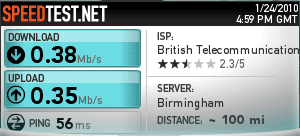
Hi, I have managed to update the router and have had a look at the settings but I am still getting a huge difference between wired and wireless.
Wired.PNG

Wireless.PNG

Any more advice?
 

My Computer

OS
Windows 7 64 bit
CPU
AMD Phenom II X2 550 Black Edition 3.1GHz
Motherboard
Gigabyte GA-MA770T-UD3P
Memory
G-Skill 4GB (2x2GB) DDR3 1600MHz/PC3
Graphics Card(s)
ASUS HD 5770 1GB
Sound Card
On board
Monitor(s) Displays
32LG3050 TV
Screen Resolution
1360 x 768
Hard Drives
Western Digital 500GB Caviar Blue
PSU
Coolermaster 500W Extreme Power Plus
Case
Coolermaster Sileo Quiet
Cooling
XIGMATEK Red Scorpion Socket 775
Keyboard
Saitek Eclipse III
Mouse
Cyber Snipa SWAT
If you can, see if there are other wireless systems in the area. Look at the channels and see what channels they're on compared to you. try and set you router channel manually and stay at least 2 channels away from any other router you see.

Another test is if you have a wired PC attache to the router is to run a throughput test between it and your laptop. That would test the wireless itself.
 

My Computer

Computer Manufacturer/Model Number
Dell C521
OS
W7 Ultimate 64bit W7 Premium 64bit W7 Premium 32bit WXP Home 32bit
CPU
Athlon 64X2 5000+
Motherboard
Dell
Memory
4GB
Graphics Card(s)
ATI X1300
Sound Card
On Board
Monitor(s) Displays
Dell 19" Flat
Screen Resolution
1280x1024
Hard Drives
500GB Western Digital Caviar Green
Mouse
Microsoft Wireless Intellimouse Explorer 2.0
Internet Speed
SBC DSL - 6Mbps
Back
Top