Cannot new create partition using third party software

shaun166

New member
Hi guys i when i try using Acronis*Disk Director Suite to create new partition it give me this error anyway idea why? My hard drive have around 260gb free space as shown why it still giving me this error T.T
30hxyyd.jpg
 

My Computer

Computer Manufacturer/Model Number
Sony vaio sb18
OS
windows 7 ultimate x64
CPU
I7-2620m
Memory
8gb
Graphics Card(s)
6470
Hi guys i when i try using Acronis*Disk Director Suite to create new partition it give me this error anyway idea why? My hard drive have around 260gb free space as shown why it still giving me this error T.T
shaun166;

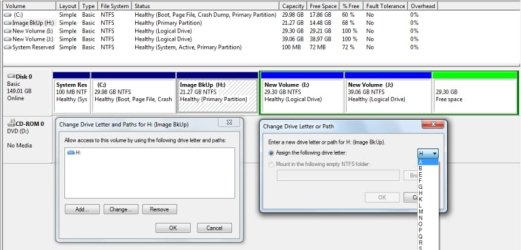
It is difficult to tell from the picture you posted, but it appears you already have 4 "Primary" partitions on this hard drive. That is the limit. However, Windows 7 and Data partitions can reside on a "Logical" partition. You would need to convert your last "Primary" partition to an "Extended" partition so you can create "Logical" partitions in the "Extended" part.

diskManagement_01.jpg

Cheers!
Robert
 

My Computer

OS
...
Can you post back a screenshot of your full Disk Management map using the Snipping Tool in Start Menu, attaching file using paper clip in reply box.

Then let us know exactly what you want to accomplish and we recommend the exact steps.

The best tool for partition management in Win7 is bootable Partition Wizard CD for that which cannot be done by Disk Mgmt. It has been used to help remove over 100+ dual boots here since Win7 release date.
 
Why use that partitioner? Windows 7's partitioner is GREAT :D ! Just right-click the computer icon in the start menu. Click on Disk Management and WHAMMO! :party:

P.S. It may take a while to load your first time.

After it loads - right click your hard drive and click "Shrink Volume". After you go through the dialogs and create the new unallocated space, right click the new space and create a new partition thingy.
 

My Computer

Computer Manufacturer/Model Number
HP G50 Laptop
OS
Windows 7 Home Premium 64-bit
CPU
2.0ghz Intel Pentium Duel-Core (Merom)
Motherboard
Winston 360Bf
Memory
2x 4.0GB Centon Duel-Channel DDR2 @ 333MHz
Sound Card
High Definition Audio Device
Monitor(s) Displays
16" lcd monitor
Screen Resolution
1280x800
Hard Drives
160GB Toshiba MK1652GSX
Internet Speed
Satalite Internet. Where I live it's uber slow.
Because, Coolio - Disk Management cannot do what the OP wants.

Not without destroying data on at least one of his existing partitions.

3rd party partitioners can do it non - destructively.

Hope it helps.

Why use that partitioner? Windows 7's partitioner is GREAT :D ! Just right-click the computer icon in the start menu. Click on Disk Management and WHAMMO! :party:

P.S. It may take a while to load your first time.

After it loads - right click your hard drive and click "Shrink Volume". After you go through the dialogs and create the new unallocated space, right click the new space and create a new partition thingy.
 

My Computers

System One System Two

  • Computer type
    PC/Desktop
    OS
    7 X64
    CPU
    i5 8400
    Motherboard
    gigabyte b365m ds3h
    Memory
    2x8gb 3200mhz
    Hard Drives
    various
    PSU
    pure power 11 400w cm
    Case
    Coolermaster
    Cooling
    cryorig m9i
  • Computer type
    PC/Desktop
    OS
    7x64
    CPU
    g5400
    Motherboard
    ga b365m ds3h
    Memory
    8gb ddr4 2400
    PSU
    xfx pro 450w
Hi Shaun,

Iseeu is correct.

Already stated on your other thread here:permalink
 

My Computers

System One System Two

  • Computer type
    PC/Desktop
    OS
    7 X64
    CPU
    i5 8400
    Motherboard
    gigabyte b365m ds3h
    Memory
    2x8gb 3200mhz
    Hard Drives
    various
    PSU
    pure power 11 400w cm
    Case
    Coolermaster
    Cooling
    cryorig m9i
  • Computer type
    PC/Desktop
    OS
    7x64
    CPU
    g5400
    Motherboard
    ga b365m ds3h
    Memory
    8gb ddr4 2400
    PSU
    xfx pro 450w
Because, Coolio - Disk Management cannot do what the OP wants. Duh, you idiot. I wish I could punch you in the face for just mentioning that.

Ow... that stung a little :shock:. BTW I use Windows 7's manager for all my partitioning needs.
 

My Computer

Computer Manufacturer/Model Number
HP G50 Laptop
OS
Windows 7 Home Premium 64-bit
CPU
2.0ghz Intel Pentium Duel-Core (Merom)
Motherboard
Winston 360Bf
Memory
2x 4.0GB Centon Duel-Channel DDR2 @ 333MHz
Sound Card
High Definition Audio Device
Monitor(s) Displays
16" lcd monitor
Screen Resolution
1280x800
Hard Drives
160GB Toshiba MK1652GSX
Internet Speed
Satalite Internet. Where I live it's uber slow.
LOL - it wasn't meant that way. Just answering the question you asked.
 

My Computers

System One System Two

  • Computer type
    PC/Desktop
    OS
    7 X64
    CPU
    i5 8400
    Motherboard
    gigabyte b365m ds3h
    Memory
    2x8gb 3200mhz
    Hard Drives
    various
    PSU
    pure power 11 400w cm
    Case
    Coolermaster
    Cooling
    cryorig m9i
  • Computer type
    PC/Desktop
    OS
    7x64
    CPU
    g5400
    Motherboard
    ga b365m ds3h
    Memory
    8gb ddr4 2400
    PSU
    xfx pro 450w
@iseeuu
So i have 4 partition it is the max. I need to delete the OEM partition and Recovery to create new partition?
The last primary partition I right click them it only show "help"
 

My Computer

Computer Manufacturer/Model Number
Sony vaio sb18
OS
windows 7 ultimate x64
CPU
I7-2620m
Memory
8gb
Graphics Card(s)
6470
Not necessarily.

You could convert two into logical drives ( it's a lot easier if they are already adjacent )

You then are able to create one more.

Just went back to get your screenie - I assume you extended already to include the Unallocated space - or is it still the same as this ?

http://i48.tinypic.com/qpgmz9.png

Alternatively , you could delete one you don't need. You might consider making the 7 partition "system" and deleting the 100mb one.

I assume you are not using Ultimate and Bitlocker drive Encryption?
 

My Computers

System One System Two

  • Computer type
    PC/Desktop
    OS
    7 X64
    CPU
    i5 8400
    Motherboard
    gigabyte b365m ds3h
    Memory
    2x8gb 3200mhz
    Hard Drives
    various
    PSU
    pure power 11 400w cm
    Case
    Coolermaster
    Cooling
    cryorig m9i
  • Computer type
    PC/Desktop
    OS
    7x64
    CPU
    g5400
    Motherboard
    ga b365m ds3h
    Memory
    8gb ddr4 2400
    PSU
    xfx pro 450w
Because, Coolio - Disk Management cannot do what the OP wants.

Ow... that stung a little :shock:. BTW I use Windows 7's manager for all my partitioning needs.

Coolio, there are many reasons we use a 3rd party Disk manager such as to Resize anything to the left, copy, mark active, convert to logical/primary, etc.

We solve many of these problems here every day and couldn't help half of them without the use of a good partition manager like Partition Wizard bootable CD which is preferred because it's free and can be used with 64 or 32 bit.

That said, I prefer Disk Management for simple shrinking since it never fails, while 3rd party partition managers can and do fail during resizing.
 
@iseeuu
So i have 4 partition it is the max. I need to delete the OEM partition and Recovery to create new partition?
The last primary partition I right click them it only show "help"
The "Extended" partition will take the place of the fourth "Primary" partition. Then inside the "Extended" partition you can create many "Logical" partitions.

To do this safely, You will need to delete one "Primary" partition, so you will want to backup any data you want to save so you don't loose it. Then delete one "Primary" partition and create the "Extended" partition with the "Logical" drive for your saved data. Add other "Logical" Partitions as needed.

Cheers!
Robert
 

My Computer

OS
...
Partitioning WIN 7 computer with XP and large HD

I have Win 7 and XP installed on a new computer with a terabyte hard drive. Can someone recommend a web site or a book with suggestions on how to handle this space?

I'm a writer and use the system for word processing mainly. On my old system I used the old DOS subst command for fast access to my book directories.

Any suggestions appreciated.

Yve
 

My Computer

OS
Windows 7
Acronis DDS 10 is not compatible with W7. They say that they are working on a new version, but how long before release...who know?

EDIT: It was said that it will work, if booting from the DDS disk, but I have not tried it.
 

My Computer

Computer Manufacturer/Model Number
DIY
OS
W7x64 Pro, SuSe 12.1/** W7 x64 Pro, XP MCE
CPU
Phenom II 1090T w/Noctua NH-D14 /**4400+ X2 w/CM Hyper TX 3
Motherboard
ASRock 890FX Deluxe 4/**A8N-SLI
Memory
2 x 2GB Patriot PGS34g1600LLKA/**4x1GB Corsair VS
Graphics Card(s)
EVGA GTX460 SC/**EVGA 8800GTS
Sound Card
Asus Xonar D2X/**Xonar D1
Monitor(s) Displays
Acer X233H, Dell E152FPc /**LG M237-WD
Screen Resolution
1920x1080 & 1024x768/**1980x1080
Hard Drives
WDC 2TB, 1.5TB, 1TB, 500GB,Seagate 500GB , Maxtor 80GB /**500GB Seagate & WDC 1TB Black
PSU
CM RS600 w/ APC BX1000G/**Antec 500 TP w/ APC BX1000
Case
HAF922/**Antec 1040IIB
Cooling
3x200mm, 1x140 and 1x120mm/**5x80mm fans
Keyboard
Logitech Media USB/**Saitek Eclipse
Mouse
Cordless Trackman Wheel/**Ditto
Internet Speed
3.3Mbps
Other Info
SB 560 5.1 w/ Sennheiser RS140/**Creative T20 speakers, Dvico FusionHDTV7 Gold RT, Cisco E3000, HP 5510V AIO, Linksys E3000, Belkin F5U237 hub and **F5D8055 adapter
(** = 2nd rig)
I have Win 7 and XP installed on a new computer with a terabyte hard drive. Can someone recommend a web site or a book with suggestions on how to handle this space?

I'm a writer and use the system for word processing mainly. On my old system I used the old DOS subst command for fast access to my book directories.

Any suggestions appreciated.

Yve

You can post back a screenshot of your full Disk management drive map, using Snipping Tool in start menu attaching file using paper clip in reply box.

Tell us exactly what you would like to do and we'll give you steps.
 
Back
Top