
WMC has no volume control :eek:

ballzac

New member
Local time
5:32 AM
Messages
27
Hi all. I've just recently updated to from xp to Windows 7 and find the WMC interface much nicer than Winfast PVR, which I was previously using for live tv. However, I have one major issue with WMC. The volume control on the application is just a shortcut to the main speaker volume. Is there any way around this? If not, it is an absolute deal breaker for me. I would like to be able to have the tv on while I listen to music. I like to be able to mute the TV during the adds but still have sound for watching youtube videos and stuff.

I have searched a lot for this but can't find any mention of it. As I can't imagine that most people would be happy with this 'feature', I can only assume that fixing it is so simple and obvious that no one prior to me has needed to ask how to do it.

Another silly 'feature' on WMC is that the mouse gets stuck on my second monitor when I maximize. Very strange indeed, but at least I can avoid that by just stretching the window to fill the screen instead of maximizing it. I can't find any way around the volume control problem though.

Thanks in advance for any replies :)
 

My Computer My Computer

At a glance

Windows 7Core 2 duo (E8400)4GB DDR2 Kingston8800GT
OS
Windows 7
CPU
Core 2 duo (E8400)
Motherboard
GA S-Series
Memory
4GB DDR2 Kingston
Graphics Card(s)
8800GT
Sound Card
Audigy 2 Platinum
Monitor(s) Displays
2693HM & TFT5015
Hard Drives
2 x 1TB Seagate
1 x 320GB Seagate
PSU
Coolermaster 800W
Case
Thermaltake Armour+ MX
Cooling
Case fans + tricool
Keyboard
Razer Lycosa
Mouse
Razer Copperhead
Internet Speed
ADSL 2+
Other Info
Event TR8 Active Reference Monitors
Logitech G-25
Shouldn't you be able to control the volume of WMC by mouse scroll?
 

My Computer My Computer

At a glance

Windows 7 Home Premium x64Intel Core i5 2500K8GB DDR3nVidia GeForce GTX650 Ti BOOST
Computer type
Laptop
Computer Manufacturer/Model Number
Custom
OS
Windows 7 Home Premium x64
CPU
Intel Core i5 2500K
Motherboard
MSI MS-7750
Memory
8GB DDR3
Graphics Card(s)
nVidia GeForce GTX650 Ti BOOST
Sound Card
Realtek
Monitor(s) Displays
21' Philips
Screen Resolution
Full HD
Hard Drives
1TB
PSU
500W
No, and even if I could, it would still just be the main speaker volume.
 

My Computer My Computer

At a glance

Windows 7Core 2 duo (E8400)4GB DDR2 Kingston8800GT
OS
Windows 7
CPU
Core 2 duo (E8400)
Motherboard
GA S-Series
Memory
4GB DDR2 Kingston
Graphics Card(s)
8800GT
Sound Card
Audigy 2 Platinum
Monitor(s) Displays
2693HM & TFT5015
Hard Drives
2 x 1TB Seagate
1 x 320GB Seagate
PSU
Coolermaster 800W
Case
Thermaltake Armour+ MX
Cooling
Case fans + tricool
Keyboard
Razer Lycosa
Mouse
Razer Copperhead
Internet Speed
ADSL 2+
Other Info
Event TR8 Active Reference Monitors
Logitech G-25
The right most - and + are the (basic) volume controls.
 

My Computer My Computer

At a glance

Windows 7 Professional 64-bitIntel E8400 3GHzKingston PC3-10700H 4GbXFX Radeon HD 5850 BlackEd.
Computer Manufacturer/Model Number
self built
OS
Windows 7 Professional 64-bit
CPU
Intel E8400 3GHz
Motherboard
Intel DX48BT2
Memory
Kingston PC3-10700H 4Gb
Graphics Card(s)
XFX Radeon HD 5850 BlackEd.
Sound Card
Asus Xonar DG
Monitor(s) Displays
2x Samsung SM-T220HD 22"
Screen Resolution
1680x1050 on two monitors
Hard Drives
OCZ Vertex 2 120gb 3.5" (OS)
Seagate Momentus XT 500gb
Samsung F3 1Tb (games)
2x Samsung F1 1Tb
PSU
Thermaltake ToughPower 850w
Case
Thermaltake Armor
Cooling
Scythe Mugen II
Keyboard
Microsoft Comfort Curve USB
Mouse
Razer Diamondback 3G
Internet Speed
8128/443
You mean on the GUI, or the keyboard? The keyboard - and + change channel. The - and + on the GUI change main speaker volume. So unless you mean something else, that does not solve my problem.
 

My Computer My Computer

At a glance

Windows 7Core 2 duo (E8400)4GB DDR2 Kingston8800GT
OS
Windows 7
CPU
Core 2 duo (E8400)
Motherboard
GA S-Series
Memory
4GB DDR2 Kingston
Graphics Card(s)
8800GT
Sound Card
Audigy 2 Platinum
Monitor(s) Displays
2693HM & TFT5015
Hard Drives
2 x 1TB Seagate
1 x 320GB Seagate
PSU
Coolermaster 800W
Case
Thermaltake Armour+ MX
Cooling
Case fans + tricool
Keyboard
Razer Lycosa
Mouse
Razer Copperhead
Internet Speed
ADSL 2+
Other Info
Event TR8 Active Reference Monitors
Logitech G-25
Obviously no one knows a way around this. It is a shame, because the WMC GUI is quite nice and the program seems mostly free from bugs, but nonetheless I am going to stop using it and go back to using winfast PVR because it has its own volume control that can be used independently of the main speaker volume.
 

My Computer My Computer

At a glance

Windows 7Core 2 duo (E8400)4GB DDR2 Kingston8800GT
OS
Windows 7
CPU
Core 2 duo (E8400)
Motherboard
GA S-Series
Memory
4GB DDR2 Kingston
Graphics Card(s)
8800GT
Sound Card
Audigy 2 Platinum
Monitor(s) Displays
2693HM & TFT5015
Hard Drives
2 x 1TB Seagate
1 x 320GB Seagate
PSU
Coolermaster 800W
Case
Thermaltake Armour+ MX
Cooling
Case fans + tricool
Keyboard
Razer Lycosa
Mouse
Razer Copperhead
Internet Speed
ADSL 2+
Other Info
Event TR8 Active Reference Monitors
Logitech G-25
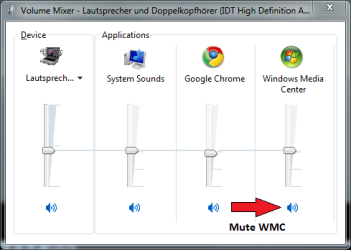
Right click the volume control icon in Notification area. Choose Open Volume Mixer, set volume level independently for every open application:

Volume_Mixer.PNG

Clicking the speaker symbol under the volume control for each application mutes that application.

Kari
 

My Computer My Computer

At a glance

Windows 10 Pro x64 EN-GB1.6 GHz Intel Core i7-720QM Processor6 GBATI Mobility Radeon HD 5850 Graphics
Computer type
Laptop
Computer Manufacturer/Model Number
HP ENVY 17-1150eg
OS
Windows 10 Pro x64 EN-GB
CPU
1.6 GHz Intel Core i7-720QM Processor
Memory
6 GB
Graphics Card(s)
ATI Mobility Radeon HD 5850 Graphics
Sound Card
Beats sound system with integrated subwoofer
Monitor(s) Displays
17" laptop display, 22" LED and 32" Full HD TV through HDMI
Screen Resolution
1600*900 (1), 1920*1080 (2&3)
Hard Drives
Internal: 2 x 500 GB SATA Hard Disk Drive 7200 rpm
External: 2TB for backups, 3TB USB3 network drive for media
Cooling
As Envy runs a bit warm, I have it on a Cooler Master pad
Keyboard
Logitech diNovo Media Desktop Laser (bluetooth)
Mouse
Logitech Performance Mouse MX
Internet Speed
50/10 Mbps VDSL
Antivirus
Windows Defender 4.3.9431.0
Browser
Maxthon 3.5.2., IE11
So simple, thank you. :)

Is there a way to link the GUI controls to the WMC volume control on the volume mixer? It seems a bit silly to have to have the volume mixer open, but I'm sure there'd be a gadget for it anyway.

Thank you so much.
 

My Computer My Computer

At a glance

Windows 7Core 2 duo (E8400)4GB DDR2 Kingston8800GT
OS
Windows 7
CPU
Core 2 duo (E8400)
Motherboard
GA S-Series
Memory
4GB DDR2 Kingston
Graphics Card(s)
8800GT
Sound Card
Audigy 2 Platinum
Monitor(s) Displays
2693HM & TFT5015
Hard Drives
2 x 1TB Seagate
1 x 320GB Seagate
PSU
Coolermaster 800W
Case
Thermaltake Armour+ MX
Cooling
Case fans + tricool
Keyboard
Razer Lycosa
Mouse
Razer Copperhead
Internet Speed
ADSL 2+
Other Info
Event TR8 Active Reference Monitors
Logitech G-25
Back
Top