- Local time
- 3:17 PM
- Messages
- 4,755


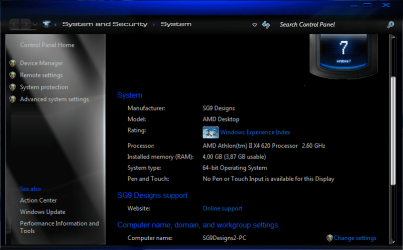
Sergio, I think the remaining RAM is possibly being used by your graphics card.Hi guys i was wondering why does my PC show this? (see the attachment)
I'm running Windows 7 Ultimate x64, on the specs in my 'system specs'
How can i make all 4 gb usable?

Sergio, I think the remaining RAM is possibly being used by your graphics card.
I say possibly because looking at my own computer's specs seems to contradict that theory.

Hmm so what you are saying is, that when i get my GT220 later this month, i will be able to get all my ram back? By turning off the onboard graphics?
lol The GT220 i'm getting is a 1024mbHmm so what you are saying is, that when i get my GT220 later this month, i will be able to get all my ram back? By turning off the onboard graphics?
I'm no expert but it sounds right, have fun using the extra 256MB.

lol The GT220 i'm getting is a 1024mb

lol The GT220 i'm getting is a 1024mb
Pure marketing BS, that card isn't anywhere near powerful enough to make use of it. It is a nice step up from your current onboard, but hope you don't plan on any serious gaming with it.
Oh lol i understanded it another wayUm , 4GB - 3.78GB...=256MB extra. :sarc:

Hi guys i was wondering why does my PC show this? (see the attachment)
I'm running Windows 7 Ultimate x64, on the specs in my 'system specs'
How can i make all 4 gb usable?

If "serious gaming" includes 1360x768 GTA IV, GRID, NFS, Saints Row, Fallout etc, then yes.lol The GT220 i'm getting is a 1024mb
Pure marketing BS, that card isn't anywhere near powerful enough to make use of it. It is a nice step up from your current onboard, but hope you don't plan on any serious gaming with it.
Thats not the one