
Solved Code 10 in Device Manager, Unable to Discover WD 2TB

MiKe092

New member
Hiya, i've been doing a bit of investigating into why i can't discover my MyBookWorld Edition 2TB. Hopped into device Manager an ther's a few devices code 10, Unable to start. Heres a Piccy
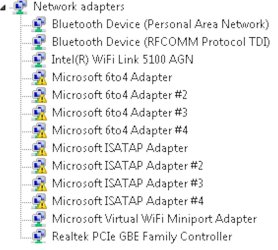
Image1.jpg

Not sure what the go with it, i was thinking about unistalling some of the network adaptors as some of them are not needed (i think) and maybe reinstalling because of the Code 10. Btw, i just solved some Blue screen Probs, running MSE as Norton Internet Security 2009 Firewall was resulting in one of the Blue screens, Im using latest WD Discovery Software 1.61, Updated All drivers most of them are current im pretty sure. The MyBookWorld device has just had a firmware update 01.01.16.

Is there anyway of figuring out which are out of date? I don't update the Devices through Device Manager or windows Update as i've been told.

Not sure where to go or what do? Im running the external HDD Through an Access Point, where the network is transmitted from. The HDD can be accessed on another laptop on the network wirelessly and by cable. I have tried both with the win& Laptop but not working. Btw, IT WAS WORKING before drivers got updated. Im Hoping the community can help me solve this Prob or at least find whats wrong with the devices. Any help is much appreciated and im sure is gonna be help.

Mike
 

My Computer

Computer Manufacturer/Model Number
HP Pavillion dv7 Notebook PC
OS
Windows 7 Prem
CPU
Intel Core i7 CPU Q 720 @ 1.60ghz
Motherboard
Intel PM55
Memory
4096MB DDR3 (2 Dimm) 3GB Avail as of 32bit Windows
Graphics Card(s)
NVIDIA GeForce GT 230M 1 GB
Sound Card
NVIDIA HD Audio
Monitor(s) Displays
17.3 Diagonal HD High-Definition HP BrightView Widescreen
Hard Drives
640GB 7200RPM (Dual HDD - 320GB x 2)
I dont know if this may help but its a possibility...

try updating your Chipset drivers which will enable to update your usb drivers as well for the motherboard. Sometimes that helps...
 

My Computer

Computer Manufacturer/Model Number
HP Pavilion Elite HPE-410f
OS
Windows 7 Ultimate x64
CPU
AMD Phenom x6 1045t
Motherboard
N/A
Memory
8 GB
Graphics Card(s)
ATI Radeon HD 5570
Sound Card
Realtek Highdefinition Audio / 5.1 Dolby Setup
Monitor(s) Displays
HP w2207h Widescreen
Screen Resolution
1680*1050
Hard Drives
1 TB (fixed), 320 Portable maxtor, Server Hard drives
PSU
350 Watt
Case
HP CASE
Cooling
Bass
Keyboard
Logitech MX 5500
Mouse
Logitech MX 5500
Internet Speed
ROAD RUNNER 16MB D/512 U
Alritey i'll let you know how it goes :)
 

My Computer

Computer Manufacturer/Model Number
HP Pavillion dv7 Notebook PC
OS
Windows 7 Prem
CPU
Intel Core i7 CPU Q 720 @ 1.60ghz
Motherboard
Intel PM55
Memory
4096MB DDR3 (2 Dimm) 3GB Avail as of 32bit Windows
Graphics Card(s)
NVIDIA GeForce GT 230M 1 GB
Sound Card
NVIDIA HD Audio
Monitor(s) Displays
17.3 Diagonal HD High-Definition HP BrightView Widescreen
Hard Drives
640GB 7200RPM (Dual HDD - 320GB x 2)
Thx for the input :)
 

My Computer

Computer Manufacturer/Model Number
HP Pavillion dv7 Notebook PC
OS
Windows 7 Prem
CPU
Intel Core i7 CPU Q 720 @ 1.60ghz
Motherboard
Intel PM55
Memory
4096MB DDR3 (2 Dimm) 3GB Avail as of 32bit Windows
Graphics Card(s)
NVIDIA GeForce GT 230M 1 GB
Sound Card
NVIDIA HD Audio
Monitor(s) Displays
17.3 Diagonal HD High-Definition HP BrightView Widescreen
Hard Drives
640GB 7200RPM (Dual HDD - 320GB x 2)

My Computer

Computer Manufacturer/Model Number
Home built
OS
Windows 7 Home Premium x64
CPU
Phenom II X4 955 BE
Motherboard
Asus Sabertooth 990FX
Memory
8 GB OCZ BE 1667
Graphics Card(s)
EVGA GeForce GTX470 SC
Monitor(s) Displays
BenQ 19"
Screen Resolution
1280x1024
Hard Drives
256 GB OCZ Vertex 3 SSD
2x WD 1 TB
1x WD 2 TB
PSU
Thermaltake 850W
Case
Coolermaster Cosmos 1000
Cooling
Air
Keyboard
Logitech
Mouse
Cyborg R.A.T 7
Internet Speed
Standard RR
Ye i know about the USB, eanables increased storage :) it's wired though ethernet port in the back, :) im not sure whats the go is with it? Thanks for the input on IPv6 networking fixed me up on that bit but still got probs with MBW :(
 

My Computer

Computer Manufacturer/Model Number
HP Pavillion dv7 Notebook PC
OS
Windows 7 Prem
CPU
Intel Core i7 CPU Q 720 @ 1.60ghz
Motherboard
Intel PM55
Memory
4096MB DDR3 (2 Dimm) 3GB Avail as of 32bit Windows
Graphics Card(s)
NVIDIA GeForce GT 230M 1 GB
Sound Card
NVIDIA HD Audio
Monitor(s) Displays
17.3 Diagonal HD High-Definition HP BrightView Widescreen
Hard Drives
640GB 7200RPM (Dual HDD - 320GB x 2)
Intel® Chipset Identification Utility

System Information

Detected Chipset: Mobile Intel® 5 Series Chipset

Chipset Components
Platform Component Hub: Intel® PM55 SATA Controller found in AHCI mode

You wouldnt happen to have a link for updating this chipset? :sarc:
 

My Computer

Computer Manufacturer/Model Number
HP Pavillion dv7 Notebook PC
OS
Windows 7 Prem
CPU
Intel Core i7 CPU Q 720 @ 1.60ghz
Motherboard
Intel PM55
Memory
4096MB DDR3 (2 Dimm) 3GB Avail as of 32bit Windows
Graphics Card(s)
NVIDIA GeForce GT 230M 1 GB
Sound Card
NVIDIA HD Audio
Monitor(s) Displays
17.3 Diagonal HD High-Definition HP BrightView Widescreen
Hard Drives
640GB 7200RPM (Dual HDD - 320GB x 2)
Since it is intel... go to this link. install the applet...
and have the website automatically find your drivers


Intel® Driver Update Utility
 

My Computer

Computer Manufacturer/Model Number
HP Pavilion Elite HPE-410f
OS
Windows 7 Ultimate x64
CPU
AMD Phenom x6 1045t
Motherboard
N/A
Memory
8 GB
Graphics Card(s)
ATI Radeon HD 5570
Sound Card
Realtek Highdefinition Audio / 5.1 Dolby Setup
Monitor(s) Displays
HP w2207h Widescreen
Screen Resolution
1680*1050
Hard Drives
1 TB (fixed), 320 Portable maxtor, Server Hard drives
PSU
350 Watt
Case
HP CASE
Cooling
Bass
Keyboard
Logitech MX 5500
Mouse
Logitech MX 5500
Internet Speed
ROAD RUNNER 16MB D/512 U
Thanks for the Link, updated still no solution to the WD Discovery of HDD which is wired through Acess Point, Not sure how to find a solution to it :( Code 10 resolved within Device Manager thnx to Mlevy :) just need to solve The Discovery of The Networked HDD
 
Last edited:

My Computer

Computer Manufacturer/Model Number
HP Pavillion dv7 Notebook PC
OS
Windows 7 Prem
CPU
Intel Core i7 CPU Q 720 @ 1.60ghz
Motherboard
Intel PM55
Memory
4096MB DDR3 (2 Dimm) 3GB Avail as of 32bit Windows
Graphics Card(s)
NVIDIA GeForce GT 230M 1 GB
Sound Card
NVIDIA HD Audio
Monitor(s) Displays
17.3 Diagonal HD High-Definition HP BrightView Widescreen
Hard Drives
640GB 7200RPM (Dual HDD - 320GB x 2)
What version of the Discovery software are you running? WD has a version 1.61, released in August. None of their software actually lists compatibility with Windows 7 yet.
 

My Computer

Computer Manufacturer/Model Number
Home built
OS
Windows 7 Home Premium x64
CPU
Phenom II X4 955 BE
Motherboard
Asus Sabertooth 990FX
Memory
8 GB OCZ BE 1667
Graphics Card(s)
EVGA GeForce GTX470 SC
Monitor(s) Displays
BenQ 19"
Screen Resolution
1280x1024
Hard Drives
256 GB OCZ Vertex 3 SSD
2x WD 1 TB
1x WD 2 TB
PSU
Thermaltake 850W
Case
Coolermaster Cosmos 1000
Cooling
Air
Keyboard
Logitech
Mouse
Cyborg R.A.T 7
Internet Speed
Standard RR
Yea i know what you mean but why would it suddenly stop working after a little while? an while it worked perfectly for a couple of weeks :S im puzzled:sarc:
 

My Computer

Computer Manufacturer/Model Number
HP Pavillion dv7 Notebook PC
OS
Windows 7 Prem
CPU
Intel Core i7 CPU Q 720 @ 1.60ghz
Motherboard
Intel PM55
Memory
4096MB DDR3 (2 Dimm) 3GB Avail as of 32bit Windows
Graphics Card(s)
NVIDIA GeForce GT 230M 1 GB
Sound Card
NVIDIA HD Audio
Monitor(s) Displays
17.3 Diagonal HD High-Definition HP BrightView Widescreen
Hard Drives
640GB 7200RPM (Dual HDD - 320GB x 2)
Did anything on your network change? Do you HAVE to use the Discovery software? You could log in to your router, find out the network address of the device (shouldn't it be static or is that what the software is for?), and map it using the address. Out of curiosity, what AV are you using, are you using Homegroups?
 

My Computer

Computer Manufacturer/Model Number
Home built
OS
Windows 7 Home Premium x64
CPU
Phenom II X4 955 BE
Motherboard
Asus Sabertooth 990FX
Memory
8 GB OCZ BE 1667
Graphics Card(s)
EVGA GeForce GTX470 SC
Monitor(s) Displays
BenQ 19"
Screen Resolution
1280x1024
Hard Drives
256 GB OCZ Vertex 3 SSD
2x WD 1 TB
1x WD 2 TB
PSU
Thermaltake 850W
Case
Coolermaster Cosmos 1000
Cooling
Air
Keyboard
Logitech
Mouse
Cyborg R.A.T 7
Internet Speed
Standard RR
Not using Homegroups, yea the ip is static, and im using Microsoft Security Essentials AV. The discovery Software was working before with Norton Internet Security 2009, but apparently the firewall was resulting in Blue Screen Probs so i uninstalled it and and was told to Install MSE so..

Btw, you log into router how would i go about doing that, im new to all this stuff?
 

My Computer

Computer Manufacturer/Model Number
HP Pavillion dv7 Notebook PC
OS
Windows 7 Prem
CPU
Intel Core i7 CPU Q 720 @ 1.60ghz
Motherboard
Intel PM55
Memory
4096MB DDR3 (2 Dimm) 3GB Avail as of 32bit Windows
Graphics Card(s)
NVIDIA GeForce GT 230M 1 GB
Sound Card
NVIDIA HD Audio
Monitor(s) Displays
17.3 Diagonal HD High-Definition HP BrightView Widescreen
Hard Drives
640GB 7200RPM (Dual HDD - 320GB x 2)
Back
Top