Dual Boot Win7 x64 with Vista x64

tnpir4002

New member
Local time
9:25 PM
Messages
7
Hi all,

Got a few questions w/r to doing a dual boot between Vista x64 and Win7 x64.

First and foremost, I know I need a secondary partition on my drive. But when I try to section off some space using the Windows Disk Manager, I get an error about how dynamic disks won't support OS booting. I tell it to proceed anyway, on the thought that I can convert it to a basic disk later; but then it says dynamic disk not supported on system.

So there's the major hurdle--has anyone else seen this before? How do you get around that?

Second: previous experience setting up dual boots on machines (beetween Vista and XP) suggests that when the second OS is installed, it will override boot handles for the first OS, such that if I have Vista installed first, then install XP, it'll boot straight to XP without giving me the option to boot to Vista. For Vista-XP situations I know there's a specialized tool to fix that. Is there likewise a specific method for this kind of scenario as well?

Third: are there any other unique challenges that I should be aware of when dealing with a 64-bit environment? I've only ever done 32-bit operations before so this is new territory for me.

Fourth: when I installed the Windows 7 Beta as an upgrade on a previous computer (overwriting that computer's OEM Windows Vista OS), it destroyed that computer's ability to restore from its factory image. Are there any such effects on the BIOS or anything of that nature when dual-booting with Win7, or are those changes contained entirely within that OS' dedicated partition?

Fifth and finally: the computer I'm working with is an Acer Aspire 8930G-7665 with a 500GB hard drive sectioned into two 250GB pieces, one the OS drive and one a utility partition where I have my backup image stored. Are there any unique steps that I need to take with this particular make and model? (I've historically always done it on Dell machines)
 

My Computer My Computer

At a glance

Windows Vista Home Premium x64
OS
Windows Vista Home Premium x64
  1. Well, as to the Dynamic disks, yes, that is true - but your Windows system partition should not be a *dynamic* disk in the first place. How are you trying to partition, and more importantly, *which* partition are you trying to partition?
  2. As for the boot situation, no, the Windows 7 bootloader will take over since it is the newer OS, and it will recognize Vista as the other OS and set everything up for you.
  3. I was in your shoes a year ago - be wary of drivers support (or, actually, lack thereof) especially for older hardware.
  4. No such effects on the BIOS - however, it can interact negatively with the BIOSs, in that if your BIOS does not support Vista (hypothetically speaking, as you are already running Vista) then there is a good chance it will not work correctly with Win7. However, OEM computers quite possibly face that same problem - I have an HP 2710p Tablet PC and it still shows all the same partitions as before, but I never bothered to see if the restore works or not - perhaps another project for me this weekend....
  5. None that I know of, but others may know something that I do not....
 

My Computers My Computers

  • At a glance

    Windows 11 21H2 Current buildAMD Ryzen 9 3950X4 * 32 GB - Corsair Vengeance 3600 MHzEVGA GeForce RTX 3080 Ti XC3 ULTRA GAMING (12...
    Computer type
    PC/Desktop
    Computer Manufacturer/Model Number
    The Beast Model A (homebrew)
    OS
    Windows 11 21H2 Current build
    CPU
    AMD Ryzen 9 3950X
    Motherboard
    MSI MEG X570 GODLIKE
    Memory
    4 * 32 GB - Corsair Vengeance 3600 MHz
    Graphics Card(s)
    EVGA GeForce RTX 3080 Ti XC3 ULTRA GAMING (12G-P5-3955-KR)
    Sound Card
    Realtek® ALC1220 Codec
    Monitor(s) Displays
    2x Eve Spectrum ES07D03 4K Gaming Monitor (Matte) | Eve Spec
    Screen Resolution
    3x 3840 x 2160
    Hard Drives
    3x Samsung 980 Pro NVMe PCIe 4 M.2 2 TB SSD (MZ-V8P2T0B/AM) } 3x Sabrent Rocket NVMe 4.0 1 TB SSD
    PSU
    PC Power & Cooling’s Silencer Series 1050 Watt, 80 Plus Plat
    Case
    Fractal Design Define 7 XL Dark ATX Full Tower Case
    Cooling
    SteelSeries Apex Pro Wired Gaming Keyboard
    Keyboard
    SteelSeries Apex Pro
    Mouse
    Logitech MX Master 3S | MX Master 3 for business
    Internet Speed
    AT&T LightSpeed Gigabit Duplex Ftth
    Antivirus
    Windows Defender + MB 3
    Browser
    Nightly (default) + Firefox (stable),Chrome, Edge
  • At a glance

    ChromeOS Flex Dev Channel (current)Intel(R) Core(TM) i5-6300U CPU @ 2.40GHz, 250...16 GBIntel(R) HD Graphics 520
    Computer type
    PC/Desktop
    System Manufacturer/Model Number
    Dell Latitude E5470
    OS
    ChromeOS Flex Dev Channel (current)
    CPU
    Intel(R) Core(TM) i5-6300U CPU @ 2.40GHz, 2501 Mhz, 2 Core(s), 4 Logical Processor(s)
    Motherboard
    Dell
    Memory
    16 GB
    Graphics Card(s)
    Intel(R) HD Graphics 520
    Sound Card
    Intel(R) HD Graphics 520 + RealTek Audio
    Monitor(s) Displays
    Dell laptop display 15"
    Screen Resolution
    1920 * 1080
    Hard Drives
    Toshiba 128GB M.2 22300 drive
    INTEL Cherryville 520 Series SSDSC2CW180A 180 GB SATA III SSD
    PSU
    Dell
    Case
    Dell
    Cooling
    Dell
    Keyboard
    Dell
    Mouse
    Logitech MX Master 3S (shared w. Sys 1) | Dell TouchPad
    Internet Speed
    AT&T LightSpeed Gigabit Duplex Ftth
Hi,

Could you post a screenshot of Disk Management, like this:

DISKMANAGEMENT2009-02-04_031947.jpg

If you need to convert Dynamic to Basic, do you have an app. which will do that without data loss?
 

My Computers My Computers

  • At a glance

    7 X64i5 84002x8gb 3200mhz
    Computer type
    PC/Desktop
    OS
    7 X64
    CPU
    i5 8400
    Motherboard
    gigabyte b365m ds3h
    Memory
    2x8gb 3200mhz
    Hard Drives
    various
    PSU
    pure power 11 400w cm
    Case
    Coolermaster
    Cooling
    cryorig m9i
  • At a glance

    7x64g54008gb ddr4 2400
    Computer type
    PC/Desktop
    OS
    7x64
    CPU
    g5400
    Motherboard
    ga b365m ds3h
    Memory
    8gb ddr4 2400
    PSU
    xfx pro 450w
  1. Well, as to the Dynamic disks, yes, that is true - but your Windows system partition should not be a *dynamic* disk in the first place. How are you trying to partition, and more importantly, *which* partition are you trying to partition?

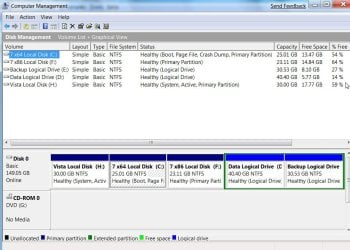
That's the mystery, my OS drive isn't a dynamic. All of the drives I see are basic drives.

When attempting to partition, I go into Control Panel > Administrative Tools > Computer Management > Disk Management, then right-click the logical drive I want to steal free space from. I've stuck with 50GB up till now, so I select that amount and then let the computer do it. (I've tried this with both the OS partition as well as the secondary partition). The unallocated space shows up, and so I right-click it to set up a new simple volume. This is when the trouble starts--I go through the steps, but when I click OK for what should be the final time, I get the warning about how the new volume is going to be a dynamic volume. The rest you know.

Hi,

If you need to convert Dynamic to Basic, do you have an app. which will do that without data loss?

Unfortunately no, before today I didn't know anything about dynamic disks or how to manage them.

Here's a glimpse at what my Disk Management console looks like:
 

Attachments

  • Disk Management Console.jpg
    Disk Management Console.jpg
    109.3 KB · Views: 155

My Computer My Computer

At a glance

Windows Vista Home Premium x64
OS
Windows Vista Home Premium x64
The problem is that you can only have 4 primary partitions on HD - so trying to make a new partition on that drive *forces* it to become a dynamic drive.
 

My Computers My Computers

  • At a glance

    Windows 11 21H2 Current buildAMD Ryzen 9 3950X4 * 32 GB - Corsair Vengeance 3600 MHzEVGA GeForce RTX 3080 Ti XC3 ULTRA GAMING (12...
    Computer type
    PC/Desktop
    Computer Manufacturer/Model Number
    The Beast Model A (homebrew)
    OS
    Windows 11 21H2 Current build
    CPU
    AMD Ryzen 9 3950X
    Motherboard
    MSI MEG X570 GODLIKE
    Memory
    4 * 32 GB - Corsair Vengeance 3600 MHz
    Graphics Card(s)
    EVGA GeForce RTX 3080 Ti XC3 ULTRA GAMING (12G-P5-3955-KR)
    Sound Card
    Realtek® ALC1220 Codec
    Monitor(s) Displays
    2x Eve Spectrum ES07D03 4K Gaming Monitor (Matte) | Eve Spec
    Screen Resolution
    3x 3840 x 2160
    Hard Drives
    3x Samsung 980 Pro NVMe PCIe 4 M.2 2 TB SSD (MZ-V8P2T0B/AM) } 3x Sabrent Rocket NVMe 4.0 1 TB SSD
    PSU
    PC Power & Cooling’s Silencer Series 1050 Watt, 80 Plus Plat
    Case
    Fractal Design Define 7 XL Dark ATX Full Tower Case
    Cooling
    SteelSeries Apex Pro Wired Gaming Keyboard
    Keyboard
    SteelSeries Apex Pro
    Mouse
    Logitech MX Master 3S | MX Master 3 for business
    Internet Speed
    AT&T LightSpeed Gigabit Duplex Ftth
    Antivirus
    Windows Defender + MB 3
    Browser
    Nightly (default) + Firefox (stable),Chrome, Edge
  • At a glance

    ChromeOS Flex Dev Channel (current)Intel(R) Core(TM) i5-6300U CPU @ 2.40GHz, 250...16 GBIntel(R) HD Graphics 520
    Computer type
    PC/Desktop
    System Manufacturer/Model Number
    Dell Latitude E5470
    OS
    ChromeOS Flex Dev Channel (current)
    CPU
    Intel(R) Core(TM) i5-6300U CPU @ 2.40GHz, 2501 Mhz, 2 Core(s), 4 Logical Processor(s)
    Motherboard
    Dell
    Memory
    16 GB
    Graphics Card(s)
    Intel(R) HD Graphics 520
    Sound Card
    Intel(R) HD Graphics 520 + RealTek Audio
    Monitor(s) Displays
    Dell laptop display 15"
    Screen Resolution
    1920 * 1080
    Hard Drives
    Toshiba 128GB M.2 22300 drive
    INTEL Cherryville 520 Series SSDSC2CW180A 180 GB SATA III SSD
    PSU
    Dell
    Case
    Dell
    Cooling
    Dell
    Keyboard
    Dell
    Mouse
    Logitech MX Master 3S (shared w. Sys 1) | Dell TouchPad
    Internet Speed
    AT&T LightSpeed Gigabit Duplex Ftth
The easy answer then is to make the secondary partition a non-primary partition, is there a way to do that?
 

My Computer My Computer

At a glance

Windows Vista Home Premium x64
OS
Windows Vista Home Premium x64
No, you don't understand. You can only have 4 Max Primary partitions - however, if you have more than 4 partitions, then you can only have 3 primary partitions and the rest are going to be made into 'extended partitions', which Vista calls dynamic disks.
 

My Computers My Computers

  • At a glance

    Windows 11 21H2 Current buildAMD Ryzen 9 3950X4 * 32 GB - Corsair Vengeance 3600 MHzEVGA GeForce RTX 3080 Ti XC3 ULTRA GAMING (12...
    Computer type
    PC/Desktop
    Computer Manufacturer/Model Number
    The Beast Model A (homebrew)
    OS
    Windows 11 21H2 Current build
    CPU
    AMD Ryzen 9 3950X
    Motherboard
    MSI MEG X570 GODLIKE
    Memory
    4 * 32 GB - Corsair Vengeance 3600 MHz
    Graphics Card(s)
    EVGA GeForce RTX 3080 Ti XC3 ULTRA GAMING (12G-P5-3955-KR)
    Sound Card
    Realtek® ALC1220 Codec
    Monitor(s) Displays
    2x Eve Spectrum ES07D03 4K Gaming Monitor (Matte) | Eve Spec
    Screen Resolution
    3x 3840 x 2160
    Hard Drives
    3x Samsung 980 Pro NVMe PCIe 4 M.2 2 TB SSD (MZ-V8P2T0B/AM) } 3x Sabrent Rocket NVMe 4.0 1 TB SSD
    PSU
    PC Power & Cooling’s Silencer Series 1050 Watt, 80 Plus Plat
    Case
    Fractal Design Define 7 XL Dark ATX Full Tower Case
    Cooling
    SteelSeries Apex Pro Wired Gaming Keyboard
    Keyboard
    SteelSeries Apex Pro
    Mouse
    Logitech MX Master 3S | MX Master 3 for business
    Internet Speed
    AT&T LightSpeed Gigabit Duplex Ftth
    Antivirus
    Windows Defender + MB 3
    Browser
    Nightly (default) + Firefox (stable),Chrome, Edge
  • At a glance

    ChromeOS Flex Dev Channel (current)Intel(R) Core(TM) i5-6300U CPU @ 2.40GHz, 250...16 GBIntel(R) HD Graphics 520
    Computer type
    PC/Desktop
    System Manufacturer/Model Number
    Dell Latitude E5470
    OS
    ChromeOS Flex Dev Channel (current)
    CPU
    Intel(R) Core(TM) i5-6300U CPU @ 2.40GHz, 2501 Mhz, 2 Core(s), 4 Logical Processor(s)
    Motherboard
    Dell
    Memory
    16 GB
    Graphics Card(s)
    Intel(R) HD Graphics 520
    Sound Card
    Intel(R) HD Graphics 520 + RealTek Audio
    Monitor(s) Displays
    Dell laptop display 15"
    Screen Resolution
    1920 * 1080
    Hard Drives
    Toshiba 128GB M.2 22300 drive
    INTEL Cherryville 520 Series SSDSC2CW180A 180 GB SATA III SSD
    PSU
    Dell
    Case
    Dell
    Cooling
    Dell
    Keyboard
    Dell
    Mouse
    Logitech MX Master 3S (shared w. Sys 1) | Dell TouchPad
    Internet Speed
    AT&T LightSpeed Gigabit Duplex Ftth
Hi,

Try this

1. Move your data from D to C.

2. Delete D

3. Recreate another partition using the unallocated space that was D. Disk Management will automatically create an Extended partition ( dark green rectangle - see my screenshot )

4. Create another partition inside the Extended one - you now have two partitions inside the Extended, 5 in total.

5. Move your data back onto the new partition (I would use the one on the right inside the Extended - F probably).

6. Install 7 on the first partition ( the one on the left) inside the Extended one. That should be fine as Vista will be the System partition.

Hope it helps.
 

My Computers My Computers

  • At a glance

    7 X64i5 84002x8gb 3200mhz
    Computer type
    PC/Desktop
    OS
    7 X64
    CPU
    i5 8400
    Motherboard
    gigabyte b365m ds3h
    Memory
    2x8gb 3200mhz
    Hard Drives
    various
    PSU
    pure power 11 400w cm
    Case
    Coolermaster
    Cooling
    cryorig m9i
  • At a glance

    7x64g54008gb ddr4 2400
    Computer type
    PC/Desktop
    OS
    7x64
    CPU
    g5400
    Motherboard
    ga b365m ds3h
    Memory
    8gb ddr4 2400
    PSU
    xfx pro 450w
That's a good approach!...but I wonder, in theory could I not back up the data from D onto an external drive and, from there, simply put 7 onto the D drive?
 

My Computer My Computer

At a glance

Windows Vista Home Premium x64
OS
Windows Vista Home Premium x64
Yes you could do that.

You would not be able to make any more partitions on Disk0 , to put your data back on, for example.

If you are ok to keep it on an external HD, that's fine.
 

My Computers My Computers

  • At a glance

    7 X64i5 84002x8gb 3200mhz
    Computer type
    PC/Desktop
    OS
    7 X64
    CPU
    i5 8400
    Motherboard
    gigabyte b365m ds3h
    Memory
    2x8gb 3200mhz
    Hard Drives
    various
    PSU
    pure power 11 400w cm
    Case
    Coolermaster
    Cooling
    cryorig m9i
  • At a glance

    7x64g54008gb ddr4 2400
    Computer type
    PC/Desktop
    OS
    7x64
    CPU
    g5400
    Motherboard
    ga b365m ds3h
    Memory
    8gb ddr4 2400
    PSU
    xfx pro 450w
Yes you could do that.
If you are ok to keep it on an external HD, that's fine.

As far as I know all that's on the D drive is a backup image I made, which I consider expendable since from what I can gather the factory default image is on one of the EISA-config partitions. I can keep the image I made on an external device since I can rely on the factory partition to get things back up and running in the event of catastrophe, and then copy the image back over, or else simply restore from right on the external device.
 

My Computer My Computer

At a glance

Windows Vista Home Premium x64
OS
Windows Vista Home Premium x64
Sounds fine to me.

You might want to make another backup image every now and again- so it's reasonably up to date - you can delete the old ones if you are short of space.

If you use the restore to Factory image option, you will need to set everything up again, reinstall your programs (assuming you still have their setup files), get all the Windows updates, etc. Better than having no restore function, but your own images will be far better than that.

You could use this free app. to make backup images - I use it all the time.

Macrium Reflect FREE Edition - Information and download

There is also a good partition app. going free if you d/l and install in the next few hours. If you don't already have a good 64 bit compatible partition manager - suggest you grab this while it's going

Giveaway of the Day - free licensed software daily. Today: EASEUS Partition Master Professional Edition 3.5 - EASEUS Partition Master Professional Edition is a comprehensive hard disk partition management tool to let you enjoy all the powerful ...
 

My Computers My Computers

  • At a glance

    7 X64i5 84002x8gb 3200mhz
    Computer type
    PC/Desktop
    OS
    7 X64
    CPU
    i5 8400
    Motherboard
    gigabyte b365m ds3h
    Memory
    2x8gb 3200mhz
    Hard Drives
    various
    PSU
    pure power 11 400w cm
    Case
    Coolermaster
    Cooling
    cryorig m9i
  • At a glance

    7x64g54008gb ddr4 2400
    Computer type
    PC/Desktop
    OS
    7x64
    CPU
    g5400
    Motherboard
    ga b365m ds3h
    Memory
    8gb ddr4 2400
    PSU
    xfx pro 450w
I've heard good things about EASEUS and their products so that's a TERRIFIC find, thanks for the recommendation!
 

My Computer My Computer

At a glance

Windows Vista Home Premium x64
OS
Windows Vista Home Premium x64
Alright, no sooner so I solve one problem than another presents itself. I have a feeling this one's Acer-specific but here goes anyway:

I've got the beta for Windows 7 x64 all ready to go. But I can't get it onto my system! The Acer boot sequence is apparently a little different than the Dell one because I can't get to the menu that lets me choose my boot device (HDD, USB, CD drive, etc.). I've tried changing the boot sequence in the BIOS, which resulted in the computer reading from the drive, but then hanging there, with a black screen and a white cursor in the upper left-hand corner.

Has anyone else run across this, with either build 7000 or 7068? I've now encountered it with both, using (in the case of 7.7000) a DVD that worked perfectly on another computer previously.
 

My Computer My Computer

At a glance

Windows Vista Home Premium x64
OS
Windows Vista Home Premium x64

My Computer My Computer

At a glance

Win 7
OS
Win 7
Back
Top