dvd/cd drive is disappeared/missing

mrjonson

New member
Dear friends

I have hp dv 6615em laptop with factory installed window vista home premium. Recently I upgraded (clean install) to win 7. I noticed my dvd/cd drive is disappeared after two months of win 7. I reinstalled win 7 again but no driver was found. I have done everything like upper/lower filter, removed all third party software,run cccleaner,run registry booster from ubiblue, Bios set to boot from dvd/cd drive, reseated drive many times and it also does not show in device manager at all. Looks like there is no solution for my dvd drive apart from buying external dvd drive.

MY dvd/cd rw is Matshita UJ 861 h.

I hope someone can suggest how to restore my pc to original factory vista home premium unfortunately my recovery disk wont work because of dvd drive is not showing. Is there any way I can do somthing from my HP Recovery Partition and how can I use usb flash drive to reload factory setting windows etc. Reinstalling window to factory might bring my dvd drive back.

I am not very expert in technology. :(

Thanks in advance.
 

My Computer

Computer Manufacturer/Model Number
HP dv 6615em
OS
Windows 7
CPU
AMD Athlon(tm)64x2 Dual-Core Processor TK-55
Motherboard
amd
Memory
DDR2 - 2048mb
Graphics Card(s)
NVIDIA GEFORCE 7150M/nforce 630M
Sound Card
conexant High definition smart audio HD2
Hard Drives
225 gb
Welcome to sevenforums mrjohnson!

Since you had win7 working and seeing your optical drive for 2 months you may have a dead optical drive...

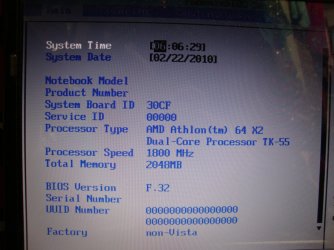
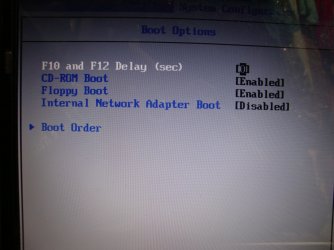
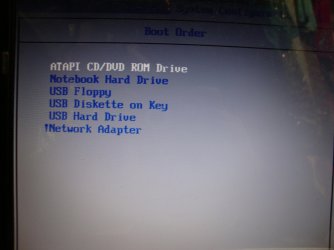
If you enter the BIOS... do you see the DVD there?

If you do see it through BIOS, can you attach a screenshot of device manager?

Please respond...
 

My Computer

Computer Manufacturer/Model Number
Homebrew PC - "Alpha_Dawg"
OS
Windows 7 Ultimate 64 bit Steve Ballmer Signature Edition
CPU
Intel Core 2 Quad - Q9550 - 2.83GHz stock - OC'd to 3.6GHz
Motherboard
Gigabyte EP45-UD3P
Memory
4GB DDR2 800MHz (PC6400) OCZ Reaper
Graphics Card(s)
Nvidia GE Force 8800 GTS
Sound Card
Asus Xonar DX
Monitor(s) Displays
Samsung SyncMaster 2333HD
Screen Resolution
1920 x 1080
Hard Drives
WD Caviar Black 750GB - 7200RPM - 32MB cache
WD Caviar Green 1.5TB - 5400RPM - 64MB cache
WD Caviar Green 2.0TB - 5400RPM - 64MB cache
PSU
PC Power & Cooling Silencer 750
Case
Gigabyte 3D Aurora
Cooling
Case is Air - 5ea. 120mm fans (mix of Arctic and Xigmatec)
Keyboard
MS Natural Wireless KB
Mouse
MS Wireless Mouse
Internet Speed
50 mbps down/5 mbps up
Other Info
AVerMedia - AVerTVHD G2 Dual Tuner Card
Hi Darryl Licht

Thank you so much for your quick response. I am attaching few my bios pics, hope this is will be helpful. :)

screen shot 1.jpg

screen shot 2.jpg

screen shot 3.jpg

screen shot 4.jpg
 

My Computer

Computer Manufacturer/Model Number
HP dv 6615em
OS
Windows 7
CPU
AMD Athlon(tm)64x2 Dual-Core Processor TK-55
Motherboard
amd
Memory
DDR2 - 2048mb
Graphics Card(s)
NVIDIA GEFORCE 7150M/nforce 630M
Sound Card
conexant High definition smart audio HD2
Hard Drives
225 gb
I would check and double check the power and data connections inside the case. I have seen them come loose more than once.
 

My Computer

Computer Manufacturer/Model Number
Keeps changing - (Custom)
OS
Windows 7 Professional x64
CPU
Intel Core i7 860
Motherboard
Gigabyte GA-P55-UD4P
Memory
4GB DDR3 Mushkin 1600Mhz @ 7-8-7-20
Graphics Card(s)
MSI GTS250 1GB DDR3 Twin Frozr
Sound Card
Onboard realtek
Monitor(s) Displays
Samsung SyncMaster 24" P2450 + Samsung 20" 2033
Screen Resolution
1920 X 1080 and 1600 X 900 (#2 system 1440 X 900)
Hard Drives
Patriot Inferno 120GB SSD + 3 WD Blue 640GB drives
PSU
Corsair 750 HX Modular
Case
Lancool PC-K62
Cooling
Cooler Master TX3 CPU cooler and 4-140mm and 1-120mm case
Keyboard
Gigabyte USB keyboard
Mouse
Microsoft wireless laser mouse 5000
Internet Speed
7 Mb down 1.5 up
Other Info
System #2: AMD Phenom II X6 1055T (Freezer 7 Pro cooler) - Gigabyte 880GMA-UD2H - WD 500GB Black - 9500GT (1GB) 500W OCZ modular PSU - Antec 200 case. System #3 (LapTop) Core 2 Duo T6670 - 320GB 7200RPM HD - 4GB DDR3 RAM.
mrj:

No problemo! Usually if you see the options for boot from cd/dvd it means that BIOS ID'd the drive, but not always... Is there a screen in BIOS where it lists your hdd and cd/dvd?

I will look at this school hp (Im at work... students taking a midterm) to report back where you might find it in BIOS...
 

My Computer

Computer Manufacturer/Model Number
Homebrew PC - "Alpha_Dawg"
OS
Windows 7 Ultimate 64 bit Steve Ballmer Signature Edition
CPU
Intel Core 2 Quad - Q9550 - 2.83GHz stock - OC'd to 3.6GHz
Motherboard
Gigabyte EP45-UD3P
Memory
4GB DDR2 800MHz (PC6400) OCZ Reaper
Graphics Card(s)
Nvidia GE Force 8800 GTS
Sound Card
Asus Xonar DX
Monitor(s) Displays
Samsung SyncMaster 2333HD
Screen Resolution
1920 x 1080
Hard Drives
WD Caviar Black 750GB - 7200RPM - 32MB cache
WD Caviar Green 1.5TB - 5400RPM - 64MB cache
WD Caviar Green 2.0TB - 5400RPM - 64MB cache
PSU
PC Power & Cooling Silencer 750
Case
Gigabyte 3D Aurora
Cooling
Case is Air - 5ea. 120mm fans (mix of Arctic and Xigmatec)
Keyboard
MS Natural Wireless KB
Mouse
MS Wireless Mouse
Internet Speed
50 mbps down/5 mbps up
Other Info
AVerMedia - AVerTVHD G2 Dual Tuner Card
Hi nate42nd

This is laptop, how would I check power and data connections inside the case. As mentioned above I don't know much about harware.

Plz respond
 

My Computer

Computer Manufacturer/Model Number
HP dv 6615em
OS
Windows 7
CPU
AMD Athlon(tm)64x2 Dual-Core Processor TK-55
Motherboard
amd
Memory
DDR2 - 2048mb
Graphics Card(s)
NVIDIA GEFORCE 7150M/nforce 630M
Sound Card
conexant High definition smart audio HD2
Hard Drives
225 gb
You might also switch SATA ports on your motherboard. (where the data line plugs into the board...change it to another one)
 

My Computer

Computer Manufacturer/Model Number
Keeps changing - (Custom)
OS
Windows 7 Professional x64
CPU
Intel Core i7 860
Motherboard
Gigabyte GA-P55-UD4P
Memory
4GB DDR3 Mushkin 1600Mhz @ 7-8-7-20
Graphics Card(s)
MSI GTS250 1GB DDR3 Twin Frozr
Sound Card
Onboard realtek
Monitor(s) Displays
Samsung SyncMaster 24" P2450 + Samsung 20" 2033
Screen Resolution
1920 X 1080 and 1600 X 900 (#2 system 1440 X 900)
Hard Drives
Patriot Inferno 120GB SSD + 3 WD Blue 640GB drives
PSU
Corsair 750 HX Modular
Case
Lancool PC-K62
Cooling
Cooler Master TX3 CPU cooler and 4-140mm and 1-120mm case
Keyboard
Gigabyte USB keyboard
Mouse
Microsoft wireless laser mouse 5000
Internet Speed
7 Mb down 1.5 up
Other Info
System #2: AMD Phenom II X6 1055T (Freezer 7 Pro cooler) - Gigabyte 880GMA-UD2H - WD 500GB Black - 9500GT (1GB) 500W OCZ modular PSU - Antec 200 case. System #3 (LapTop) Core 2 Duo T6670 - 320GB 7200RPM HD - 4GB DDR3 RAM.
Hi nate42nd

This is laptop, how would I check power and data connections inside the case. As mentioned above I don't know much about harware.

Plz respond

Oh, if it's a laptop.....I don't know.....there are still connections, but they are not as likely to come loose.

If possible, bring up the "device manager" and see if you have any yellow triangles. Put a screenshot of the "device manager" up here using the "snipping tool"
 

My Computer

Computer Manufacturer/Model Number
Keeps changing - (Custom)
OS
Windows 7 Professional x64
CPU
Intel Core i7 860
Motherboard
Gigabyte GA-P55-UD4P
Memory
4GB DDR3 Mushkin 1600Mhz @ 7-8-7-20
Graphics Card(s)
MSI GTS250 1GB DDR3 Twin Frozr
Sound Card
Onboard realtek
Monitor(s) Displays
Samsung SyncMaster 24" P2450 + Samsung 20" 2033
Screen Resolution
1920 X 1080 and 1600 X 900 (#2 system 1440 X 900)
Hard Drives
Patriot Inferno 120GB SSD + 3 WD Blue 640GB drives
PSU
Corsair 750 HX Modular
Case
Lancool PC-K62
Cooling
Cooler Master TX3 CPU cooler and 4-140mm and 1-120mm case
Keyboard
Gigabyte USB keyboard
Mouse
Microsoft wireless laser mouse 5000
Internet Speed
7 Mb down 1.5 up
Other Info
System #2: AMD Phenom II X6 1055T (Freezer 7 Pro cooler) - Gigabyte 880GMA-UD2H - WD 500GB Black - 9500GT (1GB) 500W OCZ modular PSU - Antec 200 case. System #3 (LapTop) Core 2 Duo T6670 - 320GB 7200RPM HD - 4GB DDR3 RAM.
I would check and double check the power and data connections inside the case. I have seen them come loose more than once.

Nate... it's a lappy!
 

My Computer

Computer Manufacturer/Model Number
Homebrew PC - "Alpha_Dawg"
OS
Windows 7 Ultimate 64 bit Steve Ballmer Signature Edition
CPU
Intel Core 2 Quad - Q9550 - 2.83GHz stock - OC'd to 3.6GHz
Motherboard
Gigabyte EP45-UD3P
Memory
4GB DDR2 800MHz (PC6400) OCZ Reaper
Graphics Card(s)
Nvidia GE Force 8800 GTS
Sound Card
Asus Xonar DX
Monitor(s) Displays
Samsung SyncMaster 2333HD
Screen Resolution
1920 x 1080
Hard Drives
WD Caviar Black 750GB - 7200RPM - 32MB cache
WD Caviar Green 1.5TB - 5400RPM - 64MB cache
WD Caviar Green 2.0TB - 5400RPM - 64MB cache
PSU
PC Power & Cooling Silencer 750
Case
Gigabyte 3D Aurora
Cooling
Case is Air - 5ea. 120mm fans (mix of Arctic and Xigmatec)
Keyboard
MS Natural Wireless KB
Mouse
MS Wireless Mouse
Internet Speed
50 mbps down/5 mbps up
Other Info
AVerMedia - AVerTVHD G2 Dual Tuner Card
Mrj:

In a typical HP BIOS... go to storage and then Device Configuration.... do you see your HDD and CD/DVD there?
 

My Computer

Computer Manufacturer/Model Number
Homebrew PC - "Alpha_Dawg"
OS
Windows 7 Ultimate 64 bit Steve Ballmer Signature Edition
CPU
Intel Core 2 Quad - Q9550 - 2.83GHz stock - OC'd to 3.6GHz
Motherboard
Gigabyte EP45-UD3P
Memory
4GB DDR2 800MHz (PC6400) OCZ Reaper
Graphics Card(s)
Nvidia GE Force 8800 GTS
Sound Card
Asus Xonar DX
Monitor(s) Displays
Samsung SyncMaster 2333HD
Screen Resolution
1920 x 1080
Hard Drives
WD Caviar Black 750GB - 7200RPM - 32MB cache
WD Caviar Green 1.5TB - 5400RPM - 64MB cache
WD Caviar Green 2.0TB - 5400RPM - 64MB cache
PSU
PC Power & Cooling Silencer 750
Case
Gigabyte 3D Aurora
Cooling
Case is Air - 5ea. 120mm fans (mix of Arctic and Xigmatec)
Keyboard
MS Natural Wireless KB
Mouse
MS Wireless Mouse
Internet Speed
50 mbps down/5 mbps up
Other Info
AVerMedia - AVerTVHD G2 Dual Tuner Card
Dear nate42nd

There was no yellow triangle in device manager at all.
 

My Computer

Computer Manufacturer/Model Number
HP dv 6615em
OS
Windows 7
CPU
AMD Athlon(tm)64x2 Dual-Core Processor TK-55
Motherboard
amd
Memory
DDR2 - 2048mb
Graphics Card(s)
NVIDIA GEFORCE 7150M/nforce 630M
Sound Card
conexant High definition smart audio HD2
Hard Drives
225 gb
Dear Darryl Licht and nate42nd

Thank you so much for your help. My dvd/cd drive has come back after restart. But I still would like to know why it keeps on disappearing and appear itself because It happened before as well. Do you think there is something wrong in mothboard. when I spoke to hp technical couple of days ago they suggested to change motherboard. I would never spend money on month board.

Plz suggest what to do to avoid this to occur again.
 

My Computer

Computer Manufacturer/Model Number
HP dv 6615em
OS
Windows 7
CPU
AMD Athlon(tm)64x2 Dual-Core Processor TK-55
Motherboard
amd
Memory
DDR2 - 2048mb
Graphics Card(s)
NVIDIA GEFORCE 7150M/nforce 630M
Sound Card
conexant High definition smart audio HD2
Hard Drives
225 gb
I am sorry friends my dvd drive has disappeared again after restart. :(

Don't know what to do.
 

My Computer

Computer Manufacturer/Model Number
HP dv 6615em
OS
Windows 7
CPU
AMD Athlon(tm)64x2 Dual-Core Processor TK-55
Motherboard
amd
Memory
DDR2 - 2048mb
Graphics Card(s)
NVIDIA GEFORCE 7150M/nforce 630M
Sound Card
conexant High definition smart audio HD2
Hard Drives
225 gb
Dear Darryl Licht and nate42nd

Thank you so much for your help. My dvd/cd drive has come back after restart. But I still would like to know why it keeps on disappearing and appear itself because It happened before as well. Do you think there is something wrong in mothboard. when I spoke to hp technical couple of days ago they suggested to change motherboard. I would never spend money on month board.

Plz suggest what to do to avoid this to occur again.

HP's answer is always a new Mobo... is this still under warranty? If so... they will have your lappy for 2-6 weeks. If not, dont waste your $$$-- for the price of a new mobo and installation you can nearly get a new laptop!

I'd check ebay for a CD/DVD drive for your lappy... usually 1 or 2 screws to remove and replace.... its easy! There are many on ebay selling lappy parts. Or get an external optical drive???
 

My Computer

Computer Manufacturer/Model Number
Homebrew PC - "Alpha_Dawg"
OS
Windows 7 Ultimate 64 bit Steve Ballmer Signature Edition
CPU
Intel Core 2 Quad - Q9550 - 2.83GHz stock - OC'd to 3.6GHz
Motherboard
Gigabyte EP45-UD3P
Memory
4GB DDR2 800MHz (PC6400) OCZ Reaper
Graphics Card(s)
Nvidia GE Force 8800 GTS
Sound Card
Asus Xonar DX
Monitor(s) Displays
Samsung SyncMaster 2333HD
Screen Resolution
1920 x 1080
Hard Drives
WD Caviar Black 750GB - 7200RPM - 32MB cache
WD Caviar Green 1.5TB - 5400RPM - 64MB cache
WD Caviar Green 2.0TB - 5400RPM - 64MB cache
PSU
PC Power & Cooling Silencer 750
Case
Gigabyte 3D Aurora
Cooling
Case is Air - 5ea. 120mm fans (mix of Arctic and Xigmatec)
Keyboard
MS Natural Wireless KB
Mouse
MS Wireless Mouse
Internet Speed
50 mbps down/5 mbps up
Other Info
AVerMedia - AVerTVHD G2 Dual Tuner Card
Hi Darryl Licht

Many many thanks for your concern regarding my dvd disappearing issue, finally I have bought external dvd rw.

Thank you so much.
 

My Computer

Computer Manufacturer/Model Number
HP dv 6615em
OS
Windows 7
CPU
AMD Athlon(tm)64x2 Dual-Core Processor TK-55
Motherboard
amd
Memory
DDR2 - 2048mb
Graphics Card(s)
NVIDIA GEFORCE 7150M/nforce 630M
Sound Card
conexant High definition smart audio HD2
Hard Drives
225 gb

My Computer

Computer Manufacturer/Model Number
Self Build 64bit
OS
Vista Ult64, Win7600
CPU
Intel Core 2 Quad Q6600 @ 2400 MHz 64bit OS
Motherboard
Asus P5E3 Deluxe WiFi @p 64 bit OS
Memory
4096 MB DDR3-SDRAM
Graphics Card(s)
ATI Radeon HD 3870 Series x2 Crossfired
Sound Card
Realtek on board
Monitor(s) Displays
Samsung SyncMaster - 23 inches
Screen Resolution
1680x1050 pixels at 60 Hz in True Colors
Hard Drives
Hitachi (250 GB)/Samsung 750 GB. /Barracuda 160 GB.
My Book 1 TB external..
PSU
Cooler Master 1000w
Case
Cooler Master Cosmos 1000.
Cooling
Fans and fresh air,
Keyboard
Wireless
Mouse
Wireless
Internet Speed
Never fast enough
Other Info
I use a Magnum.
had this problem with vista, don't know if i ever figuired out what caused it, but it would disappear when i put in a cd, or take one out.
i uninstalled the other cd software i had, other than windows, and i stopped having the problem.
a did keep ashampoo.

this can all be wrong. but it might be worthwhile testing if you did install other software.
 

My Computer

Computer type
PC/Desktop
Computer Manufacturer/Model Number
surface pro 1
OS
windows 8.1 pro
CPU
Intel Core i5
Memory
4096 MB
Screen Resolution
1920 x 1080 x 59 hertz
Thanks tapuz I had removed all my softwares but all in futile now I have bought external dvd rw but not sure will I be able to use recovery disk from hp booting from external drive. I would like to remove everthing then have fresh installation. I hope recovery disk which i order from hp will work from external dvd for booting purpose.

thanks
 

My Computer

Computer Manufacturer/Model Number
HP dv 6615em
OS
Windows 7
CPU
AMD Athlon(tm)64x2 Dual-Core Processor TK-55
Motherboard
amd
Memory
DDR2 - 2048mb
Graphics Card(s)
NVIDIA GEFORCE 7150M/nforce 630M
Sound Card
conexant High definition smart audio HD2
Hard Drives
225 gb
Thanks tapuz I had removed all my softwares but all in futile now I have bought external dvd rw but not sure will I be able to use recovery disk from hp booting from external drive. I would like to remove everthing then have fresh installation. I hope recovery disk which i order from hp will work from external dvd for booting purpose.

thanks

Assuming the external DVD is USB... your BIOS should have a boot from USB option in the Boot Order... choose it to be the first bootable device and you will be able to perform a clean install!

Here is a tutorial on how to do a clean install: http://www.sevenforums.com/tutorials/1649-clean-install-windows-7-a.html?filter

Just back up your user created data first!

Please keep us informed as to your progress.
 

My Computer

Computer Manufacturer/Model Number
Homebrew PC - "Alpha_Dawg"
OS
Windows 7 Ultimate 64 bit Steve Ballmer Signature Edition
CPU
Intel Core 2 Quad - Q9550 - 2.83GHz stock - OC'd to 3.6GHz
Motherboard
Gigabyte EP45-UD3P
Memory
4GB DDR2 800MHz (PC6400) OCZ Reaper
Graphics Card(s)
Nvidia GE Force 8800 GTS
Sound Card
Asus Xonar DX
Monitor(s) Displays
Samsung SyncMaster 2333HD
Screen Resolution
1920 x 1080
Hard Drives
WD Caviar Black 750GB - 7200RPM - 32MB cache
WD Caviar Green 1.5TB - 5400RPM - 64MB cache
WD Caviar Green 2.0TB - 5400RPM - 64MB cache
PSU
PC Power & Cooling Silencer 750
Case
Gigabyte 3D Aurora
Cooling
Case is Air - 5ea. 120mm fans (mix of Arctic and Xigmatec)
Keyboard
MS Natural Wireless KB
Mouse
MS Wireless Mouse
Internet Speed
50 mbps down/5 mbps up
Other Info
AVerMedia - AVerTVHD G2 Dual Tuner Card
Dear Darryl Licht

Today I have spoken to Hp technicitan and they said I can not install operating system or recovery disk from external dvd drive, because there is no option in bios to boot from usb dvd drive in my hp laptop dv6615em and I assume it might be some kind of registry might be stopping my dvd drive to recognise. If I fully format (clean) my hdd then I might be able to recover my dvd issues.

My external dvd drive is working fine since I bought it.
 
Last edited:

My Computer

Computer Manufacturer/Model Number
HP dv 6615em
OS
Windows 7
CPU
AMD Athlon(tm)64x2 Dual-Core Processor TK-55
Motherboard
amd
Memory
DDR2 - 2048mb
Graphics Card(s)
NVIDIA GEFORCE 7150M/nforce 630M
Sound Card
conexant High definition smart audio HD2
Hard Drives
225 gb
Back
Top