WMP Album Art Fixed in 7077 Halleluja!

baarod

New member
Guru
VIP
Local time
7:26 AM
Messages
1,519
Location
Chicago
After being broken since WMP11 automatically fetching album art is fixed in Windows 7 build 7077. Thank you Microsoft!
 

My Computer My Computer

At a glance

El Capitan / Windows 10i7-4980HQ16GBIris 5200
Computer type
Laptop
Computer Manufacturer/Model Number
Apple
OS
El Capitan / Windows 10
CPU
i7-4980HQ
Memory
16GB
Graphics Card(s)
Iris 5200
Just tried it with The Prodigy - Invaders Must Die, was instant, it's never been instant. This IS good news.
 

My Computer My Computer

At a glance

Windows 7 Ultimate x64AMD Sempron Dual Core3GBNVIDIA GeForce 6150SE nForce 430
Computer Manufacturer/Model Number
Compaq Desktop
OS
Windows 7 Ultimate x64
CPU
AMD Sempron Dual Core
Memory
3GB
Graphics Card(s)
NVIDIA GeForce 6150SE nForce 430
Screen Resolution
1024x768
Hard Drives
150GB Sata
You mean you get folder images back in explorer for your music collection?

Also. I always set up a toolbar on my taskbar pointing to my music folder. I used to be able to right click an entry here and select 'play with media player' to load into the app. No longer - now I have to navigate all the way into the specific directory and click play all on the menu bar. Please tell me that has been fixed.
 

My Computer My Computer

At a glance

Windows Seven 7068 x64Core Duo e6300 @ 2.8ghz3gb DDR2 8009600GT
OS
Windows Seven 7068 x64
CPU
Core Duo e6300 @ 2.8ghz
Motherboard
Gigabyte GA-P965-DS3
Memory
3gb DDR2 800
Graphics Card(s)
9600GT
Sound Card
XFi extrememusic
Monitor(s) Displays
22" LCD WIDE
Screen Resolution
1680x1050
Hard Drives
2 Diamondmax 80 GB
PSU
400W PSU
Case
Coolermaster Mystique
Cooling
Stock cooling
Keyboard
Logitech Illuminated
Mouse
Logitech MX Revolution
Internet Speed
2Mb
You mean you get folder images back in explorer for your music collection?

Also. I always set up a toolbar on my taskbar pointing to my music folder. I used to be able to right click an entry here and select 'play with media player' to load into the app. No longer - now I have to navigate all the way into the specific directory and click play all on the menu bar. Please tell me that has been fixed.

Just add the folder(s) to you music library then you can jump straight to it from any explorer window and either right click -> play, or select song(s) and press play in the taskbar. (this works on build 7000, 7077 and all builds in between)
 

My Computer My Computer

At a glance

W7 RC 7100 64 BitPhenom 955 @ 3730Mhz8Gb OCZ DDR3 @ 1333 7-6-6-24 1TGTX275
OS
W7 RC 7100 64 Bit
CPU
Phenom 955 @ 3730Mhz
Motherboard
Gigabyte GA-MA-790FXT-UD5P
Memory
8Gb OCZ DDR3 @ 1333 7-6-6-24 1T
Graphics Card(s)
GTX275
Sound Card
Onboard
Monitor(s) Displays
Benq 22"
Screen Resolution
1680X1050
Hard Drives
OCZ 60Gb Vertex SSD
Samsung F1 1Tb
WD 750Gb
Seagate 1.5Tb
PSU
OCZ 520W
Case
Custom made, Plexiglass
Cooling
Water
Keyboard
Saitek Eclipse III
Mouse
MX1000
Internet Speed
18Mb/s
It's quicker and more intuitive doing it my way. Libraries are a waste of time imo.

My method = left click "music'" toolbar, right click album folder and click play with media player. Easy - two clicks from a resource that is always available to me on the taskbar.
 

My Computer My Computer

At a glance

Windows Seven 7068 x64Core Duo e6300 @ 2.8ghz3gb DDR2 8009600GT
OS
Windows Seven 7068 x64
CPU
Core Duo e6300 @ 2.8ghz
Motherboard
Gigabyte GA-P965-DS3
Memory
3gb DDR2 800
Graphics Card(s)
9600GT
Sound Card
XFi extrememusic
Monitor(s) Displays
22" LCD WIDE
Screen Resolution
1680x1050
Hard Drives
2 Diamondmax 80 GB
PSU
400W PSU
Case
Coolermaster Mystique
Cooling
Stock cooling
Keyboard
Logitech Illuminated
Mouse
Logitech MX Revolution
Internet Speed
2Mb
You mean you get folder images back in explorer for your music collection?

Also. I always set up a toolbar on my taskbar pointing to my music folder. I used to be able to right click an entry here and select 'play with media player' to load into the app. No longer - now I have to navigate all the way into the specific directory and click play all on the menu bar. Please tell me that has been fixed.

Yup folder images are back in Explorer for your music collection.
 

My Computer My Computer

At a glance

El Capitan / Windows 10i7-4980HQ16GBIris 5200
Computer type
Laptop
Computer Manufacturer/Model Number
Apple
OS
El Capitan / Windows 10
CPU
i7-4980HQ
Memory
16GB
Graphics Card(s)
Iris 5200
It's quicker and more intuitive doing it my way. Libraries are a waste of time imo.

My method = left click "music'" toolbar, right click album folder and click play with media player. Easy - two clicks from a resource that is always available to me on the taskbar.

Do you check out every book in the library when you go? How do you choose which one to read? Do your musical tastes change over time -- have some hot bands this week and others later? How much music do you have? How's at arranged? Just how many music folder are there in your toolbar?

How about you don't just count libraries out yet -- you're missing another of their important aspects: Jump Lists. Just as a right click on the Explorer taskbar icon bring up a list of pinned and recent folders, a right click on the WMP icon brings up a list of pinned and recent folders, static playlists, years, ratings, contributing artists, composers, parental ratings, and most importantly autoplaylists. Works for Videos, Pictures and Recorded TV too. You just need to click a single option in WMP to activate this:
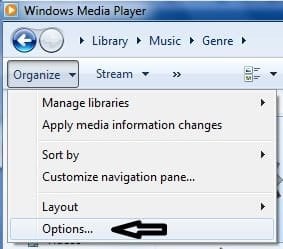
options.jpg
options2.jpg
Now play those folders, playlists, etc. from Explorer or right from within WMP and right click the WMP icon on the taskbar:
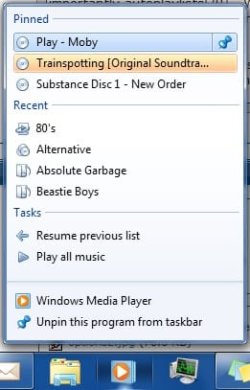
jump.jpg

Now what is it about that approach, albeit different, that fails to suit your requirements?

 

My Computer My Computer

At a glance

El Capitan / Windows 10i7-4980HQ16GBIris 5200
Computer type
Laptop
Computer Manufacturer/Model Number
Apple
OS
El Capitan / Windows 10
CPU
i7-4980HQ
Memory
16GB
Graphics Card(s)
Iris 5200
Well. I don't have things pinned to my taskbar. That is quite a bad UI development in my opinion. It's not intuitive and looks messy. All my various media are located in specific folders on a seperate drive to my OS. On the taskbar I have a toolbar pointing to my music folder.

desktop1.jpg

I click said toolbar and thus

desktop2.jpg

I glide my mouse smoothly to the album or song I want to listen to

desktop3.jpg

This is where it gets curious. I noticed that the Portishead album gives me the option to play in media player - like I was always used to. However almost all the other folders are missing the option. I don't know why. Am I missing something obvious :confused:

I'm all for change and have tried using Libraries and pinning elements to the taskbar but found that the way I am use to working is simpler and more efficient. UI changes should be offered not enforced. I like using Quick Launch. I like using toolbars. I hope this is just an oversight.

Reminds me of the time Adobe decided they would remove thumbnails to force people to use their cludgy, bloated 'Bridge' crap.
 

My Computer My Computer

At a glance

Windows Seven 7068 x64Core Duo e6300 @ 2.8ghz3gb DDR2 8009600GT
OS
Windows Seven 7068 x64
CPU
Core Duo e6300 @ 2.8ghz
Motherboard
Gigabyte GA-P965-DS3
Memory
3gb DDR2 800
Graphics Card(s)
9600GT
Sound Card
XFi extrememusic
Monitor(s) Displays
22" LCD WIDE
Screen Resolution
1680x1050
Hard Drives
2 Diamondmax 80 GB
PSU
400W PSU
Case
Coolermaster Mystique
Cooling
Stock cooling
Keyboard
Logitech Illuminated
Mouse
Logitech MX Revolution
Internet Speed
2Mb
select and right click on the folder(s) that don't give you the option to play your mp3 in media player and check if the customize tab is set on "Music".
 

Attachments

  • Capture.JPG
    Capture.JPG
    33 KB · Views: 50

My Computer My Computer

At a glance

Windows 7 x64
OS
Windows 7 x64
select and right click on the folder(s) that don't give you the option to play your mp3 in media player and check if the customize tab is set on "Music".

It's that "Also apply template to subfolders" option that's really important...
 

My Computer My Computer

At a glance

El Capitan / Windows 10i7-4980HQ16GBIris 5200
Computer type
Laptop
Computer Manufacturer/Model Number
Apple
OS
El Capitan / Windows 10
CPU
i7-4980HQ
Memory
16GB
Graphics Card(s)
Iris 5200
It's that "Also apply template to subfolders" option that's really important...

Yes, I forgot to precise that :(
But it's only important if you do change this option when selecting the root folder where all your other album folders are, as selecting this option on a single folder that only has music files in it doesn't do anything more.
I.e: C:\My music collection root folder\where all your albums are stored\
and you select that option on "My music collection root folder"
 
Last edited:

My Computer My Computer

At a glance

Windows 7 x64
OS
Windows 7 x64
Problem solved - Thanks very much.

I selected my Music folder and made the change, making sure that 'apply to subfolders' was ticked. Everything is now as I like.
 

My Computer My Computer

At a glance

Windows Seven 7068 x64Core Duo e6300 @ 2.8ghz3gb DDR2 8009600GT
OS
Windows Seven 7068 x64
CPU
Core Duo e6300 @ 2.8ghz
Motherboard
Gigabyte GA-P965-DS3
Memory
3gb DDR2 800
Graphics Card(s)
9600GT
Sound Card
XFi extrememusic
Monitor(s) Displays
22" LCD WIDE
Screen Resolution
1680x1050
Hard Drives
2 Diamondmax 80 GB
PSU
400W PSU
Case
Coolermaster Mystique
Cooling
Stock cooling
Keyboard
Logitech Illuminated
Mouse
Logitech MX Revolution
Internet Speed
2Mb
Back
Top