
Solved USB tray icon does not work ( more detailed )

support4u

New member
[SOLVED] USB tray icon does not work ( more detailed )

I made some screenshots, to make things more clear.
First look at all the images below.

image 1
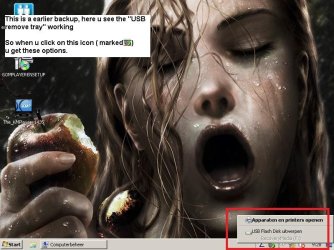
USB Tray Working.jpg
shows USB tray working correctly in "safe mode", under administrator (on the same computer)

image 2
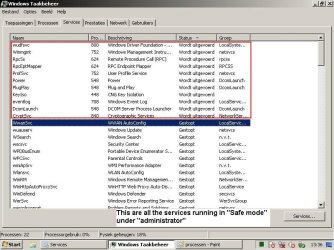
services in safe mode.jpg
shows all the services that are running in "safe mode", under administrator (on the same computer)

image 3
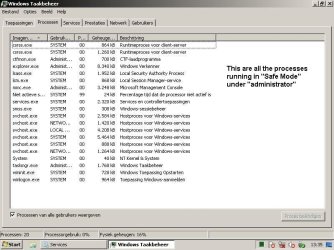
processen in safe mode.jpg
shows all the processes that are running in "safe mode", under administrator (on the same computer)


then:


image 4
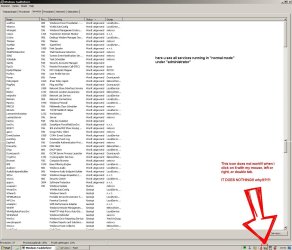
services under normal mode.jpg
shows all the services that are running in "normal mode", under administrator (on the same computer)

image 5
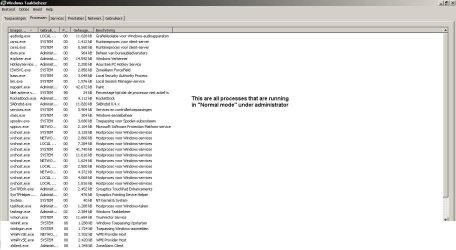
processen in normal mode.JPG
shows all the processes that are running in "normal mode", under administrator (on the same computer)


The problem:
Normal mode:
The removable usb tray icon does not work in normal mode!
i cannot click on it! nothing happens!

- true printers and devices, nothing shows!

Save mode
in save mode, under printers and devices, things show up! like the should!

how can i fix my problem!?!


- got no recovery points!
- not going to put back a backup yet!
- got windows 7 professional ( MSDN version )
 
Last edited:

My Computer

Computer Manufacturer/Model Number
-
OS
Windows 7
CPU
Intel Core 2 Quad Q6600
Motherboard
ASUS P5N32e SLI
Memory
OCZ2N1066SR2GK 4gb total
Graphics Card(s)
Sapphire ATI HD5770,1GB
Sound Card
Creative Sounblaster Live!
Monitor(s) Displays
Samsung Syncmaster 206BW
Hard Drives
1x WD Raptor 250gb
2x 500 gb Hitachi Deskstar
PSU
-
Case
Coolermaster Cosmos
Cooling
-

My Computer

Computer Manufacturer/Model Number
Sony Vaio FZ21Z
OS
Windows 7 Ultimate x64 ®™
CPU
Intel Core 2 Duo (2.2 GHz)
Motherboard
Sony (Intel Chipset)
Memory
2x 2GB Corsair (667 MHz)
Graphics Card(s)
NVIDIA 8600M GS (256MB)
Sound Card
Sigmatel
Monitor(s) Displays
15.4" TFT X-Black
Screen Resolution
1280x800
Hard Drives
Western Digital 300GB Scorpio Black (7200rpm)
Mouse
Logitech Anywhere MX
Internet Speed
Sky 5MB
sorry. sorry.

not to be a smart azz. but they work. u need to copy paste them into your browser.
next time i will use the preferred method.

again sorry!
 

My Computer

Computer Manufacturer/Model Number
-
OS
Windows 7
CPU
Intel Core 2 Quad Q6600
Motherboard
ASUS P5N32e SLI
Memory
OCZ2N1066SR2GK 4gb total
Graphics Card(s)
Sapphire ATI HD5770,1GB
Sound Card
Creative Sounblaster Live!
Monitor(s) Displays
Samsung Syncmaster 206BW
Hard Drives
1x WD Raptor 250gb
2x 500 gb Hitachi Deskstar
PSU
-
Case
Coolermaster Cosmos
Cooling
-

Attachments

  • 404.PNG
    404.PNG
    2.5 KB · Views: 911

My Computer

Computer Manufacturer/Model Number
Sony Vaio FZ21Z
OS
Windows 7 Ultimate x64 ®™
CPU
Intel Core 2 Duo (2.2 GHz)
Motherboard
Sony (Intel Chipset)
Memory
2x 2GB Corsair (667 MHz)
Graphics Card(s)
NVIDIA 8600M GS (256MB)
Sound Card
Sigmatel
Monitor(s) Displays
15.4" TFT X-Black
Screen Resolution
1280x800
Hard Drives
Western Digital 300GB Scorpio Black (7200rpm)
Mouse
Logitech Anywhere MX
Internet Speed
Sky 5MB
well thats just great. they work ar my opera and firefox browsers.
I will at them again then!


There we go.

sorry!
 

My Computer

Computer Manufacturer/Model Number
-
OS
Windows 7
CPU
Intel Core 2 Quad Q6600
Motherboard
ASUS P5N32e SLI
Memory
OCZ2N1066SR2GK 4gb total
Graphics Card(s)
Sapphire ATI HD5770,1GB
Sound Card
Creative Sounblaster Live!
Monitor(s) Displays
Samsung Syncmaster 206BW
Hard Drives
1x WD Raptor 250gb
2x 500 gb Hitachi Deskstar
PSU
-
Case
Coolermaster Cosmos
Cooling
-
u need to copy paste them into your browser.
:rolleyes: Your links DON'T work.


The few I tested work, but it's a pain to cut and paste all the links... so I didn't :zip: sorry.

Seems like the USB device is greyed out, Support4u some questions:
1. Can u access the USB devices that you plug in and use files on it?
2. Are you logged in as an administrative user?
3. If you open windows Exporer (Win+E) is the Eject option available whe you right click on the USB drive? If so, does this work?
 

My Computer

Computer Manufacturer/Model Number
Custom Hack job
OS
Windows 7 Ultimate 64 bit
CPU
Intel(R) Core(TM)2 Quad CPU Q8200 @ 2.33GHz
Motherboard
GigaByte EP45-UD3
Memory
8 GB Kingston
Graphics Card(s)
Nvidia GeForce 9600GT
Sound Card
Soundblaster Audigy
Monitor(s) Displays
AOC x2 22"
Hard Drives
2 x Samsung 500GB (RAID)
2 x Samsung 2TB
1 x WD Green 2TB
1 x Seagate 1TB
1 x Samsung 500GB
PSU
Thermaltake QFan 750W
Case
CM Scout Gaming
Cooling
Coolermaster V10
Keyboard
Microsoft Wireless Keyboard 1000
Mouse
Microsoft Wireless Optical 2000
Internet Speed
320
Other Info
Winfast PVR2000CP
LG DVD-RAM DVD/RW/DL Super Multi
Linksys WMP300Nx2 Wireless Adapter

My Computer

Computer Manufacturer/Model Number
Sony Vaio FZ21Z
OS
Windows 7 Ultimate x64 ®™
CPU
Intel Core 2 Duo (2.2 GHz)
Motherboard
Sony (Intel Chipset)
Memory
2x 2GB Corsair (667 MHz)
Graphics Card(s)
NVIDIA 8600M GS (256MB)
Sound Card
Sigmatel
Monitor(s) Displays
15.4" TFT X-Black
Screen Resolution
1280x800
Hard Drives
Western Digital 300GB Scorpio Black (7200rpm)
Mouse
Logitech Anywhere MX
Internet Speed
Sky 5MB

Attachments

  • ff.PNG
    ff.PNG
    108.3 KB · Views: 19

My Computer

Computer Manufacturer/Model Number
Sony Vaio FZ21Z
OS
Windows 7 Ultimate x64 ®™
CPU
Intel Core 2 Duo (2.2 GHz)
Motherboard
Sony (Intel Chipset)
Memory
2x 2GB Corsair (667 MHz)
Graphics Card(s)
NVIDIA 8600M GS (256MB)
Sound Card
Sigmatel
Monitor(s) Displays
15.4" TFT X-Black
Screen Resolution
1280x800
Hard Drives
Western Digital 300GB Scorpio Black (7200rpm)
Mouse
Logitech Anywhere MX
Internet Speed
Sky 5MB
u need to copy paste them into your browser.
:rolleyes: Your links DON'T work.


The few I tested work, but it's a pain to cut and paste all the links... so I didn't :zip: sorry.

Seems like the USB device is greyed out, Support4u some questions:
1. Can u access the USB devices that you plug in and use files on it?
2. Are you logged in as an administrative user?
3. If you open windows Exporer (Win+E) is the Eject option available whe you right click on the USB drive? If so, does this work?


1 yes i can, i can do anything i normaly can with a usb device.
2 yup. the one and only administrator account, i removed all other accounts
3 yes, but for usb flash drives only, and yes it works.
usb hdd's do not have a eject option. bummer!


so now what now :D

Tried these thru start-> run

"%windir%\system32\rundll32.exe shell32.dll,Control_RunDLL hotplug.dll"

and

"rundll32.exe shell32.dll,Control_RunDLL hotplug.dll"

both show me the remove dialog.

so only the damn tray icon doesent work!
what the hell! thats all i can keep on saying! its driving me nuts! :party:
 

My Computer

Computer Manufacturer/Model Number
-
OS
Windows 7
CPU
Intel Core 2 Quad Q6600
Motherboard
ASUS P5N32e SLI
Memory
OCZ2N1066SR2GK 4gb total
Graphics Card(s)
Sapphire ATI HD5770,1GB
Sound Card
Creative Sounblaster Live!
Monitor(s) Displays
Samsung Syncmaster 206BW
Hard Drives
1x WD Raptor 250gb
2x 500 gb Hitachi Deskstar
PSU
-
Case
Coolermaster Cosmos
Cooling
-
Wish I could test for you, but I'm travelling and on XP for another month, so I can't even look at my Win 7 box (which is on a ship on it's way to Singapore). But here's what I'd do to trouble shoot it

- Try a system repair? I.e. put in the windows 7 disk and repair the installation.
- Open an elevated command prompt and run an SFC/SCANNOW
- Browse through both the group (gpedit.msc) and security policy (secpol.msc) and check for anything that looks like it could be the issue (look up any entries that you are unsure of before you make changes, maybe enable system restore first).
- Lastly, I have a batch file that registers all dll's, as a last resort you set up system restore and then drop my batch into your system32 folder and run it and run it. It will re-register all the dll's and ocx's in that folder.

good luck.
PS: There's no particular order, they're all separate things to look at.

@FZ21Z - No idea about the links mate, I checked and they both worked.... mystery lol.
 

My Computer

Computer Manufacturer/Model Number
Custom Hack job
OS
Windows 7 Ultimate 64 bit
CPU
Intel(R) Core(TM)2 Quad CPU Q8200 @ 2.33GHz
Motherboard
GigaByte EP45-UD3
Memory
8 GB Kingston
Graphics Card(s)
Nvidia GeForce 9600GT
Sound Card
Soundblaster Audigy
Monitor(s) Displays
AOC x2 22"
Hard Drives
2 x Samsung 500GB (RAID)
2 x Samsung 2TB
1 x WD Green 2TB
1 x Seagate 1TB
1 x Samsung 500GB
PSU
Thermaltake QFan 750W
Case
CM Scout Gaming
Cooling
Coolermaster V10
Keyboard
Microsoft Wireless Keyboard 1000
Mouse
Microsoft Wireless Optical 2000
Internet Speed
320
Other Info
Winfast PVR2000CP
LG DVD-RAM DVD/RW/DL Super Multi
Linksys WMP300Nx2 Wireless Adapter
policys do not change when u don't toch them? right?
i never experienced a problem related to policys before in my life.
 

My Computer

Computer Manufacturer/Model Number
-
OS
Windows 7
CPU
Intel Core 2 Quad Q6600
Motherboard
ASUS P5N32e SLI
Memory
OCZ2N1066SR2GK 4gb total
Graphics Card(s)
Sapphire ATI HD5770,1GB
Sound Card
Creative Sounblaster Live!
Monitor(s) Displays
Samsung Syncmaster 206BW
Hard Drives
1x WD Raptor 250gb
2x 500 gb Hitachi Deskstar
PSU
-
Case
Coolermaster Cosmos
Cooling
-
Another thought. It really shouldn't work in safe mode and not in the normal. This suggests that dll's are probably ok, but that policy, another program or corruption somewhere in the user profile is causing the issue.

-Try creating another user and check this user in normal mode, does it work?
-Look for any third party programs that access USB, this last one is a b**ch coz you may have to disable or uninstall the third party programs one at a time to find the culprit. :shock:
 

My Computer

Computer Manufacturer/Model Number
Custom Hack job
OS
Windows 7 Ultimate 64 bit
CPU
Intel(R) Core(TM)2 Quad CPU Q8200 @ 2.33GHz
Motherboard
GigaByte EP45-UD3
Memory
8 GB Kingston
Graphics Card(s)
Nvidia GeForce 9600GT
Sound Card
Soundblaster Audigy
Monitor(s) Displays
AOC x2 22"
Hard Drives
2 x Samsung 500GB (RAID)
2 x Samsung 2TB
1 x WD Green 2TB
1 x Seagate 1TB
1 x Samsung 500GB
PSU
Thermaltake QFan 750W
Case
CM Scout Gaming
Cooling
Coolermaster V10
Keyboard
Microsoft Wireless Keyboard 1000
Mouse
Microsoft Wireless Optical 2000
Internet Speed
320
Other Info
Winfast PVR2000CP
LG DVD-RAM DVD/RW/DL Super Multi
Linksys WMP300Nx2 Wireless Adapter
1 Try creating another user and check this user in normal mode, does it work?
2 Look for any third party programs that access USB, this last one is a b**ch coz you may have to disable or uninstall the third party programs one at a time to find the culprit.


1 Already done, still did not work
2 as for this solution.. its a netbook. i don't have any software on it, that i dont have on my desktop computer.

so its almost the same configurations, and installed applications.
and my desktop computer works fine.

the only thing different in applications is i got avacam installed on this netbook.
( for webcam )
but it does not boot with the system.
as for all services and processos, i knockt them all out. because i like a clean fast system.


thanks for thinking with me!
i shall try to repair. hope it does not reset anything :D
 

My Computer

Computer Manufacturer/Model Number
-
OS
Windows 7
CPU
Intel Core 2 Quad Q6600
Motherboard
ASUS P5N32e SLI
Memory
OCZ2N1066SR2GK 4gb total
Graphics Card(s)
Sapphire ATI HD5770,1GB
Sound Card
Creative Sounblaster Live!
Monitor(s) Displays
Samsung Syncmaster 206BW
Hard Drives
1x WD Raptor 250gb
2x 500 gb Hitachi Deskstar
PSU
-
Case
Coolermaster Cosmos
Cooling
-
SOLVED

yes yes, i solved it


this computer -> manage -> devices -> bluetooth radio's ->

generic bluetooth adapter, put it on disable

and wham! it works instantly

damn bluetooth piece of crap!, i thought i disabled them all. gues i dident ;)

SO! victory for me! :party:

take that damn bluetooth!

hehe happy happy, joy joy!


thanks all, again for thinking with me!
 

My Computer

Computer Manufacturer/Model Number
-
OS
Windows 7
CPU
Intel Core 2 Quad Q6600
Motherboard
ASUS P5N32e SLI
Memory
OCZ2N1066SR2GK 4gb total
Graphics Card(s)
Sapphire ATI HD5770,1GB
Sound Card
Creative Sounblaster Live!
Monitor(s) Displays
Samsung Syncmaster 206BW
Hard Drives
1x WD Raptor 250gb
2x 500 gb Hitachi Deskstar
PSU
-
Case
Coolermaster Cosmos
Cooling
-
SOLVED

yes yes, i solved it


this computer -> manage -> devices -> bluetooth radio's ->

generic bluetooth adapter, put it on disable

and wham! it works instantly

damn bluetooth piece of crap!, i thought i disabled them all. gues i dident ;)

SO! victory for me! :party:

take that damn bluetooth!

hehe happy happy, joy joy!


thanks all, again for thinking with me!


No problem, that's all it takes sometimes just throwing ideas at each other until the solution is triggered. :-)
 

My Computer

Computer Manufacturer/Model Number
Custom Hack job
OS
Windows 7 Ultimate 64 bit
CPU
Intel(R) Core(TM)2 Quad CPU Q8200 @ 2.33GHz
Motherboard
GigaByte EP45-UD3
Memory
8 GB Kingston
Graphics Card(s)
Nvidia GeForce 9600GT
Sound Card
Soundblaster Audigy
Monitor(s) Displays
AOC x2 22"
Hard Drives
2 x Samsung 500GB (RAID)
2 x Samsung 2TB
1 x WD Green 2TB
1 x Seagate 1TB
1 x Samsung 500GB
PSU
Thermaltake QFan 750W
Case
CM Scout Gaming
Cooling
Coolermaster V10
Keyboard
Microsoft Wireless Keyboard 1000
Mouse
Microsoft Wireless Optical 2000
Internet Speed
320
Other Info
Winfast PVR2000CP
LG DVD-RAM DVD/RW/DL Super Multi
Linksys WMP300Nx2 Wireless Adapter
Back
Top