
You are using an out of date browser. It may not display this or other websites correctly.
You should upgrade or use an alternative browser.
You should upgrade or use an alternative browser.
Solved Empty Recycle Bin
- Thread starter Spyderco
- Start date
Orbital Shark
New member

My Computer
- Computer Manufacturer/Model Number
- Compaq Desktop
- OS
- Windows 7 Ultimate x64
- CPU
- AMD Sempron Dual Core
- Memory
- 3GB
- Graphics Card(s)
- NVIDIA GeForce 6150SE nForce 430
- Screen Resolution
- 1024x768
- Hard Drives
- 150GB Sata

I think he may mean to the desktop context menu instead. The method used in Vista for this does not work in Windows 7 though. 
I'll keep looking to see if I can figure something out that may work though. I'll post back if I find anything.
I'll keep looking to see if I can figure something out that may work though. I'll post back if I find anything.
My Computer
- Computer type
- PC/Desktop
- Computer Manufacturer/Model Number
- Self built custom
- OS
- 64-bit Windows 11 Pro for Workstations
- CPU
- Intel i7-8700K OC'd to 5 GHz
- Motherboard
- ASUS ROG Maximus XI Formula Z390
- Memory
- 64 GB (4x16GB) G.SKILL TridentZ RGB DDR4 3600 MHz
- Graphics Card(s)
- ASUS ROG-STRIX-GTX1080TI-O11G-GAMING
- Sound Card
- Integrated
- Monitor(s) Displays
- 2 x Samsung Odyssey G7 27"
- Screen Resolution
- 2560x1440
- Hard Drives
- 1TB Samsung 990 PRO M.2,
4TB Samsung 990 PRO PRO M.2,
TerraMaster F8 SSD Plus NAS
- PSU
- Seasonic Prime Titanium 850W
- Case
- Thermaltake Core P3
- Cooling
- Corsair Hydro H115i
- Keyboard
- Logitech wireless K800
- Mouse
- Logitech MX Master 4
- Internet Speed
- 2 Gb/s Download and 100 Mb/s Upload
- Antivirus
- Malwarebyte Anti-Malware Premium
- Browser
- Google Chrome
- Other Info
- Logitech Z625 speaker system,
Logitech BRIO 4K Pro webcam,
HP Color LaserJet Pro MFP M477fdn,
APC SMART-UPS RT 1000 XL - SURT1000XLI,
Galaxy S23 Plus phone

pclove
PCLover
Any update to this post? I have found a few workarounds, but they aren't the same as a simple registry edit. I currently use a sidebar gadget for it, and that's a pain in my...
Brink, you are the man, so I'll wait for you.
Brink, you are the man, so I'll wait for you.
My Computer
- Computer Manufacturer/Model Number
- Asus G50V
- OS
- 7 Ultimate 7601
- CPU
- Core Duo 2.4GHz
- Memory
- 6GB DDR2 667
- Graphics Card(s)
- nVidia GeForce 9700m GT
- Screen Resolution
- 1366 x 768
- Hard Drives
- RAIDed 320GB 7K2 RPM Hitachi & 200GB 7K2 RPM Seagate
Hello Pclove,
Empty Recycle Bin - Add to Desktop Context Menu - Vista Forums
http://www.sevenforums.com/tutorials/65561-empty-recycle-bin-add-desktop-context-menu.html
Hope this helps,
Shawn
Empty Recycle Bin - Add to Desktop Context Menu - Vista Forums
http://www.sevenforums.com/tutorials/65561-empty-recycle-bin-add-desktop-context-menu.html
Hope this helps,
Shawn
Last edited:
My Computer
- Computer type
- PC/Desktop
- Computer Manufacturer/Model Number
- Self built custom
- OS
- 64-bit Windows 11 Pro for Workstations
- CPU
- Intel i7-8700K OC'd to 5 GHz
- Motherboard
- ASUS ROG Maximus XI Formula Z390
- Memory
- 64 GB (4x16GB) G.SKILL TridentZ RGB DDR4 3600 MHz
- Graphics Card(s)
- ASUS ROG-STRIX-GTX1080TI-O11G-GAMING
- Sound Card
- Integrated
- Monitor(s) Displays
- 2 x Samsung Odyssey G7 27"
- Screen Resolution
- 2560x1440
- Hard Drives
- 1TB Samsung 990 PRO M.2,
4TB Samsung 990 PRO PRO M.2,
TerraMaster F8 SSD Plus NAS
- PSU
- Seasonic Prime Titanium 850W
- Case
- Thermaltake Core P3
- Cooling
- Corsair Hydro H115i
- Keyboard
- Logitech wireless K800
- Mouse
- Logitech MX Master 4
- Internet Speed
- 2 Gb/s Download and 100 Mb/s Upload
- Antivirus
- Malwarebyte Anti-Malware Premium
- Browser
- Google Chrome
- Other Info
- Logitech Z625 speaker system,
Logitech BRIO 4K Pro webcam,
HP Color LaserJet Pro MFP M477fdn,
APC SMART-UPS RT 1000 XL - SURT1000XLI,
Galaxy S23 Plus phone
I would also like to add "empty recycle bin" to the right-click desktop context menu. I have searched the web, but I have been unable to locate a registry script that I can merge into the registry to add this feature. I am familiar with editing the registry, so if anyone knows how to add this feature to the desktop context menu, it would be much appreciated.
Joseph Y.
Joseph Y.
My Computer
- Computer Manufacturer/Model Number
- Compaq CQ60-615DX
- OS
- Windows 7 Home Premium (Version 6.1, Build 7600)
- CPU
- Intel (R) Celeron (R) Pentium III Xeon, 900 2.20 GHz
- Memory
- 2.0 GB
- Graphics Card(s)
- Mobile Intel(R) 4 Series Express Chipset Family (797 MB)
- Sound Card
- Conexant Pebble High Definition SmartAudio
- Monitor(s) Displays
- 16:9 BrightView (High Definition)
- Hard Drives
- Seagate Momentus Model ST9250410AS, 7200.4 SATA 3-Gb/s 250-GB Hard Drive. Intel(R) ICH9M/M-E Family 4 Port SATA AHCI Controller-2929
HP Compaq Presario CQ61-410US DVDRAM GT30L Optical Drive
It appears that Win 7 has a command for emptying the RB now instead of ref'ing a GUID in shellex for the task.I would also like to add "empty recycle bin" to the right-click desktop context menu. I have searched the web, but I have been unable to locate a registry script that I can merge into the registry to add this feature. I am familiar with editing the registry, so if anyone knows how to add this feature to the desktop context menu, it would be much appreciated.
Joseph Y.
Code:
Windows Registry Editor Version 5.00

[HKEY_CLASSES_ROOT\Directory\Background\shell\empty]
"CommandStateHandler"="{c9298eef-69dd-4cdd-b153-bdbc38486781}"
"Description"="@shell32.dll,-31332"
"Icon"="shell32.dll,-254"
"MUIVerb"="@shell32.dll,-10564"
[HKEY_CLASSES_ROOT\Directory\Background\shell\empty\command]
"DelegateExecute"="{48527bb3-e8de-450b-8910-8c4099cb8624}"
Here's the code to place the context menu item at the bottom
Code:
Windows Registry Editor Version 5.00
[HKEY_CLASSES_ROOT\Directory\Background\shell\empty]
"CommandStateHandler"="{c9298eef-69dd-4cdd-b153-bdbc38486781}"
"Description"="@shell32.dll,-31332"
"Icon"="shell32.dll,-254"
"MUIVerb"="@shell32.dll,-10564"
"Position"="Bottom"
[HKEY_CLASSES_ROOT\Directory\Background\shell\empty\command]
"DelegateExecute"="{48527bb3-e8de-450b-8910-8c4099cb8624}"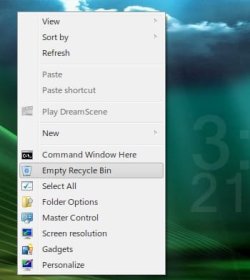
I can upload as reg file if moderators will allow
Last edited:
My Computer
- Computer Manufacturer/Model Number
- Averatec 6130HS-20
- OS
- Windows 7 Professional 32-bit (6.1, Build 7600)
- CPU
- Intel(R) Pentium(R) 4 3.00 GHz HT
- Memory
- 2.0 GB
- Graphics Card(s)
- ATI Mobility Radeon 9600 64MB
- Sound Card
- Realtek AC'97 Audio
- Screen Resolution
- 1280 x 800
- Hard Drives
- Seagate 96023A 60GB 7200RPM -
Seagate FreeAgentDesktop 250GB
- Cooling
- 20 Inch Box Fan
- Mouse
- Targus PAWM10 Wireless Optical Laptop Mouse

ridakash
Banned
Thank you Greg S
To make a .reg :
copye the code
Start,All Programs,Accessorries,Notpad and past the code and close,save..
Then follow like picture:

Right click on saved .reg and Merge !
To make a .reg :
copye the code
Code:
Windows Registry Editor Version 5.00
[HKEY_CLASSES_ROOT\Directory\Background\shell\empty]
"CommandStateHandler"="{c9298eef-69dd-4cdd-b153-bdbc38486781}"
"Description"="@shell32.dll,-31332"
"Icon"="shell32.dll,-254"
"MUIVerb"="@shell32.dll,-10564"
"Position"="Bottom"
[HKEY_CLASSES_ROOT\Directory\Background\shell\empty\command]
"DelegateExecute"="{48527bb3-e8de-450b-8910-8c4099cb8624}"Then follow like picture:
Right click on saved .reg and Merge !
My Computer
- OS
- Windows Seven Ultimate
You're welcome my friendThank you Greg S
My Computer
- Computer Manufacturer/Model Number
- Averatec 6130HS-20
- OS
- Windows 7 Professional 32-bit (6.1, Build 7600)
- CPU
- Intel(R) Pentium(R) 4 3.00 GHz HT
- Memory
- 2.0 GB
- Graphics Card(s)
- ATI Mobility Radeon 9600 64MB
- Sound Card
- Realtek AC'97 Audio
- Screen Resolution
- 1280 x 800
- Hard Drives
- Seagate 96023A 60GB 7200RPM -
Seagate FreeAgentDesktop 250GB
- Cooling
- 20 Inch Box Fan
- Mouse
- Targus PAWM10 Wireless Optical Laptop Mouse

midgo
New member
Thank you Greg S
To make a .reg :
copye the code
Start,All Programs,Accessorries,Notpad and past the code and close,save..Code:Windows Registry Editor Version 5.00 [HKEY_CLASSES_ROOT\Directory\Background\shell\empty] "CommandStateHandler"="{c9298eef-69dd-4cdd-b153-bdbc38486781}" "Description"="@shell32.dll,-31332" "Icon"="shell32.dll,-254" "MUIVerb"="@shell32.dll,-10564" "Position"="Bottom" [HKEY_CLASSES_ROOT\Directory\Background\shell\empty\command] "DelegateExecute"="{48527bb3-e8de-450b-8910-8c4099cb8624}"
Then follow like picture:
Right click on saved .reg and Merge !
This did not work for me
Can anyone put up a tute on how they made this work

My Computer
- Computer Manufacturer/Model Number
- MSI 6702
- OS
- Windows 7 32 bit
- CPU
- AMD Athlon 64
- Motherboard
- MSI 6702
- Memory
- 2GB
- Graphics Card(s)
- Nvidia 7600GT
- Sound Card
- Realtek Internal
- Monitor(s) Displays
- Dell Anologue 19" Monitor
- Hard Drives
- 2 IDE
2 SATA
2 External Hard drives WD 2TB Iomega 1TB
- PSU
- 600w
- Case
- Generic
- Cooling
- Standard with 2 case fans
- Keyboard
- HP
- Mouse
- Microsoft Intelimouse
- Internet Speed
- Crappy:( I'm from Australia:)
Thanks to all who helped me with this modification.
joS3ph
joS3ph
My Computer
- Computer Manufacturer/Model Number
- Compaq CQ60-615DX
- OS
- Windows 7 Home Premium (Version 6.1, Build 7600)
- CPU
- Intel (R) Celeron (R) Pentium III Xeon, 900 2.20 GHz
- Memory
- 2.0 GB
- Graphics Card(s)
- Mobile Intel(R) 4 Series Express Chipset Family (797 MB)
- Sound Card
- Conexant Pebble High Definition SmartAudio
- Monitor(s) Displays
- 16:9 BrightView (High Definition)
- Hard Drives
- Seagate Momentus Model ST9250410AS, 7200.4 SATA 3-Gb/s 250-GB Hard Drive. Intel(R) ICH9M/M-E Family 4 Port SATA AHCI Controller-2929
HP Compaq Presario CQ61-410US DVDRAM GT30L Optical Drive