

Darryl Licht
New member
I figured I'd start a thread on Network Terms and Definitions... I guess it could also become a tutorial in the future...
What is a PING???
A ping, or ping test is to test the connectivity between 2 computers. It actually measures the latency (delay or lag time) of that connection. Thus, the reason that your results show as a time in MS (milliseconds).
If run from the Windows command prompt by typing PING IP OF OTHER PC, the result usually includes confirmation that connection was successful, along with a series of numbers that represent the communication delay in milliseconds (ms).
The results of a ping test vary depending on the quality of the Internet / network connection. A good broadband Internet connection (wired or wireless) typically results in ping test latency of less than 100 ms, often less than 30 ms. Typically the closer the server, the lower the ping time in milliseconds.
It is very similar to what we see in old war movies with submarines. Every sub movie I've ever seen has "that" scene where the crew stops all engines, and goes silent (this is usually where some sweaty submariner drops a wrench) while the boats above are hunting (listening) for that sub using a sonar ping via a microphone in the water. The hunters on the surface are looking for a ping back or reflection of that original sonar ping (sound wave)... If they get a reflection (think echo) they have located the sub...
or a whale!
In our case, when we ping either a known IP address or a domain name, we are sending a special packet of info called an ICMP (Internet Control Message Protocol) packet. These ICMP PING packets get to that IP or domanin name and ask for a reply packet to be sent back to the source (our PC)as in this example:
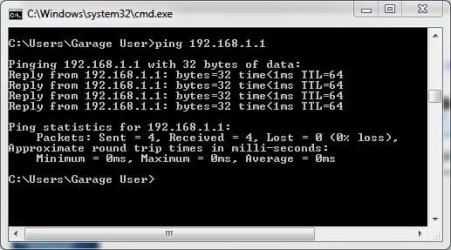
Notice how I get a reflection, or response, from the other IP above (my router).
Manytimes when we ping a domain name we can see this:

This lack of a reply above is usually due to a router, server, or firewall in stealth mode blocking these PING replies. There are many reasons why companies and users might want their PCs, routers, or networks hidden from view. Mostly the Hack/Crack/Attack factor...
You can test your PC or Networks stealth status using a great free web based utility from one greatest names in the security biz, Steve Gibson... by using ShieldsUP!.
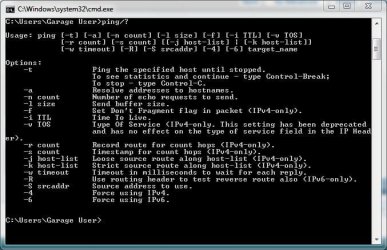
To learn more about ping related commands you can type PING/HELP or PING/? to see all the variables (switches) to that command as I have here:
Hope that helps!
And we will look at the related TRACERT (trace route) command next!
What is a PING???
A ping, or ping test is to test the connectivity between 2 computers. It actually measures the latency (delay or lag time) of that connection. Thus, the reason that your results show as a time in MS (milliseconds).
If run from the Windows command prompt by typing PING IP OF OTHER PC, the result usually includes confirmation that connection was successful, along with a series of numbers that represent the communication delay in milliseconds (ms).
The results of a ping test vary depending on the quality of the Internet / network connection. A good broadband Internet connection (wired or wireless) typically results in ping test latency of less than 100 ms, often less than 30 ms. Typically the closer the server, the lower the ping time in milliseconds.
It is very similar to what we see in old war movies with submarines. Every sub movie I've ever seen has "that" scene where the crew stops all engines, and goes silent (this is usually where some sweaty submariner drops a wrench) while the boats above are hunting (listening) for that sub using a sonar ping via a microphone in the water. The hunters on the surface are looking for a ping back or reflection of that original sonar ping (sound wave)... If they get a reflection (think echo) they have located the sub...
or a whale!
In our case, when we ping either a known IP address or a domain name, we are sending a special packet of info called an ICMP (Internet Control Message Protocol) packet. These ICMP PING packets get to that IP or domanin name and ask for a reply packet to be sent back to the source (our PC)as in this example:
Notice how I get a reflection, or response, from the other IP above (my router).
Manytimes when we ping a domain name we can see this:
This lack of a reply above is usually due to a router, server, or firewall in stealth mode blocking these PING replies. There are many reasons why companies and users might want their PCs, routers, or networks hidden from view. Mostly the Hack/Crack/Attack factor...
You can test your PC or Networks stealth status using a great free web based utility from one greatest names in the security biz, Steve Gibson... by using ShieldsUP!.
To learn more about ping related commands you can type PING/HELP or PING/? to see all the variables (switches) to that command as I have here:
Hope that helps!
And we will look at the related TRACERT (trace route) command next!
Last edited:
My Computer
- Computer Manufacturer/Model Number
- Homebrew PC - "Alpha_Dawg"
- OS
- Windows 7 Ultimate 64 bit Steve Ballmer Signature Edition
- CPU
- Intel Core 2 Quad - Q9550 - 2.83GHz stock - OC'd to 3.6GHz
- Motherboard
- Gigabyte EP45-UD3P
- Memory
- 4GB DDR2 800MHz (PC6400) OCZ Reaper
- Graphics Card(s)
- Nvidia GE Force 8800 GTS
- Sound Card
- Asus Xonar DX
- Monitor(s) Displays
- Samsung SyncMaster 2333HD
- Screen Resolution
- 1920 x 1080
- Hard Drives
- WD Caviar Black 750GB - 7200RPM - 32MB cache
WD Caviar Green 1.5TB - 5400RPM - 64MB cache
WD Caviar Green 2.0TB - 5400RPM - 64MB cache
- PSU
- PC Power & Cooling Silencer 750
- Case
- Gigabyte 3D Aurora
- Cooling
- Case is Air - 5ea. 120mm fans (mix of Arctic and Xigmatec)
- Keyboard
- MS Natural Wireless KB
- Mouse
- MS Wireless Mouse
- Internet Speed
- 50 mbps down/5 mbps up
- Other Info
- AVerMedia - AVerTVHD G2 Dual Tuner Card

