Changing default downloading directory

chermesh

New member
Hi,
How do I change the default downloading directory in win 7? In the past, TweakUI included an easy way to configure special folders. How can it be done in win 7?
 

My Computer

Computer type
PC/Desktop
OS
Triple boot: WinXP Pro + Win7 Ultimate + Win10 Ultimate
CPU
Intel Core 2 Duo 3.0GHz
Motherboard
Gigabyte GA-P43-ES3G
Memory
Transcend 2GB DDR2 800
Graphics Card(s)
NVIDIA GeForce 9500 GT
Sound Card
Realtek High Definition Audio
Monitor(s) Displays
Dell P2314H
Hard Drives
Samsung 1TB 32 MB 7200RPM
PSU
seasonic ss-500et active pfc
Case
Compucase 6A19 Black
Thanks. It was very helpful.
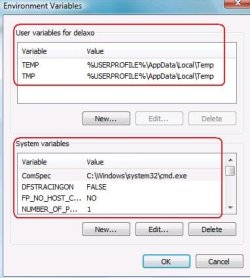
Still, how do I change the location of my default temp directory?
 

My Computer

Computer type
PC/Desktop
OS
Triple boot: WinXP Pro + Win7 Ultimate + Win10 Ultimate
CPU
Intel Core 2 Duo 3.0GHz
Motherboard
Gigabyte GA-P43-ES3G
Memory
Transcend 2GB DDR2 800
Graphics Card(s)
NVIDIA GeForce 9500 GT
Sound Card
Realtek High Definition Audio
Monitor(s) Displays
Dell P2314H
Hard Drives
Samsung 1TB 32 MB 7200RPM
PSU
seasonic ss-500et active pfc
Case
Compucase 6A19 Black
sorry i think your problem is you want to change the directory download default to your folder.

if you would like to the default download target for internet explorer from desktop you can..
click on start type regedit, navigate the following key from left panel
HKEY_CURRENT_USER\Software\Microsoft\internet explorer
find download directory value, double click and change the value data you want to save.
 

My Computer

Computer Manufacturer/Model Number
built up
OS
windows 7
CPU
Phenom II AMD Dragon 3.5Ghz
Memory
DDR3 4GB
Graphics Card(s)
ATI Radeon 512Mb
Monitor(s) Displays
HP L1506
Screen Resolution
1152 x 864
Hard Drives
WDC 1 TB SATA-II Green Power
Keyboard
HP wireless keyboard
Mouse
HP Optic
Internet Speed
1GB
If I understand your question correctly, you would have to change that in your browser options.
 

My Computer

Computer Manufacturer/Model Number
Toshiba Satellite A135S4487
OS
Windows 7 Ultimate (32-bit)
CPU
Intel Mobile Core 2 Duo T5500 @ 1.66 GHz
Motherboard
Intel i945GM Chipset
Memory
2.0GB Dual Channel DDR2 @ 266 MHz 4-4-4-12
Graphics Card(s)
Mobile Intel 945 Express Chipset Family
Sound Card
Realtek High Definition Audio
Monitor(s) Displays
Generic PnP Monitor, Samsung 46" LCD
Screen Resolution
1280 x 800, 1920 x 1080
Hard Drives
100GB Hitachi ATA Device (IDE)
120GB Western Digital USB
250GB External USB
Keyboard
Microsoft Wireless Comfort Keyboard 5000
Mouse
Microsoft Wireless Mouse 5000
Internet Speed
DSL
Well, I'm sorry. While being quite experience I failed. I added a new problem to my existing thread.

My NEW question deals with the default temp directory and while applying your original respnse, I fould the solution.
The path is: Control Panel => System and Security => System => Advanced System Settings => System Properties => Enviornment Variables

Thanks and my aplogies
 

My Computer

Computer type
PC/Desktop
OS
Triple boot: WinXP Pro + Win7 Ultimate + Win10 Ultimate
CPU
Intel Core 2 Duo 3.0GHz
Motherboard
Gigabyte GA-P43-ES3G
Memory
Transcend 2GB DDR2 800
Graphics Card(s)
NVIDIA GeForce 9500 GT
Sound Card
Realtek High Definition Audio
Monitor(s) Displays
Dell P2314H
Hard Drives
Samsung 1TB 32 MB 7200RPM
PSU
seasonic ss-500et active pfc
Case
Compucase 6A19 Black
Well, I'm sorry. While being quite experience I failed. I added a new problem to my existing thread.

My NEW question deals with the default temp directory and while applying your original respnse, I fould the solution.
The path is: Control Panel => System and Security => System => Advanced System Settings => System Properties => Enviornment Variables

Thanks and my aplogies

glad your problem done.
you mean changer the directory of this temporary
abc.JPG
 

My Computer

Computer Manufacturer/Model Number
built up
OS
windows 7
CPU
Phenom II AMD Dragon 3.5Ghz
Memory
DDR3 4GB
Graphics Card(s)
ATI Radeon 512Mb
Monitor(s) Displays
HP L1506
Screen Resolution
1152 x 864
Hard Drives
WDC 1 TB SATA-II Green Power
Keyboard
HP wireless keyboard
Mouse
HP Optic
Internet Speed
1GB
exactly.
 

My Computer

Computer type
PC/Desktop
OS
Triple boot: WinXP Pro + Win7 Ultimate + Win10 Ultimate
CPU
Intel Core 2 Duo 3.0GHz
Motherboard
Gigabyte GA-P43-ES3G
Memory
Transcend 2GB DDR2 800
Graphics Card(s)
NVIDIA GeForce 9500 GT
Sound Card
Realtek High Definition Audio
Monitor(s) Displays
Dell P2314H
Hard Drives
Samsung 1TB 32 MB 7200RPM
PSU
seasonic ss-500et active pfc
Case
Compucase 6A19 Black
Back
Top