JavaScript is disabled. For a better experience, please enable JavaScript in your browser before proceeding.
You are using an out of date browser. It may not display this or other websites correctly.
You should upgrade or use an
alternative browser .
Blue icons after ReadyBoost
Master of Technology
Power User
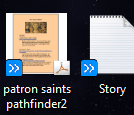
These blue icons appeared on a lot of things once i turned on ReadyBoost on a 1 GB stick. Is that normal?
Windows 7 Home Premium x64, Mac OS X 10.6.2 x64 AMD Athlon X2 Dual-Core 2.1 GHz 4 GB DDR2 800 MHz ATI Radeon HD Mobility 3100 Graphics 256MB to... Toshiba Satellite L505D-S9565 Windows 7 Home Premium x64, Mac OS X 10.6.2 x64 AMD Athlon X2 Dual-Core 2.1 GHz Toshiba Built-In with Insyde H20 BIOS 1.40 4 GB DDR2 800 MHz ATI Radeon HD Mobility 3100 Graphics 256MB to 1468 MB Shared Realtek Mobile ALC272 HD Audio 15.6" TFT LCD with TruBrite, Samsung 1080p HDTV 1366x768, 1920x1080 ❶:Main: Toshiba 250 GB SATA 5400 RPM N/A N/A Built-in/Open window in winter :P Built-in Build-in Symantics SmartTouch Pad 55 MB/sec Down, 9 MB/sec Up ❷:Backup: Seagate FreeAgent Desk USB 2.0 5400 RPM
מעשוגע פ
Guru
You shouldn't be using a 1GB stick alone for Readyboost. You can use it if you have atleast 3GB on other sticks being used by Readyboost but you should always use between 1 and 1.5 times your current ram.
EDIT: Apparently those icons are created by Norton, not Readyboost. They're green checks when the files have been backed up completely and they're blue arrows when the files are in the process of being backed up.
Source:
http://www.winhelponline.com/blog/g...rlay-displayed-for-files-in-windows-explorer/
W7 Ult. x64 | OS X Intel Mobile Core 2 Duo 2.93Ghz [T9800 Penryn] 4096MB Samsung DDR3 Dual Channel [PC3-8500F 1... NVIDIA GeForce 9600M GT 512MB [G96M Rev. C1] Apple Macbook Pro (April 2009) W7 Ult. x64 | OS X Intel Mobile Core 2 Duo 2.93Ghz [T9800 Penryn] NVIDIA nForce 730i Rev. B1 [Mac-F2268EC8 (U2E1)] 4096MB Samsung DDR3 Dual Channel [PC3-8500F 1066Mhz] NVIDIA GeForce 9600M GT 512MB [G96M Rev. C1] SB X-Fi Surround 5.1 USB | Onboard Realtek (Disabled) Acer x223wbd 22" | Apple Anti-Glare 17" (Disabled) {Current} 1440x900 {Acer} 1680x1050 {Apple} 1920x1200 {Internal} Magsafe Aluminum/Unibody (MBP52) 2 x 6000 RPM Fans Logitech G-15v2 [PN 920-000379] Logitech G-9 [PN 910-000338] 12Mbps/2.5Mbps w/ 24Mbps Speed Boost [Comcast] Logitech X-540 Speakers [PN 970223-0122]
Master of Technology
Power User
Thread Starter
But I have backup disabled on norton 360.
Windows 7 Home Premium x64, Mac OS X 10.6.2 x64 AMD Athlon X2 Dual-Core 2.1 GHz 4 GB DDR2 800 MHz ATI Radeon HD Mobility 3100 Graphics 256MB to... Toshiba Satellite L505D-S9565 Windows 7 Home Premium x64, Mac OS X 10.6.2 x64 AMD Athlon X2 Dual-Core 2.1 GHz Toshiba Built-In with Insyde H20 BIOS 1.40 4 GB DDR2 800 MHz ATI Radeon HD Mobility 3100 Graphics 256MB to 1468 MB Shared Realtek Mobile ALC272 HD Audio 15.6" TFT LCD with TruBrite, Samsung 1080p HDTV 1366x768, 1920x1080 ❶:Main: Toshiba 250 GB SATA 5400 RPM N/A N/A Built-in/Open window in winter :P Built-in Build-in Symantics SmartTouch Pad 55 MB/sec Down, 9 MB/sec Up ❷:Backup: Seagate FreeAgent Desk USB 2.0 5400 RPM