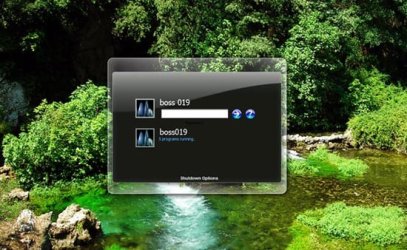
logon screen

My Computer

Computer type
Laptop
Computer Manufacturer/Model Number
HP ENVY 17-1150eg
OS
Windows 10 Pro x64 EN-GB
CPU
1.6 GHz Intel Core i7-720QM Processor
Memory
6 GB
Graphics Card(s)
ATI Mobility Radeon HD 5850 Graphics
Sound Card
Beats sound system with integrated subwoofer
Monitor(s) Displays
17" laptop display, 22" LED and 32" Full HD TV through HDMI
Screen Resolution
1600*900 (1), 1920*1080 (2&3)
Hard Drives
Internal: 2 x 500 GB SATA Hard Disk Drive 7200 rpm
External: 2TB for backups, 3TB USB3 network drive for media
Cooling
As Envy runs a bit warm, I have it on a Cooler Master pad
Keyboard
Logitech diNovo Media Desktop Laser (bluetooth)
Mouse
Logitech Performance Mouse MX
Internet Speed
50/10 Mbps VDSL
Antivirus
Windows Defender 4.3.9431.0
Browser
Maxthon 3.5.2., IE11
I suppose that is not really what I mean.. That tutorial is just changing the logon background pic. I really want another logon screen with a different log on box options like below

customize-logon-screen-of-windows-xp-and-vista-easily.jpg
 

My Computer

OS
Windows 7 Ultimate 64-bits
I think that is not possible, I believe that pic to be a result of some Photoshopping, a mockup rather than a real screenshot.

The only thing you can change in logon screen is the background. You can not change the placement or the size of user pics.

Kari
 

My Computer

Computer type
Laptop
Computer Manufacturer/Model Number
HP ENVY 17-1150eg
OS
Windows 10 Pro x64 EN-GB
CPU
1.6 GHz Intel Core i7-720QM Processor
Memory
6 GB
Graphics Card(s)
ATI Mobility Radeon HD 5850 Graphics
Sound Card
Beats sound system with integrated subwoofer
Monitor(s) Displays
17" laptop display, 22" LED and 32" Full HD TV through HDMI
Screen Resolution
1600*900 (1), 1920*1080 (2&3)
Hard Drives
Internal: 2 x 500 GB SATA Hard Disk Drive 7200 rpm
External: 2TB for backups, 3TB USB3 network drive for media
Cooling
As Envy runs a bit warm, I have it on a Cooler Master pad
Keyboard
Logitech diNovo Media Desktop Laser (bluetooth)
Mouse
Logitech Performance Mouse MX
Internet Speed
50/10 Mbps VDSL
Antivirus
Windows Defender 4.3.9431.0
Browser
Maxthon 3.5.2., IE11
I think that is not possible, I believe that pic to be a result of some Photoshopping, a mockup rather than a real screenshot.

The only thing you can change in logon screen is the background. You can not change the placement or the size of user pics.

Kari
Not entirely true Kari.
It is possible to change the whole layout of your Logon Screen.

I have a custom Win7 iso installed on my laptop which contains the logon screen as in the video below ;) I think it's close to the one the OP posted a screenshot off ;)

Download here: LHR_AND_LH_4074_LOGON_FOR_W7.rar

 
Wooooow that is awsome! I really like that! Thank you very much!
 

My Computer

OS
Windows 7 Ultimate 64-bits
mmm I don't really understand how to install it.. when I replace the .dll files I still get the message thad I'm not allowed to replace them.. any help would be appricated! :)
 

My Computer

OS
Windows 7 Ultimate 64-bits
Okay, I have copied authui.dll, but when I try to copy the background file I get the following error:

0x800704C8

Do you know what that means?
 

My Computer

OS
Windows 7 Ultimate 64-bits
Thanks again for helping me! One small thing..
Is it right that there's one small bug? When you press CTRL + ALT + DEL I get the screen with the menu Lock computer, Start Taskbar, etc. But the button 'Lock Computer' isn't diplayed well.. You know why this is?
 

My Computer

OS
Windows 7 Ultimate 64-bits
Use tweaklogon. You just pick a wallpaper, and click OK. Simple as that.
 

My Computer

Computer Manufacturer/Model Number
Me
OS
Windows 7 Pro
CPU
Athlon II x4 620
Motherboard
Gigabyte
Memory
2gb ddr2 800mhz 6-6-6-16
Graphics Card(s)
Radeon HD 4850
Sound Card
Onboard
Monitor(s) Displays
1366 x 768
Hard Drives
WDC Black 500gb
PSU
OCZ ceritified SLI ready 500w
Case
Cool Master Mid tower
Cooling
Stock
Heroxoot,
You better read the posts before, cause that was not what I meant ;)
 

My Computer

OS
Windows 7 Ultimate 64-bits
Thanks again for helping me! One small thing..
Is it right that there's one small bug? When you press CTRL + ALT + DEL I get the screen with the menu Lock computer, Start Taskbar, etc. But the button 'Lock Computer' isn't diplayed well.. You know why this is?
I guess it is ;) Mine on my laptop only shows 3 options when pressing CTRL + ALT + DEL:
Switch User
Log Off
Change a password

But pressing Switch user, actually looks the computer, so you'll need to put your password in to logon again ;)
 
haha strange, I get 5 options, that's weird. Try if I can fix it..
 

My Computer

OS
Windows 7 Ultimate 64-bits
Back
Top