Nvidia Geforce GT 325M graphics card is not detected

satyr

New member
Local time
10:35 PM
Messages
8
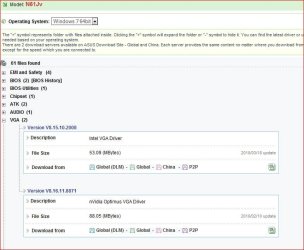
I have the Asus-N61JV notebook with Nvidia Geforce GT 325M grpahics card on Windows 7 32 bit. I downloaded the version 197.16 driver from Nvidia. By default my notebook detects the driver as standard VGA graphics adapter. The Chip type is detected as “Intel(R)Ironlake Mobile Graphics ChipSet”. Now when I follow the manual driver installation the message I am receiving is “Installing this device is not recommended because Windows cannot verify that iy is compatible with your hardware…. ” , I thought of ignoring this message and proceed with the installation but then paused to check if any one else is facing the same problem. Any idea?
 

My Computer My Computer

At a glance

Windows 7 ultimate 32 bit
OS
Windows 7 ultimate 32 bit
Well, if you want to install the latest driver for this graphic card, you can find it here.

NVIDIA DRIVERS 197.16 WHQL

Or you can try the one available on the Asus website.

It should work just fine either way, despite the message.
 

My Computer My Computer

At a glance

Windows 7 Ultimate x64Intel i7-860Corsair Dominator 1600Mhz, 8-8-8-24 1.65v 2x2GBATI Radeon 5770 HD
Computer Manufacturer/Model Number
Zen Productions
OS
Windows 7 Ultimate x64
CPU
Intel i7-860
Motherboard
Gigabyte GA-P55A-UD4P
Memory
Corsair Dominator 1600Mhz, 8-8-8-24 1.65v 2x2GB
Graphics Card(s)
ATI Radeon 5770 HD
Sound Card
Intel High Definition Sound
Monitor(s) Displays
Samsung P2570HD
Screen Resolution
1920x1080
Hard Drives
Western Digital Caviar Black 500gb
PSU
Corsair CMPSU-750HX 750W
Case
Antec p183
Cooling
Corsair H50 Water Cooler
Keyboard
Logitech G110
Mouse
Logitech MX Revolution
Internet Speed
768 mb/s
Well as I mentioned in my original post I have downloaded the latest driver from Nvidia website. I have ignored the message and the Nvidia Geforce GT 325M is installed.
But when I go to
Control Panel--> Display--> Change Display Settings and then Click on the Advanced Settings link a Window Opened with the title "(Default Monitor) and Properties". There is an Adapter Tab in there which I assume should list the details of the graphics card.
Here it is showing nothing i.e

Chip type: "Unavailable"
Total Available Graphics Memory: "Unavailable" etc.

Is this how it supposed to show ?
 

My Computer My Computer

At a glance

Windows 7 ultimate 32 bit
OS
Windows 7 ultimate 32 bit
Well, with my card, it does show all the information. Try running the WEI to see if that helps your computer recognize the card.
 

My Computer My Computer

At a glance

Windows 7 Ultimate x64Intel i7-860Corsair Dominator 1600Mhz, 8-8-8-24 1.65v 2x2GBATI Radeon 5770 HD
Computer Manufacturer/Model Number
Zen Productions
OS
Windows 7 Ultimate x64
CPU
Intel i7-860
Motherboard
Gigabyte GA-P55A-UD4P
Memory
Corsair Dominator 1600Mhz, 8-8-8-24 1.65v 2x2GB
Graphics Card(s)
ATI Radeon 5770 HD
Sound Card
Intel High Definition Sound
Monitor(s) Displays
Samsung P2570HD
Screen Resolution
1920x1080
Hard Drives
Western Digital Caviar Black 500gb
PSU
Corsair CMPSU-750HX 750W
Case
Antec p183
Cooling
Corsair H50 Water Cooler
Keyboard
Logitech G110
Mouse
Logitech MX Revolution
Internet Speed
768 mb/s
This is interesting, even though the driver installation was successful when i shut down the computer and start it again it showed the message that "standard VGA graphics adapter" is installed successfully and it replace the Nvidia driver. So I updated the driver files once again and the Nvidia came back. On a test basis when i shut down the computer and start it again the "standard vga graphics adapter" took over once again. In Device manager I can see two Display adapters are listed:
1. Standard VGA graphics adapter
2. Nvidia Geforce GT 325M

As FYI: I ran the WEI but it reported an error and couldn't complete it.
 

My Computer My Computer

At a glance

Windows 7 ultimate 32 bit
OS
Windows 7 ultimate 32 bit
Well, if you can get it to work, you can force Windows to stop auto installing the automatic drivers. Though I suggest installing the ASUS driver versions first to see if that works more properly. There may be something that they did to modify the graphics that makes them not fully compatible with the Nvidia drivers.
 

My Computer My Computer

At a glance

Windows 7 Ultimate x64Intel i7-860Corsair Dominator 1600Mhz, 8-8-8-24 1.65v 2x2GBATI Radeon 5770 HD
Computer Manufacturer/Model Number
Zen Productions
OS
Windows 7 Ultimate x64
CPU
Intel i7-860
Motherboard
Gigabyte GA-P55A-UD4P
Memory
Corsair Dominator 1600Mhz, 8-8-8-24 1.65v 2x2GB
Graphics Card(s)
ATI Radeon 5770 HD
Sound Card
Intel High Definition Sound
Monitor(s) Displays
Samsung P2570HD
Screen Resolution
1920x1080
Hard Drives
Western Digital Caviar Black 500gb
PSU
Corsair CMPSU-750HX 750W
Case
Antec p183
Cooling
Corsair H50 Water Cooler
Keyboard
Logitech G110
Mouse
Logitech MX Revolution
Internet Speed
768 mb/s
You install both the Intel and Nvidia video drivers?

asuslappy.JPG

The Intel driver is for the GPU integrated into the CPU. As to how it switches between the two (automatically or by a setting in the display controls) I can't tell you as what passes for a manual for that model at the moment leaves a lot to be desired (as in totally useless).
 

My Computer My Computer

At a glance

Win 7 Ultimate x64FX-8350 @ 4.6 GHz so farADATA XPG V1 Series Black 8GB DDR3 1600Sapphire R9 270x Dual-X
Computer type
PC/Desktop
Computer Manufacturer/Model Number
Me
OS
Win 7 Ultimate x64
CPU
FX-8350 @ 4.6 GHz so far
Motherboard
Asus M5A97 EVO
Memory
ADATA XPG V1 Series Black 8GB DDR3 1600
Graphics Card(s)
Sapphire R9 270x Dual-X
Sound Card
Xonar DGX w/ Corsair Vengence 1300
Monitor(s) Displays
Acer S232HL Abid
Screen Resolution
1920x1080
Hard Drives
120 GB OCZ Vertex 3
500 GB Seagate 7200.12
PSU
Antec Earthwatts 650W Green
Case
Antec Three Hundred
Cooling
Cooler Master 212 EVO
Keyboard
Logitech G510
Mouse
Logitech G500s
Internet Speed
35000/3000
@Zen00: From Nvidia I have found a display driver which says will support my specific model of notebook.
Nvidia link: NVIDIA DRIVERS 189.42

I will start with that to see if it works. Also downloaded the Asus supported driver from the Asus support site.

Asus Link : http://support.asus.com/download/Download.aspx?SLanguage=en-us

@Stormy13: NO I didn't install both the drivers. By default my notebook detects the Intel driver. I removed and try to install the Nvidia driver which was installed. But if I Shutdown the notebook and then start it after a while the notebook once again automatically detect the intel driver.
 
Last edited:

My Computer My Computer

At a glance

Windows 7 ultimate 32 bit
OS
Windows 7 ultimate 32 bit
The "Standard VGA graphics adapter" says to me that while it may be detected the driver for the Intel video isn't installed, which unlike onboard video is integrated into the CPU.
 

My Computer My Computer

At a glance

Win 7 Ultimate x64FX-8350 @ 4.6 GHz so farADATA XPG V1 Series Black 8GB DDR3 1600Sapphire R9 270x Dual-X
Computer type
PC/Desktop
Computer Manufacturer/Model Number
Me
OS
Win 7 Ultimate x64
CPU
FX-8350 @ 4.6 GHz so far
Motherboard
Asus M5A97 EVO
Memory
ADATA XPG V1 Series Black 8GB DDR3 1600
Graphics Card(s)
Sapphire R9 270x Dual-X
Sound Card
Xonar DGX w/ Corsair Vengence 1300
Monitor(s) Displays
Acer S232HL Abid
Screen Resolution
1920x1080
Hard Drives
120 GB OCZ Vertex 3
500 GB Seagate 7200.12
PSU
Antec Earthwatts 650W Green
Case
Antec Three Hundred
Cooling
Cooler Master 212 EVO
Keyboard
Logitech G510
Mouse
Logitech G500s
Internet Speed
35000/3000
Ok, so I tried both the drivers

1. The Nvidia Recommended from the NVIDIA link
2. The Asus Recommended from the Asus Support link

Result: Unsurprisingly same. It does install the NVIDIA GT325 card, showed it into the device list but doesn't show the specification in the "Adapter details" page.

I ran the WEI but it cannot complete the process and throws an error.

I have a feeling there could be a fault in the hardware that came with my laptop.
 

My Computer My Computer

At a glance

Windows 7 ultimate 32 bit
OS
Windows 7 ultimate 32 bit
Ok, so I tried both the drivers

Is that the Nvidia driver from two different links, or the Nvidia driver and the Intel driver?
 

My Computer My Computer

At a glance

Win 7 Ultimate x64FX-8350 @ 4.6 GHz so farADATA XPG V1 Series Black 8GB DDR3 1600Sapphire R9 270x Dual-X
Computer type
PC/Desktop
Computer Manufacturer/Model Number
Me
OS
Win 7 Ultimate x64
CPU
FX-8350 @ 4.6 GHz so far
Motherboard
Asus M5A97 EVO
Memory
ADATA XPG V1 Series Black 8GB DDR3 1600
Graphics Card(s)
Sapphire R9 270x Dual-X
Sound Card
Xonar DGX w/ Corsair Vengence 1300
Monitor(s) Displays
Acer S232HL Abid
Screen Resolution
1920x1080
Hard Drives
120 GB OCZ Vertex 3
500 GB Seagate 7200.12
PSU
Antec Earthwatts 650W Green
Case
Antec Three Hundred
Cooling
Cooler Master 212 EVO
Keyboard
Logitech G510
Mouse
Logitech G500s
Internet Speed
35000/3000
It is Nvidia driver from two different links
 

My Computer My Computer

At a glance

Windows 7 ultimate 32 bit
OS
Windows 7 ultimate 32 bit
Still say you need to install the Intel video driver from Asus. I have a feeling the way it is supposed to work is it will run using the Intel graphics for anything that is low power, and will switch to the Nvidia graphics as demand warrants.
 

My Computer My Computer

At a glance

Win 7 Ultimate x64FX-8350 @ 4.6 GHz so farADATA XPG V1 Series Black 8GB DDR3 1600Sapphire R9 270x Dual-X
Computer type
PC/Desktop
Computer Manufacturer/Model Number
Me
OS
Win 7 Ultimate x64
CPU
FX-8350 @ 4.6 GHz so far
Motherboard
Asus M5A97 EVO
Memory
ADATA XPG V1 Series Black 8GB DDR3 1600
Graphics Card(s)
Sapphire R9 270x Dual-X
Sound Card
Xonar DGX w/ Corsair Vengence 1300
Monitor(s) Displays
Acer S232HL Abid
Screen Resolution
1920x1080
Hard Drives
120 GB OCZ Vertex 3
500 GB Seagate 7200.12
PSU
Antec Earthwatts 650W Green
Case
Antec Three Hundred
Cooling
Cooler Master 212 EVO
Keyboard
Logitech G510
Mouse
Logitech G500s
Internet Speed
35000/3000
Well, the question is why the following never showed the Adapter specification?

Control Panel--> Display--> Change Display Settings and then Click on the "Advanced Settings link", a Window Opened with the title "(Default Monitor) and Properties". There is an Adapter Tab in there which I assume should list the details of the graphics card.
Here it is showing nothing i.e

Chip type: "Unavailable"
Total Available Graphics Memory: "Unavailable" etc.

Also why WEI cannot complete the process and throws an error if the NVIDIA Driver is installed ?
Is it because the driver file is not correct?
 
Last edited:

My Computer My Computer

At a glance

Windows 7 ultimate 32 bit
OS
Windows 7 ultimate 32 bit
If your laptop is supposed to work as I think it is, the Nvidia card will only be used when something graphically demanding is run, games for example. Other than that it will run of the Intel graphics that is integrated into the CPU (which I don't know if it can even be disabled).

That is how the new laptops that come with both the Intel and an ATI card in them work. It is designed that way as a power saving feature so that the more powerful card is only used as needed.
 

My Computer My Computer

At a glance

Win 7 Ultimate x64FX-8350 @ 4.6 GHz so farADATA XPG V1 Series Black 8GB DDR3 1600Sapphire R9 270x Dual-X
Computer type
PC/Desktop
Computer Manufacturer/Model Number
Me
OS
Win 7 Ultimate x64
CPU
FX-8350 @ 4.6 GHz so far
Motherboard
Asus M5A97 EVO
Memory
ADATA XPG V1 Series Black 8GB DDR3 1600
Graphics Card(s)
Sapphire R9 270x Dual-X
Sound Card
Xonar DGX w/ Corsair Vengence 1300
Monitor(s) Displays
Acer S232HL Abid
Screen Resolution
1920x1080
Hard Drives
120 GB OCZ Vertex 3
500 GB Seagate 7200.12
PSU
Antec Earthwatts 650W Green
Case
Antec Three Hundred
Cooling
Cooler Master 212 EVO
Keyboard
Logitech G510
Mouse
Logitech G500s
Internet Speed
35000/3000
Well looks like I have found a solution and here it goes:

The first driver that I actually required is the Intel Display Driver from Asus's Web Page. The mistake that I was making was completly ignoring the Intel Driver. I was under the impression that only one graphics card should be installed in the system. But looks like for Intel I series processors two graphics card has to be present in the system. I am not really sure why none of the Vendors (Be it Asus or Be it Nvidia) explicitly mention this criteria (or do they?). In the defence of NVIDIA though, they mention it as a matter of factly in their website that the driver version version 197.16 is compitable with Intel Driver (March Release). So I installed the Intel Graphics driver (March Release) and for the first time it felt the burning bright screen which was giving me a headache if I look into the screen for a while was gone.
After installing the Intel driver , I could properly updated the driver file for Nvidia card (version 197.16). Now I can access the NVIDIA Control Panel from the Device Manager which was not working before. The WEI is running properly without throwing the error.
With all these positives one thing has not changed is my system. The Adapter Tab is still showing the Adapter Specification as Intel Graphics card. For a change this time it is shwoing the Chip Type as "Intel (R) Graphics Media Accelarator HD (Core i3)".
Again I did not see any utility to switch from Intel to Nvdia nor I do not find any key in the laptop.

@Stormy13: I presume you are correct, though I am not sure how the switching will occur. I may have to buy some games which require high graphics resolution.
 

My Computer My Computer

At a glance

Windows 7 ultimate 32 bit
OS
Windows 7 ultimate 32 bit
Not so solved...

Sorry, I'm reviving the dead one (talking about this thread), but I couldn't find such a problem anywhere, and this one is similar to mine.

Well: I've got exactly the same notebook:ASUS N61JV, with CPU Intel Core i3,and Graphic: NVidia GeForce GT 325M. Without an OS. I installed it later.

At the beginning it looked fine: I didn't have black screen - I could see everything on screen, move around system etc. I installed NVidia driver from CD attached to product. And in order to test it I launched TR: Legend (one of games with very good graphic). Looked beautiful and moved fluent :cool: until I changed details to maximum. Then I was surprised, cause it looked worse, than on old GF7900!!. I thought "somethings wrong..." :confused: and started to dig in Nvidia driver settings (unfortunately, I don't remember what I've changed). Big mistake. Only effect I got is so, that when I start ANY game with good graphics, there's only black screen waiting for me. Bah! One game, when I try to launch it, gives me such a warning:

Your CPU type « INTEL Pentium-II » is below the minimum requirements.
Your videocard « Intel(R) HD Graphics » is not supported.
Do you want to launch the game anyway? [Y/N]
So, maybe it does mean, that I somehow turned off Nvidia permanently, so it does not start working when needed (as Stormy said many times in this thread). :sarc: I tried many thigs, including:

  • Digging in Nvidia driver settings more and more in order to find, what I've changed,
  • Reinstalling Nvidia driver,
  • Installing Intel driver from CD, though it somehow installed itself, maybe W7 downloaded it,
  • UNinstalling Intel driver - bad choice, effect - black screen all the time. Luckily after restart, W7 installed VGA, so I could install Intel driver again.
  • UNinstalling and installing again Nvidia driver,
  • Finally, tried to restore system to point before this digging in settings of driver. Surprisingly - even this didn't help!! :shock:
I'm desperate now. Windows works, but games - not. That's not what I have paid for! :cry: The only step I can think of now, is reinstalling whole OS, and starting everything from the very beginning. But this is ultimately. And no more DIGGING....

Have any clue, how to solve it?

 
Last edited:

My Computer My Computer

At a glance

Windows 7 Ultimate N 32bitntel Core i3-350M4GBnVidia GeForce GT 325M
OS
Windows 7 Ultimate N 32bit
CPU
ntel Core i3-350M
Memory
4GB
Graphics Card(s)
nVidia GeForce GT 325M
Hard Drives
320GB
Mouse
Logitech
Back
Top