Delay in files showing up on Xbox 360

sandmonkee

New member
Not sure if this is the best forum for this topic, but it kind of goes across several topics, so thats why its posted here. Mods, feel free to move.

First of all, a little background...

I am currently dual booting Win7 Ultimate and XP SP2 on the same brand new machine. It works great and I've had no problems with any hardware or software. All hardware is well above min specs and drivers are all up to date.

When running XP, I share my files to my Xbox 360 using a Microsoft utility called "Windows Media Connect 2" (WMC2). It allows me to access my video and music files directly from the Xbox dashboard (ie I don't need Media Center). It works great - everything plays without lag, and as soon as I move a file into one of the directories thats shared through WMC2, its instantly available on my xbox (note that the xbox connects to the computer through a wireless network).

After installing Win7, I was disappointed to learn that WMC2 was no longer supported and could not be installed. I tried using Windows Media Center, but found it unacceptably slow. On the xbox, I would try to open a folder full of files, and end up sitting there looking at the hourglass for 30 sec. Hard to believe, given that WMC2 was pretty much instantaneous when opening the exact same folder.

Next, I realized I could still browse Windows 7 files from the Xbox dashboard by sharing them with "Everyone" and then adding them to my "Videos" library. Its way way faster than Media Center, and from the xbox's point of view, works exactly the same as WMC2 did on XP. This has been working great, except for the following (which the meat of my question here):

When I add a file to one of the shared folders, it doesn't immediately show up on my Xbox. For instance, I can have a folder full of video files that all show up on the xbox, but if I add a new video to that directory on the computer, it won't show up on the xbox until (usually) the following day. This is very odd. I've tried a lot of different things, but haven't yet resolved this.

More info:
-The folder and all of its contents (except for the recently added file) are showing up on the xbox, so it can't be a folder sharing/permissions issue
-The file does eventually show up (and plays) on the xbox, so it can't be a file format issue
-When I move the file into one of the shared directories, it immediately shows up in my "Videos" library on the Win7 machine, but not on the xbox
-If I boot into XP, which has WMC2 running, I can see the file on the xbox immediately
-I know other people share media to the xbox using WMP, but seeing as my sharing is working except for one small annoyance, I don't see the point in using WMP - especially given that I've read dozens of posts from people having the exact same issue in WMP (ie files not updating to remote devices without them manually opening and closing WMP). Plus I just plain don't like WMP - I find it bloated, hobbled and not at all user-friendly.

Here's what I've tried so far:
-Rebooted the Win7 machine - no effect (did this multiple times)
-Rebooted the Xbox - no effect (did this multiple times)
-Rebooted the router - no effect
-Removed and re-added the shared directory to my "Videos" library - no effect
-Hit the refresh button (F5) in the shared folder and the "Videos" library - no effect

It seems the problem lies somewhere along the lines of Windows 7 not refreshing shared content over the network, or only doing it once a day or so. Does anyone have any idea how I can correct this? Is there some hidden setting that will change how often Win7 broadcasts shared folder contents?

Thanks!
Mike
 

My Computer

OS
Windows 7
Possible Workaround #1
Apparently if you do all of your changes through the Libraries folder, the changes will show instantaneosly. If true, this shows that the problem lies in Window's indexing service.​

Possible Workaround #2
A workaround without solely using the library's folders would be to open Windows Media Player 12 whenever you want the files to refresh, apparently this starts the indexing.​

Possible Fix:

1. Start
2. Control Panel
3. Programs
4. Programs and Features
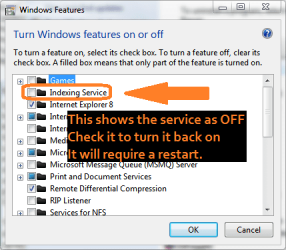
5. Turn Windows Features on or off
6. Make sure "Indexing Service" is installed.
7. Wait to reboot until after verifying folders shared are part of index.

windowsfeatureindexing.png

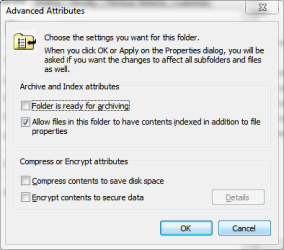
Now make sure that the folder/files you're trying to access are part of the index.

1. Right Click Folder
2. Properties
3. General Tab
4. Advanced
5. Make sure that "Allow files in this folder to have contents indexed..." is checked.
6. Reboot

folderindexing.png

Etzel42 @ socials.answers.microsoft.com said:
So I did find a way to get this to work without using Windows Media Player (WMP)... however it uses the same Libraries as WMP. If you open "Computer" (aka My Computer), Music, Pictures, ect.. or any folder really... You will notice that there is a "Libraries" folder in which Documents, Music, Pictures, and Vidoes is listed.. this is the same Libraries that WMP uses will you add the its libraries. Right click on any of the above mentioned sub folders in the Libraries folder and select "Properties." In the properties dialog you will find a button that says "Include a folder...," this is where you can select any folder on any drive and the contents of that folder will be shared with Xbox 360, provided that you have allowed it access to your computer via the Network and Sharing Center.

The only catch to this method (because there always is something) is that if you add or delete files in that folder which you added to the Libraries, it seems the library will not be updated with those changes. But if you access that folder via the Lbraries (as you can see all the files from that folder there) and then you add, delete or edit files, those changes are updated. So as long as you always remember to do everything from within the Libraries folder, you should be fine.

This is better than having to open WMP everytime but still seems like I should just be able to share a folder and update files in that folder and have the Xbox access it... but hey its good enough for now. WMP needs some serious help (in my opinion).. wish I could get WMP 11 back on Win7, 12 seems to be missing a lot of features that use to be there.
 

My Computer

Computer Manufacturer/Model Number
Apple Macbook Pro (April 2009)
OS
W7 Ult. x64 | OS X
CPU
Intel Mobile Core 2 Duo 2.93Ghz [T9800 Penryn]
Motherboard
NVIDIA nForce 730i Rev. B1 [Mac-F2268EC8 (U2E1)]
Memory
4096MB Samsung DDR3 Dual Channel [PC3-8500F 1066Mhz]
Graphics Card(s)
NVIDIA GeForce 9600M GT 512MB [G96M Rev. C1]
Sound Card
SB X-Fi Surround 5.1 USB | Onboard Realtek (Disabled)
Monitor(s) Displays
Acer x223wbd 22" | Apple Anti-Glare 17" (Disabled)
Screen Resolution
{Current} 1440x900 {Acer} 1680x1050 {Apple} 1920x1200
Hard Drives
{Internal}
Seagate Momentus 320GB 2.5" 7200RPM [ST9320421AS]

{Externals}
LaCie 320GB USB 2.0 HDD [301284UR]
LaCie 750GB USB 2.0 FW400 eSATA HDD [301314U]
LaCie 1TB USB 2.0 HDD [301304UR]
PSU
Magsafe
Case
Aluminum/Unibody (MBP52)
Cooling
2 x 6000 RPM Fans
Keyboard
Logitech G-15v2 [PN 920-000379]
Mouse
Logitech G-9 [PN 910-000338]
Internet Speed
12Mbps/2.5Mbps w/ 24Mbps Speed Boost [Comcast]
Other Info
Logitech X-540 Speakers [PN 970223-0122]
Sennheiser PC-151 Headset
Hey darkmatter, thanks for the reply. I'd seen that post by Etzel that you quoted, it still seemed like a bit of a ridiculous workaround. Like him, I feel that this should just work. But anyways.

The problem is that I use a small utility to automatically move files from my video editing drive to my shared drive once they finish processing, so I don't manually move them into the folder (or library). I can look to see if its possible to change the path in the utility to have it move the files through the library. In that case, I have a new question: Is there an actual path to files that are included in a library? (c:/users/username/videos......?)

As for your other suggestions with the indexing, I will try that tonight when I get home and report back as to how it went.

Thanks again for the response!
 

My Computer

OS
Windows 7
Have you tried using TVersity?
 

My Computer

Computer Manufacturer/Model Number
Self Build
OS
Windows 7 Ultimate 32bit
CPU
AMD Athlon 64 X2 6400+
Motherboard
ALiveNF6G-VSTA
Memory
4GB DDR2 800
Graphics Card(s)
GEFORCE 8600GT 256MB
Sound Card
ONBOARD
Monitor(s) Displays
17" TEO TL766
Hard Drives
156GB SAMSUNG SAMSUNG SP1604N/R ATA Device (PATA)
161GB Hitachi HDT722516DLAT80 ATA Device (PATA)
313GB Western Digital WDC WD32 00BEVT-75ZCT SCSI Disk Device (ATA)
244GB Hitachi Hitachi HDT725025VLA SCSI Disk Device (ATA)
Cooling
Arctic Cooling Freezer 64 Pro
Have you tried using TVersity?

Tversity, XBMC, and other uPnP servers are going to be the last thing I try if nothing else works. If I can avoid using more software than is necessary, thats preferable (I like a clean machine with as few background processes as is possible).

The thing is I'm so close - I can see and play all my files, there's just this bizarre delay in recently added files showing up!

(PS thanks kidicarus for your reply)
 

My Computer

OS
Windows 7
So I thought I would post an update here in case anyone else is trying to figure this out...

Possible Workaround #1
Apparently if you do all of your changes through the Libraries folder, the changes will show instantaneosly. If true, this shows that the problem lies in Window's indexing service.​


I tried manually moving all my files into the shared folder by using this method. Unfortunately it did not fix the problem

Possible Workaround #2
A workaround without solely using the library's folders would be to open Windows Media Player 12 whenever you want the files to refresh, apparently this starts the indexing.​


I didn't try this as it was undesirable. I really don't like WMP, and I found something that worked just as good (see below)

Possible Fix:
1. Start
2. Control Panel
3. Programs
4. Programs and Features
5. Turn Windows Features on or off
6. Make sure "Indexing Service" is installed.
7. Wait to reboot until after verifying folders shared are part of index.​


I checked - Indexing service was installed and started. Good suggestion though!

View attachment 68837

Now make sure that the folder/files you're trying to access are part of the index.

1. Right Click Folder
2. Properties
3. General Tab
4. Advanced
5. Make sure that "Allow files in this folder to have contents indexed..." is checked.
6. Reboot

I checked - all shared folders already had this box checked off.

Etzel42 @ socials.answers.microsoft.com said:
So I did find a way to get this to work without using Windows Media Player (WMP)... however it uses the same Libraries as WMP. If you open "Computer" (aka My Computer), Music, Pictures, ect.. or any folder really... You will notice that there is a "Libraries" folder in which Documents, Music, Pictures, and Vidoes is listed.. this is the same Libraries that WMP uses will you add the its libraries. Right click on any of the above mentioned sub folders in the Libraries folder and select "Properties." In the properties dialog you will find a button that says "Include a folder...," this is where you can select any folder on any drive and the contents of that folder will be shared with Xbox 360, provided that you have allowed it access to your computer via the Network and Sharing Center.

The method described by Etzel is exactly what I used to finally get my files to show up on the xbox. Definite kudos to him. But then I ran into the same problem he did apparently - refreshing of files.

What I finally got to work reliably was removing and then re-adding the shared folder to the "Videos" library. This forces Windows to refresh the library. Its a pretty cheezy thing to have to do, but its the only thing I've found that works repeatedly.

Like Etzel, I think there's definitely something broken here. Windows XP in concert with WMC2 had no problem instantly refreshing while using little or no system resources. How can it not be possible in Windows 7, Microsoft's latest and greatest???

I think its telling that no Microsoft MVP's have replied to this post. Finally got you all stumped, do we?

Other than this, I am loving Windows 7. Problem is, this could be a real deal-breaker :confused:
 

My Computer

OS
Windows 7
Have you tried using TVersity?

Tversity, XBMC, and other uPnP servers are going to be the last thing I try if nothing else works. If I can avoid using more software than is necessary, thats preferable (I like a clean machine with as few background processes as is possible).

The thing is I'm so close - I can see and play all my files, there's just this bizarre delay in recently added files showing up!

(PS thanks kidicarus for your reply)

Then turn off indexing service :)

TVersity has proven itself over time. Microsoft maybe good at doing some stuff but they are not the best at everything. TVersity is fast, reliable, instantanous and as a no impact on system performance. I'd have to check but i'm sure indexing service as a bigger footprint than TVersity. So now that you've got the best OS and the best console (i hear ps3 fanboy ranting) why not use the best sharing software?

I had the same trouble a while back and after installing TVersity to my surprise, some file format i was'nt even able to read worked too! To me waisting 15 minutes to delete and add the files back to my library every time i wanted to watch a movie sounds like accepting to buy a cheap a** car for twice the price and then saying no to a free add on that'll turn it into a real race car. What's the point? If you weight the pros and cons TVersity is really the best solution out there to my opinion
 

My Computer

OS
Windows pro 7 32 and 64 bits
CPU
AMD Athlon 2 X2
Memory
4Gb
Graphics Card(s)
ATI Radeon 4650
Sound Card
Realtek (integrated)
Monitor(s) Displays
2 x 19"
Screen Resolution
1280x1024
Hard Drives
750GB of pure virtual crap
TVersity has proven itself over time. Microsoft maybe good at doing some stuff but they are not the best at everything. TVersity is fast, reliable, instantanous and as a no impact on system performance. I'd have to check but i'm sure indexing service as a bigger footprint than TVersity. So now that you've got the best OS and the best console (i hear ps3 fanboy ranting) why not use the best sharing software?

I had the same trouble a while back and after installing TVersity to my surprise, some file format i was'nt even able to read worked too! To me waisting 15 minutes to delete and add the files back to my library every time i wanted to watch a movie sounds like accepting to buy a cheap a** car for twice the price and then saying no to a free add on that'll turn it into a real race car. What's the point? If you weight the pros and cons TVersity is really the best solution out there to my opinion

Thats a good point, Wyldkaarde, about the footprint of indexing service vs tversity. I think I might go ahead an bite the bullet. Like you, I find it a huge pain in the butt to have to remove/re-add my folders every time I want to move in a file.

Thanks again for the input folks. I'm going to leave this post open though in case anyone ever manages to figure this out!
 

My Computer

OS
Windows 7
glad I came across this topic in a google search. This forum is very helpful.

I too have been struggling with this issue for a while and it only happened when I got windows 7. I tried all of the solutions mentioned here, but they didn't work.

What worked for me was simply opening the file on my computer before I tried to access it on the xbox. Worked like a charm. Just by opening then closing it, the file was able to be "seen" by the xbox, instantly. Very strange, but I'm just glad it worked.
 

My Computer

OS
windows 7
I'm suffering from the same frustration

looks like restarting the 'Windows Media Player Network Sharing Service' service seems to refresh the items shown on the 360 (or PS3, not a fanboy, just have both)

If only my VBscripts that used to work fine in XP work in 7, I could automate it, but thats another issue.

Windows 7 seems to want to fight me on everything I do, not really justifying itself on the upgrade? from XP
 

My Computer

OS
Windows 7 Professional 32-bit
Hi Xierion,

As mentioned in the other posts, this doesn't look like something MS is gonna fix soon. Have you tried TVersity? I was skeptical at first too, but it turned out to be ridiculously easy to set up, and it doesn't use any resources to speak of. It also doesn't do anything shady in the background (I keep my computer a VERY tight ship). I've been using it for about 6 months now with no issues. Files show up within a few seconds, and so far I have found very few that don't play. I recommend giving it a try, its worth it to be able to have Windows 7 on yer computer (and still watch stuff on yer xbox). Good luck!
 

My Computer

OS
Windows 7
This might help anyone still having issues with this.

First I can't believe how old this post is, yet I still seem to be having this issue. I admit to being a latecomer to the 360 scene but have been around Computers my entire life. I am not happy with having to use a third party software to play Videos from one Microsoft OS to a Microsoft machine. I want my videos to show up as soon as they are added to the shared folder. Plus rewinding and fast forwarding with Tversity for me anyway is horrible. I am always busy and never have time to watch something completely through so I have to usually stop in the middle of something and have to pick it up later.
The only thing I have found to work was mentioned earlier in the post, to restart the "Windows Media Player Network Sharing Service". This can be annoying having to do it manually and as I know this was offered as a Solution no one mentioned a simple way to automate this process. Since this is a simple Windows network service you can use the NET STOP and NET START dos commands to restart the service. With those commands you can make a simple batch file and then set a scheduled task to run the batch file how ever often you need it to refresh. Since I have my Recorded TV shows encode to smaller avi files automatically during work I have it run after they finish encoding. By the time I get home from work I can relax and watch all the shows that recorded the night before encoded and on my Xbox in the shared folder without Tversity. To create the batch file Open Notepad, on the first line type NET STOP WMPNetworkSvc then hit enter 2 times. On the third line type NET START WMPNetworkSvc. Then click file Save As, navigate to C:\Windows\System32, name the file something like mediarefresh.bat. It is very important that you clear out the .txt that auto populates the file name field before naming your batch file. If it ends up looking like mediarefresh.bat.txt it will not work. To test it open a command prompt, run, cmd, enter, or click the start orb in the search bar type in CMD when CMD.exe shows up click it. Now simply type in mediafresh in the command prompt and you should see a message saying the service is stopping then stopped successfully, then a message saying the service is starting then started successfully. If you need to do it on the fly and are familiar with the run command, open run, WindowsKey+R, and type in mediarefresh and hit enter. Or just create a shortcut on the desktop for yourself then you can just double click it and walk away happy. Again I know this post is old so if there is something else out there other than 3rd party software that I somehow missed on Google i would love to hear it.
 

My Computer

OS
Windows 7 Professional x64
Well I've been having this same issue as well, and I happened across a fix by accident. What worked for me was right clicking my Video library, hitting Properties, then removing the video library's i was using. I didn't re add the library's after removing them, and for some reason, my Xbox updates IMMEDIATELY after transferring something into that folder now. I don't have to even mess with it anymore, I hope this helps someone out there, because this has been bugging me for a loooong time!
 

My Computer

Computer type
PC/Desktop
OS
Windows 7 Ultimate x64
Back
Top