pufftissue
New member
- Local time
- 7:37 PM
- Messages
- 1
Hi everyone,
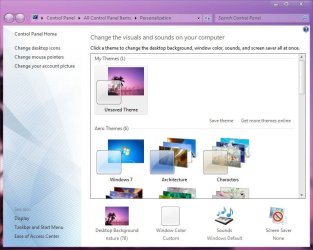
I am wondering if someone could show me how to change windows 7's pastel-blue motif in any given window's background. It's easier to show what I mean (please see pic).
I'd like a light gray background. I've looked through the advanced options in the theme and it does not appear to be able to change what I want. Is this like an unchangeable windows 7 look and feel? I'm pretty sure that it's not.
I am also eager to change this behavior in Eclipse, and someone said that the default pastel blue for java is also tied to the underlying system, and that's why it's pastel blue.
THANK YOU!
I am wondering if someone could show me how to change windows 7's pastel-blue motif in any given window's background. It's easier to show what I mean (please see pic).
I'd like a light gray background. I've looked through the advanced options in the theme and it does not appear to be able to change what I want. Is this like an unchangeable windows 7 look and feel? I'm pretty sure that it's not.
I am also eager to change this behavior in Eclipse, and someone said that the default pastel blue for java is also tied to the underlying system, and that's why it's pastel blue.
THANK YOU!
Attachments


My Computer
At a glance
win 7
- OS
- win 7