Cant turn on/off systray icons

LynRennick

New member
Local time
9:22 PM
Messages
7
Hi,

My Network icon went missing from the systray so I went into the Control Panel etc to turn it back on and found that it's greyed out. It tells me that only the Administrator can turn on/off the icons. I AM the Administrator! lol :cry:

On another forum I was told, that as I only had one Logon account, as Administrator, it was a bad thing to do and that I should create a 2nd account and use that all the time and just go to the Admin accoount when needed. I did that and changed my usual Admin account to a normal account and the new one to Admin. Now, when I logon as Admin I can see the Network icon but I still cant see it when Im on with the normal account. When I login as Admin I still can't change the icons for my ordinary account.

Hope you can understand what I'm saying and I've not confused you. lol :o

Can anyone help me please? I'd like to be able to see the Network icon with both accounts.

Thanx.

Lyn
x
 

My Computer My Computer

At a glance

Windows 7 Home Premium 64-bitIntel Core 2 Duo4GB
Computer Manufacturer/Model Number
Acer Aspire X1700
OS
Windows 7 Home Premium 64-bit
CPU
Intel Core 2 Duo
Memory
4GB
Hard Drives
ACER (C:)
DATA (D:)
TOSHIBA 1TB EHD
Welcome!

If you are the only user of your computer, I suggest using an Admin account as your main account. If you need a Standard account, use one, but you will find an Admin account will simplify things.

You may want to run a system files check. Open an elevated command prompt and enter sfc /scannow.

A repair install might help also, if the above doesn't work.
 

My Computer My Computer

At a glance

Windows 7 Professional x64Intel i7 2600K OC'd @ 4620 MHz16GB GSkill Sniper 2133 Mhz (4x4GB)EVGA GeForce GTX 480 SuperClocked+
Computer Manufacturer/Model Number
Custom
OS
Windows 7 Professional x64
CPU
Intel i7 2600K OC'd @ 4620 MHz
Motherboard
Asus P8Z68-V Pro
Memory
16GB GSkill Sniper 2133 Mhz (4x4GB)
Graphics Card(s)
EVGA GeForce GTX 480 SuperClocked+
Sound Card
Realtek High Definition Audio
Monitor(s) Displays
2x Acer S273HLbmii 27"
Screen Resolution
2 x 1920x1080
Hard Drives
64GB Crucial M4 SSD

Storage: Hitachi 1TB 5400RPM, Samsung 1.5TB 5400RPM
PSU
Corsair HW Series 750w (modular)
Case
Cooler Master HAF 932 Advanced Blue Edition
Cooling
CM Hyper 212+ CPU cooler, 3x 230mm + 1x 140mm case fans
Keyboard
Logitech MK320 (wireless)
Mouse
Logitech MK320 (wireless)
Internet Speed
30 Mb/s : 2 Mb/s
If it just started recently, then just do a system restore.
 

My Computer My Computer

At a glance

Windows® 8 Pro (64-bit)Intel® Core™ i5 Processor 2467M (1.60GHz, 3MB...6GB DDR3 System Memory at 1,333MHz (on BD 4GB...AMD Radeon™ HD7550M 1GB DDR3 (Ext. Graphic)
Computer Manufacturer/Model Number
Samsung NP530U4B-S02IN
OS
Windows® 8 Pro (64-bit)
CPU
Intel® Core™ i5 Processor 2467M (1.60GHz, 3MB L3 Cache)
Motherboard
Samsung Electronics
Memory
6GB DDR3 System Memory at 1,333MHz (on BD 4GB + 2GB x 1)
Graphics Card(s)
AMD Radeon™ HD7550M 1GB DDR3 (Ext. Graphic)
Sound Card
Realtek High Definition Audio
Monitor(s) Displays
35.56cm (14.0) SuperBright 300nit HD LED Display
Screen Resolution
1366x768
Hard Drives
1TB S-ATA II Hard Drive (5400RPM) with ExpressCache 16GB SSD
Internet Speed
sucks
Antivirus
Microsoft Security Essentials
Browser
Google Chrome (Sync enabled)
Don't confuse the "Administrator" account with a user account that has administrator privileges. The built in Administrator account is there for emergencies and is not meant to be used as your default daily user account. It's fine to create a separate user account and make it an administrator. Just don't use the built in Administrator account as your only user account. If it gets hosed you have no way to get in and fix it. Having said that even if your user account has administrative privileges windows UAC is still going to prompt you with "you must have...." messages. You could turn it off temporarily while you try to sort this out just to rule it out. Just don't forget to turn it back on again. I wouldn't personally use a "normal account" for my daily login. It would just drive me nuts not being able to change anything. The only time I would use that type of account is if I was to let somebody else use my PC and i didn't want them to be able to change anything.
 

My Computer My Computer

At a glance

Windows 10 Education 64 bitAMD Phenom II X4 980 Black Edition Deneb 3.7GHz8GB 4GBx2 Kingston PC10600 DDR3 1333 MemoryZotac NVIDIA Geforce GT640 2 Gig DDR3 PCIe
Computer type
PC/Desktop
Computer Manufacturer/Model Number
Home Built
OS
Windows 10 Education 64 bit
CPU
AMD Phenom II X4 980 Black Edition Deneb 3.7GHz
Motherboard
Asus M4N68T-M V2 µATX Motherboard
Memory
8GB 4GBx2 Kingston PC10600 DDR3 1333 Memory
Graphics Card(s)
Zotac NVIDIA Geforce GT640 2 Gig DDR3 PCIe
Sound Card
VIA VT1708s High Definition Audio 8-channel Onboard
Monitor(s) Displays
22" LG E2242 1080p and 2 19" I-INC AG191D
Screen Resolution
1280x1024 - 1920x1080 - 1280x1024
Hard Drives
Crucial M100 256 GB SSD and 500 GB WD Blue SATA
PSU
Thermaltake TR 620
Case
Power Up Black ATX Mid-Tower Case
Cooling
Stock heatsink and fan
Keyboard
Logitech Wireless K350 Wave
Mouse
Logitech Wireless M570 Trackman Wheel
Internet Speed
80 Mbps Down 30 Mbps Up
Antivirus
Windows Defender
Browser
Internet Explorer 11
Other Info
HP DVD1040e Lightscribe - External USB2

My Computer My Computer

At a glance

64-bit Windows 11 Pro for WorkstationsIntel i7-8700K OC'd to 5 GHz64 GB (4x16GB) G.SKILL TridentZ RGB DDR4 3600...ASUS ROG-STRIX-GTX1080TI-O11G-GAMING
Computer type
PC/Desktop
Computer Manufacturer/Model Number
Self built custom
OS
64-bit Windows 11 Pro for Workstations
CPU
Intel i7-8700K OC'd to 5 GHz
Motherboard
ASUS ROG Maximus XI Formula Z390
Memory
64 GB (4x16GB) G.SKILL TridentZ RGB DDR4 3600 MHz
Graphics Card(s)
ASUS ROG-STRIX-GTX1080TI-O11G-GAMING
Sound Card
Integrated
Monitor(s) Displays
2 x Samsung Odyssey G7 27"
Screen Resolution
2560x1440
Hard Drives
1TB Samsung 990 PRO M.2,
4TB Samsung 990 PRO PRO M.2,
TerraMaster F8 SSD Plus NAS
PSU
Seasonic Prime Titanium 850W
Case
Thermaltake Core P3
Cooling
Corsair Hydro H115i
Keyboard
Logitech wireless K800
Mouse
Logitech MX Master 4
Internet Speed
2 Gb/s Download and 100 Mb/s Upload
Antivirus
Malwarebyte Anti-Malware Premium
Browser
Google Chrome
Other Info
Logitech Z625 speaker system,
Logitech BRIO 4K Pro webcam,
HP Color LaserJet Pro MFP M477fdn,
APC SMART-UPS RT 1000 XL - SURT1000XLI,
Galaxy S23 Plus phone
Thanx for the replies. But its still the same.

The first thing I did Brink, was to check that I had the Network icon turned on, and as I said, it wasn't and I am unable to turn it on as it is greyed out. This is the problem I have..I cant turn anything on or off as it says I'm not the administrator.

I took notice of Jonathan_King's comments and I have now got rid of the 2nd account, so as before, I am the only user and am the Administrator.

I also did what JK suggested re: elevated command prompt and sfc /scannow, it scanned and said that there had been a few errors which had been fixed but I lost my Internet connection and couldnt get it back at all. I was having quite a few probs so I ended up using System Restore and went back to last Wednesday, when I know the Network icone was in the systray...but it's still the same..no icon and I can't turn it on.

I'm confused now as I've now seen Alphanumeric's post saying that I SHOULD have a 2nd account. :( I've only ever had one account and that was as Administrator. I only created the second account yesterday when someone on another forum said I should. But, whether I have one or two accounts, the problem still exists and was there BEFORE I created the second account. I WAS the Administrator but it wasn't letting me turn on/off the icons and still said only an administrator could do that, which I was.

The Network icon went missing from the systray on Thursday.

I'm really beginning to hate Windows 7. I only installed it last Sunday and I've had nothing but trouble since. I've not had this much trouble with any of my computer systems in the 10 years I've been using a computer, going from Windows 98, XP, Vista and now 7. I got my computer in October the day before 7 came out..yes..I know..stupid move...but Acer sent me a Windows 7 disc but I've only just found the time to install it.

I want my XP back! :sarc:

Lyn
 

My Computer My Computer

At a glance

Windows 7 Home Premium 64-bitIntel Core 2 Duo4GB
Computer Manufacturer/Model Number
Acer Aspire X1700
OS
Windows 7 Home Premium 64-bit
CPU
Intel Core 2 Duo
Memory
4GB
Hard Drives
ACER (C:)
DATA (D:)
TOSHIBA 1TB EHD
Lyn,

Did you do a clean install or a upgrade install to Windows 7? Upgrade installs may sometimes develop issues from the previous OS.

Sometimes a simple restart of the computer will return them to normal. If not, then I would try what Dinesh posted above and do a system restore using a restore point dated before this happened.
 

My Computer My Computer

At a glance

64-bit Windows 11 Pro for WorkstationsIntel i7-8700K OC'd to 5 GHz64 GB (4x16GB) G.SKILL TridentZ RGB DDR4 3600...ASUS ROG-STRIX-GTX1080TI-O11G-GAMING
Computer type
PC/Desktop
Computer Manufacturer/Model Number
Self built custom
OS
64-bit Windows 11 Pro for Workstations
CPU
Intel i7-8700K OC'd to 5 GHz
Motherboard
ASUS ROG Maximus XI Formula Z390
Memory
64 GB (4x16GB) G.SKILL TridentZ RGB DDR4 3600 MHz
Graphics Card(s)
ASUS ROG-STRIX-GTX1080TI-O11G-GAMING
Sound Card
Integrated
Monitor(s) Displays
2 x Samsung Odyssey G7 27"
Screen Resolution
2560x1440
Hard Drives
1TB Samsung 990 PRO M.2,
4TB Samsung 990 PRO PRO M.2,
TerraMaster F8 SSD Plus NAS
PSU
Seasonic Prime Titanium 850W
Case
Thermaltake Core P3
Cooling
Corsair Hydro H115i
Keyboard
Logitech wireless K800
Mouse
Logitech MX Master 4
Internet Speed
2 Gb/s Download and 100 Mb/s Upload
Antivirus
Malwarebyte Anti-Malware Premium
Browser
Google Chrome
Other Info
Logitech Z625 speaker system,
Logitech BRIO 4K Pro webcam,
HP Color LaserJet Pro MFP M477fdn,
APC SMART-UPS RT 1000 XL - SURT1000XLI,
Galaxy S23 Plus phone
Hi Brink,

It was a clean install. It was the only way that it could be done with the model PC I have.

I did the System Restore earlier on this afternoon after I did the elevated command prompt and I lost my Internet and a few other issues occurred. I guess I'm just not meant to have the Network icon showing. lol It does seem strange tho that even as the Administrator it's telling me that I can't change the icon as I need to be an Administrator! Weird! :confused:

Lyn
 

My Computer My Computer

At a glance

Windows 7 Home Premium 64-bitIntel Core 2 Duo4GB
Computer Manufacturer/Model Number
Acer Aspire X1700
OS
Windows 7 Home Premium 64-bit
CPU
Intel Core 2 Duo
Memory
4GB
Hard Drives
ACER (C:)
DATA (D:)
TOSHIBA 1TB EHD
There is a trouble shooting section in control panel with a section for "Network and Internet" and also "System and Security". It might be worth a look see.
 

My Computer My Computer

At a glance

Windows 10 Education 64 bitAMD Phenom II X4 980 Black Edition Deneb 3.7GHz8GB 4GBx2 Kingston PC10600 DDR3 1333 MemoryZotac NVIDIA Geforce GT640 2 Gig DDR3 PCIe
Computer type
PC/Desktop
Computer Manufacturer/Model Number
Home Built
OS
Windows 10 Education 64 bit
CPU
AMD Phenom II X4 980 Black Edition Deneb 3.7GHz
Motherboard
Asus M4N68T-M V2 µATX Motherboard
Memory
8GB 4GBx2 Kingston PC10600 DDR3 1333 Memory
Graphics Card(s)
Zotac NVIDIA Geforce GT640 2 Gig DDR3 PCIe
Sound Card
VIA VT1708s High Definition Audio 8-channel Onboard
Monitor(s) Displays
22" LG E2242 1080p and 2 19" I-INC AG191D
Screen Resolution
1280x1024 - 1920x1080 - 1280x1024
Hard Drives
Crucial M100 256 GB SSD and 500 GB WD Blue SATA
PSU
Thermaltake TR 620
Case
Power Up Black ATX Mid-Tower Case
Cooling
Stock heatsink and fan
Keyboard
Logitech Wireless K350 Wave
Mouse
Logitech Wireless M570 Trackman Wheel
Internet Speed
80 Mbps Down 30 Mbps Up
Antivirus
Windows Defender
Browser
Internet Explorer 11
Other Info
HP DVD1040e Lightscribe - External USB2
Lyn,

Perhaps we are missing something. To be sure, could you post some screenshots of what you are seeing?
 

My Computer My Computer

At a glance

64-bit Windows 11 Pro for WorkstationsIntel i7-8700K OC'd to 5 GHz64 GB (4x16GB) G.SKILL TridentZ RGB DDR4 3600...ASUS ROG-STRIX-GTX1080TI-O11G-GAMING
Computer type
PC/Desktop
Computer Manufacturer/Model Number
Self built custom
OS
64-bit Windows 11 Pro for Workstations
CPU
Intel i7-8700K OC'd to 5 GHz
Motherboard
ASUS ROG Maximus XI Formula Z390
Memory
64 GB (4x16GB) G.SKILL TridentZ RGB DDR4 3600 MHz
Graphics Card(s)
ASUS ROG-STRIX-GTX1080TI-O11G-GAMING
Sound Card
Integrated
Monitor(s) Displays
2 x Samsung Odyssey G7 27"
Screen Resolution
2560x1440
Hard Drives
1TB Samsung 990 PRO M.2,
4TB Samsung 990 PRO PRO M.2,
TerraMaster F8 SSD Plus NAS
PSU
Seasonic Prime Titanium 850W
Case
Thermaltake Core P3
Cooling
Corsair Hydro H115i
Keyboard
Logitech wireless K800
Mouse
Logitech MX Master 4
Internet Speed
2 Gb/s Download and 100 Mb/s Upload
Antivirus
Malwarebyte Anti-Malware Premium
Browser
Google Chrome
Other Info
Logitech Z625 speaker system,
Logitech BRIO 4K Pro webcam,
HP Color LaserJet Pro MFP M477fdn,
APC SMART-UPS RT 1000 XL - SURT1000XLI,
Galaxy S23 Plus phone

My Computer My Computer

At a glance

Windows 7 Home Premium 64-bitIntel Core 2 Duo4GB
Computer Manufacturer/Model Number
Acer Aspire X1700
OS
Windows 7 Home Premium 64-bit
CPU
Intel Core 2 Duo
Memory
4GB
Hard Drives
ACER (C:)
DATA (D:)
TOSHIBA 1TB EHD

My Computer My Computer

At a glance

64-bit Windows 11 Pro for WorkstationsIntel i7-8700K OC'd to 5 GHz64 GB (4x16GB) G.SKILL TridentZ RGB DDR4 3600...ASUS ROG-STRIX-GTX1080TI-O11G-GAMING
Computer type
PC/Desktop
Computer Manufacturer/Model Number
Self built custom
OS
64-bit Windows 11 Pro for Workstations
CPU
Intel i7-8700K OC'd to 5 GHz
Motherboard
ASUS ROG Maximus XI Formula Z390
Memory
64 GB (4x16GB) G.SKILL TridentZ RGB DDR4 3600 MHz
Graphics Card(s)
ASUS ROG-STRIX-GTX1080TI-O11G-GAMING
Sound Card
Integrated
Monitor(s) Displays
2 x Samsung Odyssey G7 27"
Screen Resolution
2560x1440
Hard Drives
1TB Samsung 990 PRO M.2,
4TB Samsung 990 PRO PRO M.2,
TerraMaster F8 SSD Plus NAS
PSU
Seasonic Prime Titanium 850W
Case
Thermaltake Core P3
Cooling
Corsair Hydro H115i
Keyboard
Logitech wireless K800
Mouse
Logitech MX Master 4
Internet Speed
2 Gb/s Download and 100 Mb/s Upload
Antivirus
Malwarebyte Anti-Malware Premium
Browser
Google Chrome
Other Info
Logitech Z625 speaker system,
Logitech BRIO 4K Pro webcam,
HP Color LaserJet Pro MFP M477fdn,
APC SMART-UPS RT 1000 XL - SURT1000XLI,
Galaxy S23 Plus phone
Lyn,

The Customize - Notification Area Icons window would be a good one, and any other screen that will not allow you to change them. Also any error messages. :)

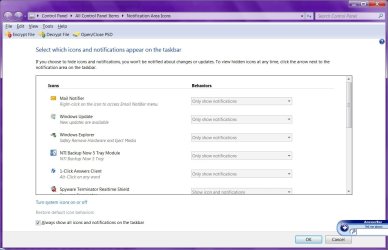
OK..well this first one is the Notification Area Icons, and as you can see everything is greyed out.

The second one is after I click "Turn system icons on or off". As you can see the Clock and Volume Icons are set to "On" but Network and Power are "Off" and greyed out.

When I clickk on "Customize Notification Icons it takes me back to the previous screen. When I click on "Restore deault icon behaviors" nothing at all happens.

Notification Area Icons.jpg

Network Icon Greyed Out.jpg

I cant attached the 3rd screenshot so will do it after this post.

Continued....

Continued...


When I click to find out why I can't turn them on I get this:

When I click to find out why I can't turn them on or off I get this:

Lyn
 

Attachments

  • Why won't Windows allow etc..jpg
    Why won't Windows allow etc..jpg
    59.3 KB · Views: 32
  • Why won't Windows allow etc..jpg
    Why won't Windows allow etc..jpg
    59.3 KB · Views: 19
Last edited by a moderator:

My Computer My Computer

At a glance

Windows 7 Home Premium 64-bitIntel Core 2 Duo4GB
Computer Manufacturer/Model Number
Acer Aspire X1700
OS
Windows 7 Home Premium 64-bit
CPU
Intel Core 2 Duo
Memory
4GB
Hard Drives
ACER (C:)
DATA (D:)
TOSHIBA 1TB EHD
Ok Lyn,

From what I see, you will need to uncheck the Always show all icons on the taskbar box in the first screenshot for the Notifications Area Icons for them not to be grayed out.

On the second screenshot, it looks like you need to enable all of the ones (ex: Network) that are grayed out. Power will not ungray unless you have a battery on your computer though. It's just like the 2nd example screenshot in this tutorial. If enabling Network from this tutorial does not help, then search the registry using Find and Find Next for HideSCANetwork to see if it may be at some other location. If it is found, then delete all entries of it that is found. Afterwards, restart and see if it is ungrayed now.

Hope this helps,
Shawn
 

My Computer My Computer

At a glance

64-bit Windows 11 Pro for WorkstationsIntel i7-8700K OC'd to 5 GHz64 GB (4x16GB) G.SKILL TridentZ RGB DDR4 3600...ASUS ROG-STRIX-GTX1080TI-O11G-GAMING
Computer type
PC/Desktop
Computer Manufacturer/Model Number
Self built custom
OS
64-bit Windows 11 Pro for Workstations
CPU
Intel i7-8700K OC'd to 5 GHz
Motherboard
ASUS ROG Maximus XI Formula Z390
Memory
64 GB (4x16GB) G.SKILL TridentZ RGB DDR4 3600 MHz
Graphics Card(s)
ASUS ROG-STRIX-GTX1080TI-O11G-GAMING
Sound Card
Integrated
Monitor(s) Displays
2 x Samsung Odyssey G7 27"
Screen Resolution
2560x1440
Hard Drives
1TB Samsung 990 PRO M.2,
4TB Samsung 990 PRO PRO M.2,
TerraMaster F8 SSD Plus NAS
PSU
Seasonic Prime Titanium 850W
Case
Thermaltake Core P3
Cooling
Corsair Hydro H115i
Keyboard
Logitech wireless K800
Mouse
Logitech MX Master 4
Internet Speed
2 Gb/s Download and 100 Mb/s Upload
Antivirus
Malwarebyte Anti-Malware Premium
Browser
Google Chrome
Other Info
Logitech Z625 speaker system,
Logitech BRIO 4K Pro webcam,
HP Color LaserJet Pro MFP M477fdn,
APC SMART-UPS RT 1000 XL - SURT1000XLI,
Galaxy S23 Plus phone
Is your network connection working? Do you have Internet? If network is not working that may be why the network icon is grayed out. More specifically if your network card is not detected or not working I think I would try to fix that first, then the ICON might fix itself.
 

My Computer My Computer

At a glance

Windows 10 Education 64 bitAMD Phenom II X4 980 Black Edition Deneb 3.7GHz8GB 4GBx2 Kingston PC10600 DDR3 1333 MemoryZotac NVIDIA Geforce GT640 2 Gig DDR3 PCIe
Computer type
PC/Desktop
Computer Manufacturer/Model Number
Home Built
OS
Windows 10 Education 64 bit
CPU
AMD Phenom II X4 980 Black Edition Deneb 3.7GHz
Motherboard
Asus M4N68T-M V2 µATX Motherboard
Memory
8GB 4GBx2 Kingston PC10600 DDR3 1333 Memory
Graphics Card(s)
Zotac NVIDIA Geforce GT640 2 Gig DDR3 PCIe
Sound Card
VIA VT1708s High Definition Audio 8-channel Onboard
Monitor(s) Displays
22" LG E2242 1080p and 2 19" I-INC AG191D
Screen Resolution
1280x1024 - 1920x1080 - 1280x1024
Hard Drives
Crucial M100 256 GB SSD and 500 GB WD Blue SATA
PSU
Thermaltake TR 620
Case
Power Up Black ATX Mid-Tower Case
Cooling
Stock heatsink and fan
Keyboard
Logitech Wireless K350 Wave
Mouse
Logitech Wireless M570 Trackman Wheel
Internet Speed
80 Mbps Down 30 Mbps Up
Antivirus
Windows Defender
Browser
Internet Explorer 11
Other Info
HP DVD1040e Lightscribe - External USB2
Ok Lyn,

From what I see, you will need to uncheck the Always show all icons on the taskbar box in the first screenshot for the Notifications Area Icons for them not to be grayed out.

On the second screenshot, it looks like you need to enable all of the ones (ex: Network) that are grayed out. Power will not ungray unless you have a battery on your computer though. It's just like the 2nd example screenshot in this tutorial. If enabling Network from this tutorial does not help, then search the registry using Find and Find Next for HideSCANetwork to see if it may be at some other location. If it is found, then delete all entries of it that is found. Afterwards, restart and see if it is ungrayed now.

Hope this helps,
Shawn


Hi Again,

Well, I did everything you said except search the registry and nothing worked..then I searched the registry and looked for HideSCANetwork, found it and deleted it, rebooted and MY NETWORK ICON IS BACK!!!!

Thank you sooooo much for your help (and everybody else), I really appreciate the time taken in helping me.

I'm a happy bunny again. :-) Wooooo Hoooooooooooooooooo!!!!!

Thanx. :thumbsup:

Lyn
xxxxxx
 

My Computer My Computer

At a glance

Windows 7 Home Premium 64-bitIntel Core 2 Duo4GB
Computer Manufacturer/Model Number
Acer Aspire X1700
OS
Windows 7 Home Premium 64-bit
CPU
Intel Core 2 Duo
Memory
4GB
Hard Drives
ACER (C:)
DATA (D:)
TOSHIBA 1TB EHD
You're most welcome Lynn. That's great news. :)

Do you remember where in the registry it was for you?
 

My Computer My Computer

At a glance

64-bit Windows 11 Pro for WorkstationsIntel i7-8700K OC'd to 5 GHz64 GB (4x16GB) G.SKILL TridentZ RGB DDR4 3600...ASUS ROG-STRIX-GTX1080TI-O11G-GAMING
Computer type
PC/Desktop
Computer Manufacturer/Model Number
Self built custom
OS
64-bit Windows 11 Pro for Workstations
CPU
Intel i7-8700K OC'd to 5 GHz
Motherboard
ASUS ROG Maximus XI Formula Z390
Memory
64 GB (4x16GB) G.SKILL TridentZ RGB DDR4 3600 MHz
Graphics Card(s)
ASUS ROG-STRIX-GTX1080TI-O11G-GAMING
Sound Card
Integrated
Monitor(s) Displays
2 x Samsung Odyssey G7 27"
Screen Resolution
2560x1440
Hard Drives
1TB Samsung 990 PRO M.2,
4TB Samsung 990 PRO PRO M.2,
TerraMaster F8 SSD Plus NAS
PSU
Seasonic Prime Titanium 850W
Case
Thermaltake Core P3
Cooling
Corsair Hydro H115i
Keyboard
Logitech wireless K800
Mouse
Logitech MX Master 4
Internet Speed
2 Gb/s Download and 100 Mb/s Upload
Antivirus
Malwarebyte Anti-Malware Premium
Browser
Google Chrome
Other Info
Logitech Z625 speaker system,
Logitech BRIO 4K Pro webcam,
HP Color LaserJet Pro MFP M477fdn,
APC SMART-UPS RT 1000 XL - SURT1000XLI,
Galaxy S23 Plus phone
Yes, it was in HKEY_CURRENT_USER>Software>Policies but I cant remember if there was anything after Policies..but I remember getting to Policies. :)

Lyn
x
 

My Computer My Computer

At a glance

Windows 7 Home Premium 64-bitIntel Core 2 Duo4GB
Computer Manufacturer/Model Number
Acer Aspire X1700
OS
Windows 7 Home Premium 64-bit
CPU
Intel Core 2 Duo
Memory
4GB
Hard Drives
ACER (C:)
DATA (D:)
TOSHIBA 1TB EHD
Thank you Lyn for posting back with the location. :)
 

My Computer My Computer

At a glance

64-bit Windows 11 Pro for WorkstationsIntel i7-8700K OC'd to 5 GHz64 GB (4x16GB) G.SKILL TridentZ RGB DDR4 3600...ASUS ROG-STRIX-GTX1080TI-O11G-GAMING
Computer type
PC/Desktop
Computer Manufacturer/Model Number
Self built custom
OS
64-bit Windows 11 Pro for Workstations
CPU
Intel i7-8700K OC'd to 5 GHz
Motherboard
ASUS ROG Maximus XI Formula Z390
Memory
64 GB (4x16GB) G.SKILL TridentZ RGB DDR4 3600 MHz
Graphics Card(s)
ASUS ROG-STRIX-GTX1080TI-O11G-GAMING
Sound Card
Integrated
Monitor(s) Displays
2 x Samsung Odyssey G7 27"
Screen Resolution
2560x1440
Hard Drives
1TB Samsung 990 PRO M.2,
4TB Samsung 990 PRO PRO M.2,
TerraMaster F8 SSD Plus NAS
PSU
Seasonic Prime Titanium 850W
Case
Thermaltake Core P3
Cooling
Corsair Hydro H115i
Keyboard
Logitech wireless K800
Mouse
Logitech MX Master 4
Internet Speed
2 Gb/s Download and 100 Mb/s Upload
Antivirus
Malwarebyte Anti-Malware Premium
Browser
Google Chrome
Other Info
Logitech Z625 speaker system,
Logitech BRIO 4K Pro webcam,
HP Color LaserJet Pro MFP M477fdn,
APC SMART-UPS RT 1000 XL - SURT1000XLI,
Galaxy S23 Plus phone
Back
Top