Lexmark x8350-any way to get it to work with 64 bit Windows Seven?

pittguy578

New member
Ok-I posted earlier about my problems getting my Lexmark X8350 to work-it would print, but I could not get the scanner to work. I thought maybe there was something wrong with the hardware...I am running Windows 7-64 bit on my desktop.

I then remember my wife has her laptop downstairs..her laptop has the 32 BIT Version of Windows 7 installed-I connect the scanner up and it works PERFECTLY with the 32 bit version of Windows 7..

I am not sure what I can do-the Lexmark indicates I can use the 64 bit version of the Vista driver for Windows 7-obviously that is not working.

Anyone know of anything I can do? Or am I just screwed? No scanning on this PC?

Jim
 

My Computer

OS
Windows 7
Not to be a smartass, but I tried those drivers-they are no different from the ones on the USA web site. I just do not think this scanner is compatible with 64 bit Windows 7-worked fine with the 32 bit version.
 

My Computer

OS
Windows 7
Not to be a smartass, but I tried those drivers-they are no different from the ones on the USA web site. I just do not think this scanner is compatible with 64 bit Windows 7-worked fine with the 32 bit version.

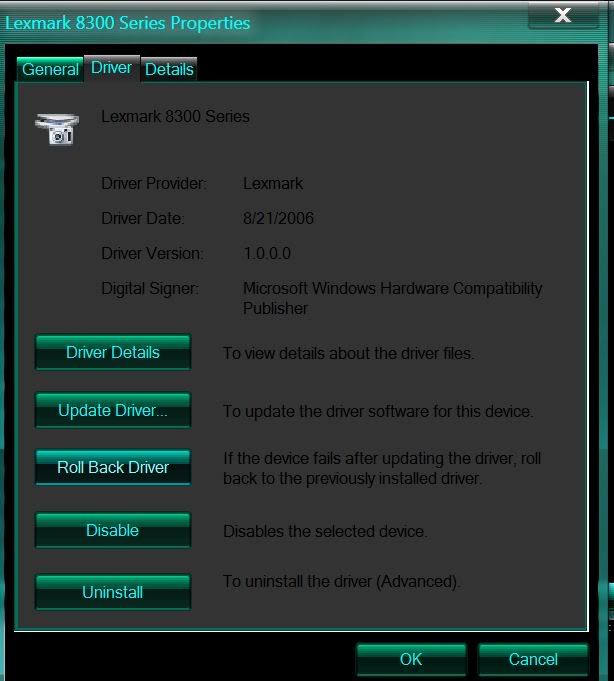
I have the same printer and downloaded the Vista driver and my scanner works on my 64bit 7.

Have this driver?
driver.jpg
 

My Computer

Computer Manufacturer/Model Number
HP Pavillion- p6331-p
OS
Windows 7 (64bit)
CPU
AMD Athlon II X4 630 2.8 GHz
Motherboard
Foxconn: H-Rs780-uATX
Memory
8.00GB DDR3-SDRAM (1333 MHz) ( Max allowed-16GB)
Graphics Card(s)
ATI Radeon HD 4200
Sound Card
Realtek High Def Audio
Monitor(s) Displays
HP 20" high Def Widescreen
Screen Resolution
1600x 900
Hard Drives
Seagate ST3750528AS- 700 GB
Keyboard
Logitech EX110 Cordless
Mouse
Logitech LX Laser Cordless
Internet Speed
25/25
Dan,

Thanks for the response-when you say Vista driver-is it the 64 bit Vista driver?
That is the one I have been downloading.

Maybe something got messed up with my Windows 7 configuration?
I don't know if a clean install would work. This is boggling my mind.
Even the MS web site says the printer is compatible with the 64 bit version of 7.
 

My Computer

OS
Windows 7
May sound like a dumb question, but is your scanner working? The reason I am asking is I can get it to print-just no scanning.
 

My Computer

OS
Windows 7

My Computer

Computer Manufacturer/Model Number
HP Pavillion- p6331-p
OS
Windows 7 (64bit)
CPU
AMD Athlon II X4 630 2.8 GHz
Motherboard
Foxconn: H-Rs780-uATX
Memory
8.00GB DDR3-SDRAM (1333 MHz) ( Max allowed-16GB)
Graphics Card(s)
ATI Radeon HD 4200
Sound Card
Realtek High Def Audio
Monitor(s) Displays
HP 20" high Def Widescreen
Screen Resolution
1600x 900
Hard Drives
Seagate ST3750528AS- 700 GB
Keyboard
Logitech EX110 Cordless
Mouse
Logitech LX Laser Cordless
Internet Speed
25/25
I think it may be an issue with my motherboard? It is a Gigabyte-they have been known to have strange USB issues-some things work-some things don't. I reinstalled Windows 7 and it did not help. Looks like I will be going to Wal-mart to get a new scanner tomorrow.
 

My Computer

OS
Windows 7
In the end it was pointless for me to go waste so much time-should have just gone to Walmart to begin with. I got a Canon printer/scanner for $50. I rarely print anything so that is more than adequate.
 

My Computer

OS
Windows 7
Back
Top