
Virtualbox not working with 64bit guest

Dinesh

Wonder Man
Hi, I just installed the latest version of virtualbox. When I try to add a VM with Ubuntu 10.04 as a guest, I get this error.
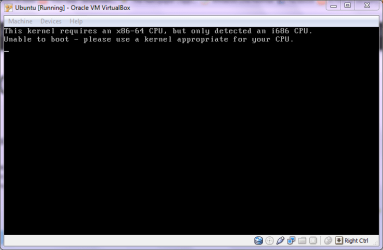
Capture.PNG

What do I do now?
 

My Computer

Computer Manufacturer/Model Number
Samsung NP530U4B-S02IN
OS
Windows® 8 Pro (64-bit)
CPU
Intel® Core™ i5 Processor 2467M (1.60GHz, 3MB L3 Cache)
Motherboard
Samsung Electronics
Memory
6GB DDR3 System Memory at 1,333MHz (on BD 4GB + 2GB x 1)
Graphics Card(s)
AMD Radeon™ HD7550M 1GB DDR3 (Ext. Graphic)
Sound Card
Realtek High Definition Audio
Monitor(s) Displays
35.56cm (14.0) SuperBright 300nit HD LED Display
Screen Resolution
1366x768
Hard Drives
1TB S-ATA II Hard Drive (5400RPM) with ExpressCache 16GB SSD
Internet Speed
sucks
Antivirus
Microsoft Security Essentials
Browser
Google Chrome (Sync enabled)
Hi, I just installed the latest version of virtualbox. When I try to add a VM with Ubuntu 10.04 as a guest, I get this error.

View attachment 74831

What do I do now?

It says you are running Seven 64bit which means you have a 64bit processor, obviously, so it should work, but it says you have a 32bit processor in the error which is strange.

Have you set the guest OS to Ubuntu 64bit not just Ubuntu; make sure it's Ubuntu 64bit.

If you are running a 32bit version then you can only install 32bit OSs on top of 32bit OSs not 64bit OSs.

Oli
 

My Computer

Computer Manufacturer/Model Number
Apple MacBook 5,1
OS
Windows 7 Profesional x86, Mac OS X 10.6 Snow Leopard
CPU
Intel Core 2 Duo 2.4Ghz
Memory
4GB DDR3
Graphics Card(s)
Nvidia 9400m
Monitor(s) Displays
13.3" Internal + 22" DVI + 21.5" USB
Screen Resolution
1280x800 + 1920x1080 + 1920x1080
Hard Drives
Internal SATA 2.5" 500GB (395GB Mac HFS+, 105GB Windows NTFS)
2.48TB RAID consisting of 5 disks (HFS+)
Case
Aluminium Unibody
Keyboard
Apple Late 2009 Wireless Keyboard (US)
Mouse
Apple Magic Mouse
Internet Speed
6.33Mb/s up. 0.36Mb/s down.
Other Info
Harman Kardon Soundsticks II Speakers
Hi Oli, thanks for the reply. There is no option to set the guest OS as Ubuntu 64 bit. I have also checked at Virtualbox forums. This seems to be the biggest bug in Virtualbox and there is no solution for this ATM. :(
That really sucks.
 

My Computer

Computer Manufacturer/Model Number
Samsung NP530U4B-S02IN
OS
Windows® 8 Pro (64-bit)
CPU
Intel® Core™ i5 Processor 2467M (1.60GHz, 3MB L3 Cache)
Motherboard
Samsung Electronics
Memory
6GB DDR3 System Memory at 1,333MHz (on BD 4GB + 2GB x 1)
Graphics Card(s)
AMD Radeon™ HD7550M 1GB DDR3 (Ext. Graphic)
Sound Card
Realtek High Definition Audio
Monitor(s) Displays
35.56cm (14.0) SuperBright 300nit HD LED Display
Screen Resolution
1366x768
Hard Drives
1TB S-ATA II Hard Drive (5400RPM) with ExpressCache 16GB SSD
Internet Speed
sucks
Antivirus
Microsoft Security Essentials
Browser
Google Chrome (Sync enabled)
Stick with the Sunbox Version.

The oracle version is far from ready to be released. It's just a bugfest.
 

My Computer

Computer type
PC/Desktop
Computer Manufacturer/Model Number
Systems by SmartEyeball
OS
8 Pro x64
CPU
i7 3770K 4.6GHz
Motherboard
ASUS P8Z77 WS
Memory
16GB G.Skill Trident X 2666mhz
Graphics Card(s)
x2 EVGA 780 Ti Superclocked SLI
Sound Card
SB X-FI Surround 5.1 PRO USB / ATH-AD900 Headphones
Monitor(s) Displays
x3 Dell U2410 / 58" Samsung
Screen Resolution
5760*1200/ 1920*1200
Hard Drives
2x Intel 520 240GB (RAID 0) * 2x WD Caviar Blacks 2TB (RAID 0) * 2TB WD Caviar Black * Sony Optirac DVD
PSU
Silverstone Strider Evolution 1200W
Case
Thermaltake Level 10 GT Snow Edition
Cooling
Noctua NH-D14
Keyboard
Topre Realforce // Ducky Shine MX Black // Filco Ninja TKL
Mouse
Thermaltake Theron (Highly Recommended) + Razer Imperator
Antivirus
MSE
Browser
IE, FF, WaterFox
Other Info
GT Extreme V2 Sim Racing Cockpit + 40" LCD and K/B Mouse stand ▼
Fanatec CSR Elite Wheel + Clubsport V1 Pedals + CSR shifter/7G-H ▼Saitek X52 Pro ▼ TrackIR 5 Pro
Buttkicker v2 Seat Rumbler with Dedicated 5.1 and Sub Woofer attached to frame ▼
=
Bloody Big Grin
I use vmware :)
 

My Computer

Computer Manufacturer/Model Number
Dell Inspiron 1440, Apple macbook pro
OS
Windows 7 32bit, Snow leopard
CPU
Intel Core 2 Duo 2.2GHz
Motherboard
IDK LOL
Memory
2GB DDR2 RAM
Graphics Card(s)
Intel GMA X4500MHD
Sound Card
NONE
Monitor(s) Displays
14" WLED-backlit display :: resolution 1366x768
Hard Drives
320GB HDD
PSU
Stock
Case
Stock
Cooling
Stock
Stick with the Sunbox Version.

The oracle version is far from ready to be released. It's just a bugfest.
I thought they are one n the same. Aren't they?
 

My Computer

Computer Manufacturer/Model Number
Samsung NP530U4B-S02IN
OS
Windows® 8 Pro (64-bit)
CPU
Intel® Core™ i5 Processor 2467M (1.60GHz, 3MB L3 Cache)
Motherboard
Samsung Electronics
Memory
6GB DDR3 System Memory at 1,333MHz (on BD 4GB + 2GB x 1)
Graphics Card(s)
AMD Radeon™ HD7550M 1GB DDR3 (Ext. Graphic)
Sound Card
Realtek High Definition Audio
Monitor(s) Displays
35.56cm (14.0) SuperBright 300nit HD LED Display
Screen Resolution
1366x768
Hard Drives
1TB S-ATA II Hard Drive (5400RPM) with ExpressCache 16GB SSD
Internet Speed
sucks
Antivirus
Microsoft Security Essentials
Browser
Google Chrome (Sync enabled)
Stick with the Sunbox Version.

The oracle version is far from ready to be released. It's just a bugfest.
I thought they are one n the same. Aren't they?


Well, pretty much it's still the same, but kind of not. Oracle bought out Sun, so the newest VirtualBox is now under Oracle development, and it's now called Oracle VM VirtualBox instead of Sun VirtaulBox, or just VirtualBox.
 

My Computer

Computer type
PC/Desktop
Computer Manufacturer/Model Number
Airbot 2.0
OS
Windows 7 Ultimate x64 SP1
CPU
Core i7 920 (D0) @ 4Ghz, *26c idle *65c full load on air
Motherboard
Asus P6X58D Premium - Sata 6Gb/s - USB 3.0
Memory
12GB DDR3 Corsair Dominator -CMD12GX3M6A1600C8 at 1600MHz
Graphics Card(s)
Zotac Geforce GTX 770
Sound Card
ASUS Xonar D2X
Monitor(s) Displays
1 LG 24" Flatron W2453V-PF 1 Samsung 24" P2450H both 2ms RT
Screen Resolution
1920x1080@60hz
Hard Drives
1 Samsung 250GB 840 Evo SSD
1 OCZ Vertex2 180GB SSD
1 TB Samsung Spinpoint F1 7200RPM 32MB cache
2 500GB WD Caviar Blacks 7200RPM 32MB cache (WD5001AALS)

Pioneer DVD Burner DVR-S18M
PSU
Corsair HX1000W
Case
Cooler Master HAF 932
Cooling
Case Fans *3 230mm, *1 140mm/CPU - *Tuniq Tower 120 Extreme
Keyboard
Logitech Wireless MK700
Mouse
Logitech Wireless MK700
Internet Speed
DL 15 Mbps UL 0.98 Mbps
Antivirus
None
Browser
Firefox Nightly
Other Info
Processor-7.7 *RAM- 7.9 *Graphics-7.9 *Gaming Graphics- 7.9 *SSD- 7.8 W.E.I final score= 7.7
*Phone- LG Nexus 5
Stick with the Sunbox Version.

The oracle version is far from ready to be released. It's just a bugfest.
I thought they are one n the same. Aren't they?


Well, pretty much it's still the same, but kind of not. Oracle bought out Sun, so the newest VirtualBox is now under Oracle development, and it's now called Oracle VM VirtualBox instead of Sun VirtaulBox, or just VirtualBox.

So it's in that annoying stage of trying to rebrand something while adding new features, effectively putting it back into beta?

What's Solaris going to be called now too?

Oli
 

My Computer

Computer Manufacturer/Model Number
Apple MacBook 5,1
OS
Windows 7 Profesional x86, Mac OS X 10.6 Snow Leopard
CPU
Intel Core 2 Duo 2.4Ghz
Memory
4GB DDR3
Graphics Card(s)
Nvidia 9400m
Monitor(s) Displays
13.3" Internal + 22" DVI + 21.5" USB
Screen Resolution
1280x800 + 1920x1080 + 1920x1080
Hard Drives
Internal SATA 2.5" 500GB (395GB Mac HFS+, 105GB Windows NTFS)
2.48TB RAID consisting of 5 disks (HFS+)
Case
Aluminium Unibody
Keyboard
Apple Late 2009 Wireless Keyboard (US)
Mouse
Apple Magic Mouse
Internet Speed
6.33Mb/s up. 0.36Mb/s down.
Other Info
Harman Kardon Soundsticks II Speakers
Dinesh, does your processor have VT-x extension? If so, just tick the VT-x/AMD-V Virtualization Acceleration option in VirtualBox. FYI, you need to have VT-x/AMD-V to be able to virtualize 64bit guest OSes. I have OpenSUSE 11.2 64bit running as a guest right now, using VirtualBox 3.1.8 r61349.

zzz2496

Edit: I just read Intel's Doc about your T5500 here, it doesn't support VT-x, thus you won't be able to virtualize 64bit guest OS. You can virtualize 32bit guest OS though...
 

My Computer

Computer Manufacturer/Model Number
Self Built
OS
Windows7 Ultimate 64bit
CPU
Intel Core 2 Quad Q6600
Motherboard
Abit IN9-32X-MMAX
Memory
DDR2 Adata 4GB
Graphics Card(s)
Nvidia GeForce GTX 285 1024 and Nvidia GeForce 8800GT 512
Sound Card
Asus Xonar HDAV 1.3
Monitor(s) Displays
Dell 2407WFP and BenQ 2400v and Philips 150v3
Screen Resolution
3840x1200 and 1024x768
Hard Drives
2 WDC 1TB
1 WDC 1.5TB
1 WDC 640GB
1 WDC 320GB
1 Seagate 200GB
PSU
Corsair TX 850W
Case
Cooler Master HAF932
Cooling
Arctic Cooling Freezer Extreme and plenty of fans...
Keyboard
MicrosoftNaturalKeyboard 4000/Apple Alu keyboard/Dinovo mini
Mouse
Logitech G5/MarbleMouseTrackball/PerformanceMX/SpacePilotPRO
Internet Speed
1.5Mbps down/384Kbps up
Other Info
APC SURT 1000XL
Logitech Z-560
Wiimote
Mikrotik Router
Linksys (now Cisco) SD2008 8 port Gigabit switch
Linksys WRT54G (acting as AP)
Apple wireless Aluminium keyboard
Apple Magic Mouse
Xbox360 wired controller
Dinesh, does your processor have VT-x extension? If so, just tick the VT-x/AMD-V Virtualization Acceleration option in VirtualBox. FYI, you need to have VT-x/AMD-V to be able to virtualize 64bit guest OSes. I have OpenSUSE 11.2 64bit running as a guest right now, using VirtualBox 3.1.8 r61349.

zzz2496

Edit: I just read Intel's Doc about your T5500 here, it doesn't support VT-x, thus you won't be able to virtualize 64bit guest OS. You can virtualize 32bit guest OS though...
Now that explains the mystery. Thanks for the findings.
 

My Computer

Computer Manufacturer/Model Number
Samsung NP530U4B-S02IN
OS
Windows® 8 Pro (64-bit)
CPU
Intel® Core™ i5 Processor 2467M (1.60GHz, 3MB L3 Cache)
Motherboard
Samsung Electronics
Memory
6GB DDR3 System Memory at 1,333MHz (on BD 4GB + 2GB x 1)
Graphics Card(s)
AMD Radeon™ HD7550M 1GB DDR3 (Ext. Graphic)
Sound Card
Realtek High Definition Audio
Monitor(s) Displays
35.56cm (14.0) SuperBright 300nit HD LED Display
Screen Resolution
1366x768
Hard Drives
1TB S-ATA II Hard Drive (5400RPM) with ExpressCache 16GB SSD
Internet Speed
sucks
Antivirus
Microsoft Security Essentials
Browser
Google Chrome (Sync enabled)
You're welcome... :)

zzz2496
 

My Computer

Computer Manufacturer/Model Number
Self Built
OS
Windows7 Ultimate 64bit
CPU
Intel Core 2 Quad Q6600
Motherboard
Abit IN9-32X-MMAX
Memory
DDR2 Adata 4GB
Graphics Card(s)
Nvidia GeForce GTX 285 1024 and Nvidia GeForce 8800GT 512
Sound Card
Asus Xonar HDAV 1.3
Monitor(s) Displays
Dell 2407WFP and BenQ 2400v and Philips 150v3
Screen Resolution
3840x1200 and 1024x768
Hard Drives
2 WDC 1TB
1 WDC 1.5TB
1 WDC 640GB
1 WDC 320GB
1 Seagate 200GB
PSU
Corsair TX 850W
Case
Cooler Master HAF932
Cooling
Arctic Cooling Freezer Extreme and plenty of fans...
Keyboard
MicrosoftNaturalKeyboard 4000/Apple Alu keyboard/Dinovo mini
Mouse
Logitech G5/MarbleMouseTrackball/PerformanceMX/SpacePilotPRO
Internet Speed
1.5Mbps down/384Kbps up
Other Info
APC SURT 1000XL
Logitech Z-560
Wiimote
Mikrotik Router
Linksys (now Cisco) SD2008 8 port Gigabit switch
Linksys WRT54G (acting as AP)
Apple wireless Aluminium keyboard
Apple Magic Mouse
Xbox360 wired controller
Dinesh, does your processor have VT-x extension? If so, just tick the VT-x/AMD-V Virtualization Acceleration option in VirtualBox. FYI, you need to have VT-x/AMD-V to be able to virtualize 64bit guest OSes. I have OpenSUSE 11.2 64bit running as a guest right now, using VirtualBox 3.1.8 r61349.

zzz2496

Edit: I just read Intel's Doc about your T5500 here, it doesn't support VT-x, thus you won't be able to virtualize 64bit guest OS. You can virtualize 32bit guest OS though...
Now that explains the mystery. Thanks for the findings.

Hi, I'm a total novice to Ubuntu who is reading this thread because I was intrigued by a mention in PCWorld that one could run Portable Ubuntu Remix "as an app within Windows". Portable Ubuntu For Windows http://www.progmic.com/2009/09/porta...-in-windows-7/ However it would not work for me stopping with a fatal error about cygwin. So I was searching this forum to look for answers and stumbled on this thread. Unlike the OP, what to do remains a mystery to me ..... I am running Windows 7 Home Premium 64 bit. I have 6 G of ram but my processor is a "Intel Core2 Duo P7450" which I believe does not have the built in virtualization capability and as noted my W7 is not Professional. a) Can I still run another OS in a virtual box (XP or Ubuntu)? b) How? c) In view of the problems discussed in this thread, will it be able to run Ubuntu 32? (Maybe the 32/64 conflict was my problem in running the portable Ubuntu as a Windows 7 app, even though I carefully followed the instructions in http://www.progmic.com/2009/09/porta...-in-windows-7/ Would appreciate any help. Thanks.
 

My Computer

OS
Windows 7
Dinesh did you ever get this running? The fix is in the BIOS. I have older laptops and the setting was there for me. PM me if you need a hand still, yes a little late but hey, worth asking. I know many people are struggling.
 

My Computer

OS
Windows 7 Ultimate x64, Windows 7 Home Premium 32bit, Linux, Solarius, DOS
To be honest,.I don't even remember. :o
 

My Computer

Computer Manufacturer/Model Number
Samsung NP530U4B-S02IN
OS
Windows® 8 Pro (64-bit)
CPU
Intel® Core™ i5 Processor 2467M (1.60GHz, 3MB L3 Cache)
Motherboard
Samsung Electronics
Memory
6GB DDR3 System Memory at 1,333MHz (on BD 4GB + 2GB x 1)
Graphics Card(s)
AMD Radeon™ HD7550M 1GB DDR3 (Ext. Graphic)
Sound Card
Realtek High Definition Audio
Monitor(s) Displays
35.56cm (14.0) SuperBright 300nit HD LED Display
Screen Resolution
1366x768
Hard Drives
1TB S-ATA II Hard Drive (5400RPM) with ExpressCache 16GB SSD
Internet Speed
sucks
Antivirus
Microsoft Security Essentials
Browser
Google Chrome (Sync enabled)
Back
Top