Disable Mouse and Keyboard from Turning On Monitors?

darkangel86

New member
Local time
12:31 AM
Messages
5
Hey guys,

I have a quick question ... I'm not sure if this is doable or not, but here is my question anyway...

I followed the following link on how to create a keyboard shortcut that turns off all connected screens to my computer at once Link. This worked just fine, and has been really useful for the past few days, however my problem is as follows:

When I use my keyboard shortcut and turn off my screens (which are two Acer multi-touch screens), any key-press to the keyboard or move to the mouse will bring them back on... Is there ANY WAY to disable that?

I would like my screens to ONLY turn on when I touch them, and NOT when I move the mouse or press the keyboard.

It is annoying for me because when I place anything on my desk that causes the mouse to move both screens go back on. I don't use SLEEP or STANDBY neither do I lock my machine, since my computer is always on.

Any ideas?

Thanks!
 

My Computer My Computer

At a glance

Windows 7 Professional x64 w/ Dual Multi-Touc...Intel Q6600 Quad Core Processor 2.4 GHz OC'd ...4GB DDR2 800MHzNVIDIA GeForce 8600 GTS
Computer Manufacturer/Model Number
Home-Built PC
OS
Windows 7 Professional x64 w/ Dual Multi-Touch Monitors
CPU
Intel Q6600 Quad Core Processor 2.4 GHz OC'd to 3.2 GHz
Motherboard
ASUS PE-VM HDMI
Memory
4GB DDR2 800MHz
Graphics Card(s)
NVIDIA GeForce 8600 GTS
Sound Card
Realtek HD Audio
Monitor(s) Displays
Dual 23 inch 1080p Acer T230H Multi-Touch Monitors
PSU
500W
Cooling
Stock
Keyboard
Logitech Wave Keyboard
Mouse
Generic Wheel USB Mouse
Internet Speed
35MBPS Down, 8MBPS Up
Welcome to the forum darkangel86, sure that is doable.

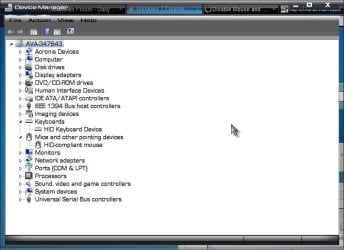
Start> in search field type Device Manager, click on Device Manager to open it

1.jpg

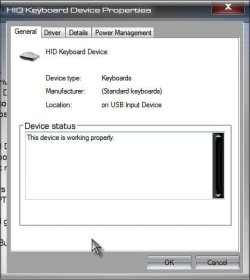
Expand both the Keyboards and Mice and other pointing devices. Right click on your keyboard> Select Properties>

2.jpg

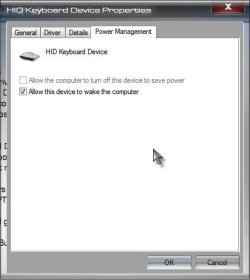
Click on Power Management tab

3.jpg

Unclick Allow this device to wake the computer

Click ok

Repeat for the mouse and there you go. A Guy
 

My Computer My Computer

At a glance

Windows 10 Home x64INTEL Core i5-750 Quad-Core 3.37GHzHyperX Fury Black Series 8GB (2 x 4GB) 1866MhzEVGA GeForce GTX 750 Superclocked 1GB 128-Bit...
Computer type
PC/Desktop
OS
Windows 10 Home x64
CPU
INTEL Core i5-750 Quad-Core 3.37GHz
Motherboard
ASUS P7P55D
Memory
HyperX Fury Black Series 8GB (2 x 4GB) 1866Mhz
Graphics Card(s)
EVGA GeForce GTX 750 Superclocked 1GB 128-Bit GDDR5
Monitor(s) Displays
LG 32MA68HY 32" IPS
Screen Resolution
1920 x 1080
Hard Drives
Samsung 840 Evo 120GB, SEAGATE 500GB Barracuda® 7200.12, SATA 3 Gb/s, 7200 RPM, 16MB cache
PSU
ANTEC TruePower New TP-550, 80 PLUS, 550W
Case
ANTEC Three Hundred Illusion
Cooling
COOLER MASTER Hyper 212 Plus, 4 x 120mm 1 x 140mm Noctua's
Internet Speed
85 + Mbps
Antivirus
Avast
Browser
Vivaldi
Thank you for your reply, I've done that but it doesn't work.. Remember I'm not putting my computer in sleep mode, I am just simply turning off the monitors, but my mouse or keyboard turns the monitors back on. Is there any way I can disable the mouse and keyboard from turning the screens back on?

Thanks again for your help!
 

My Computer My Computer

At a glance

Windows 7 Professional x64 w/ Dual Multi-Touc...Intel Q6600 Quad Core Processor 2.4 GHz OC'd ...4GB DDR2 800MHzNVIDIA GeForce 8600 GTS
Computer Manufacturer/Model Number
Home-Built PC
OS
Windows 7 Professional x64 w/ Dual Multi-Touch Monitors
CPU
Intel Q6600 Quad Core Processor 2.4 GHz OC'd to 3.2 GHz
Motherboard
ASUS PE-VM HDMI
Memory
4GB DDR2 800MHz
Graphics Card(s)
NVIDIA GeForce 8600 GTS
Sound Card
Realtek HD Audio
Monitor(s) Displays
Dual 23 inch 1080p Acer T230H Multi-Touch Monitors
PSU
500W
Cooling
Stock
Keyboard
Logitech Wave Keyboard
Mouse
Generic Wheel USB Mouse
Internet Speed
35MBPS Down, 8MBPS Up
Ahhh, I get it, the PC is still on just the monitors go to sleep after a set amount of time. I'm sorry, I don't have the answer for you. Not sure it can be done natively. A Guy
 

My Computer My Computer

At a glance

Windows 10 Home x64INTEL Core i5-750 Quad-Core 3.37GHzHyperX Fury Black Series 8GB (2 x 4GB) 1866MhzEVGA GeForce GTX 750 Superclocked 1GB 128-Bit...
Computer type
PC/Desktop
OS
Windows 10 Home x64
CPU
INTEL Core i5-750 Quad-Core 3.37GHz
Motherboard
ASUS P7P55D
Memory
HyperX Fury Black Series 8GB (2 x 4GB) 1866Mhz
Graphics Card(s)
EVGA GeForce GTX 750 Superclocked 1GB 128-Bit GDDR5
Monitor(s) Displays
LG 32MA68HY 32" IPS
Screen Resolution
1920 x 1080
Hard Drives
Samsung 840 Evo 120GB, SEAGATE 500GB Barracuda® 7200.12, SATA 3 Gb/s, 7200 RPM, 16MB cache
PSU
ANTEC TruePower New TP-550, 80 PLUS, 550W
Case
ANTEC Three Hundred Illusion
Cooling
COOLER MASTER Hyper 212 Plus, 4 x 120mm 1 x 140mm Noctua's
Internet Speed
85 + Mbps
Antivirus
Avast
Browser
Vivaldi
Is there a settings / properties for the touch function for the displays? This is an obvious guess, but it would seem that would be the first place to check.
 

My Computer My Computer

At a glance

Windows 7 Ultimate x64AMD Phenom II X4 940 Black Edition @ 3.4GHz (...Corsair CM2X4096-8500C5 (4 X 2GB)XFX Radeon HD 5770 / Diamond Radeon HD 5770 C...
Computer Manufacturer/Model Number
Rig 1
OS
Windows 7 Ultimate x64
CPU
AMD Phenom II X4 940 Black Edition @ 3.4GHz (AM2+)
Motherboard
Gigabyte GA-MA790X-UD4P (AM2+)
Memory
Corsair CM2X4096-8500C5 (4 X 2GB)
Graphics Card(s)
XFX Radeon HD 5770 / Diamond Radeon HD 5770 CrossFireX
Sound Card
Asus Xonar DS (PCI)
Monitor(s) Displays
Samsung SyncMaster 932bw+ (3)
Screen Resolution
4320x900
Hard Drives
OCZ Vertex 2 80 GB - Windows 7 System --
WD Caviar Black 1TB - Music, Movies, Vids, Pics --
WD Caviar Black 640GB - User Profiles & Games --
WD My Book 320GB external
PSU
Corsair CMPSU-750TX
Case
Cooler Master HAF 932
Cooling
Corsair Hydro Series H50
Keyboard
Logitech Desktop Wave
Mouse
Logitech LX8 Laser
Internet Speed
20 down / 2 up
Other Info
LG GGC-H20L Blu-Ray / HDDVD combo --
Hauppauge HVR-1250 --
Silverstone MFP-51 --
Logitech Webcam C600
Have you try the same approach mentioned by a guy to your mouse?
 

My Computer My Computer

At a glance

window's 7core 2 quad2gb corsairati hd4850
OS
window's 7
CPU
core 2 quad
Motherboard
gigabyte
Memory
2gb corsair
Graphics Card(s)
ati hd4850
Monitor(s) Displays
lg
Screen Resolution
1600 X 900
Case
power logic
Other Info
none of the spec above is accurate
I really appreciate the help folks, I have tried the above mentioned method prior to posting this thread. There are no touch options associated with this. Windows 7 touch options are very limited.

The screen wakes up when touched, that is not the problem, my problem is that I would like the screen(s) not to wake up when the mouse is moved or the keyboard is pressed.

Perhaps a registry edit? ... I'm not sure.
 

My Computer My Computer

At a glance

Windows 7 Professional x64 w/ Dual Multi-Touc...Intel Q6600 Quad Core Processor 2.4 GHz OC'd ...4GB DDR2 800MHzNVIDIA GeForce 8600 GTS
Computer Manufacturer/Model Number
Home-Built PC
OS
Windows 7 Professional x64 w/ Dual Multi-Touch Monitors
CPU
Intel Q6600 Quad Core Processor 2.4 GHz OC'd to 3.2 GHz
Motherboard
ASUS PE-VM HDMI
Memory
4GB DDR2 800MHz
Graphics Card(s)
NVIDIA GeForce 8600 GTS
Sound Card
Realtek HD Audio
Monitor(s) Displays
Dual 23 inch 1080p Acer T230H Multi-Touch Monitors
PSU
500W
Cooling
Stock
Keyboard
Logitech Wave Keyboard
Mouse
Generic Wheel USB Mouse
Internet Speed
35MBPS Down, 8MBPS Up
I'd have to think a BIOS setting having to do with the S3, such as repost video on S3 resume or such. You do know the wise guy answer is "why are you moving the mouse and/or hitting the keyboard if your monitors are off" :D. Well, give it some time, someone else might come along with the perfect answer. A Guy
 

My Computer My Computer

At a glance

Windows 10 Home x64INTEL Core i5-750 Quad-Core 3.37GHzHyperX Fury Black Series 8GB (2 x 4GB) 1866MhzEVGA GeForce GTX 750 Superclocked 1GB 128-Bit...
Computer type
PC/Desktop
OS
Windows 10 Home x64
CPU
INTEL Core i5-750 Quad-Core 3.37GHz
Motherboard
ASUS P7P55D
Memory
HyperX Fury Black Series 8GB (2 x 4GB) 1866Mhz
Graphics Card(s)
EVGA GeForce GTX 750 Superclocked 1GB 128-Bit GDDR5
Monitor(s) Displays
LG 32MA68HY 32" IPS
Screen Resolution
1920 x 1080
Hard Drives
Samsung 840 Evo 120GB, SEAGATE 500GB Barracuda® 7200.12, SATA 3 Gb/s, 7200 RPM, 16MB cache
PSU
ANTEC TruePower New TP-550, 80 PLUS, 550W
Case
ANTEC Three Hundred Illusion
Cooling
COOLER MASTER Hyper 212 Plus, 4 x 120mm 1 x 140mm Noctua's
Internet Speed
85 + Mbps
Antivirus
Avast
Browser
Vivaldi
I'll check on the BIOS settings and let you know ASAP!

Thanks!
 

My Computer My Computer

At a glance

Windows 7 Professional x64 w/ Dual Multi-Touc...Intel Q6600 Quad Core Processor 2.4 GHz OC'd ...4GB DDR2 800MHzNVIDIA GeForce 8600 GTS
Computer Manufacturer/Model Number
Home-Built PC
OS
Windows 7 Professional x64 w/ Dual Multi-Touch Monitors
CPU
Intel Q6600 Quad Core Processor 2.4 GHz OC'd to 3.2 GHz
Motherboard
ASUS PE-VM HDMI
Memory
4GB DDR2 800MHz
Graphics Card(s)
NVIDIA GeForce 8600 GTS
Sound Card
Realtek HD Audio
Monitor(s) Displays
Dual 23 inch 1080p Acer T230H Multi-Touch Monitors
PSU
500W
Cooling
Stock
Keyboard
Logitech Wave Keyboard
Mouse
Generic Wheel USB Mouse
Internet Speed
35MBPS Down, 8MBPS Up
No, there is no way... I use the same method as the OP, but I don't have a shortcut, I set my monitor to sleep in 1 minute, before it goes to sleep, I lifted my mouse, and put something under it so that the sensor won't register anything... that way I can rock the table without it registering anything...

zzz2496
 

My Computer My Computer

At a glance

Windows7 Ultimate 64bitIntel Core 2 Quad Q6600DDR2 Adata 4GBNvidia GeForce GTX 285 1024 and Nvidia GeForc...
Computer Manufacturer/Model Number
Self Built
OS
Windows7 Ultimate 64bit
CPU
Intel Core 2 Quad Q6600
Motherboard
Abit IN9-32X-MMAX
Memory
DDR2 Adata 4GB
Graphics Card(s)
Nvidia GeForce GTX 285 1024 and Nvidia GeForce 8800GT 512
Sound Card
Asus Xonar HDAV 1.3
Monitor(s) Displays
Dell 2407WFP and BenQ 2400v and Philips 150v3
Screen Resolution
3840x1200 and 1024x768
Hard Drives
2 WDC 1TB
1 WDC 1.5TB
1 WDC 640GB
1 WDC 320GB
1 Seagate 200GB
PSU
Corsair TX 850W
Case
Cooler Master HAF932
Cooling
Arctic Cooling Freezer Extreme and plenty of fans...
Keyboard
MicrosoftNaturalKeyboard 4000/Apple Alu keyboard/Dinovo mini
Mouse
Logitech G5/MarbleMouseTrackball/PerformanceMX/SpacePilotPRO
Internet Speed
1.5Mbps down/384Kbps up
Other Info
APC SURT 1000XL
Logitech Z-560
Wiimote
Mikrotik Router
Linksys (now Cisco) SD2008 8 port Gigabit switch
Linksys WRT54G (acting as AP)
Apple wireless Aluminium keyboard
Apple Magic Mouse
Xbox360 wired controller
No luck with BIOS settings ...

I'm starting to agree with zzz2496. However, if there is a way to disable the mouse when the screen turns off and enable it when the screen is back on, wouldn't that solve this issue?

Perhaps a script of some sort? ... In the link I provided in my original post, it mentions the use of a free command line based software called NirCMD to control certain things in windows through shortcuts ... Maybe an approach like that would solve this problem, nevertheless, I haven't figured it out yet.

Thanks for your help guys. If any software could be utilized to do this please let me know.
 

My Computer My Computer

At a glance

Windows 7 Professional x64 w/ Dual Multi-Touc...Intel Q6600 Quad Core Processor 2.4 GHz OC'd ...4GB DDR2 800MHzNVIDIA GeForce 8600 GTS
Computer Manufacturer/Model Number
Home-Built PC
OS
Windows 7 Professional x64 w/ Dual Multi-Touch Monitors
CPU
Intel Q6600 Quad Core Processor 2.4 GHz OC'd to 3.2 GHz
Motherboard
ASUS PE-VM HDMI
Memory
4GB DDR2 800MHz
Graphics Card(s)
NVIDIA GeForce 8600 GTS
Sound Card
Realtek HD Audio
Monitor(s) Displays
Dual 23 inch 1080p Acer T230H Multi-Touch Monitors
PSU
500W
Cooling
Stock
Keyboard
Logitech Wave Keyboard
Mouse
Generic Wheel USB Mouse
Internet Speed
35MBPS Down, 8MBPS Up
Hello,
if you are still there, did you succeeded with your problem? Im having the same trouble now. Thanks for your answer.
Kuba
 

My Computer My Computer

At a glance

W7 SP1, W8 RCCore i316ATi R 6850
Computer Manufacturer/Model Number
HM PC
OS
W7 SP1, W8 RC
CPU
Core i3
Motherboard
GB
Memory
16
Graphics Card(s)
ATi R 6850
Sound Card
Asus Xonar DX
Monitor(s) Displays
Dell 22"
PSU
Fortron?
Case
Chieftec
Cooling
Noctua
I was looking for an answer to this too and the only thing I came across is this post here Prevent mouse to turn on monitor - Windows - Super User

They suggested to just turn your mouse upside down. It does work though it looks pretty inelegant. Someone else suggested writing a screensaver to disable the mouse and gave some tips on what to do but I have no clue on stuff like that. Maybe someone else does?

This seems like a common enough complaint that MS would have included an option for it but I guess not.
 
Last edited:

My Computer My Computer

At a glance

Windows 7 Ultimate x64
OS
Windows 7 Ultimate x64
Use displayswitch.exe
To disable monitor
Press Win+R
displayswitch.exe 4
and Press Tab and enter

To enable monitor
Press Win+R
displayswitch.exe 1
 

My Computer My Computer

At a glance

Windows 10
Computer type
PC/Desktop
OS
Windows 10
Back
Top