Desktop Icons Moving

LenBum

New member
Just an observation. I'm using Windows 7 RC 1 Build 7100. I have 9 desktop icons. After shutting down or restarting a number of them have been moved to other locations. Not all. My computer and the trash in the upper left hand corner don't move. The icons that are moved are moved to the same spots every time. Interesting......................
 

My Computer

OS
Windows Vista/Windows 7 RC1
When you right-click the desktop have you got 'Auto Arrange' or 'Sort By' selected? (See pics)
 

Attachments

  • Untitled.png
    Untitled.png
    57.2 KB · Views: 142
  • Untitled1.png
    Untitled1.png
    38.5 KB · Views: 79

My Computer

Computer Manufacturer/Model Number
Compaq Desktop
OS
Windows 7 Ultimate x64
CPU
AMD Sempron Dual Core
Memory
3GB
Graphics Card(s)
NVIDIA GeForce 6150SE nForce 430
Screen Resolution
1024x768
Hard Drives
150GB Sata
Auto arrange is not checked. Just align icons to grid is checked. Sort by has nothing checked.
 

My Computer

OS
Windows Vista/Windows 7 RC1
That's strange, i'll do some digging for you.
 

My Computer

Computer Manufacturer/Model Number
Compaq Desktop
OS
Windows 7 Ultimate x64
CPU
AMD Sempron Dual Core
Memory
3GB
Graphics Card(s)
NVIDIA GeForce 6150SE nForce 430
Screen Resolution
1024x768
Hard Drives
150GB Sata
Another observation. The same icons move to the same spots on every startup. Windows Live Mail moves to the left but AOL and IE do not. And the shortcut to my USB drive moves under the trash every time.
 

My Computer

OS
Windows Vista/Windows 7 RC1
Well I don't know how you could correct this but you can live with it if you want. I use a program called Desktop restore that works like a charm.

You can save and restore desktop icons as much as you want.
 

My Computer

OS
Win7 64 bits FR
CPU
2500K @ 4.5 GHz
Motherboard
Asrock Z68 Gen3 Extreme3
Memory
4x4GB 1600MHz GSkill CL9.
Graphics Card(s)
HD6850 Powercolor stock
Sound Card
Integrated
Monitor(s) Displays
Samsung 2343 + Dell 20in 4/3
Screen Resolution
2048x1152, 1600x1200
Hard Drives
OCZ Vertex LE SSD, 50GB
OCZ Solid 3 120GB
OCZ Vertex 2 240GB
Western Digital Scorpio 320GB 5400 rpm
PSU
KingWin Lazer Platinum (90+) 550Watts
Case
HAF912
Cooling
CPU: OCZ Vendetta 2
Keyboard
MX5500 revolution bluetooth
Mouse
MX5500 revolution bluetooth
Internet Speed
Cable 7 Mbps
Well, I could live with it. But why should I? This has never been an issue with any other Microsoft OS since 95. Why now? And what is causing just a few of the icons to be moved? And why am I the only one so far having this problem? A place for everything and everything in it's place...............someone will come up with an answer.
 

My Computer

OS
Windows Vista/Windows 7 RC1
HI Len Bum,if you click the small arrow left of the flag/clock on the taskbar, and select Customize ,and then, Restore default icon behaviour,does that change anything for you?
 

My Computer

Computer Manufacturer/Model Number
Self Build 64bit
OS
Vista Ult64, Win7600
CPU
Intel Core 2 Quad Q6600 @ 2400 MHz 64bit OS
Motherboard
Asus P5E3 Deluxe WiFi @p 64 bit OS
Memory
4096 MB DDR3-SDRAM
Graphics Card(s)
ATI Radeon HD 3870 Series x2 Crossfired
Sound Card
Realtek on board
Monitor(s) Displays
Samsung SyncMaster - 23 inches
Screen Resolution
1680x1050 pixels at 60 Hz in True Colors
Hard Drives
Hitachi (250 GB)/Samsung 750 GB. /Barracuda 160 GB.
My Book 1 TB external..
PSU
Cooler Master 1000w
Case
Cooler Master Cosmos 1000.
Cooling
Fans and fresh air,
Keyboard
Wireless
Mouse
Wireless
Internet Speed
Never fast enough
Other Info
I use a Magnum.
There might also be a resolution decrease happening somewhere from shutdown to restart.. (and then switching back to normal)

Try this:
Fix your icons the way you want them, and then change your resolution to a lower one. Windows places icons that don't fit the current resolution to an alignment of its own.
Do this and see if the icons get messed just the way they do when this occurs to you.

If so, consider updating your graphics driver, disabling your graphics driver's startup application (the ones sitting on the tray) or check for startup programs that might mess with your resolution and disabled them.

Just a thought.
 

My Computer

Computer Manufacturer/Model Number
ENIAC
OS
Windows 7 RC 7100 32bit/64bit
CPU
Intel Core2Duo E4500 2.20 GHz
Motherboard
ASUS P5LD2-X/1333
Memory
2x1GB Kinsgston DDR2 800MHz
Graphics Card(s)
Nvidia 8500GT
Sound Card
Onboard High Definition Audio Device
Monitor(s) Displays
Sony Bravia 42"
Case
LINKW 2222
Cooling
Standard Intel
Keyboard
Some cheap one
Mouse
Microsoft Intellimouse something
Internet Speed
24MBps ADSL
Well, I could live with it. But why should I? This has never been an issue with any other Microsoft OS since 95. Why now? And what is causing just a few of the icons to be moved? And why am I the only one so far having this problem? A place for everything and everything in it's place...............someone will come up with an answer.
You are not the only one I'm slightly obsessive on the position of my icon and with build 7077 I had the same issue it was annoying me real hard although the RC1 solved that issue among other bug
 

My Computer

Computer Manufacturer/Model Number
Clevo m860tu
OS
Windows 7 x64 RC1
CPU
P8400 @ 2.24ghz
Memory
2go ddr3
Graphics Card(s)
9800m gt
Monitor(s) Displays
15.4" and 22"
Screen Resolution
Both wsxga+
Hard Drives
320go@5400rpm
Keyboard
Apple Aluminium keyboard
Mouse
Logitech VX Revolution
Internet Speed
8mbit/s
jfar, when I read your suggestion I couldn't understand how adjusting anything involving the tray icons could affect the desktop icons. I did what you suggested and realized it turned off my internet security icon I like to have in the tray. So I turned that back on. I shutdown last night and didn't turn it back on until a little while ago. I first booted into Vista, then restarted to Windows 7. Lo and behold the desktop icons weren't moved. I shutdown and restarted once to be sure and the icons are where I left them...........................these are the facts as I know them............:)
How and why they were being moved is up to someone else to figure out. Thanks
 

My Computer

OS
Windows Vista/Windows 7 RC1
Desktop icons being moved again.

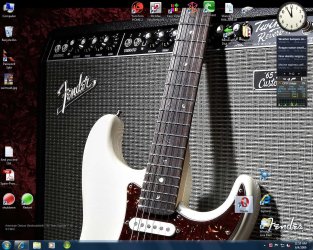
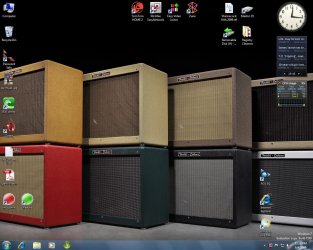
I continue to have this annoying problem. This time the BitTorrent and Opera icons are being moved back to the left side of my desktop after restarting or booting up in the morning. Anybody else have this situation come up? Here are the before and after restart pics.

Desktop 1.jpg


Desktop 2.jpg
 

My Computer

OS
Windows Vista/Windows 7 RC1
It fixed problem but why is it happening?

jfar's original fix from 3 weeks ago fixed my desktop icon moving problem again. What am I doing to create this? I'm going to install a new program and keep a desktop icon for it. Then I will see what happens after restarting..............
 

My Computer

OS
Windows Vista/Windows 7 RC1
Does the moving icons have to do with the changing themes?

Right click desktop > Change Desktop Icons > Uncheck Allow themes to change desktop icons.


Maybe that will work?
 

My Computer

Computer Manufacturer/Model Number
Custom Made
OS
Windows 7 Build 7600|16384- 64bit
CPU
AMD Phenom II X4 810 - 2.61ghz Deneb
Motherboard
Asus M4A79T Deluxe
Memory
4GB DDR3 Mushkin (1600 O.C. Rated)
Graphics Card(s)
ATI HD Radeon 4890 1GB
Sound Card
Realtek HD Onboard Audio
Monitor(s) Displays
AOC 912vwa-1
Screen Resolution
1440x900 (Max Monitor)
Hard Drives
10000RPM 150GB Western Digital Velociraptor
PSU
Corsair TSX750W
Case
Antec Nine Hundred
Cooling
Air Cooled
Keyboard
Logitech Elite
Mouse
Logitech MX518
Internet Speed
Comcast High-Speed (+Powerboost)
I don't have themes. I have the desktop background set to slideshow. Could that possibly have anything to do with the icons?
 

My Computer

OS
Windows Vista/Windows 7 RC1
Right clicking my desktop doesn't come up with any option I see to do what you've suggested.
 

My Computer

OS
Windows Vista/Windows 7 RC1
Wow, cant believe i missed a key thing.
Right click desktop > *Personalize* > Change Desktop Icons(top left) > Uncheck Allow themes to change desktop icons.
 

My Computer

Computer Manufacturer/Model Number
Custom Made
OS
Windows 7 Build 7600|16384- 64bit
CPU
AMD Phenom II X4 810 - 2.61ghz Deneb
Motherboard
Asus M4A79T Deluxe
Memory
4GB DDR3 Mushkin (1600 O.C. Rated)
Graphics Card(s)
ATI HD Radeon 4890 1GB
Sound Card
Realtek HD Onboard Audio
Monitor(s) Displays
AOC 912vwa-1
Screen Resolution
1440x900 (Max Monitor)
Hard Drives
10000RPM 150GB Western Digital Velociraptor
PSU
Corsair TSX750W
Case
Antec Nine Hundred
Cooling
Air Cooled
Keyboard
Logitech Elite
Mouse
Logitech MX518
Internet Speed
Comcast High-Speed (+Powerboost)
I unchecked anlign to grid which solved the problem for, auto arrange is also unchecked
 

My Computer

Computer Manufacturer/Model Number
HP G60
OS
windows 7
CPU
2GHz
Memory
2Gb
Hard Drives
260G
Back
Top