Adobe Bridge CS5 icon displays incorrectly

Aperture

New member
Just installed Adobe Photoshop CS5 and Adobe Bridge comes with it.

For some reason the Bridge icon displays as if the program was inactive.
I also looked in the Bridge programs folder and the icon displays as if it was inactive there too.
However when I right-click the inactive icon and click Properties I see the correct preview in the upper left hand corner.

Is there a way for me to get the icon back?

Win7 64bit.

Thanks

A
 

My Computer

OS
Windows 7 Home Premium
Just installed Adobe Photoshop CS5 and Adobe Bridge comes with it.

For some reason the Bridge icon displays as if the program was inactive.
I also looked in the Bridge programs folder and the icon displays as if it was inactive there too.
However when I right-click the inactive icon and click Properties I see the correct preview in the upper left hand corner.

Is there a way for me to get the icon back?

Win7 64bit.

Thanks

A

Screen shots please? It may be that you've pinned a 32-bit icon but 64 is running?
 

My Computer

Computer type
Laptop
Computer Manufacturer/Model Number
Apple
OS
El Capitan / Windows 10
CPU
i7-4980HQ
Memory
16GB
Graphics Card(s)
Iris 5200
The first screen shot is the portion of my desktop where the Photoshop Icons are:

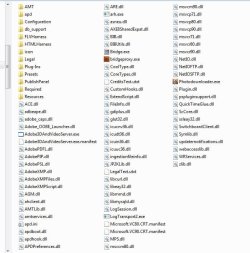
Second is from inside the bridge folder.
Which is right here: C:\Program Files (x86)\Adobe\Adobe Bridge CS5


The third is after I had right-clicked the Bridge icon and you can see the correct icon in the properties menu.

Thanks

A


Untitled-1.jpg

Untitled-2.jpg

Untitled-3.jpg
 

My Computer

OS
Windows 7 Home Premium
Just installed Adobe Photoshop CS5 and Adobe Bridge comes with it.

For some reason the Bridge icon displays as if the program was inactive.
I also looked in the Bridge programs folder and the icon displays as if it was inactive there too.
However when I right-click the inactive icon and click Properties I see the correct preview in the upper left hand corner.

Is there a way for me to get the icon back?

Win7 64bit.

Thanks

A

Adobe has never played nicely on any Windows. The problem is that they set the wrong icon resource for their desktop shortcut. What is bridgeproxy.exe? It's the only one in the folder with a valid icon.
 

My Computer

Computer type
Laptop
Computer Manufacturer/Model Number
Apple
OS
El Capitan / Windows 10
CPU
i7-4980HQ
Memory
16GB
Graphics Card(s)
Iris 5200
The first screen shot is the portion of my desktop where the Photoshop Icons are:

Second is from inside the bridge folder.
Which is right here: C:\Program Files (x86)\Adobe\Adobe Bridge CS5


The third is after I had right-clicked the Bridge icon and you can see the correct icon in the properties menu.

Thanks

A


View attachment 77744

View attachment 77745

View attachment 77746

Shot three, click change icon, browse to bridgeproxy.exe and set. I though attention to detail was a hallmark of artists? I'm sure it is, just not the companies that write software for artists!
 

My Computer

Computer type
Laptop
Computer Manufacturer/Model Number
Apple
OS
El Capitan / Windows 10
CPU
i7-4980HQ
Memory
16GB
Graphics Card(s)
Iris 5200
" Shot three, click change icon, browse to bridgeproxy.exe and set. I though attention to detail was a hallmark of artists? I'm sure it is, just not the companies that write software for artists! "


I tried that and it didn't change the icon.

A
 

My Computer

OS
Windows 7 Home Premium
" Shot three, click change icon, browse to bridgeproxy.exe and set. I though attention to detail was a hallmark of artists? I'm sure it is, just not the companies that write software for artists! "


I tried that and it didn't change the icon.

A

Open bridgeproxy then. Does it start the intended application? If so then right drag that icon to the desktop, select create shortcut and modify properties as you like. The core issue the the icon index is wrong in the PE file. So much for compatibility testing of Adobe products in Windows 7. There is a remote chance that a corruption exists in the shell icon cache but if that's the case then the icon issues would likely be more generalized. If you would like to explore this avenue as well see http://www.sevenforums.com/general-discussion/9973-icons-not-showing-up.html#post777553
 

My Computer

Computer type
Laptop
Computer Manufacturer/Model Number
Apple
OS
El Capitan / Windows 10
CPU
i7-4980HQ
Memory
16GB
Graphics Card(s)
Iris 5200
OK the icon is back.
For some reason I had to restart everything.

Thanks for your help.

A
 

My Computer

OS
Windows 7 Home Premium
OK the icon is back.
For some reason I had to restart everything.

Thanks for your help.

A

Hmmm. Was it ever there? It might have been icon cache all along?
 

My Computer

Computer type
Laptop
Computer Manufacturer/Model Number
Apple
OS
El Capitan / Windows 10
CPU
i7-4980HQ
Memory
16GB
Graphics Card(s)
Iris 5200
Back
Top