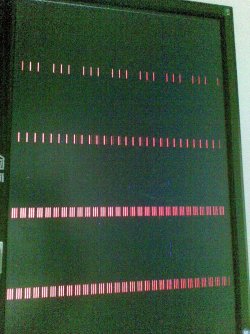
How to get rid of horizontal lines on my monitor?

Robi

New member
Local time
6:32 PM
Messages
25
There are vertical lines on my monitor that are showing ... they are not there all time and are showing from time to time ... they are showing for about 10 sec and after that my monitor shows me no signal :(

pls help and sorry for my bad english :D

...the problem is on my other pc so system specs are not the same ...
 

My Computer My Computer

At a glance

Windows 7 Ultimate 32-bitIntel(R) Pentium(R) M 1,87 GHz1,50 GB RamMobile Intel(R) 915GM/GMS,910GML ExpressChips...
Computer Manufacturer/Model Number
Dell Inspiron 1300
OS
Windows 7 Ultimate 32-bit
CPU
Intel(R) Pentium(R) M 1,87 GHz
Memory
1,50 GB Ram
Graphics Card(s)
Mobile Intel(R) 915GM/GMS,910GML ExpressChipsetFamily 128Mb
There are vertical lines on my monitor that are showing ... they are not there all time and are showing from time to time ... they are showing for about 10 sec and after that my monitor shows me no signal :(

pls help and sorry for my bad english :D

...the problem is on my other pc so system specs are not the same ...

hi Robi, first off do you have another cable you could try ? if so and you get the same probb go to devices.msc and delete your graphics driver , reboot and use the standard vga driver, do you still get the same prob ? ;)
 

My Computer My Computer

At a glance

win 7 ultimate32bit, Win8.1pro wmc 32bitamd phenom x4 9600corsair twinxs 2x2gb2x nvidia 1gb 8500gt
Computer type
PC/Desktop
Computer Manufacturer/Model Number
self build
OS
win 7 ultimate32bit, Win8.1pro wmc 32bit
CPU
amd phenom x4 9600
Motherboard
asus m2n32-sli deluxe
Memory
corsair twinxs 2x2gb
Graphics Card(s)
2x nvidia 1gb 8500gt
Sound Card
onboard
Monitor(s) Displays
23" PB Viseo 233d
Screen Resolution
1920x1080
Hard Drives
maxtor sata 500gb
maxtor sata 320gb
fujitsu sata200gb
PSU
oryxx tornado 750w
Case
thermaltake xaser lll
Cooling
artic freezer64 pro + 7 case fans
What cable ???... The one that connects monitor to electricity or with the other part on my pc ... if it's the one that connects with electricity i've tried that and it's not solving the problem

With vga driver i am gonna try now ... and can i somehow check is my graphic card malfunctioning ???
 

My Computer My Computer

At a glance

Windows 7 Ultimate 32-bitIntel(R) Pentium(R) M 1,87 GHz1,50 GB RamMobile Intel(R) 915GM/GMS,910GML ExpressChips...
Computer Manufacturer/Model Number
Dell Inspiron 1300
OS
Windows 7 Ultimate 32-bit
CPU
Intel(R) Pentium(R) M 1,87 GHz
Memory
1,50 GB Ram
Graphics Card(s)
Mobile Intel(R) 915GM/GMS,910GML ExpressChipsetFamily 128Mb
What cable ???... The one that connects monitor to electricity or with the other part on my pc ... if it's the one that connects with electricity i've tried that and it's not solving the problem

With vga driver i am gonna try now ... and can i somehow check is my graphic card malfunctioning ???

the monitor cable from the pc graphic card port to the monitor , give us a little more info on your system, particulary the graphics card and the os you are using ;)
 

My Computer My Computer

At a glance

win 7 ultimate32bit, Win8.1pro wmc 32bitamd phenom x4 9600corsair twinxs 2x2gb2x nvidia 1gb 8500gt
Computer type
PC/Desktop
Computer Manufacturer/Model Number
self build
OS
win 7 ultimate32bit, Win8.1pro wmc 32bit
CPU
amd phenom x4 9600
Motherboard
asus m2n32-sli deluxe
Memory
corsair twinxs 2x2gb
Graphics Card(s)
2x nvidia 1gb 8500gt
Sound Card
onboard
Monitor(s) Displays
23" PB Viseo 233d
Screen Resolution
1920x1080
Hard Drives
maxtor sata 500gb
maxtor sata 320gb
fujitsu sata200gb
PSU
oryxx tornado 750w
Case
thermaltake xaser lll
Cooling
artic freezer64 pro + 7 case fans

My Computer My Computer

At a glance

win 7 ultimate32bit, Win8.1pro wmc 32bitamd phenom x4 9600corsair twinxs 2x2gb2x nvidia 1gb 8500gt
Computer type
PC/Desktop
Computer Manufacturer/Model Number
self build
OS
win 7 ultimate32bit, Win8.1pro wmc 32bit
CPU
amd phenom x4 9600
Motherboard
asus m2n32-sli deluxe
Memory
corsair twinxs 2x2gb
Graphics Card(s)
2x nvidia 1gb 8500gt
Sound Card
onboard
Monitor(s) Displays
23" PB Viseo 233d
Screen Resolution
1920x1080
Hard Drives
maxtor sata 500gb
maxtor sata 320gb
fujitsu sata200gb
PSU
oryxx tornado 750w
Case
thermaltake xaser lll
Cooling
artic freezer64 pro + 7 case fans
i have wroten in first comm ...

...the problem is on my other pc so system specs are not the same ...

Windows XP Professional SP3
Intel(R) Celeron(R) 420 1.60GHz
1Gb RAM
NVIDIA Geforce 7300 SE/7200 GS
 

My Computer My Computer

At a glance

Windows 7 Ultimate 32-bitIntel(R) Pentium(R) M 1,87 GHz1,50 GB RamMobile Intel(R) 915GM/GMS,910GML ExpressChips...
Computer Manufacturer/Model Number
Dell Inspiron 1300
OS
Windows 7 Ultimate 32-bit
CPU
Intel(R) Pentium(R) M 1,87 GHz
Memory
1,50 GB Ram
Graphics Card(s)
Mobile Intel(R) 915GM/GMS,910GML ExpressChipsetFamily 128Mb
Does it happen when you are playing games but not when at the desk top? OR, does it happen only like several minutes or a half hour after booting the first time fo the day, but then maybe much less time after you reboot?

That kind of behavior indicated that temperature is causing problems, either you have very poor air circualtion or it's very hot where you are and the cad is over heating, OR there may be a cold solder joint that fails when the card warms up (A serioursly large problem with al electronics since the eradication of working (leaded) solder)
 

My Computer My Computer

At a glance

Windows 7 x64 Ultimatei7 96012 Gig Corsair DominatorNvidia 480
Computer Manufacturer/Model Number
Scratch built
OS
Windows 7 x64 Ultimate
CPU
i7 960
Motherboard
Asus P6X58D
Memory
12 Gig Corsair Dominator
Graphics Card(s)
Nvidia 480
Sound Card
Maudio Delta 44 + breakout box
Monitor(s) Displays
Dell UltraSharp U2410 24in and Samsung 21 dual monitors
Screen Resolution
1920x1200 and 1280x1024
Hard Drives
Primary: Intel X-25M G2 160G SSD
Secondary: Segate baracuda 1.0 TB
HDs in AHCI mode.
PSU
Corasair TX850
Case
Cooler Master HAF
Cooling
Corsair H50
Keyboard
Logitech G15 + N52 game pad
Mouse
Logitech MX518
Internet Speed
15kbs down 4.5kbps up
Other Info
WEI 7.6
CPU & RAM 7.6
Graphics 7.9
Hard disk 7.7
it happens each time different ... sometimes 2-3 minutes after is turned on ... sometimes after half hour ... sometimes the pc is on couple of hours and it does'n happen anything

Sometimes is happening when i am playing games ... sometimes is happening on desktop

Each time different
 

My Computer My Computer

At a glance

Windows 7 Ultimate 32-bitIntel(R) Pentium(R) M 1,87 GHz1,50 GB RamMobile Intel(R) 915GM/GMS,910GML ExpressChips...
Computer Manufacturer/Model Number
Dell Inspiron 1300
OS
Windows 7 Ultimate 32-bit
CPU
Intel(R) Pentium(R) M 1,87 GHz
Memory
1,50 GB Ram
Graphics Card(s)
Mobile Intel(R) 915GM/GMS,910GML ExpressChipsetFamily 128Mb
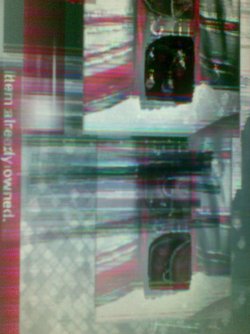
Ok, well there's no real smoking gun there, but if the vertical lines are like staticy, moving, or look like they are somwhat randomly wigling or shimmering then it's still likely bad hardware. Since you say the computer crashes shortly thereafter it's most likely the video card rather than the monitor.

It could even be the motherboard itself actually. If you have a spare, older vodeo card that will work in that otherboard you might try replacing it with that for a few days and see if it goes away.
 

My Computer My Computer

At a glance

Windows 7 x64 Ultimatei7 96012 Gig Corsair DominatorNvidia 480
Computer Manufacturer/Model Number
Scratch built
OS
Windows 7 x64 Ultimate
CPU
i7 960
Motherboard
Asus P6X58D
Memory
12 Gig Corsair Dominator
Graphics Card(s)
Nvidia 480
Sound Card
Maudio Delta 44 + breakout box
Monitor(s) Displays
Dell UltraSharp U2410 24in and Samsung 21 dual monitors
Screen Resolution
1920x1200 and 1280x1024
Hard Drives
Primary: Intel X-25M G2 160G SSD
Secondary: Segate baracuda 1.0 TB
HDs in AHCI mode.
PSU
Corasair TX850
Case
Cooler Master HAF
Cooling
Corsair H50
Keyboard
Logitech G15 + N52 game pad
Mouse
Logitech MX518
Internet Speed
15kbs down 4.5kbps up
Other Info
WEI 7.6
CPU & RAM 7.6
Graphics 7.9
Hard disk 7.7
Can i check for hardware malfunction with some program ???
 

My Computer My Computer

At a glance

Windows 7 Ultimate 32-bitIntel(R) Pentium(R) M 1,87 GHz1,50 GB RamMobile Intel(R) 915GM/GMS,910GML ExpressChips...
Computer Manufacturer/Model Number
Dell Inspiron 1300
OS
Windows 7 Ultimate 32-bit
CPU
Intel(R) Pentium(R) M 1,87 GHz
Memory
1,50 GB Ram
Graphics Card(s)
Mobile Intel(R) 915GM/GMS,910GML ExpressChipsetFamily 128Mb
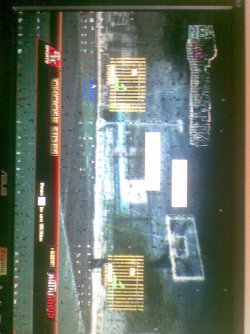
No, the quickest way is to move the card to another computer and see if it malfunctions there. Or replace the card with a different one and see if the malfunctions stop. Then at least you KNOW it's the card or driver and not the motherboard or memory or some other hardware issue.

If it's possible to upload a photograph of the problem it might be clearer. But there have been several bad video card problems here and I've had two burn out on me in the last 6 months. The quality of electronic parts is going into the crapper with current production techniques and location :(
 

My Computer My Computer

At a glance

Windows 7 x64 Ultimatei7 96012 Gig Corsair DominatorNvidia 480
Computer Manufacturer/Model Number
Scratch built
OS
Windows 7 x64 Ultimate
CPU
i7 960
Motherboard
Asus P6X58D
Memory
12 Gig Corsair Dominator
Graphics Card(s)
Nvidia 480
Sound Card
Maudio Delta 44 + breakout box
Monitor(s) Displays
Dell UltraSharp U2410 24in and Samsung 21 dual monitors
Screen Resolution
1920x1200 and 1280x1024
Hard Drives
Primary: Intel X-25M G2 160G SSD
Secondary: Segate baracuda 1.0 TB
HDs in AHCI mode.
PSU
Corasair TX850
Case
Cooler Master HAF
Cooling
Corsair H50
Keyboard
Logitech G15 + N52 game pad
Mouse
Logitech MX518
Internet Speed
15kbs down 4.5kbps up
Other Info
WEI 7.6
CPU & RAM 7.6
Graphics 7.9
Hard disk 7.7
Image000.jpg

Image001.jpg

Image004.jpg

Image002.jpg

Image003.jpg

Image005.jpg

Image006.jpg

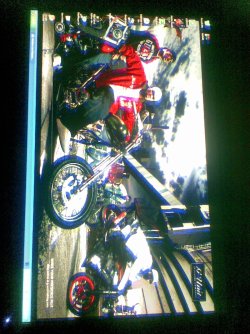
Here are some screenshots
 

My Computer My Computer

At a glance

Windows 7 Ultimate 32-bitIntel(R) Pentium(R) M 1,87 GHz1,50 GB RamMobile Intel(R) 915GM/GMS,910GML ExpressChips...
Computer Manufacturer/Model Number
Dell Inspiron 1300
OS
Windows 7 Ultimate 32-bit
CPU
Intel(R) Pentium(R) M 1,87 GHz
Memory
1,50 GB Ram
Graphics Card(s)
Mobile Intel(R) 915GM/GMS,910GML ExpressChipsetFamily 128Mb
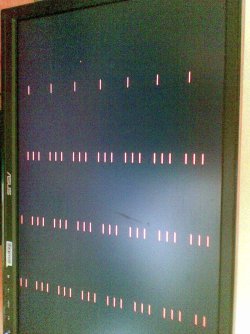
That's definitely hardware. Most likely the card itself.
 

My Computer My Computer

At a glance

8 Pro x64i7 3770K 4.6GHz16GB G.Skill Trident X 2666mhzx2 EVGA 780 Ti Superclocked SLI
Computer type
PC/Desktop
Computer Manufacturer/Model Number
Systems by SmartEyeball
OS
8 Pro x64
CPU
i7 3770K 4.6GHz
Motherboard
ASUS P8Z77 WS
Memory
16GB G.Skill Trident X 2666mhz
Graphics Card(s)
x2 EVGA 780 Ti Superclocked SLI
Sound Card
SB X-FI Surround 5.1 PRO USB / ATH-AD900 Headphones
Monitor(s) Displays
x3 Dell U2410 / 58" Samsung
Screen Resolution
5760*1200/ 1920*1200
Hard Drives
2x Intel 520 240GB (RAID 0) * 2x WD Caviar Blacks 2TB (RAID 0) * 2TB WD Caviar Black * Sony Optirac DVD
PSU
Silverstone Strider Evolution 1200W
Case
Thermaltake Level 10 GT Snow Edition
Cooling
Noctua NH-D14
Keyboard
Topre Realforce // Ducky Shine MX Black // Filco Ninja TKL
Mouse
Thermaltake Theron (Highly Recommended) + Razer Imperator
Antivirus
MSE
Browser
IE, FF, WaterFox
Other Info
GT Extreme V2 Sim Racing Cockpit + 40" LCD and K/B Mouse stand ▼
Fanatec CSR Elite Wheel + Clubsport V1 Pedals + CSR shifter/7G-H ▼Saitek X52 Pro ▼ TrackIR 5 Pro
Buttkicker v2 Seat Rumbler with Dedicated 5.1 and Sub Woofer attached to frame ▼
=
Bloody Big Grin
That's definitely hardware. Most likely the card itself.

+1 robi have you tried exchanging the cable and also have you tried using the standard vga driver yet ?;)
 

My Computer My Computer

At a glance

win 7 ultimate32bit, Win8.1pro wmc 32bitamd phenom x4 9600corsair twinxs 2x2gb2x nvidia 1gb 8500gt
Computer type
PC/Desktop
Computer Manufacturer/Model Number
self build
OS
win 7 ultimate32bit, Win8.1pro wmc 32bit
CPU
amd phenom x4 9600
Motherboard
asus m2n32-sli deluxe
Memory
corsair twinxs 2x2gb
Graphics Card(s)
2x nvidia 1gb 8500gt
Sound Card
onboard
Monitor(s) Displays
23" PB Viseo 233d
Screen Resolution
1920x1080
Hard Drives
maxtor sata 500gb
maxtor sata 320gb
fujitsu sata200gb
PSU
oryxx tornado 750w
Case
thermaltake xaser lll
Cooling
artic freezer64 pro + 7 case fans
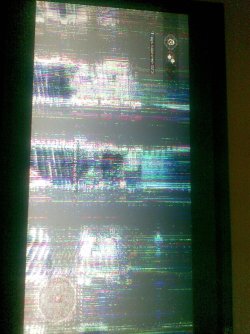
Yeah those are classic signs of bad hardware. Most likely the video card but it could also be the monitor itself (having also lost one of those recently with resuls similar to the pic 4th down). The other pics look more like the video card itself though.

Smaller chances are that it's a bad motherboard or a bad driver, or even bad main ram causing the driver to crash.

Best way to test is the replacement method. Hook machine up to a different monitor see if it goes away. Replace video card with a spare and see if it goes away etc :/
 

My Computer My Computer

At a glance

Windows 7 x64 Ultimatei7 96012 Gig Corsair DominatorNvidia 480
Computer Manufacturer/Model Number
Scratch built
OS
Windows 7 x64 Ultimate
CPU
i7 960
Motherboard
Asus P6X58D
Memory
12 Gig Corsair Dominator
Graphics Card(s)
Nvidia 480
Sound Card
Maudio Delta 44 + breakout box
Monitor(s) Displays
Dell UltraSharp U2410 24in and Samsung 21 dual monitors
Screen Resolution
1920x1200 and 1280x1024
Hard Drives
Primary: Intel X-25M G2 160G SSD
Secondary: Segate baracuda 1.0 TB
HDs in AHCI mode.
PSU
Corasair TX850
Case
Cooler Master HAF
Cooling
Corsair H50
Keyboard
Logitech G15 + N52 game pad
Mouse
Logitech MX518
Internet Speed
15kbs down 4.5kbps up
Other Info
WEI 7.6
CPU & RAM 7.6
Graphics 7.9
Hard disk 7.7
with vga driver is all ok ... no crashes ... nothing =))
 

My Computer My Computer

At a glance

Windows 7 Ultimate 32-bitIntel(R) Pentium(R) M 1,87 GHz1,50 GB RamMobile Intel(R) 915GM/GMS,910GML ExpressChips...
Computer Manufacturer/Model Number
Dell Inspiron 1300
OS
Windows 7 Ultimate 32-bit
CPU
Intel(R) Pentium(R) M 1,87 GHz
Memory
1,50 GB Ram
Graphics Card(s)
Mobile Intel(R) 915GM/GMS,910GML ExpressChipsetFamily 128Mb
My Computer My Computer

At a glance

win 7 ultimate32bit, Win8.1pro wmc 32bitamd phenom x4 9600corsair twinxs 2x2gb2x nvidia 1gb 8500gt
Computer type
PC/Desktop
Computer Manufacturer/Model Number
self build
OS
win 7 ultimate32bit, Win8.1pro wmc 32bit
CPU
amd phenom x4 9600
Motherboard
asus m2n32-sli deluxe
Memory
corsair twinxs 2x2gb
Graphics Card(s)
2x nvidia 1gb 8500gt
Sound Card
onboard
Monitor(s) Displays
23" PB Viseo 233d
Screen Resolution
1920x1080
Hard Drives
maxtor sata 500gb
maxtor sata 320gb
fujitsu sata200gb
PSU
oryxx tornado 750w
Case
thermaltake xaser lll
Cooling
artic freezer64 pro + 7 case fans
ok ... just one question ... how much costs Nvidia 9600 or 9800 GT
 
Last edited:

My Computer My Computer

At a glance

Windows 7 Ultimate 32-bitIntel(R) Pentium(R) M 1,87 GHz1,50 GB RamMobile Intel(R) 915GM/GMS,910GML ExpressChips...
Computer Manufacturer/Model Number
Dell Inspiron 1300
OS
Windows 7 Ultimate 32-bit
CPU
Intel(R) Pentium(R) M 1,87 GHz
Memory
1,50 GB Ram
Graphics Card(s)
Mobile Intel(R) 915GM/GMS,910GML ExpressChipsetFamily 128Mb
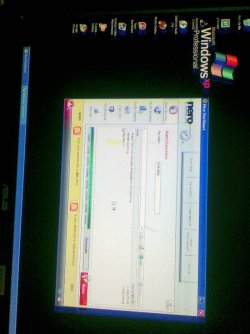
this problem happens very often if you are overclocking your graphics card and not doing it right (instable Core speeds ect.)

make sure that you have not been overclocking at any point.. :)
 

My Computer My Computer

At a glance

Microsoft Windows 7 Ultimate 64-BitIntel Core 2 Quad Q8300 2.50GHz @ 2.85GHz8GB Kingston HyperX Dual-Channel DDR2 800MHz896MB GeForce GTX 260 (nVidia)
Computer Manufacturer/Model Number
Gigabyte / Custom Case
OS
Microsoft Windows 7 Ultimate 64-Bit
CPU
Intel Core 2 Quad Q8300 2.50GHz @ 2.85GHz
Motherboard
Gigabyte Technology Co. Ltd. EP43-S3L
Memory
8GB Kingston HyperX Dual-Channel DDR2 800MHz
Graphics Card(s)
896MB GeForce GTX 260 (nVidia)
Sound Card
Onboard
Monitor(s) Displays
Samsung Full-HD TV 32"; HP monitor 19"
Screen Resolution
1920x1080 and 1280x1024
Hard Drives
750GB Samsung HD753LJ ATA Device
1TB Western Digital Drive
PSU
Energon Gaming Power Supply - 650W
Case
Custom (originally Aplus CS-188A Miditower Deluxe LowNoise)
Cooling
Custom air intake (320mm) + 3 x 80mm fans
Keyboard
Razer Arctosa
Mouse
Razer Deathadder
Internet Speed
Down: 11mb/s - Up: 2mb/s
Other Info
I LOVE customizing my pc in every possible way... :)
1. Make sure you aren't overclocking or installed any 'performance' tool or anything like that.2
2. Give your case a good clean, blow out dust, etc etc.
3. Put a heavy duty fan next to case blowing onto GPU
4. Use a live CD, and if the lines are still there, then GPU is definitely on it's way out.
 

My Computer My Computer

At a glance

W764BitEnt. 2K8R2 XPSP3
OS
W764BitEnt. 2K8R2 XPSP3
Back
Top