Go to fast user switching when I close my laptop lid, WITHOUT standby

kdogg

Enlightened
I remember there was a way to do this Windows XP, but I can't for the life of me figure out how to do it on Windows 7.

I'm going to end up in jail when I beat my kids if I come home and get on my laptop one more time and find my Facebook, Myspace etc logged out and theirs logged in.

I have made them accounts but if I forget to switch to the fast user switching screen they REFUSE to do it themselves and log into there own user accounts because it make take 10 seconds longer for them to get to there friends on Facebook.

One of my kids even went so far as to say don't make me my own user account, I won't use it, I'll just log into my Facebook on your user account anyway. My reply, well then you better get used to going to the public library to Facebook then! :cool:

Anyway, it would just be easier to setup the PC/Win7 to drop to the fast user switching when I close the lid but I do NOT want it to go into "standby" when I do this and that's the only way I can get it working right now.

On Windows XP, I had it setup to do this but it bypassed and did NOT go into standby, just to fast user switching screen.

Thanks!
 

My Computer

Computer Manufacturer/Model Number
My Own Computer!
OS
Windows 7 Ultimate x64
CPU
AMD Athlon II X2 245 Regor 2.9GHz Socket AM3 65W Dual-Core
Motherboard
ASUS M4A88TD-M/USB3 880G
Memory
Crucial Ballistix Tracer 8GB (4x2GB) DDR3 1600 (PC3 12800)
Graphics Card(s)
ATI Radeon HD3870 X2
Sound Card
Onboard HD Audio
Monitor(s) Displays
Westinghouse 22" LCD, Samsung 46" LCD TV
Screen Resolution
1680x1050, Extended Display Setup
Hard Drives
2x Western Digital 74GB Raptors SATA Raid (OS & Games Drive)
1x Western Digital 1.5TB SATA (Storage)
1x Western Digital 2TB SATA (Storage)
PSU
Antec 550 Watt
Case
Antec Three Hundred
Cooling
3x Antec 120mm Fans & OEM CPU/GPU Coolers
Keyboard
Microsoft Comfort Curve Keyboard 2000
Mouse
Microsoft Bluetooth Explorer Mouse
Internet Speed
Comcastic Cable Internet! When it works!
Hello Kdogg,

You can enable the Require a password on wakeup option in your Power Plan settings so that it will resume to the log on screen and require them to log in when the laptop is opened next.

Hope this helps,
Shawn
 

My Computer

Computer type
PC/Desktop
Computer Manufacturer/Model Number
Self built custom
OS
64-bit Windows 11 Pro for Workstations
CPU
Intel i7-8700K OC'd to 5 GHz
Motherboard
ASUS ROG Maximus XI Formula Z390
Memory
64 GB (4x16GB) G.SKILL TridentZ RGB DDR4 3600 MHz
Graphics Card(s)
ASUS ROG-STRIX-GTX1080TI-O11G-GAMING
Sound Card
Integrated
Monitor(s) Displays
2 x Samsung Odyssey G7 27"
Screen Resolution
2560x1440
Hard Drives
1TB Samsung 990 PRO M.2,
4TB Samsung 990 PRO PRO M.2,
TerraMaster F8 SSD Plus NAS
PSU
Seasonic Prime Titanium 850W
Case
Thermaltake Core P3
Cooling
Corsair Hydro H115i
Keyboard
Logitech wireless K800
Mouse
Logitech MX Master 4
Internet Speed
2 Gb/s Download and 100 Mb/s Upload
Antivirus
Malwarebyte Anti-Malware Premium
Browser
Google Chrome
Other Info
Logitech Z625 speaker system,
Logitech BRIO 4K Pro webcam,
HP Color LaserJet Pro MFP M477fdn,
APC SMART-UPS RT 1000 XL - SURT1000XLI,
Galaxy S23 Plus phone
Wake up....

See that's the problem, I don't want it to sleep. I've got stuff running I don't want to close like my VNC etc. Isn't there a way to do it WITHOUT is sleeping?

Thanks for the help btw! :D
 

My Computer

Computer Manufacturer/Model Number
My Own Computer!
OS
Windows 7 Ultimate x64
CPU
AMD Athlon II X2 245 Regor 2.9GHz Socket AM3 65W Dual-Core
Motherboard
ASUS M4A88TD-M/USB3 880G
Memory
Crucial Ballistix Tracer 8GB (4x2GB) DDR3 1600 (PC3 12800)
Graphics Card(s)
ATI Radeon HD3870 X2
Sound Card
Onboard HD Audio
Monitor(s) Displays
Westinghouse 22" LCD, Samsung 46" LCD TV
Screen Resolution
1680x1050, Extended Display Setup
Hard Drives
2x Western Digital 74GB Raptors SATA Raid (OS & Games Drive)
1x Western Digital 1.5TB SATA (Storage)
1x Western Digital 2TB SATA (Storage)
PSU
Antec 550 Watt
Case
Antec Three Hundred
Cooling
3x Antec 120mm Fans & OEM CPU/GPU Coolers
Keyboard
Microsoft Comfort Curve Keyboard 2000
Mouse
Microsoft Bluetooth Explorer Mouse
Internet Speed
Comcastic Cable Internet! When it works!
It sleeps anyway whether there are programms running or not - sleeping/locking is based on whether there is mouse/keyboard activity

You should also consider locking your account when away from your machine (as per you need to do at work) CTRL ALT DEL lock - although i cant remember whether another user can login when it's locked - give it try
 

My Computer

OS
Vista Premium
Kdogg,

You can enable CTRL+ALT+DEL secure logon, then press the Windows Key + L to lock your computer when unattended without logging off your user account. This way they will have to click on either the Switch User button and log on to their account, or you press CTRL+ALT+DEL and log on to your account.
 

My Computer

Computer type
PC/Desktop
Computer Manufacturer/Model Number
Self built custom
OS
64-bit Windows 11 Pro for Workstations
CPU
Intel i7-8700K OC'd to 5 GHz
Motherboard
ASUS ROG Maximus XI Formula Z390
Memory
64 GB (4x16GB) G.SKILL TridentZ RGB DDR4 3600 MHz
Graphics Card(s)
ASUS ROG-STRIX-GTX1080TI-O11G-GAMING
Sound Card
Integrated
Monitor(s) Displays
2 x Samsung Odyssey G7 27"
Screen Resolution
2560x1440
Hard Drives
1TB Samsung 990 PRO M.2,
4TB Samsung 990 PRO PRO M.2,
TerraMaster F8 SSD Plus NAS
PSU
Seasonic Prime Titanium 850W
Case
Thermaltake Core P3
Cooling
Corsair Hydro H115i
Keyboard
Logitech wireless K800
Mouse
Logitech MX Master 4
Internet Speed
2 Gb/s Download and 100 Mb/s Upload
Antivirus
Malwarebyte Anti-Malware Premium
Browser
Google Chrome
Other Info
Logitech Z625 speaker system,
Logitech BRIO 4K Pro webcam,
HP Color LaserJet Pro MFP M477fdn,
APC SMART-UPS RT 1000 XL - SURT1000XLI,
Galaxy S23 Plus phone
cant we lock the computer instead of sleep when closing the lid?????
 

My Computer

Computer Manufacturer/Model Number
hp pavilion dv-4 1506TX
OS
windows7 home premium
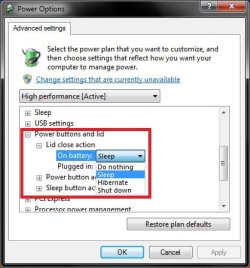
Hello Praveen,

Sorry, but these seem to be the only options for closing the lid. :(

Power_Options.jpg
 
Last edited:

My Computer

Computer type
PC/Desktop
Computer Manufacturer/Model Number
Self built custom
OS
64-bit Windows 11 Pro for Workstations
CPU
Intel i7-8700K OC'd to 5 GHz
Motherboard
ASUS ROG Maximus XI Formula Z390
Memory
64 GB (4x16GB) G.SKILL TridentZ RGB DDR4 3600 MHz
Graphics Card(s)
ASUS ROG-STRIX-GTX1080TI-O11G-GAMING
Sound Card
Integrated
Monitor(s) Displays
2 x Samsung Odyssey G7 27"
Screen Resolution
2560x1440
Hard Drives
1TB Samsung 990 PRO M.2,
4TB Samsung 990 PRO PRO M.2,
TerraMaster F8 SSD Plus NAS
PSU
Seasonic Prime Titanium 850W
Case
Thermaltake Core P3
Cooling
Corsair Hydro H115i
Keyboard
Logitech wireless K800
Mouse
Logitech MX Master 4
Internet Speed
2 Gb/s Download and 100 Mb/s Upload
Antivirus
Malwarebyte Anti-Malware Premium
Browser
Google Chrome
Other Info
Logitech Z625 speaker system,
Logitech BRIO 4K Pro webcam,
HP Color LaserJet Pro MFP M477fdn,
APC SMART-UPS RT 1000 XL - SURT1000XLI,
Galaxy S23 Plus phone
thanks brink for consideration
my friend has windows 7 basic and he can do it
 

My Computer

Computer Manufacturer/Model Number
hp pavilion dv-4 1506TX
OS
windows7 home premium
I found this on the microsoft answers site, can't vouch for it myself but someone else had the same problem as you...

User log-in screen activation - Microsoft Answers


regedit....HKEY_LOCAL_MACHINE\SYSTEM\CurrentControlSet\Control\SessionManager\Power, add a new DWORD32 there and rename it as AwayModeEnabled, right click and edit the value as 1 (Hex). Finally, edit the laptop's Lid close action as Sleep on the Power Option setting page in Windows7.
 

My Computer

Computer Manufacturer/Model Number
Sony Vaio VGN-C140g
OS
Windows 7 Home Premium 32bit
CPU
Intel® Core™ 2 Duo Processor T5500 1.66 GHZ
Memory
2 GB
Graphics Card(s)
Intel® 945GM
Screen Resolution
1280X800
Hard Drives
Seagate 500 GB
great solution morningstarc

it really helped
thanks a lot
 

My Computer

Computer Manufacturer/Model Number
hp pavilion dv-4 1506TX
OS
windows7 home premium
Back
Top