Problem setting up dual monitors with 7/GeForce GTS240 Graphics Card

PainfulGlory

New member
Local time
7:42 PM
Messages
10
Hi guys, new and in need of help please.

Probably a basic problem to most but struggling here.

It has Windows 7 & a GeForce GT240 1024MB graphics card

I cannot get my 2nd monitor to work with a new PC I had last week. The DVI port seems to be the problem.

Both monitors work independantly through the VGA port fine, no problems, but neither work through the DVI port when I use a simple DVI to VGA adapter, I have tried 2 of these just to make sure it wasn't a dodgy adapter.

I have followed the various windows 7 'set-up dual monitors' tutorials but with no luck.

Nothing happens at all when I plug the 2nd monitor in.

Any thoughts?

Could I need to download a driver or anything?

Thanks for any help.
 

My Computer My Computer

OS
Windows 7
Does that video card support DUAL VGA monitors? What I'm getting at is, is that DVI connector on the video card a DVI-I or DVI-D? If it's only a DVI-D (Digital only) the DVI to VGA adapter won't work. If it came with the DVI to VGA adapter one would assume it is DVI-I (integrated, digital and analog).

EDIT: I just tried a DVI to VGA adapter on my 220GT and it worked OK. This card has 1 VGA and 1 DVI conector. I'm running 2 VGA monitors as I type this. To be honest I was not expecting this to work.
 

My Computer My Computer

Computer type
PC/Desktop
Computer Manufacturer/Model Number
Home Built
OS
Windows 10 Education 64 bit
CPU
AMD Phenom II X4 980 Black Edition Deneb 3.7GHz
Motherboard
Asus M4N68T-M V2 µATX Motherboard
Memory
8GB 4GBx2 Kingston PC10600 DDR3 1333 Memory
Graphics Card(s)
Zotac NVIDIA Geforce GT640 2 Gig DDR3 PCIe
Sound Card
VIA VT1708s High Definition Audio 8-channel Onboard
Monitor(s) Displays
22" LG E2242 1080p and 2 19" I-INC AG191D
Screen Resolution
1280x1024 - 1920x1080 - 1280x1024
Hard Drives
Crucial M100 256 GB SSD and 500 GB WD Blue SATA
PSU
Thermaltake TR 620
Case
Power Up Black ATX Mid-Tower Case
Cooling
Stock heatsink and fan
Keyboard
Logitech Wireless K350 Wave
Mouse
Logitech Wireless M570 Trackman Wheel
Internet Speed
80 Mbps Down 30 Mbps Up
Antivirus
Windows Defender
Browser
Internet Explorer 11
Other Info
HP DVD1040e Lightscribe - External USB2
It is DVI-D, it doesn't have the 4 pins around the stright connection piece (if that makes sense?)

It didn't come with an adapter, a got a couple of cheap 1's of ebay.

So if its digital am I screwed in getting the 2nd monitor working?

Thanks again.
 

My Computer My Computer

OS
Windows 7
If it is DVI-D only you will have to use at least one monitor that has a DVI connector on it to go dual screen. That or replace the Video card or add another video card. I lucked out in that both of my LCD's have VGA and DVI inputs. I was running dual DVI on my old PC but had to settle for DVI and VGA on this build. At some point I'll upgrade my video card and go back to dual DVI. I guess its Dependant on the video card maker and how much circuitry they decide to put on the card. Some times they just split the connector and even though there is a VGA an DVI the card can only handle one monitor. I guess you just have to read the fine print. Before you go out and buy another monitor make sure that card does in fact support dual monitors.
 

My Computer My Computer

Computer type
PC/Desktop
Computer Manufacturer/Model Number
Home Built
OS
Windows 10 Education 64 bit
CPU
AMD Phenom II X4 980 Black Edition Deneb 3.7GHz
Motherboard
Asus M4N68T-M V2 µATX Motherboard
Memory
8GB 4GBx2 Kingston PC10600 DDR3 1333 Memory
Graphics Card(s)
Zotac NVIDIA Geforce GT640 2 Gig DDR3 PCIe
Sound Card
VIA VT1708s High Definition Audio 8-channel Onboard
Monitor(s) Displays
22" LG E2242 1080p and 2 19" I-INC AG191D
Screen Resolution
1280x1024 - 1920x1080 - 1280x1024
Hard Drives
Crucial M100 256 GB SSD and 500 GB WD Blue SATA
PSU
Thermaltake TR 620
Case
Power Up Black ATX Mid-Tower Case
Cooling
Stock heatsink and fan
Keyboard
Logitech Wireless K350 Wave
Mouse
Logitech Wireless M570 Trackman Wheel
Internet Speed
80 Mbps Down 30 Mbps Up
Antivirus
Windows Defender
Browser
Internet Explorer 11
Other Info
HP DVD1040e Lightscribe - External USB2
Had a thought, am at work at mo but will check later 95% sure it has a HDMI connection too, does that give me any option sto use to with a VGA monitor?
 

My Computer My Computer

OS
Windows 7
Hmm, I honestly don't know? Mine has that option too, but I don't have the adapter to even play around with it. If yours has the port you would still need a cable and something to plug it into. Whats the make and model number of your video card so I can look up its specs on line?
 

My Computer My Computer

Computer type
PC/Desktop
Computer Manufacturer/Model Number
Home Built
OS
Windows 10 Education 64 bit
CPU
AMD Phenom II X4 980 Black Edition Deneb 3.7GHz
Motherboard
Asus M4N68T-M V2 µATX Motherboard
Memory
8GB 4GBx2 Kingston PC10600 DDR3 1333 Memory
Graphics Card(s)
Zotac NVIDIA Geforce GT640 2 Gig DDR3 PCIe
Sound Card
VIA VT1708s High Definition Audio 8-channel Onboard
Monitor(s) Displays
22" LG E2242 1080p and 2 19" I-INC AG191D
Screen Resolution
1280x1024 - 1920x1080 - 1280x1024
Hard Drives
Crucial M100 256 GB SSD and 500 GB WD Blue SATA
PSU
Thermaltake TR 620
Case
Power Up Black ATX Mid-Tower Case
Cooling
Stock heatsink and fan
Keyboard
Logitech Wireless K350 Wave
Mouse
Logitech Wireless M570 Trackman Wheel
Internet Speed
80 Mbps Down 30 Mbps Up
Antivirus
Windows Defender
Browser
Internet Explorer 11
Other Info
HP DVD1040e Lightscribe - External USB2
Had a thought, am at work at mo but will check later 95% sure it has a HDMI connection too, does that give me any option sto use to with a VGA monitor?

No because it will have the same problem as the DVI-VGA adapter, there is nothing to convert the signal from digital to analogue. There are digital to analogue converters out there, but most of them cost as much as a 19-20" wide screen LCD monitor.
 

My Computer My Computer

Computer type
PC/Desktop
Computer Manufacturer/Model Number
Me
OS
Win 7 Ultimate x64
CPU
FX-8350 @ 4.6 GHz so far
Motherboard
Asus M5A97 EVO
Memory
ADATA XPG V1 Series Black 8GB DDR3 1600
Graphics Card(s)
Sapphire R9 270x Dual-X
Sound Card
Xonar DGX w/ Corsair Vengence 1300
Monitor(s) Displays
Acer S232HL Abid
Screen Resolution
1920x1080
Hard Drives
120 GB OCZ Vertex 3
500 GB Seagate 7200.12
PSU
Antec Earthwatts 650W Green
Case
Antec Three Hundred
Cooling
Cooler Master 212 EVO
Keyboard
Logitech G510
Mouse
Logitech G500s
Internet Speed
35000/3000
Is this an on board (built in) video card? If it is, its highly likely it only supports a single monitor. I've been looking at a lot of motherboards lately and every one with on board video didn't have dual monitor support. Lots of different monitor connectors but you could only ever use one of them at a time.
 

My Computer My Computer

Computer type
PC/Desktop
Computer Manufacturer/Model Number
Home Built
OS
Windows 10 Education 64 bit
CPU
AMD Phenom II X4 980 Black Edition Deneb 3.7GHz
Motherboard
Asus M4N68T-M V2 µATX Motherboard
Memory
8GB 4GBx2 Kingston PC10600 DDR3 1333 Memory
Graphics Card(s)
Zotac NVIDIA Geforce GT640 2 Gig DDR3 PCIe
Sound Card
VIA VT1708s High Definition Audio 8-channel Onboard
Monitor(s) Displays
22" LG E2242 1080p and 2 19" I-INC AG191D
Screen Resolution
1280x1024 - 1920x1080 - 1280x1024
Hard Drives
Crucial M100 256 GB SSD and 500 GB WD Blue SATA
PSU
Thermaltake TR 620
Case
Power Up Black ATX Mid-Tower Case
Cooling
Stock heatsink and fan
Keyboard
Logitech Wireless K350 Wave
Mouse
Logitech Wireless M570 Trackman Wheel
Internet Speed
80 Mbps Down 30 Mbps Up
Antivirus
Windows Defender
Browser
Internet Explorer 11
Other Info
HP DVD1040e Lightscribe - External USB2
Is this an on board (built in) video card? If it is, its highly likely it only supports a single monitor. I've been looking at a lot of motherboards lately and every one with on board video didn't have dual monitor support. Lots of different monitor connectors but you could only ever use one of them at a time.

Yes it is built in I guess, great, more bad news!

https://www.aria.co.uk/Systems/Home...+PC+-+Windows+7+Home+Premium+?productId=39948

Ive attached 2 pictures of the back of the PC, and the 2 apadters ive tried.

If it does only supoort one monitor, what would be the point of having the DVI port?
 

Attachments

  • PHONE old 001.jpg
    PHONE old 001.jpg
    280 KB · Views: 13
  • PHONE old 002.jpg
    PHONE old 002.jpg
    352.1 KB · Views: 13

My Computer My Computer

OS
Windows 7
You can run 2 screens with your PC, but 1 has to be DVI or HDMI and the other would be VGA.
 

My Computer My Computer

Computer Manufacturer/Model Number
HAL-9000
OS
Windows 7 Ultimate 64bit
CPU
Intel i7 3770K
Motherboard
Asus Sabertooth Z77
Memory
16GB DDR3 1333 Corsair XMS3
Graphics Card(s)
XFX HD6950 2GB EyeFinity
Sound Card
Logitech G35 & Sennheiser PC135 & VIA HD
Monitor(s) Displays
23" HP 2310e, 23" Samsung B2230, 21.5" Viewsonic
Screen Resolution
5760x1080
Hard Drives
16TB of Storage
128GB & 256GB Crucial M4 SSD's, 2X 1TB WD Black, 3x 2TB WD, 3x 2TB Samsung F4, 1.5TB Seagate, WD 500GB,
PSU
Antec True Power New 650watt
Case
Cooler Master HAF-932
Cooling
Corsair H60 Hydro Cooler, 3x 230mm Fans, 2x120mm Fan
Keyboard
Logitech G15 and G13
Mouse
Logitech G700 Gaming Mouse
Internet Speed
50/10 Mbit
Other Info
Speakers : Alesis M1 Active Mk2 Studio Monitors , APC RS 1200 UPS, HP 4500DN Color Laser, HP P1006 mono Laser, Kodak 8500 Dye-Sub, Epson 1280 inkjet, Epson Worforce 610 MFC

My Computer My Computer

OS
Windows 7
Ya, 1 Monitor will have to be DVI or HDMI and the other has to be VGA.

that USB adapter will work as well, but I would try to invest in a better monitor.

But, buying that adapter will give you the option of running 3 screens down the road if you buy a DVI/HDMI monitor.
 

My Computer My Computer

Computer Manufacturer/Model Number
HAL-9000
OS
Windows 7 Ultimate 64bit
CPU
Intel i7 3770K
Motherboard
Asus Sabertooth Z77
Memory
16GB DDR3 1333 Corsair XMS3
Graphics Card(s)
XFX HD6950 2GB EyeFinity
Sound Card
Logitech G35 & Sennheiser PC135 & VIA HD
Monitor(s) Displays
23" HP 2310e, 23" Samsung B2230, 21.5" Viewsonic
Screen Resolution
5760x1080
Hard Drives
16TB of Storage
128GB & 256GB Crucial M4 SSD's, 2X 1TB WD Black, 3x 2TB WD, 3x 2TB Samsung F4, 1.5TB Seagate, WD 500GB,
PSU
Antec True Power New 650watt
Case
Cooler Master HAF-932
Cooling
Corsair H60 Hydro Cooler, 3x 230mm Fans, 2x120mm Fan
Keyboard
Logitech G15 and G13
Mouse
Logitech G700 Gaming Mouse
Internet Speed
50/10 Mbit
Other Info
Speakers : Alesis M1 Active Mk2 Studio Monitors , APC RS 1200 UPS, HP 4500DN Color Laser, HP P1006 mono Laser, Kodak 8500 Dye-Sub, Epson 1280 inkjet, Epson Worforce 610 MFC
Is this an on board (built in) video card? If it is, its highly likely it only supports a single monitor. I've been looking at a lot of motherboards lately and every one with on board video didn't have dual monitor support. Lots of different monitor connectors but you could only ever use one of them at a time.

Yes it is built in I guess, great, more bad news!

https://www.aria.co.uk/Systems/Home...+PC+-+Windows+7+Home+Premium+?productId=39948

Ive attached 2 pictures of the back of the PC, and the 2 apadters ive tried.

If it does only supoort one monitor, what would be the point of having the DVI port?

If you had a monitor that only had a DVI connector on it you would use the DVI port. They could have just put just a DVI-I port on it and put a DVI to VGA adapter in the box. Instead they split the digital and analog signals to the two different connectors. It saves you from having to use an adapter. Same thing with the HDMI connector. I'm still looking up the specs for that motherboard, but I'd be willing to bet it doesn't support dual monitors.
 

My Computer My Computer

Computer type
PC/Desktop
Computer Manufacturer/Model Number
Home Built
OS
Windows 10 Education 64 bit
CPU
AMD Phenom II X4 980 Black Edition Deneb 3.7GHz
Motherboard
Asus M4N68T-M V2 µATX Motherboard
Memory
8GB 4GBx2 Kingston PC10600 DDR3 1333 Memory
Graphics Card(s)
Zotac NVIDIA Geforce GT640 2 Gig DDR3 PCIe
Sound Card
VIA VT1708s High Definition Audio 8-channel Onboard
Monitor(s) Displays
22" LG E2242 1080p and 2 19" I-INC AG191D
Screen Resolution
1280x1024 - 1920x1080 - 1280x1024
Hard Drives
Crucial M100 256 GB SSD and 500 GB WD Blue SATA
PSU
Thermaltake TR 620
Case
Power Up Black ATX Mid-Tower Case
Cooling
Stock heatsink and fan
Keyboard
Logitech Wireless K350 Wave
Mouse
Logitech Wireless M570 Trackman Wheel
Internet Speed
80 Mbps Down 30 Mbps Up
Antivirus
Windows Defender
Browser
Internet Explorer 11
Other Info
HP DVD1040e Lightscribe - External USB2
Ya, 1 Monitor will have to be DVI or HDMI and the other has to be VGA.

that USB adapter will work as well, but I would try to invest in a better monitor.

But, buying that adapter will give you the option of running 3 screens down the road if you buy a DVI/HDMI monitor.

Be carefull, just because there are three connectors doesn't mean it will support three monitors. The video card has to have the circuitry to support it. You may be able to connect three monitors to that motherboard but end up with each monitor showing the same screen (mirrored) with no way to change it. I've seen lots of (low end) video cards with VGA and DVI that didn't support dual monitors.

PainfulGlory, read the manual for that PC and see what it says as far as video support. If no paper manual came with it have a look for a PDF version on the CD that should have come with it.
 

My Computer My Computer

Computer type
PC/Desktop
Computer Manufacturer/Model Number
Home Built
OS
Windows 10 Education 64 bit
CPU
AMD Phenom II X4 980 Black Edition Deneb 3.7GHz
Motherboard
Asus M4N68T-M V2 µATX Motherboard
Memory
8GB 4GBx2 Kingston PC10600 DDR3 1333 Memory
Graphics Card(s)
Zotac NVIDIA Geforce GT640 2 Gig DDR3 PCIe
Sound Card
VIA VT1708s High Definition Audio 8-channel Onboard
Monitor(s) Displays
22" LG E2242 1080p and 2 19" I-INC AG191D
Screen Resolution
1280x1024 - 1920x1080 - 1280x1024
Hard Drives
Crucial M100 256 GB SSD and 500 GB WD Blue SATA
PSU
Thermaltake TR 620
Case
Power Up Black ATX Mid-Tower Case
Cooling
Stock heatsink and fan
Keyboard
Logitech Wireless K350 Wave
Mouse
Logitech Wireless M570 Trackman Wheel
Internet Speed
80 Mbps Down 30 Mbps Up
Antivirus
Windows Defender
Browser
Internet Explorer 11
Other Info
HP DVD1040e Lightscribe - External USB2
I'm still looking up the specs for that motherboard, but I'd be willing to bet it doesn't support dual monitors.

Is it doesn't, will that USB device also not work?

First thing I would do is check the manual that came with that PC and see if it says one way or the other if the onboard video supports dual monitors.
The USB video adapter will work, being USB its independent of the motherboards graphics capability. From what I've read the performance isn't very good though. Streaming video to that monitor will probably lag, games almost certainly will. Read the reviews for that device before you buy it. Personally, I'd buy a new video card before I'd buy one of those. Disabling your onboard will free up some RAM as a bonus.
 

My Computer My Computer

Computer type
PC/Desktop
Computer Manufacturer/Model Number
Home Built
OS
Windows 10 Education 64 bit
CPU
AMD Phenom II X4 980 Black Edition Deneb 3.7GHz
Motherboard
Asus M4N68T-M V2 µATX Motherboard
Memory
8GB 4GBx2 Kingston PC10600 DDR3 1333 Memory
Graphics Card(s)
Zotac NVIDIA Geforce GT640 2 Gig DDR3 PCIe
Sound Card
VIA VT1708s High Definition Audio 8-channel Onboard
Monitor(s) Displays
22" LG E2242 1080p and 2 19" I-INC AG191D
Screen Resolution
1280x1024 - 1920x1080 - 1280x1024
Hard Drives
Crucial M100 256 GB SSD and 500 GB WD Blue SATA
PSU
Thermaltake TR 620
Case
Power Up Black ATX Mid-Tower Case
Cooling
Stock heatsink and fan
Keyboard
Logitech Wireless K350 Wave
Mouse
Logitech Wireless M570 Trackman Wheel
Internet Speed
80 Mbps Down 30 Mbps Up
Antivirus
Windows Defender
Browser
Internet Explorer 11
Other Info
HP DVD1040e Lightscribe - External USB2
You could try connecting the monitors to the actual video card instead of the integrated video connectors, which in the case of that computer is integrated into the CPU (scroll down to "graphics specifications"),

Intel® Core™ i3-530 Processor (4M Cache, 2.93 GHz) with SPEC Code(s) SLBLR

I'm still looking up the specs for that motherboard, but I'd be willing to bet it doesn't support dual monitors.

Here is all the H55 based boards that Newegg has listed,

Newegg.com - Computer Hardware,Motherboards,Intel Motherboards,Intel H55/H57,Intel H55

didn't go through all of them but pretty sure every single on of them has VGA/DVI/NDMI connectors (or any combination of the 3) on them, with none of them actually having integrated video on them but relying on that from the video chip integrated into the CPU like the i5 I linked to above.

As faor it having a GT 240 in it,

GeForce GT 240

unless it is documented somewhere and Nvidia snuck it out as an onboard solution, that is it there.
 

My Computer My Computer

Computer type
PC/Desktop
Computer Manufacturer/Model Number
Me
OS
Win 7 Ultimate x64
CPU
FX-8350 @ 4.6 GHz so far
Motherboard
Asus M5A97 EVO
Memory
ADATA XPG V1 Series Black 8GB DDR3 1600
Graphics Card(s)
Sapphire R9 270x Dual-X
Sound Card
Xonar DGX w/ Corsair Vengence 1300
Monitor(s) Displays
Acer S232HL Abid
Screen Resolution
1920x1080
Hard Drives
120 GB OCZ Vertex 3
500 GB Seagate 7200.12
PSU
Antec Earthwatts 650W Green
Case
Antec Three Hundred
Cooling
Cooler Master 212 EVO
Keyboard
Logitech G510
Mouse
Logitech G500s
Internet Speed
35000/3000
I've just noticed my DVI to VGA adapter doesn't look like either one of the ones you posted. Mine has the 4 pins around the flat tab, a group of 8 next to that, and then two groups of 2 at the far end. Mine wouldn't plug into your motherboard DVI connector. It matches the one listed as DVI-A on this page.> Digital Visual Interface - Wikipedia, the free encyclopedia

EDIT: The pin layout for the two adapters in your posted picture look like DVI-D (Single Link) and DVI-D (Dual Link)? Whats on the other side?
 

My Computer My Computer

Computer type
PC/Desktop
Computer Manufacturer/Model Number
Home Built
OS
Windows 10 Education 64 bit
CPU
AMD Phenom II X4 980 Black Edition Deneb 3.7GHz
Motherboard
Asus M4N68T-M V2 µATX Motherboard
Memory
8GB 4GBx2 Kingston PC10600 DDR3 1333 Memory
Graphics Card(s)
Zotac NVIDIA Geforce GT640 2 Gig DDR3 PCIe
Sound Card
VIA VT1708s High Definition Audio 8-channel Onboard
Monitor(s) Displays
22" LG E2242 1080p and 2 19" I-INC AG191D
Screen Resolution
1280x1024 - 1920x1080 - 1280x1024
Hard Drives
Crucial M100 256 GB SSD and 500 GB WD Blue SATA
PSU
Thermaltake TR 620
Case
Power Up Black ATX Mid-Tower Case
Cooling
Stock heatsink and fan
Keyboard
Logitech Wireless K350 Wave
Mouse
Logitech Wireless M570 Trackman Wheel
Internet Speed
80 Mbps Down 30 Mbps Up
Antivirus
Windows Defender
Browser
Internet Explorer 11
Other Info
HP DVD1040e Lightscribe - External USB2
Here is a similarly spec'ed system as yours,

Newegg.com - CyberpowerPC Gamer Xtreme 1057 Intel Core i3 530(2.93GHz) 4GB DDR3 500GB ATI Radeon HD 4350 Windows 7 Home Premium 64-bit

and here is a picture of the back of it,

H55.JPG

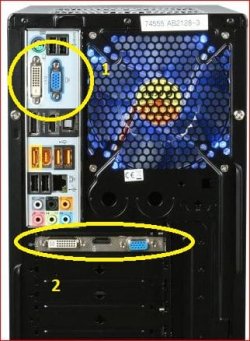
The rear panel connections are in a different location than yours, but they are all there (DVI and VGA port in #1, the HDMI port is at the bottom of the circle). Going by the picture of your computer that you posted you are connecting the monitors to the connectors in #1, when if the computer did come with a GT 240 in it you should be connecting them to the ports in #2.
 

My Computer My Computer

Computer type
PC/Desktop
Computer Manufacturer/Model Number
Me
OS
Win 7 Ultimate x64
CPU
FX-8350 @ 4.6 GHz so far
Motherboard
Asus M5A97 EVO
Memory
ADATA XPG V1 Series Black 8GB DDR3 1600
Graphics Card(s)
Sapphire R9 270x Dual-X
Sound Card
Xonar DGX w/ Corsair Vengence 1300
Monitor(s) Displays
Acer S232HL Abid
Screen Resolution
1920x1080
Hard Drives
120 GB OCZ Vertex 3
500 GB Seagate 7200.12
PSU
Antec Earthwatts 650W Green
Case
Antec Three Hundred
Cooling
Cooler Master 212 EVO
Keyboard
Logitech G510
Mouse
Logitech G500s
Internet Speed
35000/3000
Back
Top