
Memory Diagnostics Tool - Read Event Viewer Log

How to Read Event Viewer Log for Windows Memory Diagnostics Tool


   Information
This will show you how to read the Event Viewer log to see the results of the Windows Memory Diagnostics Tool in Vista, Windows 7, and Windows 8.

   Note
If you just ran the Windows Memory Diagnostics Tool, then it may take a bit before it actual shows up in the Event Viewer.
   Warning
You will need to be logged in as administrator to be able to open Event Viewer.


Here's How:
1. If you have not already, you will need to have ran the Memory Diagnostics Tool prior before it will be in the Event Viewer System log.

2. Open the Start Menu, and type eventvwr.msc in the search box and press enter.

3. If prompted by UAC, then click on Yes (Windows 7) or Continue (Vista).

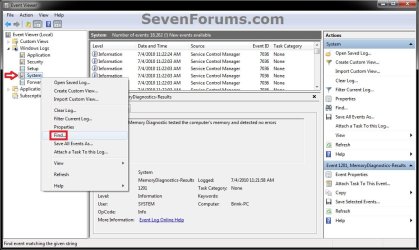
4. In the left pane of Event Viewer, double click on Windows Logs to expand it, then right click on System and click on Find. (see screenshot below)
Step1.jpg
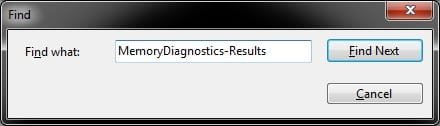
5. Copy and paste MemoryDiagnostics-Results into the line, and click on Find Next. (see screenshot below)
NOTE: You can continue to click on Find Next to search for other older system logs (if available) for the Windows Memory Diagnostics Tool to see them as well.
Step2.jpg
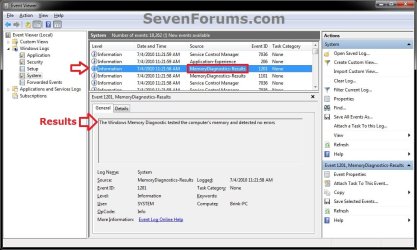
6. You will now see the system log for the results of the Windows Memory Diagnostics Tool. (see screenshot below)
Step3.jpg
7. When finished searching for Windows Memory Diagnostics Tool system logs, you can close the Find window. (see screenshot below step 5)

8. When finished, you can close Event Viewer.
That's it,
Shawn


Last edited:
I can't seem to find an event log of the memory diagnostics tool in event viewer...
 

My Computer

Computer type
Laptop
Computer Manufacturer/Model Number
MSI CX61-2PC
OS
Win 7 Ultimate x64 bit SP1
CPU
Intel Core i5 4210M @ 2.60GHz
Motherboard
Micro-Star International Co., Ltd. MS-16GD (SOCKET 0)
Memory
16.0GB Dual-Channel DDR3 @ 798MHz (11-11-11-28)
Graphics Card(s)
Intel HD Graphics 4600/NVIDIA GeForce 820M
Sound Card
Realtek High Definition Audio
Screen Resolution
1366*768
Hard Drives
1863GB Seagate ST2000LM ST2000LM003
Antivirus
Naver Vaccine
Browser
Firefox
Hello bangdosa, and welcome to Seven Forums.

Was the Memory Diagnostics Tool able to completely finish running before checking the log?
 

My Computer

Computer type
PC/Desktop
Computer Manufacturer/Model Number
Self built custom
OS
64-bit Windows 11 Pro for Workstations
CPU
Intel i7-8700K OC'd to 5 GHz
Motherboard
ASUS ROG Maximus XI Formula Z390
Memory
64 GB (4x16GB) G.SKILL TridentZ RGB DDR4 3600 MHz
Graphics Card(s)
ASUS ROG-STRIX-GTX1080TI-O11G-GAMING
Sound Card
Integrated
Monitor(s) Displays
2 x Samsung Odyssey G7 27"
Screen Resolution
2560x1440
Hard Drives
1TB Samsung 990 PRO M.2,
4TB Samsung 990 PRO PRO M.2,
TerraMaster F8 SSD Plus NAS
PSU
Seasonic Prime Titanium 850W
Case
Thermaltake Core P3
Cooling
Corsair Hydro H115i
Keyboard
Logitech wireless K800
Mouse
Logitech MX Master 4
Internet Speed
2 Gb/s Download and 100 Mb/s Upload
Antivirus
Malwarebyte Anti-Malware Premium
Browser
Google Chrome
Other Info
Logitech Z625 speaker system,
Logitech BRIO 4K Pro webcam,
HP Color LaserJet Pro MFP M477fdn,
APC SMART-UPS RT 1000 XL - SURT1000XLI,
Galaxy S23 Plus phone
I believe it did. I know it got to around 80%ish before I looked away. Next thing I saw was windows starting. should I try it again and see if it does finish? when it finishes should it automatically restart or results show?
 

My Computer

Computer type
Laptop
Computer Manufacturer/Model Number
MSI CX61-2PC
OS
Win 7 Ultimate x64 bit SP1
CPU
Intel Core i5 4210M @ 2.60GHz
Motherboard
Micro-Star International Co., Ltd. MS-16GD (SOCKET 0)
Memory
16.0GB Dual-Channel DDR3 @ 798MHz (11-11-11-28)
Graphics Card(s)
Intel HD Graphics 4600/NVIDIA GeForce 820M
Sound Card
Realtek High Definition Audio
Screen Resolution
1366*768
Hard Drives
1863GB Seagate ST2000LM ST2000LM003
Antivirus
Naver Vaccine
Browser
Firefox
It'll automatically restart when ran.

It may take a bit before it actual shows up in Event Viewer since you just ran it.

Did you run the tool from within Windows? (not in Safe Mode)
 

My Computer

Computer type
PC/Desktop
Computer Manufacturer/Model Number
Self built custom
OS
64-bit Windows 11 Pro for Workstations
CPU
Intel i7-8700K OC'd to 5 GHz
Motherboard
ASUS ROG Maximus XI Formula Z390
Memory
64 GB (4x16GB) G.SKILL TridentZ RGB DDR4 3600 MHz
Graphics Card(s)
ASUS ROG-STRIX-GTX1080TI-O11G-GAMING
Sound Card
Integrated
Monitor(s) Displays
2 x Samsung Odyssey G7 27"
Screen Resolution
2560x1440
Hard Drives
1TB Samsung 990 PRO M.2,
4TB Samsung 990 PRO PRO M.2,
TerraMaster F8 SSD Plus NAS
PSU
Seasonic Prime Titanium 850W
Case
Thermaltake Core P3
Cooling
Corsair Hydro H115i
Keyboard
Logitech wireless K800
Mouse
Logitech MX Master 4
Internet Speed
2 Gb/s Download and 100 Mb/s Upload
Antivirus
Malwarebyte Anti-Malware Premium
Browser
Google Chrome
Other Info
Logitech Z625 speaker system,
Logitech BRIO 4K Pro webcam,
HP Color LaserJet Pro MFP M477fdn,
APC SMART-UPS RT 1000 XL - SURT1000XLI,
Galaxy S23 Plus phone
Yes I told the memory diagnostic to run in windows so it restarted and did it before restarting windows
 

My Computer

Computer type
Laptop
Computer Manufacturer/Model Number
MSI CX61-2PC
OS
Win 7 Ultimate x64 bit SP1
CPU
Intel Core i5 4210M @ 2.60GHz
Motherboard
Micro-Star International Co., Ltd. MS-16GD (SOCKET 0)
Memory
16.0GB Dual-Channel DDR3 @ 798MHz (11-11-11-28)
Graphics Card(s)
Intel HD Graphics 4600/NVIDIA GeForce 820M
Sound Card
Realtek High Definition Audio
Screen Resolution
1366*768
Hard Drives
1863GB Seagate ST2000LM ST2000LM003
Antivirus
Naver Vaccine
Browser
Firefox

My Computer

Computer type
PC/Desktop
Computer Manufacturer/Model Number
Self built custom
OS
64-bit Windows 11 Pro for Workstations
CPU
Intel i7-8700K OC'd to 5 GHz
Motherboard
ASUS ROG Maximus XI Formula Z390
Memory
64 GB (4x16GB) G.SKILL TridentZ RGB DDR4 3600 MHz
Graphics Card(s)
ASUS ROG-STRIX-GTX1080TI-O11G-GAMING
Sound Card
Integrated
Monitor(s) Displays
2 x Samsung Odyssey G7 27"
Screen Resolution
2560x1440
Hard Drives
1TB Samsung 990 PRO M.2,
4TB Samsung 990 PRO PRO M.2,
TerraMaster F8 SSD Plus NAS
PSU
Seasonic Prime Titanium 850W
Case
Thermaltake Core P3
Cooling
Corsair Hydro H115i
Keyboard
Logitech wireless K800
Mouse
Logitech MX Master 4
Internet Speed
2 Gb/s Download and 100 Mb/s Upload
Antivirus
Malwarebyte Anti-Malware Premium
Browser
Google Chrome
Other Info
Logitech Z625 speaker system,
Logitech BRIO 4K Pro webcam,
HP Color LaserJet Pro MFP M477fdn,
APC SMART-UPS RT 1000 XL - SURT1000XLI,
Galaxy S23 Plus phone
ok will do. Thank you
 

My Computer

Computer type
Laptop
Computer Manufacturer/Model Number
MSI CX61-2PC
OS
Win 7 Ultimate x64 bit SP1
CPU
Intel Core i5 4210M @ 2.60GHz
Motherboard
Micro-Star International Co., Ltd. MS-16GD (SOCKET 0)
Memory
16.0GB Dual-Channel DDR3 @ 798MHz (11-11-11-28)
Graphics Card(s)
Intel HD Graphics 4600/NVIDIA GeForce 820M
Sound Card
Realtek High Definition Audio
Screen Resolution
1366*768
Hard Drives
1863GB Seagate ST2000LM ST2000LM003
Antivirus
Naver Vaccine
Browser
Firefox
You're welcome. :)
 

My Computer

Computer type
PC/Desktop
Computer Manufacturer/Model Number
Self built custom
OS
64-bit Windows 11 Pro for Workstations
CPU
Intel i7-8700K OC'd to 5 GHz
Motherboard
ASUS ROG Maximus XI Formula Z390
Memory
64 GB (4x16GB) G.SKILL TridentZ RGB DDR4 3600 MHz
Graphics Card(s)
ASUS ROG-STRIX-GTX1080TI-O11G-GAMING
Sound Card
Integrated
Monitor(s) Displays
2 x Samsung Odyssey G7 27"
Screen Resolution
2560x1440
Hard Drives
1TB Samsung 990 PRO M.2,
4TB Samsung 990 PRO PRO M.2,
TerraMaster F8 SSD Plus NAS
PSU
Seasonic Prime Titanium 850W
Case
Thermaltake Core P3
Cooling
Corsair Hydro H115i
Keyboard
Logitech wireless K800
Mouse
Logitech MX Master 4
Internet Speed
2 Gb/s Download and 100 Mb/s Upload
Antivirus
Malwarebyte Anti-Malware Premium
Browser
Google Chrome
Other Info
Logitech Z625 speaker system,
Logitech BRIO 4K Pro webcam,
HP Color LaserJet Pro MFP M477fdn,
APC SMART-UPS RT 1000 XL - SURT1000XLI,
Galaxy S23 Plus phone
So, does this means I have 2 bad memory?
 

Attachments

  • MemoryDiagnostics-Results.jpg
    MemoryDiagnostics-Results.jpg
    321.1 KB · Views: 6,274

My Computer

Computer type
PC/Desktop
Computer Manufacturer/Model Number
Custom build
OS
Microsoft Windows 7 Ultimate 64-bit 7601 Multiprocessor Free Service Pack 1
CPU
AMD FX(tm)-8350 Eight-Core Processor
Motherboard
Gigabyte Technology Co., Ltd. GA-990XA-UD3
Memory
16,00 GB
Graphics Card(s)
NVIDIA GeForce GTX 580
Sound Card
NVIDIA High Definition Audio
Screen Resolution
1680 x 1050 x 32 bits (4294967296 colors) @ 59 Hz
Hard Drives
WDC WD15EADS-00P8B0 ATA Device
PSU
LC8850 V2.2 - Arkangel
Case
NZXT Phantom 410 Series CA-PH410-W1 White Steel
Cooling
Corsair H100
Keyboard
Lifetch Basic
Mouse
Anker CG100
Internet Speed
100Mb/s Download and 20Mb/s Upload
Antivirus
Microsoft Security Essentials
Browser
Chrome

My Computer

Computer type
PC/Desktop
Computer Manufacturer/Model Number
Self built custom
OS
64-bit Windows 11 Pro for Workstations
CPU
Intel i7-8700K OC'd to 5 GHz
Motherboard
ASUS ROG Maximus XI Formula Z390
Memory
64 GB (4x16GB) G.SKILL TridentZ RGB DDR4 3600 MHz
Graphics Card(s)
ASUS ROG-STRIX-GTX1080TI-O11G-GAMING
Sound Card
Integrated
Monitor(s) Displays
2 x Samsung Odyssey G7 27"
Screen Resolution
2560x1440
Hard Drives
1TB Samsung 990 PRO M.2,
4TB Samsung 990 PRO PRO M.2,
TerraMaster F8 SSD Plus NAS
PSU
Seasonic Prime Titanium 850W
Case
Thermaltake Core P3
Cooling
Corsair Hydro H115i
Keyboard
Logitech wireless K800
Mouse
Logitech MX Master 4
Internet Speed
2 Gb/s Download and 100 Mb/s Upload
Antivirus
Malwarebyte Anti-Malware Premium
Browser
Google Chrome
Other Info
Logitech Z625 speaker system,
Logitech BRIO 4K Pro webcam,
HP Color LaserJet Pro MFP M477fdn,
APC SMART-UPS RT 1000 XL - SURT1000XLI,
Galaxy S23 Plus phone
Back
Top