

Bare Foot Kid
R.I.P. August 13th 2014
I just got this from this article ...
http://www.winsupersite.com/faq/windows_7.asp
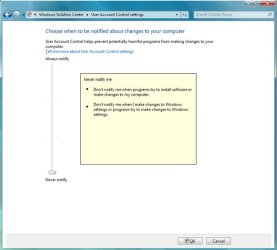
User Account Control improvements. Windows Vista's most reviled feature is being completely overhauled to be more customizable. Four settings will be available:
1. Never notify (least secure). The user is not notified when a program tries to install software or make changes to the computer. The user is not notified when they make changes to Windows settings or when programs try to do so.
2. Only notify me when programs try to make changes to my computer. The user is not notified when a program tries to install software or make changes to the computer. The user is not notified when they make changes to Windows settings. However, the user is notified when programs try to make changes to the computer, including Windows settings.
3. Always notify me. The user is notified when a program tries to install software or make changes to the computer. The user is also notified when they make changes to Windows settings or when programs try to do so.
4. Always notify me and wait for my response (most secure). The user is notified when a program tries to install software or make changes to the computer. The user is also notified when they make changes to Windows settings or when programs try to do so.
Later Ted
Ted
http://www.winsupersite.com/faq/windows_7.asp
User Account Control improvements. Windows Vista's most reviled feature is being completely overhauled to be more customizable. Four settings will be available:
1. Never notify (least secure). The user is not notified when a program tries to install software or make changes to the computer. The user is not notified when they make changes to Windows settings or when programs try to do so.
2. Only notify me when programs try to make changes to my computer. The user is not notified when a program tries to install software or make changes to the computer. The user is not notified when they make changes to Windows settings. However, the user is notified when programs try to make changes to the computer, including Windows settings.
3. Always notify me. The user is notified when a program tries to install software or make changes to the computer. The user is also notified when they make changes to Windows settings or when programs try to do so.
4. Always notify me and wait for my response (most secure). The user is notified when a program tries to install software or make changes to the computer. The user is also notified when they make changes to Windows settings or when programs try to do so.
Later
TedMy Computer
- Computer Manufacturer/Model Number
- * BFK Customs *
- OS
- W 7 64-bit Ultimate
- CPU
- Intel Q9550 Yorkfield
- Motherboard
- ASUS P5Q Pro
- Memory
- 8GB Dominator 8500C5D
- Graphics Card(s)
- ATI : XFX 5870
- Sound Card
- Realtek HD Audio 7-1
- Monitor(s) Displays
- 1x 47" LCD HDMI & 3x 26" LCD HDMI
- Screen Resolution
- 1920x1080P & 1920x1200
- Hard Drives
- 1x 80GB Intel X25-M G2 SSD : 1x 500GB & 1x 640GB WD Caviar Black(s)
- PSU
- Corsair 620HX
- Case
- Cooler Master RC-690
- Cooling
- Tuniq Tower 120, 2x 140mm and 3x 120mm case fans
- Keyboard
- Microsoft 500
- Mouse
- Razer Diamondback 3G
- Internet Speed
- 14 Mb/s
- Other Info
- 1x Koutech 3Gb/s SATA HDD Hot Swap Rack


