
Pen Drive Hidden Partition

bjproc

New member
i got a 512mb pendrive off of a guy, it has a hidden partition on it, dick management doesn't see it, but when it got's plugged into my pc 2 partitions pop up asking my what i want to do.

the hidden partition has an autorun launcher for the film 'bruno' :rolleyes:

is there anything i can do that will delete this partition or both, i've tried formatting it, but it doesn't do anything.


cheers
 

My Computer

Computer Manufacturer/Model Number
Mesh Q4
OS
Win 7 Pro 32bit
CPU
Intel Quad Core 6600
Motherboard
Asus P5N-E SLI
Memory
4 GB
Graphics Card(s)
nVidia 8800GT
Sound Card
Onboard
Hard Drives
1TB Samsung Spinpoint,
1TB WD Eco Green
Hello bjproc.


Have a look at the tutorial at the link below to see the "Clean All" option ...

Be advised: make sure you do the right disk, clean all will over-write any drive it's pointed at and the data will not be re-coverable at all, period.


Disk - Clean and Clean All with Diskpart Command
 

My Computer

Computer Manufacturer/Model Number
* BFK Customs *
OS
W 7 64-bit Ultimate
CPU
Intel Q9550 Yorkfield
Motherboard
ASUS P5Q Pro
Memory
8GB Dominator 8500C5D
Graphics Card(s)
ATI : XFX 5870
Sound Card
Realtek HD Audio 7-1
Monitor(s) Displays
1x 47" LCD HDMI & 3x 26" LCD HDMI
Screen Resolution
1920x1080P & 1920x1200
Hard Drives
1x 80GB Intel X25-M G2 SSD : 1x 500GB & 1x 640GB WD Caviar Black(s)
PSU
Corsair 620HX
Case
Cooler Master RC-690
Cooling
Tuniq Tower 120, 2x 140mm and 3x 120mm case fans
Keyboard
Microsoft 500
Mouse
Razer Diamondback 3G
Internet Speed
14 Mb/s
Other Info
1x Koutech 3Gb/s SATA HDD Hot Swap Rack
thanks for the reply,

oops, it's a 128mb :o

unfortunately it didn't work, i maybe should've said it says CDFS

as pic shows,
it also doesn't show up in disc management in the HDD, but it shows as a CD drive
 

Attachments

  • Capture.JPG
    Capture.JPG
    13 KB · Views: 4

My Computer

Computer Manufacturer/Model Number
Mesh Q4
OS
Win 7 Pro 32bit
CPU
Intel Quad Core 6600
Motherboard
Asus P5N-E SLI
Memory
4 GB
Graphics Card(s)
nVidia 8800GT
Sound Card
Onboard
Hard Drives
1TB Samsung Spinpoint,
1TB WD Eco Green
thanks Bill, thats what it is, but it's not working, never mind, it's only a 128mb pen drive, i'll just bin it, i was planing to take it to work
 

My Computer

Computer Manufacturer/Model Number
Mesh Q4
OS
Win 7 Pro 32bit
CPU
Intel Quad Core 6600
Motherboard
Asus P5N-E SLI
Memory
4 GB
Graphics Card(s)
nVidia 8800GT
Sound Card
Onboard
Hard Drives
1TB Samsung Spinpoint,
1TB WD Eco Green
If the u3 cant remove it, you're probably out of luck. Its a stinking practise, this idea of pre-loading flash drives. In any case, try the following.

Go to the command prompt and type >format <drive letter> /<fsfilesystem>. So, E.g., if your drive letter is g: then type:

format g:/fsfat32

(Note there is a space between : and /). Hit Enter.

If that doesnt help, see if you can rename the partition.
 

My Computer

Computer Manufacturer/Model Number
Too many to describe...
OS
Windows 7 x64 pro/ Windows 7 x86 Pro/ XP SP3 x86
thanks for your help bill, this is what i'm getting

the drive is L

i typed

format l: /fsfat32
 

Attachments

  • Capture.JPG
    Capture.JPG
    28.9 KB · Views: 68

My Computer

Computer Manufacturer/Model Number
Mesh Q4
OS
Win 7 Pro 32bit
CPU
Intel Quad Core 6600
Motherboard
Asus P5N-E SLI
Memory
4 GB
Graphics Card(s)
nVidia 8800GT
Sound Card
Onboard
Hard Drives
1TB Samsung Spinpoint,
1TB WD Eco Green
No, no. Look at the pic you have attached. There is a space between / and fsfat32. Thats incorrect, the space has to be between : and /. Like this:

format l: /fsfat32

Got it?
 

My Computer

Computer Manufacturer/Model Number
Too many to describe...
OS
Windows 7 x64 pro/ Windows 7 x86 Pro/ XP SP3 x86
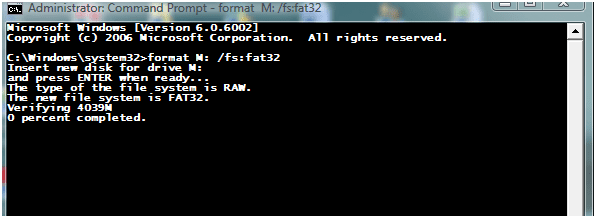
I thought there has to a " = " in the command, an I wrong?


Like this ...

format l: /fs=fat32
 

My Computer

Computer Manufacturer/Model Number
* BFK Customs *
OS
W 7 64-bit Ultimate
CPU
Intel Q9550 Yorkfield
Motherboard
ASUS P5Q Pro
Memory
8GB Dominator 8500C5D
Graphics Card(s)
ATI : XFX 5870
Sound Card
Realtek HD Audio 7-1
Monitor(s) Displays
1x 47" LCD HDMI & 3x 26" LCD HDMI
Screen Resolution
1920x1080P & 1920x1200
Hard Drives
1x 80GB Intel X25-M G2 SSD : 1x 500GB & 1x 640GB WD Caviar Black(s)
PSU
Corsair 620HX
Case
Cooler Master RC-690
Cooling
Tuniq Tower 120, 2x 140mm and 3x 120mm case fans
Keyboard
Microsoft 500
Mouse
Razer Diamondback 3G
Internet Speed
14 Mb/s
Other Info
1x Koutech 3Gb/s SATA HDD Hot Swap Rack
No, no. Look at the pic you have attached. There is a space between / and fsfat32. Thats incorrect, the space has to be between : and /. Like this:

format l: /fsfat32

Got it?

oops bill, sorry, i tried it a few times, and the one i took a screen shot of, was wrong, sorry :o

yes, i have (mostly) been putting in

format l: /fsfat32
 

My Computer

Computer Manufacturer/Model Number
Mesh Q4
OS
Win 7 Pro 32bit
CPU
Intel Quad Core 6600
Motherboard
Asus P5N-E SLI
Memory
4 GB
Graphics Card(s)
nVidia 8800GT
Sound Card
Onboard
Hard Drives
1TB Samsung Spinpoint,
1TB WD Eco Green
I thought there has to a " = " in the command, an I wrong?


Like this ...

format l: /fs=fat32
Oops, sorry. my bad. There has to be a colon.

So, like this.

format l: /fs:fat32
 

My Computer

Computer Manufacturer/Model Number
Too many to describe...
OS
Windows 7 x64 pro/ Windows 7 x86 Pro/ XP SP3 x86
BFK, sorry, that didn't work either.

to be honest, it isn't worth pursuing any further, as it's only a 128mb pendrive.

thanks for all your help guys

Bj.
 

My Computer

Computer Manufacturer/Model Number
Mesh Q4
OS
Win 7 Pro 32bit
CPU
Intel Quad Core 6600
Motherboard
Asus P5N-E SLI
Memory
4 GB
Graphics Card(s)
nVidia 8800GT
Sound Card
Onboard
Hard Drives
1TB Samsung Spinpoint,
1TB WD Eco Green
Thanks mate, too bad we couldn't get it sorted for you. ;)
 

My Computer

Computer Manufacturer/Model Number
* BFK Customs *
OS
W 7 64-bit Ultimate
CPU
Intel Q9550 Yorkfield
Motherboard
ASUS P5Q Pro
Memory
8GB Dominator 8500C5D
Graphics Card(s)
ATI : XFX 5870
Sound Card
Realtek HD Audio 7-1
Monitor(s) Displays
1x 47" LCD HDMI & 3x 26" LCD HDMI
Screen Resolution
1920x1080P & 1920x1200
Hard Drives
1x 80GB Intel X25-M G2 SSD : 1x 500GB & 1x 640GB WD Caviar Black(s)
PSU
Corsair 620HX
Case
Cooler Master RC-690
Cooling
Tuniq Tower 120, 2x 140mm and 3x 120mm case fans
Keyboard
Microsoft 500
Mouse
Razer Diamondback 3G
Internet Speed
14 Mb/s
Other Info
1x Koutech 3Gb/s SATA HDD Hot Swap Rack
still not happening, the pendrive is now in the bin :D
 

My Computer

Computer Manufacturer/Model Number
Mesh Q4
OS
Win 7 Pro 32bit
CPU
Intel Quad Core 6600
Motherboard
Asus P5N-E SLI
Memory
4 GB
Graphics Card(s)
nVidia 8800GT
Sound Card
Onboard
Hard Drives
1TB Samsung Spinpoint,
1TB WD Eco Green
U3 was a program pre-installed on some drives, primarily SanDisk.
Bruno was another such program from a different vendor.
Both (usually) were loaded into a separate partition on the drive.

Any good Partition Manager program like the one from EAsus should be able to remove the U3 or Bruno partition and reformat it.

I got a free copy of the Partition Manager program from the FREE download of the day program.

There is a U3 Removal program, but it probably won't work on Bruno.

Good Luck, (being a PC tech, I'd love to know what works)
The Doctor :cool:
 

My Computer

Computer Manufacturer/Model Number
Home Made
OS
Windows XP-Pro-SP3, Windows 7
CPU
AMD, 2X, Dual Core 5200+
Motherboard
MSI K9N Platinum
Memory
6 gig DDR2, Super Talent
Graphics Card(s)
Winfast
Sound Card
On Board AC97
Monitor(s) Displays
19" Envision LCD
Screen Resolution
1024x768
Hard Drives
3x , Maxtor/Seagate SATA2 (160, 160, 200gig)
PSU
Antec Earthwatts 650
Case
Pac Man Mid-Tower
Cooling
11 fans
Keyboard
Generic
Mouse
MS digital
Internet Speed
5 Meg Cable
U3 was a program pre-installed on some drives, primarily SanDisk.
Bruno was another such program from a different vendor.
Both (usually) were loaded into a separate partition on the drive.

Any good Partition Manager program like the one from EAsus should be able to remove the U3 or Bruno partition and reformat it.

I got a free copy of the Partition Manager program from the FREE download of the day program.

There is a U3 Removal program, but it probably won't work on Bruno.

Good Luck, (being a PC tech, I'd love to know what works)
The Doctor :cool:

Dr Who, did you post on cdfreaks?
 

My Computer

Computer Manufacturer/Model Number
Mesh Q4
OS
Win 7 Pro 32bit
CPU
Intel Quad Core 6600
Motherboard
Asus P5N-E SLI
Memory
4 GB
Graphics Card(s)
nVidia 8800GT
Sound Card
Onboard
Hard Drives
1TB Samsung Spinpoint,
1TB WD Eco Green
Hmmmm! That doesn't sound familiar.

It's in the bin? I hope you don't mean trash can.
If you lived close by, I'd say "bring that drive over hear and I'll reformat it for you".

As long as a flash memory drive, stick, card, etc., has not been physically burned out, they can be recovered, reformatted, etc.

Just playing around one day, I used the little HP program to format an SD Memory card and made it bootable.
I then put my Ghost backup program and several cleanup utilities on it. Not all, but many PC's will actually boot from a flash memory card. Just something to do.;)

Have a great day now, Y'hear?
The Doctor :cool:
 

My Computer

Computer Manufacturer/Model Number
Home Made
OS
Windows XP-Pro-SP3, Windows 7
CPU
AMD, 2X, Dual Core 5200+
Motherboard
MSI K9N Platinum
Memory
6 gig DDR2, Super Talent
Graphics Card(s)
Winfast
Sound Card
On Board AC97
Monitor(s) Displays
19" Envision LCD
Screen Resolution
1024x768
Hard Drives
3x , Maxtor/Seagate SATA2 (160, 160, 200gig)
PSU
Antec Earthwatts 650
Case
Pac Man Mid-Tower
Cooling
11 fans
Keyboard
Generic
Mouse
MS digital
Internet Speed
5 Meg Cable

My Computer

Computer Manufacturer/Model Number
* BFK Customs *
OS
W 7 64-bit Ultimate
CPU
Intel Q9550 Yorkfield
Motherboard
ASUS P5Q Pro
Memory
8GB Dominator 8500C5D
Graphics Card(s)
ATI : XFX 5870
Sound Card
Realtek HD Audio 7-1
Monitor(s) Displays
1x 47" LCD HDMI & 3x 26" LCD HDMI
Screen Resolution
1920x1080P & 1920x1200
Hard Drives
1x 80GB Intel X25-M G2 SSD : 1x 500GB & 1x 640GB WD Caviar Black(s)
PSU
Corsair 620HX
Case
Cooler Master RC-690
Cooling
Tuniq Tower 120, 2x 140mm and 3x 120mm case fans
Keyboard
Microsoft 500
Mouse
Razer Diamondback 3G
Internet Speed
14 Mb/s
Other Info
1x Koutech 3Gb/s SATA HDD Hot Swap Rack
Going that direction isn't usually the hard job.
What's harder is converting a NTFS partition to a FAT-32 partition.
I used to do that (occasionally) on NTFS hard drives using the Partition Magic 8 program. The HD had to be 100% free of errors though, or the conversion would fail, sometimes resulting in an UNreadable partition.

For a real enthusiast, running XP, FAT-32 is the nuts. XP actually runs faster on a FAT-32 partition and every file on the part is easily accessible from a DOS boot disk.
I guess I'm just Old School enough to enjoy having the extra control.
All this permission and protection stuff is BS on a privately owned home computer.

Back to the pen drive.
They should never be used for permanent storage of critical or sensitive data.
I had one customer who was not doing backups of the novel he was writing on his home PC, till the day he could not access his doc file.
He called me in a total panic. Realizing the depth of his problem, I took my friend and Software Guru (hacker) with me on the call. It took him almost an hour to fully recover the man's book. Now he backs it up to five (5) flash drives after every chapter.

Flash drives do have a finite life expectancy and they can even get zapped unexpectedly, so they should never be used for permanent storage. That's what DVD's are for.

Cheers Mates!
The Doctor :cool:
 

My Computer

Computer Manufacturer/Model Number
Home Made
OS
Windows XP-Pro-SP3, Windows 7
CPU
AMD, 2X, Dual Core 5200+
Motherboard
MSI K9N Platinum
Memory
6 gig DDR2, Super Talent
Graphics Card(s)
Winfast
Sound Card
On Board AC97
Monitor(s) Displays
19" Envision LCD
Screen Resolution
1024x768
Hard Drives
3x , Maxtor/Seagate SATA2 (160, 160, 200gig)
PSU
Antec Earthwatts 650
Case
Pac Man Mid-Tower
Cooling
11 fans
Keyboard
Generic
Mouse
MS digital
Internet Speed
5 Meg Cable
Back
Top