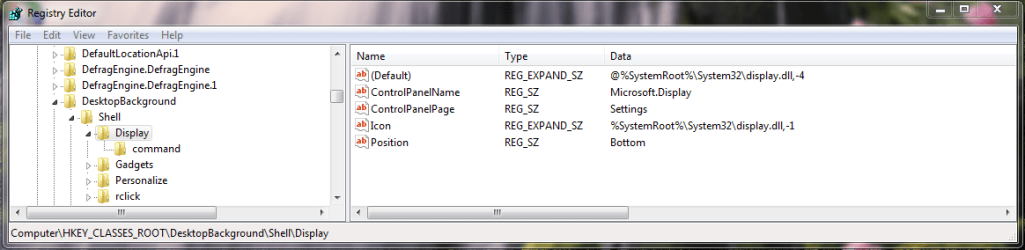
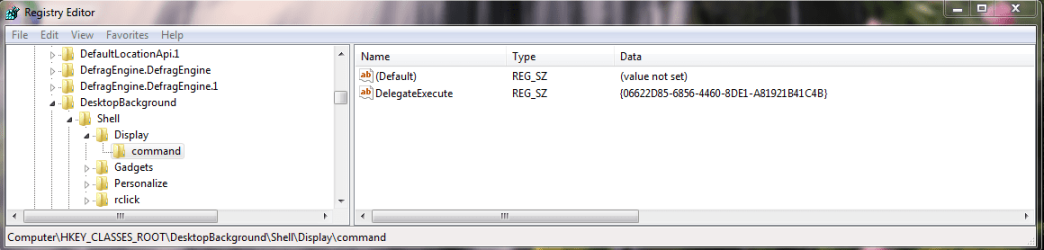
I noticed a few days ago that when I rt clkd on my desktop that the 'Display Properties' option is missing from the context menu. I can access the various settings thru the CP but I'd like to fix the desktop context menu so I can disable the desktop cleanup wizard as well. Any suggestions? Most every thing I've googled deals with various missing tabs...not the missing menu option itself. I'm sure it's probably a reg key somewhere but I haven't a clue.
Thermalright VenomousX - 120mm TR FDB Fan w/ shrowd
Keyboard
Logitech G110
Mouse
Logitech LX8 Laser
Internet Speed
22Mb Down / 7Mb Up
Other Info
Audigy ZS2 - Logitech Z-2300s - 2.1 200W RMS 270W Peak
Modded by swapping the 8" sub for a JL Audio Dual Voice Coil car sub! Mounted 2x120mm 2500rpm together to blow on the amp's external heatsink. On/off by RF remote cont. 12v switch in case.
This is my shot at building a 'most bang for the buck' system. ;)
When I right click my screen I don't see a display properties option. I see graphics properties which pulls up the options I have though the Intel driver software. I also see personalize and screen resolution. When did you start using 7? I was confused at first too and don't like having to shuffle through all the options to change what I could in one menu before either, but it is what it is. I wish I could be of more help
My Computer
At a glance
Windows 7 Professional SP1 64-bitIntel Core i5-2450M @2.5 GHz6 GB DDR3 1333MHzIntel HD 3000
Just installed last month...I can get to all the setting thru the CP but what I'm after is the option to disable the desktop cleanup wizard.
Tried this regedit...no luck. http://www.sevenforums.com/tutorials/68760-display-dpi-settings-enable-disable.html
When I rt clk the desktop there's no 'Properties' in the context menu...personalize, gadgets ect are all there tho.
I hope my Ati Catalyst driver isn't responsible for it's disappearance...:s
Thermalright VenomousX - 120mm TR FDB Fan w/ shrowd
Keyboard
Logitech G110
Mouse
Logitech LX8 Laser
Internet Speed
22Mb Down / 7Mb Up
Other Info
Audigy ZS2 - Logitech Z-2300s - 2.1 200W RMS 270W Peak
Modded by swapping the 8" sub for a JL Audio Dual Voice Coil car sub! Mounted 2x120mm 2500rpm together to blow on the amp's external heatsink. On/off by RF remote cont. 12v switch in case.
This is my shot at building a 'most bang for the buck' system. ;)
I'm confursed, or you are. There is no Display Properties option on the desktop context menu. And, there is no desktop cleanup wizard in Windows 7. Sorry. A Guy
My Computer
At a glance
Windows 10 Home x64INTEL Core i5-750 Quad-Core 3.37GHzHyperX Fury Black Series 8GB (2 x 4GB) 1866MhzEVGA GeForce GTX 750 Superclocked 1GB 128-Bit...
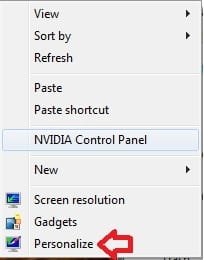
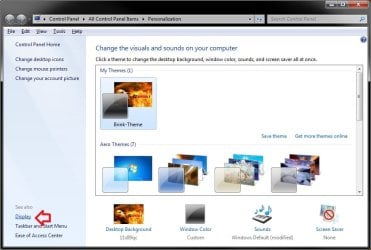
By default,Display is not listed in the desktop context menu like it is in the Control Panel (icons view). Instead you would normally click on Personalize, then click on Display at the bottom of the left pane.
Hope this helps,
Shawn
UPDATE:
In addition, the Desktop Cleanup Wizard is not in Windows 7 like XP.
Last edited:
My Computer
At a glance
64-bit Windows 11 Pro for WorkstationsIntel i7-8700K OC'd to 5 GHz64 GB (4x16GB) G.SKILL TridentZ RGB DDR4 3600...ASUS ROG-STRIX-GTX1080TI-O11G-GAMING
Computer type
PC/Desktop
Computer Manufacturer/Model Number
Self built custom
OS
64-bit Windows 11 Pro for Workstations
CPU
Intel i7-8700K OC'd to 5 GHz
Motherboard
ASUS ROG Maximus XI Formula Z390
Memory
64 GB (4x16GB) G.SKILL TridentZ RGB DDR4 3600 MHz
Graphics Card(s)
ASUS ROG-STRIX-GTX1080TI-O11G-GAMING
Sound Card
Integrated
Monitor(s) Displays
2 x Samsung Odyssey G7 27"
Screen Resolution
2560x1440
Hard Drives
1TB Samsung 990 PRO M.2,
4TB Samsung 990 PRO PRO M.2,
TerraMaster F8 SSD Plus NAS
PSU
Seasonic Prime Titanium 850W
Case
Thermaltake Core P3
Cooling
Corsair Hydro H115i
Keyboard
Logitech wireless K800
Mouse
Logitech MX Master 4
Internet Speed
2 Gb/s Download and 100 Mb/s Upload
Antivirus
Malwarebyte Anti-Malware Premium
Browser
Google Chrome
Other Info
Logitech Z625 speaker system,
Logitech BRIO 4K Pro webcam,
HP Color LaserJet Pro MFP M477fdn,
APC SMART-UPS RT 1000 XL - SURT1000XLI,
Galaxy S23 Plus phone