Conversion dialog box when copying files to mp3 player

tomamitai

New member
Every time I copy audio files to my mp3 player, a dialog box pops up warning me that the device may not play them in their current format, and asking me if I want to convert them, or just copy them. This is very annoying, as the player, a Coby MP 305-4G, is able to handle the files with no trouble.

Windows 7 didn't always do this; I think it may have started after I installed iTunes, although I recall telling iTunes during the initial setup NOT to be the default app for managing players. I also disabled all of the stuff that iTunes wanted to start automatically in the background.

Does anyone know how to get Windows to realise that my mp3 player is capable of playing mp3 files?
 

My Computer

OS
Windows 7 Home Premium 32bit
Every time I copy audio files to my mp3 player, a dialog box pops up warning me that the device may not play them in their current format, and asking me if I want to convert them, or just copy them. This is very annoying, as the player, a Coby MP 305-4G, is able to handle the files with no trouble.

Windows 7 didn't always do this; I think it may have started after I installed iTunes, although I recall telling iTunes during the initial setup NOT to be the default app for managing players. I also disabled all of the stuff that iTunes wanted to start automatically in the background.

Does anyone know how to get Windows to realise that my mp3 player is capable of playing mp3 files?
What kind of files are they....just basic music? And what bitrates are they?
 

My Computer

Computer type
PC/Desktop
Computer Manufacturer/Model Number
Gigabyte Technology Co., Ltd.
OS
Win 7 Ultimate 64-bit SP1 (desktop)
CPU
Intel Core 2 Duo E8400
Motherboard
Gigabyte GA-EP35-DS3R
Memory
2x 2GB OCZ DDR II SDRAM PC2-6400
Graphics Card(s)
NVIDIA GeForce 9400GT
Monitor(s) Displays
HP 2009m(primary), Acer P191W
Screen Resolution
1600x900, 1440x900
Hard Drives
Internal:WD Caviar Black 640GB 32MB cache 7200RPM
External:Samsung Story Station 1TB HDD desktop drive
500GB Toshiba portable drive
PSU
Antec Earthwatts EA500D
Case
Antec Sonata III
Cooling
4 fans
Keyboard
Logitech Wave
Mouse
Logitech M-SBF90
Internet Speed
Slow due to home Wireless-G router
Antivirus
MSE, Hitman Pro, Malwarebytes
Browser
Chrome and Palemoon
Other Info
Laptop....Acer 5750Z-4835
15.6" HD Widescreen CineCrystal™ LED-backlit LCD Display: (1366x768 resolution, 16:9 aspect ratio)
Intel® Pentium® Processor B940 (2.0GHz, 2MB L3 cache)
Windows® 7 Home Premium,500GB Hard Drive,4GB DDR3 RAM, Intel® HD Graphics,8X DVD-Super Multi Double-Layer Drive
Multi-in-1 Digital Media Card Reader,802.11b/g/n Wi-Fi
Chrome and Palemoon, MSE, Hitman Pro
Re install the drivers of your MP3 player (the ones on your computer of course)
 

My Computer

Computer Manufacturer/Model Number
Home made
OS
Windows 7 Home Premium 64-bit
Every time I copy audio files to my mp3 player, a dialog box pops up warning me that the device may not play them in their current format, and asking me if I want to convert them, or just copy them. This is very annoying, as the player, a Coby MP 305-4G, is able to handle the files with no trouble.

Windows 7 didn't always do this; I think it may have started after I installed iTunes, although I recall telling iTunes during the initial setup NOT to be the default app for managing players. I also disabled all of the stuff that iTunes wanted to start automatically in the background.

Does anyone know how to get Windows to realise that my mp3 player is capable of playing mp3 files?
What kind of files are they....just basic music? And what bitrates are they?

LAME VBR, with cover art.

Re install the drivers of your MP3 player (the ones on your computer of course)

I never installed drivers, Windows is using its own. Device manager shows it as an "MTP USB Device".
 

My Computer

OS
Windows 7 Home Premium 32bit
Every time I copy audio files to my mp3 player, a dialog box pops up warning me that the device may not play them in their current format, and asking me if I want to convert them, or just copy them. This is very annoying, as the player, a Coby MP 305-4G, is able to handle the files with no trouble.

Windows 7 didn't always do this; I think it may have started after I installed iTunes, although I recall telling iTunes during the initial setup NOT to be the default app for managing players. I also disabled all of the stuff that iTunes wanted to start automatically in the background.

Does anyone know how to get Windows to realise that my mp3 player is capable of playing mp3 files?
What kind of files are they....just basic music? And what bitrates are they?

LAME VBR, with cover art.

Re install the drivers of your MP3 player (the ones on your computer of course)

I never installed drivers, Windows is using its own. Device manager shows it as an "MTP USB Device".
Here's something to try, out of curiosity. Have you let it convert any of them? You should try it with one of them and see what happens. Either that, or try using a program to load them on the player....WMP12, Mediamonkey, Winamp, etc.(obviously iTuns wouldn't work.
 

My Computer

Computer type
PC/Desktop
Computer Manufacturer/Model Number
Gigabyte Technology Co., Ltd.
OS
Win 7 Ultimate 64-bit SP1 (desktop)
CPU
Intel Core 2 Duo E8400
Motherboard
Gigabyte GA-EP35-DS3R
Memory
2x 2GB OCZ DDR II SDRAM PC2-6400
Graphics Card(s)
NVIDIA GeForce 9400GT
Monitor(s) Displays
HP 2009m(primary), Acer P191W
Screen Resolution
1600x900, 1440x900
Hard Drives
Internal:WD Caviar Black 640GB 32MB cache 7200RPM
External:Samsung Story Station 1TB HDD desktop drive
500GB Toshiba portable drive
PSU
Antec Earthwatts EA500D
Case
Antec Sonata III
Cooling
4 fans
Keyboard
Logitech Wave
Mouse
Logitech M-SBF90
Internet Speed
Slow due to home Wireless-G router
Antivirus
MSE, Hitman Pro, Malwarebytes
Browser
Chrome and Palemoon
Other Info
Laptop....Acer 5750Z-4835
15.6" HD Widescreen CineCrystal™ LED-backlit LCD Display: (1366x768 resolution, 16:9 aspect ratio)
Intel® Pentium® Processor B940 (2.0GHz, 2MB L3 cache)
Windows® 7 Home Premium,500GB Hard Drive,4GB DDR3 RAM, Intel® HD Graphics,8X DVD-Super Multi Double-Layer Drive
Multi-in-1 Digital Media Card Reader,802.11b/g/n Wi-Fi
Chrome and Palemoon, MSE, Hitman Pro
What kind of files are they....just basic music? And what bitrates are they?

LAME VBR, with cover art.

Re install the drivers of your MP3 player (the ones on your computer of course)

I never installed drivers, Windows is using its own. Device manager shows it as an "MTP USB Device".
Here's something to try, out of curiosity. Have you let it convert any of them? You should try it with one of them and see what happens. Either that, or try using a program to load them on the player....WMP12, Mediamonkey, Winamp, etc.(obviously iTuns wouldn't work.

OK, I let it convert, and what looked like a normal copy box, with a progress bar, appeared. However, when I looked in process explorer, I saw that mfpmp.exe was running and using a good deal of cpu cycles.

After the copy box closed, I used MediaInfo to check the converted file, and here are the pertinent entries:

Format : MPEG Audio
File size : 44.3 MiB
Duration : 1h 4mn
Overall bit rate : 96.0 Kbps

File type : MPG/3

Audio
Format : MPEG Audio
Format version : Version 1
Format profile : Layer 3
Mode : Joint stereo
Mode extension : Intensity Stereo + MS Stereo
Duration : 1h 4mn
Bit rate mode : Constant
Bit rate : 96.0 Kbps
Channel(s) : 2 channels
Sampling rate : 44.1 KHz
Stream size : 44.3 MiB (100%)


Here's the Mediainfo output for the original file:

Format : MPEG Audio
File size : 32.0 MiB
Duration : 1h 4mn
Overall bit rate : 69.4 Kbps

Writing library : LAME3.91
Cover : Yes
Cover type : Cover (front)
Cover MIME : image/jpeg

Audio
Format : MPEG Audio
Format version : Version 1
Format profile : Layer 3
Duration : 1h 4mn
Bit rate mode : Variable
Bit rate : 69.4 Kbps
Minimum bit rate : 40.0 Kbps
Channel(s) : 1 channel
Sampling rate : 44.1 KHz
Stream size : 32.0 MiB (100%)
Writing library : LAME3.91
Encoding settings : -m m -V 0 -q 0 -lowpass 10 --vbr-old -b 40


So, the converted file is bigger, in stereo, has a constant bit rate, and the cover art has been stripped.

I don't know why it does that, as the player isn't bothered by VBR or the cover art.

The only programs you suggest trying that I have are Winamp and WMP12, and I can't figure out how to use them to copy the files to the player!:o I've never used them for that, I just use explorer.
 

My Computer

OS
Windows 7 Home Premium 32bit
LAME VBR, with cover art.


I never installed drivers, Windows is using its own. Device manager shows it as an "MTP USB Device".
Here's something to try, out of curiosity. Have you let it convert any of them? You should try it with one of them and see what happens. Either that, or try using a program to load them on the player....WMP12, Mediamonkey, Winamp, etc.(obviously iTuns wouldn't work.

OK, I let it convert, and what looked like a normal copy box, with a progress bar, appeared. However, when I looked in process explorer, I saw that mfpmp.exe was running and using a good deal of cpu cycles.

After the copy box closed, I used MediaInfo to check the converted file, and here are the pertinent entries:

Format : MPEG Audio
File size : 44.3 MiB
Duration : 1h 4mn
Overall bit rate : 96.0 Kbps

File type : MPG/3

Audio
Format : MPEG Audio
Format version : Version 1
Format profile : Layer 3
Mode : Joint stereo
Mode extension : Intensity Stereo + MS Stereo
Duration : 1h 4mn
Bit rate mode : Constant
Bit rate : 96.0 Kbps
Channel(s) : 2 channels
Sampling rate : 44.1 KHz
Stream size : 44.3 MiB (100%)


Here's the Mediainfo output for the original file:

Format : MPEG Audio
File size : 32.0 MiB
Duration : 1h 4mn
Overall bit rate : 69.4 Kbps

Writing library : LAME3.91
Cover : Yes
Cover type : Cover (front)
Cover MIME : image/jpeg

Audio
Format : MPEG Audio
Format version : Version 1
Format profile : Layer 3
Duration : 1h 4mn
Bit rate mode : Variable
Bit rate : 69.4 Kbps
Minimum bit rate : 40.0 Kbps
Channel(s) : 1 channel
Sampling rate : 44.1 KHz
Stream size : 32.0 MiB (100%)
Writing library : LAME3.91
Encoding settings : -m m -V 0 -q 0 -lowpass 10 --vbr-old -b 40


So, the converted file is bigger, in stereo, has a constant bit rate, and the cover art has been stripped.

I don't know why it does that, as the player isn't bothered by VBR or the cover art.

The only programs you suggest trying that I have are Winamp and WMP12, and I can't figure out how to use them to copy the files to the player!:o I've never used them for that, I just use explorer.
Very interesting. I've only had to deal with that conversion message once, when I was trying to get a podcast to play on a player without a seperate podcast menu.....and it also made the files bigger, but let them play.

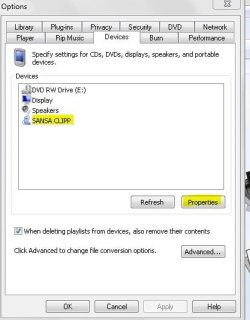
I've never used Winamp, bit with WMP12, open the program, and plug in your player, then follow the snips below.:)
 

Attachments

  • Capture.JPG
    Capture.JPG
    26.3 KB · Views: 9
  • Capture1.JPG
    Capture1.JPG
    55.9 KB · Views: 11
  • Capture2.JPG
    Capture2.JPG
    44.1 KB · Views: 10

My Computer

Computer type
PC/Desktop
Computer Manufacturer/Model Number
Gigabyte Technology Co., Ltd.
OS
Win 7 Ultimate 64-bit SP1 (desktop)
CPU
Intel Core 2 Duo E8400
Motherboard
Gigabyte GA-EP35-DS3R
Memory
2x 2GB OCZ DDR II SDRAM PC2-6400
Graphics Card(s)
NVIDIA GeForce 9400GT
Monitor(s) Displays
HP 2009m(primary), Acer P191W
Screen Resolution
1600x900, 1440x900
Hard Drives
Internal:WD Caviar Black 640GB 32MB cache 7200RPM
External:Samsung Story Station 1TB HDD desktop drive
500GB Toshiba portable drive
PSU
Antec Earthwatts EA500D
Case
Antec Sonata III
Cooling
4 fans
Keyboard
Logitech Wave
Mouse
Logitech M-SBF90
Internet Speed
Slow due to home Wireless-G router
Antivirus
MSE, Hitman Pro, Malwarebytes
Browser
Chrome and Palemoon
Other Info
Laptop....Acer 5750Z-4835
15.6" HD Widescreen CineCrystal™ LED-backlit LCD Display: (1366x768 resolution, 16:9 aspect ratio)
Intel® Pentium® Processor B940 (2.0GHz, 2MB L3 cache)
Windows® 7 Home Premium,500GB Hard Drive,4GB DDR3 RAM, Intel® HD Graphics,8X DVD-Super Multi Double-Layer Drive
Multi-in-1 Digital Media Card Reader,802.11b/g/n Wi-Fi
Chrome and Palemoon, MSE, Hitman Pro
Here's something to try, out of curiosity. Have you let it convert any of them? You should try it with one of them and see what happens. Either that, or try using a program to load them on the player....WMP12, Mediamonkey, Winamp, etc.(obviously iTuns wouldn't work.

OK, I let it convert, and what looked like a normal copy box, with a progress bar, appeared. However, when I looked in process explorer, I saw that mfpmp.exe was running and using a good deal of cpu cycles.

After the copy box closed, I used MediaInfo to check the converted file, and here are the pertinent entries:

Format : MPEG Audio
File size : 44.3 MiB
Duration : 1h 4mn
Overall bit rate : 96.0 Kbps

File type : MPG/3

Audio
Format : MPEG Audio
Format version : Version 1
Format profile : Layer 3
Mode : Joint stereo
Mode extension : Intensity Stereo + MS Stereo
Duration : 1h 4mn
Bit rate mode : Constant
Bit rate : 96.0 Kbps
Channel(s) : 2 channels
Sampling rate : 44.1 KHz
Stream size : 44.3 MiB (100%)


Here's the Mediainfo output for the original file:

Format : MPEG Audio
File size : 32.0 MiB
Duration : 1h 4mn
Overall bit rate : 69.4 Kbps

Writing library : LAME3.91
Cover : Yes
Cover type : Cover (front)
Cover MIME : image/jpeg

Audio
Format : MPEG Audio
Format version : Version 1
Format profile : Layer 3
Duration : 1h 4mn
Bit rate mode : Variable
Bit rate : 69.4 Kbps
Minimum bit rate : 40.0 Kbps
Channel(s) : 1 channel
Sampling rate : 44.1 KHz
Stream size : 32.0 MiB (100%)
Writing library : LAME3.91
Encoding settings : -m m -V 0 -q 0 -lowpass 10 --vbr-old -b 40


So, the converted file is bigger, in stereo, has a constant bit rate, and the cover art has been stripped.

I don't know why it does that, as the player isn't bothered by VBR or the cover art.

The only programs you suggest trying that I have are Winamp and WMP12, and I can't figure out how to use them to copy the files to the player!:o I've never used them for that, I just use explorer.
Very interesting. I've only had to deal with that conversion message once, when I was trying to get a podcast to play on a player without a seperate podcast menu.....and it also made the files bigger, but let them play.

I've never used Winamp, bit with WMP12, open the program, and plug in your player, then follow the snips below.:)

OK, I tried that, and the files were converted to wma stereo, but with the album art embedded.
 

My Computer

OS
Windows 7 Home Premium 32bit
OK, I let it convert, and what looked like a normal copy box, with a progress bar, appeared. However, when I looked in process explorer, I saw that mfpmp.exe was running and using a good deal of cpu cycles.

After the copy box closed, I used MediaInfo to check the converted file, and here are the pertinent entries:

Format : MPEG Audio
File size : 44.3 MiB
Duration : 1h 4mn
Overall bit rate : 96.0 Kbps

File type : MPG/3

Audio
Format : MPEG Audio
Format version : Version 1
Format profile : Layer 3
Mode : Joint stereo
Mode extension : Intensity Stereo + MS Stereo
Duration : 1h 4mn
Bit rate mode : Constant
Bit rate : 96.0 Kbps
Channel(s) : 2 channels
Sampling rate : 44.1 KHz
Stream size : 44.3 MiB (100%)


Here's the Mediainfo output for the original file:

Format : MPEG Audio
File size : 32.0 MiB
Duration : 1h 4mn
Overall bit rate : 69.4 Kbps

Writing library : LAME3.91
Cover : Yes
Cover type : Cover (front)
Cover MIME : image/jpeg

Audio
Format : MPEG Audio
Format version : Version 1
Format profile : Layer 3
Duration : 1h 4mn
Bit rate mode : Variable
Bit rate : 69.4 Kbps
Minimum bit rate : 40.0 Kbps
Channel(s) : 1 channel
Sampling rate : 44.1 KHz
Stream size : 32.0 MiB (100%)
Writing library : LAME3.91
Encoding settings : -m m -V 0 -q 0 -lowpass 10 --vbr-old -b 40


So, the converted file is bigger, in stereo, has a constant bit rate, and the cover art has been stripped.

I don't know why it does that, as the player isn't bothered by VBR or the cover art.

The only programs you suggest trying that I have are Winamp and WMP12, and I can't figure out how to use them to copy the files to the player!:o I've never used them for that, I just use explorer.
Very interesting. I've only had to deal with that conversion message once, when I was trying to get a podcast to play on a player without a seperate podcast menu.....and it also made the files bigger, but let them play.

I've never used Winamp, bit with WMP12, open the program, and plug in your player, then follow the snips below.:)

OK, I tried that, and the files were converted to wma stereo, but with the album art embedded.
Ah, yes.....WMP and its lovely options menu....forgot about that, as I use Mediamonkey.

Give me a little while, and I'll work up some new snips for you that should clear up the WMP options.
 

My Computer

Computer type
PC/Desktop
Computer Manufacturer/Model Number
Gigabyte Technology Co., Ltd.
OS
Win 7 Ultimate 64-bit SP1 (desktop)
CPU
Intel Core 2 Duo E8400
Motherboard
Gigabyte GA-EP35-DS3R
Memory
2x 2GB OCZ DDR II SDRAM PC2-6400
Graphics Card(s)
NVIDIA GeForce 9400GT
Monitor(s) Displays
HP 2009m(primary), Acer P191W
Screen Resolution
1600x900, 1440x900
Hard Drives
Internal:WD Caviar Black 640GB 32MB cache 7200RPM
External:Samsung Story Station 1TB HDD desktop drive
500GB Toshiba portable drive
PSU
Antec Earthwatts EA500D
Case
Antec Sonata III
Cooling
4 fans
Keyboard
Logitech Wave
Mouse
Logitech M-SBF90
Internet Speed
Slow due to home Wireless-G router
Antivirus
MSE, Hitman Pro, Malwarebytes
Browser
Chrome and Palemoon
Other Info
Laptop....Acer 5750Z-4835
15.6" HD Widescreen CineCrystal™ LED-backlit LCD Display: (1366x768 resolution, 16:9 aspect ratio)
Intel® Pentium® Processor B940 (2.0GHz, 2MB L3 cache)
Windows® 7 Home Premium,500GB Hard Drive,4GB DDR3 RAM, Intel® HD Graphics,8X DVD-Super Multi Double-Layer Drive
Multi-in-1 Digital Media Card Reader,802.11b/g/n Wi-Fi
Chrome and Palemoon, MSE, Hitman Pro
Very interesting. I've only had to deal with that conversion message once, when I was trying to get a podcast to play on a player without a seperate podcast menu.....and it also made the files bigger, but let them play.

I've never used Winamp, bit with WMP12, open the program, and plug in your player, then follow the snips below.:)

OK, I tried that, and the files were converted to wma stereo, but with the album art embedded.
Ah, yes.....WMP and its lovely options menu....forgot about that, as I use Mediamonkey.

Give me a little while, and I'll work up some new snips for you that should clear up the WMP options.
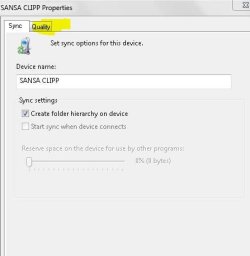
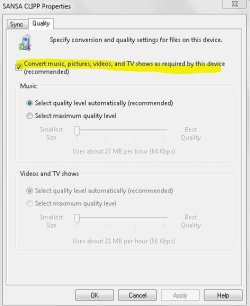
Well, hopefully, if you click on the highlighted sections, you can disable the conversions.
Capture.JPGCapture1.JPGCapture2.JPG

I hope it works for you, but I can't say for sure it will. I don't like using WMP for mp3 player management, never have liked it....it's good that you asked this question here in this forum though ,because some mp3 player forums would have members that simply would say, "get rid of the Coby and get something real!"......I wanted to try and help you out, if I could.:D Good luck!
 

My Computer

Computer type
PC/Desktop
Computer Manufacturer/Model Number
Gigabyte Technology Co., Ltd.
OS
Win 7 Ultimate 64-bit SP1 (desktop)
CPU
Intel Core 2 Duo E8400
Motherboard
Gigabyte GA-EP35-DS3R
Memory
2x 2GB OCZ DDR II SDRAM PC2-6400
Graphics Card(s)
NVIDIA GeForce 9400GT
Monitor(s) Displays
HP 2009m(primary), Acer P191W
Screen Resolution
1600x900, 1440x900
Hard Drives
Internal:WD Caviar Black 640GB 32MB cache 7200RPM
External:Samsung Story Station 1TB HDD desktop drive
500GB Toshiba portable drive
PSU
Antec Earthwatts EA500D
Case
Antec Sonata III
Cooling
4 fans
Keyboard
Logitech Wave
Mouse
Logitech M-SBF90
Internet Speed
Slow due to home Wireless-G router
Antivirus
MSE, Hitman Pro, Malwarebytes
Browser
Chrome and Palemoon
Other Info
Laptop....Acer 5750Z-4835
15.6" HD Widescreen CineCrystal™ LED-backlit LCD Display: (1366x768 resolution, 16:9 aspect ratio)
Intel® Pentium® Processor B940 (2.0GHz, 2MB L3 cache)
Windows® 7 Home Premium,500GB Hard Drive,4GB DDR3 RAM, Intel® HD Graphics,8X DVD-Super Multi Double-Layer Drive
Multi-in-1 Digital Media Card Reader,802.11b/g/n Wi-Fi
Chrome and Palemoon, MSE, Hitman Pro
  • Like
Reactions: JMH
OK, I tried that, and the files were converted to wma stereo, but with the album art embedded.
Ah, yes.....WMP and its lovely options menu....forgot about that, as I use Mediamonkey.

Give me a little while, and I'll work up some new snips for you that should clear up the WMP options.
Well, hopefully, if you click on the highlighted sections, you can disable the conversions.
View attachment 87090View attachment 87091View attachment 87092

I hope it works for you, but I can't say for sure it will. I don't like using WMP for mp3 player management, never have liked it....it's good that you asked this question here in this forum though ,because some mp3 player forums would have members that simply would say, "get rid of the Coby and get something real!"......I wanted to try and help you out, if I could.:D Good luck!

Thanks, I very much appreciate your help, but I just want to figure out how to get my pc to just copy the files, without asking me if I want to convert them. That's how it behaved before, and I wish I could figure out how to get it to do so once again. It never asks me if I want to convert files when I copy them to my brother's Sansa Fuze, which I bought him for Xmas last year, so maybe I should get myself one.
 

My Computer

OS
Windows 7 Home Premium 32bit
Ah, yes.....WMP and its lovely options menu....forgot about that, as I use Mediamonkey.

Give me a little while, and I'll work up some new snips for you that should clear up the WMP options.
Well, hopefully, if you click on the highlighted sections, you can disable the conversions.
View attachment 87090View attachment 87091View attachment 87092

I hope it works for you, but I can't say for sure it will. I don't like using WMP for mp3 player management, never have liked it....it's good that you asked this question here in this forum though ,because some mp3 player forums would have members that simply would say, "get rid of the Coby and get something real!"......I wanted to try and help you out, if I could.:D Good luck!

Thanks, I very much appreciate your help, but I just want to figure out how to get my pc to just copy the files, without asking me if I want to convert them. That's how it behaved before, and I wish I could figure out how to get it to do so once again. It never asks me if I want to convert files when I copy them to my brother's Sansa Fuze, which I bought him for Xmas last year, so maybe I should get myself one.
Well, the copy, not convert issue seems to be beyond my ability to solve....But I do know about the Fuze.
The Fuze is a bargain, for how good it sounds. I had one as my first ever mp3 player, and just recently got another one to Rockbox.
 

My Computer

Computer type
PC/Desktop
Computer Manufacturer/Model Number
Gigabyte Technology Co., Ltd.
OS
Win 7 Ultimate 64-bit SP1 (desktop)
CPU
Intel Core 2 Duo E8400
Motherboard
Gigabyte GA-EP35-DS3R
Memory
2x 2GB OCZ DDR II SDRAM PC2-6400
Graphics Card(s)
NVIDIA GeForce 9400GT
Monitor(s) Displays
HP 2009m(primary), Acer P191W
Screen Resolution
1600x900, 1440x900
Hard Drives
Internal:WD Caviar Black 640GB 32MB cache 7200RPM
External:Samsung Story Station 1TB HDD desktop drive
500GB Toshiba portable drive
PSU
Antec Earthwatts EA500D
Case
Antec Sonata III
Cooling
4 fans
Keyboard
Logitech Wave
Mouse
Logitech M-SBF90
Internet Speed
Slow due to home Wireless-G router
Antivirus
MSE, Hitman Pro, Malwarebytes
Browser
Chrome and Palemoon
Other Info
Laptop....Acer 5750Z-4835
15.6" HD Widescreen CineCrystal™ LED-backlit LCD Display: (1366x768 resolution, 16:9 aspect ratio)
Intel® Pentium® Processor B940 (2.0GHz, 2MB L3 cache)
Windows® 7 Home Premium,500GB Hard Drive,4GB DDR3 RAM, Intel® HD Graphics,8X DVD-Super Multi Double-Layer Drive
Multi-in-1 Digital Media Card Reader,802.11b/g/n Wi-Fi
Chrome and Palemoon, MSE, Hitman Pro
Well, hopefully, if you click on the highlighted sections, you can disable the conversions.
View attachment 87090View attachment 87091View attachment 87092

I hope it works for you, but I can't say for sure it will. I don't like using WMP for mp3 player management, never have liked it....it's good that you asked this question here in this forum though ,because some mp3 player forums would have members that simply would say, "get rid of the Coby and get something real!"......I wanted to try and help you out, if I could.:D Good luck!

Thanks, I very much appreciate your help, but I just want to figure out how to get my pc to just copy the files, without asking me if I want to convert them. That's how it behaved before, and I wish I could figure out how to get it to do so once again. It never asks me if I want to convert files when I copy them to my brother's Sansa Fuze, which I bought him for Xmas last year, so maybe I should get myself one.
Well, the copy, not convert issue seems to be beyond my ability to solve....But I do know about the Fuze.
The Fuze is a bargain, for how good it sounds. I had one as my first ever mp3 player, and just recently got another one to Rockbox.

The only thing about the Fuze that is making me hesitate to get one is the lack of a way to attach a lanyard. I don't like cases or skins that attache to your belt or arm, and things are always falling out of my shirt pocket when I bend over.
 

My Computer

OS
Windows 7 Home Premium 32bit
Thanks, I very much appreciate your help, but I just want to figure out how to get my pc to just copy the files, without asking me if I want to convert them. That's how it behaved before, and I wish I could figure out how to get it to do so once again. It never asks me if I want to convert files when I copy them to my brother's Sansa Fuze, which I bought him for Xmas last year, so maybe I should get myself one.
Well, the copy, not convert issue seems to be beyond my ability to solve....But I do know about the Fuze.
The Fuze is a bargain, for how good it sounds. I had one as my first ever mp3 player, and just recently got another one to Rockbox.

The only thing about the Fuze that is making me hesitate to get one is the lack of a way to attach a lanyard. I don't like cases or skins that attache to your belt or arm, and things are always falling out of my shirt pocket when I bend over.
There's always the Clip+....it has the card slot just like the Fuze, but you can clip it onto your shirt pocket like I do.
 

My Computer

Computer type
PC/Desktop
Computer Manufacturer/Model Number
Gigabyte Technology Co., Ltd.
OS
Win 7 Ultimate 64-bit SP1 (desktop)
CPU
Intel Core 2 Duo E8400
Motherboard
Gigabyte GA-EP35-DS3R
Memory
2x 2GB OCZ DDR II SDRAM PC2-6400
Graphics Card(s)
NVIDIA GeForce 9400GT
Monitor(s) Displays
HP 2009m(primary), Acer P191W
Screen Resolution
1600x900, 1440x900
Hard Drives
Internal:WD Caviar Black 640GB 32MB cache 7200RPM
External:Samsung Story Station 1TB HDD desktop drive
500GB Toshiba portable drive
PSU
Antec Earthwatts EA500D
Case
Antec Sonata III
Cooling
4 fans
Keyboard
Logitech Wave
Mouse
Logitech M-SBF90
Internet Speed
Slow due to home Wireless-G router
Antivirus
MSE, Hitman Pro, Malwarebytes
Browser
Chrome and Palemoon
Other Info
Laptop....Acer 5750Z-4835
15.6" HD Widescreen CineCrystal™ LED-backlit LCD Display: (1366x768 resolution, 16:9 aspect ratio)
Intel® Pentium® Processor B940 (2.0GHz, 2MB L3 cache)
Windows® 7 Home Premium,500GB Hard Drive,4GB DDR3 RAM, Intel® HD Graphics,8X DVD-Super Multi Double-Layer Drive
Multi-in-1 Digital Media Card Reader,802.11b/g/n Wi-Fi
Chrome and Palemoon, MSE, Hitman Pro
Hi..
Have the same anoying problem... Win7 asks if i want to convert files... An Sony mp3 player, No driver, just win7 mtp usb drivers... Files work fine on the player in the format they already are in so why convert them ?

Tried to find the setting in the post abow... but there are no option other then the quality choise there :( Any regedit hack/info on it? ie where is the setting storing the info and what is the key name?

BB
 

My Computer

OS
Win7
Hi..
Have the same anoying problem... Win7 asks if i want to convert files... An Sony mp3 player, No driver, just win7 mtp usb drivers... Files work fine on the player in the format they already are in so why convert them ?

Tried to find the setting in the post abow... but there are no option other then the quality choise there :( Any regedit hack/info on it? ie where is the setting storing the info and what is the key name?

BB
With a Sony player, this trick has worked for some people.....changes the device driver to a mass storage class driver instead of MTP.
A810 series FAQ - Walkman A Series - abi>>forums
 

My Computer

Computer type
PC/Desktop
Computer Manufacturer/Model Number
Gigabyte Technology Co., Ltd.
OS
Win 7 Ultimate 64-bit SP1 (desktop)
CPU
Intel Core 2 Duo E8400
Motherboard
Gigabyte GA-EP35-DS3R
Memory
2x 2GB OCZ DDR II SDRAM PC2-6400
Graphics Card(s)
NVIDIA GeForce 9400GT
Monitor(s) Displays
HP 2009m(primary), Acer P191W
Screen Resolution
1600x900, 1440x900
Hard Drives
Internal:WD Caviar Black 640GB 32MB cache 7200RPM
External:Samsung Story Station 1TB HDD desktop drive
500GB Toshiba portable drive
PSU
Antec Earthwatts EA500D
Case
Antec Sonata III
Cooling
4 fans
Keyboard
Logitech Wave
Mouse
Logitech M-SBF90
Internet Speed
Slow due to home Wireless-G router
Antivirus
MSE, Hitman Pro, Malwarebytes
Browser
Chrome and Palemoon
Other Info
Laptop....Acer 5750Z-4835
15.6" HD Widescreen CineCrystal™ LED-backlit LCD Display: (1366x768 resolution, 16:9 aspect ratio)
Intel® Pentium® Processor B940 (2.0GHz, 2MB L3 cache)
Windows® 7 Home Premium,500GB Hard Drive,4GB DDR3 RAM, Intel® HD Graphics,8X DVD-Super Multi Double-Layer Drive
Multi-in-1 Digital Media Card Reader,802.11b/g/n Wi-Fi
Chrome and Palemoon, MSE, Hitman Pro
Back
Top