How to exclude files and folders from "Recent" lists and jump lists

Stawan

New member
How to exclude files and folders from "Recent" lists and jump lists

I have some sensitive material on my computer which I would not like others to see. So, I'd like to know how to exclude some folders and files from lists like recent items, jump lists, etc. Is it possible?
 

My Computer

OS
Windows 7
Welcome to Seven Forums Stawan. It's possible to turn off the recent items in the jumplists of specific programs. But it's a laborious process. I will describe it, but you'll have to do the legwork.

The Jump lists for each program are stored in

C:\Users\(User name)\AppData\Roaming\Microsoft\Windows\Recent\AutomaticDestinations

as automaticDestination-ms files with random names.


To figure out which file belongs to which program , you'll have to do some detective work.

For instance, you could open a video with your media player program.

Change the AutomaticDestinations folder into Detail view and Sort by Date Modified.

Only one or two of the files should be showing as modified in the past minute. One may be a list of recently viewed folders, the other should be your program.

Delete one of the files then try to open your program's jump list. If it is gone, you have the right file.

Once you have identified the right file, restore it from recycle bin and set the file properties to Read-only. This will disable the jump list for that file. You'll need to do this for all the programs you want to exclude from jump lists.

As you can see, this would be a long and lengthy process, you'd be better off creating a password protected user. Good luck. A Guy
 

My Computer

Computer type
PC/Desktop
OS
Windows 10 Home x64
CPU
INTEL Core i5-750 Quad-Core 3.37GHz
Motherboard
ASUS P7P55D
Memory
HyperX Fury Black Series 8GB (2 x 4GB) 1866Mhz
Graphics Card(s)
EVGA GeForce GTX 750 Superclocked 1GB 128-Bit GDDR5
Monitor(s) Displays
LG 32MA68HY 32" IPS
Screen Resolution
1920 x 1080
Hard Drives
Samsung 840 Evo 120GB, SEAGATE 500GB Barracuda® 7200.12, SATA 3 Gb/s, 7200 RPM, 16MB cache
PSU
ANTEC TruePower New TP-550, 80 PLUS, 550W
Case
ANTEC Three Hundred Illusion
Cooling
COOLER MASTER Hyper 212 Plus, 4 x 120mm 1 x 140mm Noctua's
Internet Speed
85 + Mbps
Antivirus
Avast
Browser
Vivaldi
Another way .... To not show anything in recent folder, and in jump list.

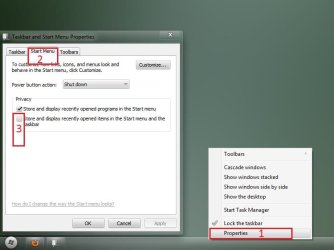
Right click on the taskbar, select properties. The taskbar and start menu properties window will appear. Now select the Start menu tab, uncheck the box shown in the snip.

Untitled.jpg

But if the sensitive materials are videos, and usually opened with WMP, you are to clear WIM history, and disable WMP history. In WMP, Organize > Options > Privacy . In Privacy tab, uncheck all the four boxes in history part, and clear both the history and cache once.
Capture1.JPG

Now you are done ;)
 

My Computer

Computer type
PC/Desktop
Computer Manufacturer/Model Number
Self Assembled
OS
Microsoft Windows 10 Pro Insider Preview 64-bit
CPU
Intel(R) Core(TM) i3-4130 CPU @ 3.40GHz
Motherboard
Gigabyte Technology Co., Ltd. B85M-D3H
Memory
Corsair Vengence 4GB x2 (8.00GB Dual-Channel DDR3 @ 798MHz)
Graphics Card(s)
2047MB GeForce GTS 450 (ZOTAC International)
Sound Card
Onboard (Realtek High Definition Audio)
Monitor(s) Displays
LG Flatron E2040T
Screen Resolution
1600x900
Hard Drives
Western Digital 1 TB
Seagate 500 GB
PSU
Corsair VS550
Case
Cooler Master K380
Cooling
Cooler Master Seidon 120V Plus
Keyboard
Logitech MK260r
Mouse
Logitech MK260r
Internet Speed
PMPL Broadband
Antivirus
Windows Defender + MBAM
Browser
Firefox
Other Info
Dell Studio 15" Laptop
Hey and thanks for the replies, however, they do not answer to my question exactly. I like the jump list feature and recent item lists, I'd just like to exclude a few folders and the files inside them - so that they would not appear in these lists. Is this possible without disabling the jump lists and recent item lists all together?
 

My Computer

OS
Windows 7
As you open those files and folders, they will be included in Jump Lists and recent items . You may run disk cleanup every time after opening them, it will remove those from recent list, but not from jump list .
 

My Computer

Computer type
PC/Desktop
Computer Manufacturer/Model Number
Self Assembled
OS
Microsoft Windows 10 Pro Insider Preview 64-bit
CPU
Intel(R) Core(TM) i3-4130 CPU @ 3.40GHz
Motherboard
Gigabyte Technology Co., Ltd. B85M-D3H
Memory
Corsair Vengence 4GB x2 (8.00GB Dual-Channel DDR3 @ 798MHz)
Graphics Card(s)
2047MB GeForce GTS 450 (ZOTAC International)
Sound Card
Onboard (Realtek High Definition Audio)
Monitor(s) Displays
LG Flatron E2040T
Screen Resolution
1600x900
Hard Drives
Western Digital 1 TB
Seagate 500 GB
PSU
Corsair VS550
Case
Cooler Master K380
Cooling
Cooler Master Seidon 120V Plus
Keyboard
Logitech MK260r
Mouse
Logitech MK260r
Internet Speed
PMPL Broadband
Antivirus
Windows Defender + MBAM
Browser
Firefox
Other Info
Dell Studio 15" Laptop
Okay, too bad then. It isn't the end of the world, but it would have been nice to be able to do that. Thanks anyway.
 

My Computer

OS
Windows 7
Hey and thanks for the replies, however, they do not answer to my question exactly. I like the jump list feature and recent item lists, I'd just like to exclude a few folders and the files inside them - so that they would not appear in these lists. Is this possible without disabling the jump lists and recent item lists all together?

Not sure you read my post correctly, it will indeed do what you wanted, only for the specific items you want, without disabling the feature all together. That's why I did not add the instructions to completely disable. A Guy
 

My Computer

Computer type
PC/Desktop
OS
Windows 10 Home x64
CPU
INTEL Core i5-750 Quad-Core 3.37GHz
Motherboard
ASUS P7P55D
Memory
HyperX Fury Black Series 8GB (2 x 4GB) 1866Mhz
Graphics Card(s)
EVGA GeForce GTX 750 Superclocked 1GB 128-Bit GDDR5
Monitor(s) Displays
LG 32MA68HY 32" IPS
Screen Resolution
1920 x 1080
Hard Drives
Samsung 840 Evo 120GB, SEAGATE 500GB Barracuda® 7200.12, SATA 3 Gb/s, 7200 RPM, 16MB cache
PSU
ANTEC TruePower New TP-550, 80 PLUS, 550W
Case
ANTEC Three Hundred Illusion
Cooling
COOLER MASTER Hyper 212 Plus, 4 x 120mm 1 x 140mm Noctua's
Internet Speed
85 + Mbps
Antivirus
Avast
Browser
Vivaldi
I think you described how to disable a jump list for a specific program, for example, VLC Media Player or Explorer's jump list (or that is what happened when I did what you told). I don't want to do that, I want the lists to work as they should, but just exclude a few folders and the files inside them from appearing on those lists.
 

My Computer

OS
Windows 7
I think you described how to disable a jump list for a specific program, for example, VLC Media Player or Explorer's jump list (or that is what happened when I did what you told). I don't want to do that, I want the lists to work as they should, but just exclude a few folders and the files inside them from appearing on those lists.

OK, sorry I misunderstood. I believe that is too fine a control. A Guy
 

My Computer

Computer type
PC/Desktop
OS
Windows 10 Home x64
CPU
INTEL Core i5-750 Quad-Core 3.37GHz
Motherboard
ASUS P7P55D
Memory
HyperX Fury Black Series 8GB (2 x 4GB) 1866Mhz
Graphics Card(s)
EVGA GeForce GTX 750 Superclocked 1GB 128-Bit GDDR5
Monitor(s) Displays
LG 32MA68HY 32" IPS
Screen Resolution
1920 x 1080
Hard Drives
Samsung 840 Evo 120GB, SEAGATE 500GB Barracuda® 7200.12, SATA 3 Gb/s, 7200 RPM, 16MB cache
PSU
ANTEC TruePower New TP-550, 80 PLUS, 550W
Case
ANTEC Three Hundred Illusion
Cooling
COOLER MASTER Hyper 212 Plus, 4 x 120mm 1 x 140mm Noctua's
Internet Speed
85 + Mbps
Antivirus
Avast
Browser
Vivaldi
Here is a sort of a work around to clear jumplists selectively. It's still rather tedious but does get rid on the endless Right-click / Remove operations for an unknown period as the jumplists just keep bringing in another item as one is removed.
It does mean you have to review all the jumplists you want to keep though. Chances are there may not be too many of them.

1. In the jumplists you want to keep right click each item that is definitely useful to keep and select Pin to this list.
2. Right click on Start menu, uncheck the Store and Display items, Apply, recheck them, OK. This clears all the jumplists but not the pinned items.
3. Unpin the pinned items as you use the programs and they become recent or frequent back in the jumplist.

I used this because I found I really didn't want to keep many jumplist items for each program in the Start menu.

Now I wonder what the limit is on number of items in a jumplist?
 

My Computer

OS
Windows 7

My Computer

Computer type
Laptop
Computer Manufacturer/Model Number
Dell
OS
Windows 7 Ultimate 64bit
CPU
2.2
Memory
8Gb
Graphics Card(s)
NVIDIA
Screen Resolution
1280/762
Mouse
built in pad || iphone || MS wireless
Internet Speed
100MB
Antivirus
Avast
Browser
Chrome, Chrome portable
exclude path from jumplist(s?)

Wow, dead thread. OK, this is the best I've seen. There's greate example builds, and you can even include recent/frequent jumplist entries, including 'launch multiple programs'... I tried it on explorer.exe, and the changes persisted, even after unpinning the instance I created, disappearring only when I deleted the newly created, custom pinned explorer (with super jumplist)...

I digress, The JumpList Editor also includes the ability to associate frequent filetype(s) with blacklist folder exclusion paths...

editor.png

Requires .NET 4 or above. (I think you need to set 'custom' automatic list to enable the exclusion options.


You may want to also include the 'banApplication' regHack method 'A Guy' posted 'earlier' (eg if you customise vlc with exclusions, but some archaic file association exists, causing the recent media to launch with wmplayer). you'll want to use a JumpList viewer to aid in this exercise (Nirsoft:).

If you can, please comment if this is a viable solution. Apppreciate it may not be 'globally affecting', as desired

 
Last edited:

My Computer

Computer type
Laptop
Computer Manufacturer/Model Number
Dell
OS
Windows 7 Ultimate 64bit
CPU
2.2
Memory
8Gb
Graphics Card(s)
NVIDIA
Screen Resolution
1280/762
Mouse
built in pad || iphone || MS wireless
Internet Speed
100MB
Antivirus
Avast
Browser
Chrome, Chrome portable
Back
Top