|
Welcome to Windows 7 Forums. Our forum is dedicated to helping you find solutions with any problems, errors or issues you are experiencing with Windows 7. The Windows 7 forum also covers news and updates and has an extensive Windows 7 tutorial section that covers a wide range of tips and tricks.
Windows 7 - Revert to Windows Live Essentials 2009! |
11-02-2010
|
#1 | | |
Revert to Windows Live Essentials 2009! I have no idea how long this URL will be out there folks, but you can get WLE 2009/2010 back on your Windows OS.
This pertains to Hotmail, MSN and Live email accounts. All the folders you have created in Windows Live Mail are synchronized with the Hotmail server. Therefore, once you have completed this task, all your folders, email and contacts will reappear in WLM 2009. POP3 and IMAP email accounts that you have created in the program---all those folders and email will need to be backed-up before doing the following steps. If you have moved any Hotmail, MSN or Live email into Storage Folders also need to be backed-up as well OR moved back to any of the Synchronized Folders. (thank you roncerr for reminding me  )
Be sure you uninstall WLE 2011 through Add/Remove (XP) or Programs and Features (Vista, Windows 7), then un-hide folders and go to User, appdata, Local, Microsoft, Programs etc. Find folder named; Windows Live*anthing* and delete them. If you have the new CCleaner, run that and it's registry cleaner.
Download the WLE 2009 version from here, It's near the bottom of the page on the left side. SAVE the file to your hard drive for future reinstalls or repairs. From WLM 2011 to 2009 in Windows Live Mail Desktop
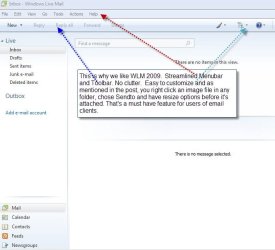
I did a lot of research on this today and the world is not embracing WLE 2011. In one of my early posts about the streamlined look of WLE 2009's Toolbar, I had a feeling others might not like the change as well.
Some like the direct links to social networking sites but many of the posts over the past 72 hours are showing a huge contempt for Skydrive and not being able to get a simple attachment of an image when you right-click a photo and "sendto" "email recipient". (that's a big beef of mine too).
Lastly. Be sure to HIDE the Windows Update for Windows Live Essentials 2011!!! To hide an update visit Windows Update and right-click on the update, choose Hide.
Last edited by winsupertweaker; 12-30-2010 at 02:20 AM..
Reason: add image and correct a sentence
| My System Specs | | System Manufacturer/Model Number My own Custom Build: Asus, Corsair, Transcend, AMD, PNY, Ultra OS W7 64 Bit CPU AMD Phenom x4 4000Mhz Memory 8 GB DDR-2 Graphics Card PNY-NVIDIA GeForce GTX 460 1GB GDDR5 PCI-e Monitor(s) Displays Dual: Flatron L1942T PSU 650 Watt Cooling Corsair Hydro H6 Liquid Cooler Hard Drives C: Drive (Agility 2 Solid State Drive 60 GB)
D: Drive (HDD Internal Western Digital 640 GB) Internet Speed 25 mbps down - 3 mbps up |
11-02-2010
|
#2 | | |
Thanks for the info Ace
I'd have to admit I quite like the new WLE2011 and the good thing about Messenger is that you can put it into compact view just like in previous versions Windows Live Messenger - Change to Full or Compact View
Am I the only 1 that likes it? Seems there's not many fans out there | My System Specs | | System Manufacturer/Model Number Compaq Desktop OS Windows 7 Ultimate x64 CPU AMD Sempron Dual Core Memory 3GB Graphics Card NVIDIA GeForce 6150SE nForce 430 Screen Resolution 1024x768 Hard Drives 150GB Sata |
11-02-2010
|
#3 | | |
I guess it all depends on what you are use to. If you like Office 2003/2007 then all the tabs on the Toolbar are familiar. If you are a person who likes to network with FaceBook and YouTube, life got easier with this upgrade. However, with WLM 2009 every day emails are fast and easy just like they were with Outlook, Outlook Express and Windows Maill. For M$ email clients, everthing was "easy-breezy" with Windows Live Mail 2009. The major change was like plopping Vista into a Windows XP users lap and saying, "have at it!". A lot more eye candy and a whole lot of extra "stuff". And a big plus for Windows Live (IMO). You get to use your synchronized hotmail or Live email account. The calendar sends me my appointment reminders through Messenger---I love that! I would be lost without the Calendar reminders. I am a right-clicker as well. When I browse my images and want to send large ones, that ability to choose the 640 x 480 during "sendto" is wonderful. You can do that in WLE 2011 but the outcome is not "just an attachment". You have to insert photos to get them attached rather than have them transformed immediately into a photo album--then up, up and away to Skydrive. You have that option in WLM 2009 but can easily opt out when you do your first right-click, "sendto". I teach so many PC skills on a daily basis around the world that I get a lot of feedback from my clients. My niche' on the web is very personal and I get to speak with PC users of all levels during remote sessions. I feel, in all honesty, I have a pretty good finger on the pulse of the residential computer users in Western Society.
Last edited by winsupertweaker; 12-30-2010 at 04:31 AM..
Reason: emoticon
| My System Specs | | System Manufacturer/Model Number My own Custom Build: Asus, Corsair, Transcend, AMD, PNY, Ultra OS W7 64 Bit CPU AMD Phenom x4 4000Mhz Memory 8 GB DDR-2 Graphics Card PNY-NVIDIA GeForce GTX 460 1GB GDDR5 PCI-e Monitor(s) Displays Dual: Flatron L1942T PSU 650 Watt Cooling Corsair Hydro H6 Liquid Cooler Hard Drives C: Drive (Agility 2 Solid State Drive 60 GB)
D: Drive (HDD Internal Western Digital 640 GB) Internet Speed 25 mbps down - 3 mbps up |
11-02-2010
|
#4 | | Windows 7 Ultimate 64 bit |

Quote: Originally Posted by Orbital Shark
Am I the only 1 that likes it? Seems there's not many fans out there  I like It. Don't see why everyones complaining about it. | My System Specs | | System Manufacturer/Model Number Self-built on 31/1/11 OS Windows 7 Ultimate 64 bit CPU Intel i5 2400 @ 3.80 GHz Motherboard Ashrock P67 Extreme 4 Memory Mushkin Silverline 996768 4GB Graphics Card MSI GTX 460 760MB Cyclone Overclocked Sound Card Integrated Monitor(s) Displays Asus VH202T 20" Widescreen Screen Resolution 1600x900 Keyboard Logitech Wireless Keyboard MK520 Mouse Logitech M310 PSU Silverstone Strider 500W Case Zalman Z9 Plus Cooling Cooler Master Hyper 212 Plus Hard Drives SSD: OCZ Vertex 2 60GB
HDD: Hitachi Deskstar 7K1000.C 500GB Internet Speed 3 Mbps Other Info UEFI: Ashrock P67/
Network Card :TP-Link WN350GD/
WEI: 7.4/
ODD: Lite-On IHAS324 |
11-02-2010
|
#5 | | |
I have absolutely no issues with it. Live Writer works, Movie Maker works, photo gallery works. That's all I use... | My System Specs | | System Manufacturer/Model Number Heavily Modified Dell Inspiron 530 OS Windows 7 CPU Intel Q6600 Quad Core Motherboard Dell Inspiron Memory 4GB DDR2 800 Graphics Card nVidia Geforce 9800 GTX+ Sound Card ALC 888 HD Audio Monitor(s) Displays Twin Dell 23 inch LCD Keyboard Kennsington ci70 USB Mouse Razer Lachesis PSU Antec 1000w Case RAIDMAX Tornado ATX-238WR Black SECC Steel ATX Mid Tower Cooling A metric buttload of fans Hard Drives Twin Seagate 500 GB Raid 0 Internet Speed 10mb Cable Other Info http://www.y0himba.net |
11-02-2010
|
#6 | | |
That's great guys! But for those that don't, it was and is a real nightmare. | My System Specs | | System Manufacturer/Model Number My own Custom Build: Asus, Corsair, Transcend, AMD, PNY, Ultra OS W7 64 Bit CPU AMD Phenom x4 4000Mhz Memory 8 GB DDR-2 Graphics Card PNY-NVIDIA GeForce GTX 460 1GB GDDR5 PCI-e Monitor(s) Displays Dual: Flatron L1942T PSU 650 Watt Cooling Corsair Hydro H6 Liquid Cooler Hard Drives C: Drive (Agility 2 Solid State Drive 60 GB)
D: Drive (HDD Internal Western Digital 640 GB) Internet Speed 25 mbps down - 3 mbps up |
11-02-2010
|
#7 | | Windows 7 x86/x64, Server 2008r2, Web Server 2008 |
I love it except one small tiny annoying forced feature... The whole social networking aspect to WLM... they removed the Display name, you have to log into the panel to add new people, just ANYONE can search and find new random people to add... its juts like facebook.... :S | My System Specs | | System Manufacturer/Model Number SMN-Productions OS Windows 7 x86/x64, Server 2008r2, Web Server 2008 CPU i7 v2 3930K Steping stone 2 Motherboard ASUS Rampage IV Extreme Memory G.SKILL Ripjaws Z Series 32GB Graphics Card AMD HD 5770 Monitor(s) Displays Acer 21" and Samsung 20" Keyboard Black Widow Ultimate PSU 1000 Watt Case HAF-X Cooling 4 Fans Hard Drives Patriot Pyro 80GB |
12-28-2010
|
#8 | | |
I am sticking with the streamlined look of WLE 2009. Right clicking on image, sendto, allows you to resize images--2011 does not. The emoticons in 2011 look crappy too. The emoticons used here in the forum are the same as WLE 2009, they look solid, detailed and simply, nicer. The ones in 2011 look all spazzed-out and cheap looking, like someone scratched them out quickly with a colored pencil.
We all have our prferences and between being able to totally skip Skydrive, being able to resize with a right click sendto and a skinny Menu Bar that's easily customized. I'm sticking with WLE 2009 for as long as is possible. | My System Specs | | System Manufacturer/Model Number My own Custom Build: Asus, Corsair, Transcend, AMD, PNY, Ultra OS W7 64 Bit CPU AMD Phenom x4 4000Mhz Memory 8 GB DDR-2 Graphics Card PNY-NVIDIA GeForce GTX 460 1GB GDDR5 PCI-e Monitor(s) Displays Dual: Flatron L1942T PSU 650 Watt Cooling Corsair Hydro H6 Liquid Cooler Hard Drives C: Drive (Agility 2 Solid State Drive 60 GB)
D: Drive (HDD Internal Western Digital 640 GB) Internet Speed 25 mbps down - 3 mbps up |
12-30-2010
|
#9 | | |

Quote: Originally Posted by si8mon I like It. Don't see why everyones complaining about it.  Here is a Bing search with the key words " global opinion windows live mail 2011" and chose one of many Reviews by Users of WLE 2011. This url is IMHO the world view in general of Window Live Mail 2011. Just do your own search and see for yourself. If YOU like 2011, good for you! I'm not trying to convince anyone to switch, I'm trying help others understand how to switch back to 2009.
This post is for anyone who would say "I don't know why anyone wouldn't like it?" And actually mean that question when they could search the WWW for every opinion under the sun.
My signature is quoting myself, something I have been telling Windows Users for about five years.
Who knows? Maybe M$ will create a download that will add a feature to change the look and behavior of WLM 2011 to what would be called Legacy UI 2009. | My System Specs | | System Manufacturer/Model Number My own Custom Build: Asus, Corsair, Transcend, AMD, PNY, Ultra OS W7 64 Bit CPU AMD Phenom x4 4000Mhz Memory 8 GB DDR-2 Graphics Card PNY-NVIDIA GeForce GTX 460 1GB GDDR5 PCI-e Monitor(s) Displays Dual: Flatron L1942T PSU 650 Watt Cooling Corsair Hydro H6 Liquid Cooler Hard Drives C: Drive (Agility 2 Solid State Drive 60 GB)
D: Drive (HDD Internal Western Digital 640 GB) Internet Speed 25 mbps down - 3 mbps up |
04-22-2011
|
#10 | | Windows 7 Home Premium 64-bit |
I am desperate to change back to WLM 2009! 2011 is horrible! I want to be able to adapt my own toolbar (or ribbon, whatever they want to call it) so that I can QUICKLY see if there's anything stuck in the Outbox / switch to 'Sent' etc. Frankly I find nothing in 2011 preferable to 2009. (PS The fact that I started using Computers in the 1970's may make not only me but my views archaic.) | My System Specs | | System Manufacturer/Model Number Zoostorm 3370-6102 Desktop PC OS Windows 7 Home Premium 64-bit CPU Core i3-2120 (2 x 3.3GHz) Motherboard ECS H61H2-M2 Memory 6.0GB Graphics Card Intel HD Graphics 1000 (GT1) Sound Card Core i3-2120 Monitor(s) Displays Samsung SyncMaster Screen Resolution (1280x1024@60Hz) Keyboard HP std Mouse std - USB PSU std Case Zoostorm Cooling std Hard Drives Samsung HD103SI ATA (1TB) Internet Speed Bandwidth (Up/Down) [kbps/kbps]:1,325 / 18,052 Revert to Windows Live Essentials 2009! problems? All times are GMT -5. The time now is 10:04 PM. |  |