| Windows 7: voice entry issues with x10 home automation |
09 Dec 2010
|
#1 | | |
voice entry issues with x10 home automation I'm having a small dilemma. I am running and home automation computer with Windows 7, BVC (bills voice control), Active Home Pro (X10 home control) all to voice control my television, stereo and cable box as well as some household appliances and lights. Basically I speak to the computer, it transmits an infrared signal via a USB UIRT to what ever I want to control. My issue is happening with the Windows 7 voice input program. When I get the TV a command such as "mute" the computer doesn't know it's not for it so it deciphers the command as a command for Windows 7. What I'm curious about is is there a way to disable the voice input program that comes with Windows 7 or is there a way to tell it to listen but not perform any task within Windows. I hope I've made myself clear and not just confused every body? I think I can use myself! I was doing this with windows XP and it was working very well with a download voice engine. | My System Specs |
| System Manufacturer/Model Number e machine OS Windows 764 bit CPU ? Motherboard ? Memory 2 gigabyte Graphics Card ? Sound Card onboard sound Monitor(s) Displays LCD PSU ? Case tower Cooling central air Hard Drives ? |
09 Dec 2010
|
#2 | | Windows 7 x64 Ultimate A Finnish immigrant in Leipzig, Germany |
Hi Vanner, welcome to the Seven Forums.
Isn't it enough just to stop the Windows Speech process? If not, you can find the speech recognition in C:\Windows\Speech\, the application itself is sapisvr.exe in C:\Windows\Speech\Common.
Kari | My System Specs | | Computer type Laptop System Manufacturer/Model Number HP ENVY 17-1150eg OS Windows 7 x64 Ultimate CPU 1.6 GHz Intel Core i7-720QM Processor Memory 6 GB Graphics Card ATI Mobility Radeon HD 5850 Graphics Sound Card Beats sound system with integrated subwoofer Monitor(s) Displays 17" laptop display, 22" LCD and 32" Full HD TV through HDMI Screen Resolution 1600*900, 1680*1050 and 1920*1080 Keyboard Logitech diNovo Media Desktop Laser (bluetooth) Mouse Logitech MX1000 Laser (Bluetooth) Hard Drives Internal: 2 x 500 GB SATA Hard Disk Drive 7200 rpm
External: 2TB for backups, 3TB USB3 network drive for media Internet Speed 50/10 Mbps VDSL Antivirus MSE, Windows Defender Browser Maxthon 3.5.2. Other Info Windows 7 Ultimate Retail Full in English, additional Guest-user accounts in Finnish, German and Swedish (Working languages English & Swedish, Family language German, my own language, mother tongue, Finnish. I really need Ultimate to get to use Language Packs!) |
09 Dec 2010
|
#3 | | |
I guess this might help explain things better. I use this as a verbal remote control to control my house and audio video equipment, I need this because of a disability. When I first started using Bills Voice Control (wgjohns.com/bvc) I was using XP (my XP computer died due to hardware malfunction), anyway in order to run the programs on Windows XP I had to download Microsoft's Speech SDK 5.1 for Windows. This program worked great because it did not do anything but allow speech entry for the BVC program which was specifically used for sending commands to either an X10 transceiver or a USB UIRT (Universal infrared remote transceiver). This worked really good. After the burial at a suitable morning time I purchased a refurbished PC running Windows 7, and I really like 7 and would like to keep it. However what I need to do is have a speech engine that listens but does not try to control the computer itself when it hears similar commands for BVC. In other words I need to keep the microphone on and the speech engine listening for BVC but be able to turn it off at the computer control level, similar to DragonDictate where you can turn off dictation and leave on command mode, something like that anyway. If I can't fix this I guess I will revert back to XP but I really don't want to do that if I can't keep from it. | My System Specs | | System Manufacturer/Model Number e machine OS Windows 764 bit CPU ? Motherboard ? Memory 2 gigabyte Graphics Card ? Sound Card onboard sound Monitor(s) Displays LCD PSU ? Case tower Cooling central air Hard Drives ? |
10 Dec 2010
|
#4 | | Windows 7 x64 Ultimate A Finnish immigrant in Leipzig, Germany |
Sorry for misunderstanding you. I understood that your special application already has a speech engine and you are looking a way to disable the built-in engine interfering.
I'll check if I can find out something. I'll also tell some other geeks to look this thread, in case they have ideas.
Kari | My System Specs | | Computer type Laptop System Manufacturer/Model Number HP ENVY 17-1150eg OS Windows 7 x64 Ultimate CPU 1.6 GHz Intel Core i7-720QM Processor Memory 6 GB Graphics Card ATI Mobility Radeon HD 5850 Graphics Sound Card Beats sound system with integrated subwoofer Monitor(s) Displays 17" laptop display, 22" LCD and 32" Full HD TV through HDMI Screen Resolution 1600*900, 1680*1050 and 1920*1080 Keyboard Logitech diNovo Media Desktop Laser (bluetooth) Mouse Logitech MX1000 Laser (Bluetooth) Hard Drives Internal: 2 x 500 GB SATA Hard Disk Drive 7200 rpm
External: 2TB for backups, 3TB USB3 network drive for media Internet Speed 50/10 Mbps VDSL Antivirus MSE, Windows Defender Browser Maxthon 3.5.2. Other Info Windows 7 Ultimate Retail Full in English, additional Guest-user accounts in Finnish, German and Swedish (Working languages English & Swedish, Family language German, my own language, mother tongue, Finnish. I really need Ultimate to get to use Language Packs!) |
10 Dec 2010
|
#5 | | Windows 7 x64 Ultimate A Finnish immigrant in Leipzig, Germany |
I do not find anything regarding how to tell speech recognition the commands are not ment to Windows.
However, this might just work:
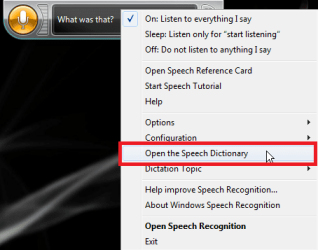
Right click Speech Recognition on Windows Desktop to open its context menu. Choose Open the Speech Dictionary:
A new window opens. Click Add a new word:
Follow instructions given on screen to add a new word, new command for instance to mute television.
Sorry, this is the best I can come on now.
Kari | My System Specs | | Computer type Laptop System Manufacturer/Model Number HP ENVY 17-1150eg OS Windows 7 x64 Ultimate CPU 1.6 GHz Intel Core i7-720QM Processor Memory 6 GB Graphics Card ATI Mobility Radeon HD 5850 Graphics Sound Card Beats sound system with integrated subwoofer Monitor(s) Displays 17" laptop display, 22" LCD and 32" Full HD TV through HDMI Screen Resolution 1600*900, 1680*1050 and 1920*1080 Keyboard Logitech diNovo Media Desktop Laser (bluetooth) Mouse Logitech MX1000 Laser (Bluetooth) Hard Drives Internal: 2 x 500 GB SATA Hard Disk Drive 7200 rpm
External: 2TB for backups, 3TB USB3 network drive for media Internet Speed 50/10 Mbps VDSL Antivirus MSE, Windows Defender Browser Maxthon 3.5.2. Other Info Windows 7 Ultimate Retail Full in English, additional Guest-user accounts in Finnish, German and Swedish (Working languages English & Swedish, Family language German, my own language, mother tongue, Finnish. I really need Ultimate to get to use Language Packs!) |
10 Dec 2010
|
#6 | | Win 7 Home Premium 64bit Ver 6.1.7600 Build 7601 - SP1 Central Pa. |
Hi! vanner, welcome to 7F
Unless You, Bill, Dave_X10_L or members here at 7Fs can find a way to turn off input to Microsoft's Speech SDK 5.1 for Windows, but still leave it as an engine for BVC you are going to need a different combination for win 7.
Your specs show you are running 7x64, and BVC has yet to be programmed for x64.....yet.
See Your, Bill, Dave_X10_L reply #11 & #12 at: Windows 7 compatible with BVC (Short answer is YES!)
Bill seems willing, but as many of us he has too many irons in the fire.
I do not think that with all the grey-matter-power we have here at 7Fs (Think Developers) it would take too long to solve this.
Though it may take a collaboration with your Bill, and our Admins to accomplish it.
Say something to Bill, and I will approach our Admins to see if we can start a collaboration.
Please do not be discouraged if the answer is Nyet!
Best Regards
Steve | My System Specs | | Computer type PC/Desktop System Manufacturer/Model Number Gateway DX4831e (Mid-Tower Desktop) OS Win 7 Home Premium 64bit Ver 6.1.7600 Build 7601 - SP1 CPU Intel i3 530 2.93GHz, 2933MHz 2 Cores 4 Logical Processors Motherboard Gateway H57M01 133 megahertz Memory 6GB of 1,333MHz DDR3 SDRAM Graphics Card 32MB Intel Graphics Media Accelerator HD IGChip Sound Card Realtek High Definition Audio Monitor(s) Displays Gateway HX2000 20inch TFT active matrix TN Screen Resolution 1600 x 900 x 59 hertz Keyboard MS 'Natural' Standard PS/2 Enhanced 101-102 Key Mouse Gateway USB wired optical PSU 300watts. Case Mid-Tower Desktop Cooling Stock from Gateway Hard Drives WDC WD10EADS-00M2B0 [HDD] (1000.20 GB) -- drive 0,
HL-DT-ST DVDRAM GH41N [CD-ROM dr]
HP Photosmart Plus B210a e_series AIO Printer
Four card readers, and Four USB 2.0 Internet Speed Verizon FIOS 24.57Mbps Down - 5.68Mbps up Antivirus MSE Browser IE9.0.8112.16421-Upd ver 9.0.13, FireFox 19.2, Opera 12.14 Other Info BIOS: American Megatrends Inc. P01-A0 11/17/2009
System Specs by Belarc.
Join Date March 27th 2010 at 10:44:15 AM. |
10 Dec 2010
|
#7 | | |
as I said before I need to speech engine and the one that comes with Windows 7 works really well so I really don't want to disable it as much as I guess I want it to ignore the verbal commands for the computer and hear them for BVC. When I was using XP with the Microsoft speech engine it only listen for commands that were for BVC, but with Windows 7 the entire computer is listening and has difficulty deciding which program the verbal command was used for. I guess what I really want to do is direct all verbal commands that the computer hears at BVC... I will speak to Bill first chance I get but with this schedule I hate to add more to his plate. | My System Specs | | System Manufacturer/Model Number e machine OS Windows 764 bit CPU ? Motherboard ? Memory 2 gigabyte Graphics Card ? Sound Card onboard sound Monitor(s) Displays LCD PSU ? Case tower Cooling central air Hard Drives ? |
10 Dec 2010
|
#8 | | Win 7 Home Premium 64bit Ver 6.1.7600 Build 7601 - SP1 Central Pa. |

Quote: Originally Posted by vanner as I said before I need to speech engine and the one that comes with Windows 7 works really well so I really don't want to disable it as much as I guess I want it to ignore the verbal commands for the computer and hear them for BVC. When I was using XP with the Microsoft speech engine it only listen for commands that were for BVC, but with Windows 7 the entire computer is listening and has difficulty deciding which program the verbal command was used for. I guess what I really want to do is direct all verbal commands that the computer hears at BVC... I will speak to Bill first chance I get but with this schedule I hate to add more to his plate. And there in lies the rub.......You have a program that doesn't play well with win 7.
Kari, and I have asked around to see if there are any possibilities for you.
So far none.
It is getting late for me (3pmedt) to try and pursue this any further for you. If you would like to try. get in touch with Brink (my apologies Brink, I owe you an OX roast!)
Last edited by Anak; 11 Dec 2010 at 05:46 AM..
Reason: typos
| My System Specs | | Computer type PC/Desktop System Manufacturer/Model Number Gateway DX4831e (Mid-Tower Desktop) OS Win 7 Home Premium 64bit Ver 6.1.7600 Build 7601 - SP1 CPU Intel i3 530 2.93GHz, 2933MHz 2 Cores 4 Logical Processors Motherboard Gateway H57M01 133 megahertz Memory 6GB of 1,333MHz DDR3 SDRAM Graphics Card 32MB Intel Graphics Media Accelerator HD IGChip Sound Card Realtek High Definition Audio Monitor(s) Displays Gateway HX2000 20inch TFT active matrix TN Screen Resolution 1600 x 900 x 59 hertz Keyboard MS 'Natural' Standard PS/2 Enhanced 101-102 Key Mouse Gateway USB wired optical PSU 300watts. Case Mid-Tower Desktop Cooling Stock from Gateway Hard Drives WDC WD10EADS-00M2B0 [HDD] (1000.20 GB) -- drive 0,
HL-DT-ST DVDRAM GH41N [CD-ROM dr]
HP Photosmart Plus B210a e_series AIO Printer
Four card readers, and Four USB 2.0 Internet Speed Verizon FIOS 24.57Mbps Down - 5.68Mbps up Antivirus MSE Browser IE9.0.8112.16421-Upd ver 9.0.13, FireFox 19.2, Opera 12.14 Other Info BIOS: American Megatrends Inc. P01-A0 11/17/2009
System Specs by Belarc.
Join Date March 27th 2010 at 10:44:15 AM. |
11 Dec 2010
|
#9 | | win 7 ultimate nottingham |
| My System Specs | | System Manufacturer/Model Number self build OS win 7 ultimate CPU amd phenom x4 9600 Motherboard asus m2n32-sli deluxe Memory corsair twinxs 2x2gb Graphics Card 2x nvidia 1gb 8500gt Sound Card onboard Monitor(s) Displays 19" lg ring tft PSU oryxx tornado 750w Case thermaltake xaser lll Cooling artic freezer64 pro + 7 case fans Hard Drives maxtor sata 500gb
maxtor sata 320gb
fujitsu sata200gb voice entry issues with x10 home automation problems? All times are GMT -5. The time now is 09:10 AM. | |