Windows 7 Forums


Windows 7: This operation has been cancelled due to restrictions

25 Mar 2011   #1

Windows 7
 
 
This operation has been cancelled due to restrictions

When trying to access internet options in IE 8. I had F-Secure/Shaw Secure AV running previously. I believe it messed things up adding a parental block.


I tried the below but I am lost when I reach #7. Any help?
  1. Quote:
    1. Click Start > Run. Type MMC and then click OK.
    2. Click Console and then click Add/remove Snap-in.
    3. In the Add/remove Snap-in dialog box, click Add.
    4. In the Add Standalone Snap-in list, click Group Policy, and then click Add.
    5. In the Group Policy object window, click Finish.
    6. Click Close, and then click OK.
    7. Go to Local Computer Policy > User Configuration > Administrative Templates.
    8. Click Desktop.
    9. In the right-pane, Right-click Hide my Network Places icon on desktop, and then click Properties.
    10. Click Not Configured, and then click OK.
    11. Expand Windows Components, and then click Windows explorer.
    12. In the right pane, right-click Prevent access to drives from my Computer, and then click Properties.
    13. Click Not Configured, and then click OK.
    14. Quit the Local Computer Policy MMC snap-in.
My System SpecsSystem Spec

25 Mar 2011   #2

64-bit Windows 7 Ultimate SP1 & Windows 8 Enterprise
Texas


Hello Sammy,

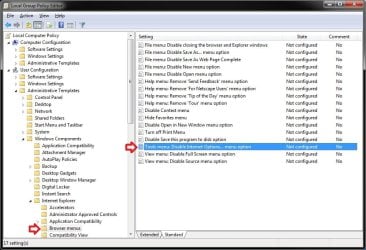
That setting in group policy above would not have anything to do with Internet Options. Check the location below to make sure that the highlighted item in the right pane of Browser menus is set to Not configured instead to see if that may help. You'll need to close and reopen IE9 afterwards to apply.

This operation has been cancelled due to restrictions-internet_options.jpg

Hope this helps,
Shawn

Last edited by Brink; 25 Mar 2011 at 04:33 PM.. Reason: typo
My System SpecsSystem Spec
25 Mar 2011   #3

Windows 7


Hi Shawn.
Thanks. I'll give it a shot. However, looks like I got some bigger issues at play here. I ran SFC/scan now and I got a message that some files are corrupt and Windows was not able to repair them. I have not seen this message before.

I am not sure if this had anything to do with it, but I uninstalled SP 1 thinking I can use SFC to repair any files if necessary. I can attach or past the CBS.log if it'll help.

S
My System SpecsSystem Spec
.


25 Mar 2011   #4

Windows 7


Unfortunately. It's a no go. I am not sure what happened here. I am running malware scans at the moment. I am getting "bad image errors when attempting to run some..but not all apps. Uninstalling or reinstalling the apps gives me the same error message.

As far as the IE issue goes, IE 8 64 bit works fine but not IE 8 32 bit.

I am getting insufficient rights issues when running AV programs...like at 90+% completiton/scanning. It appears my system32 folder may also have rights issues as well.

Last edited by Sammy888; 25 Mar 2011 at 08:55 PM..
My System SpecsSystem Spec
25 Mar 2011   #5

64-bit Windows 7 Ultimate SP1 & Windows 8 Enterprise
Texas


Sammy,

You might see if doing a system restore (at boot if needed) using a restore point dated before you had these issues may be able to undo and fix them.
My System SpecsSystem Spec
25 Mar 2011   #6

Windows 7


I just deleted all my restore points but the most current one this morning...the problem happened right after....as luck would have it. I tried the latest restore point and that failed to remedy the problem. The corruption likely happened a few weeks ago, my guess...perhaps during a power outage or during one of my routine registry cleaning with Advanced System Care.
My System SpecsSystem Spec
25 Mar 2011   #7

64-bit Windows 7 Ultimate SP1 & Windows 8 Enterprise
Texas


That's not good.

Well, as a test, create a new administrator account and see if everything works ok in it.

If not, then you might consider doing a repair install if you haven't installed SP1 yet to avoid a clean reinstall, unless you just wanted to do a clean install.
My System SpecsSystem Spec
25 Mar 2011   #8

Windows 7


Don't I know it.

I got a few "Bad image" errors setting up the new admin account. the errors all pointed to System32 files.

I uninstalled SP 1 this morning then I proceeded with the SFC scan.

What are the chances of success with a repair install? I am thinking if SFC couldnt fix the files including rights issue, how could doing the repair install?
My System SpecsSystem Spec
25 Mar 2011   #9

64-bit Windows 7 Ultimate SP1 & Windows 8 Enterprise
Texas


A repair install is basically a inplace upgrade install workaround that uses your Windows 7 installation disc to upgrade your current Windows 7 edition to the same edition.

A repair install replaces your system files with the ones on the installation disc, and a SFC scan doesn't.
My System SpecsSystem Spec
09 Apr 2011   #10

64-bit Windows 7 Ultimate SP1 & Windows 8 Enterprise
Texas


Hello Sammy,

If you are still having this issue, then you might give this a try to see if it may be able to enable Internet Options for you.

Internet Options - Enable or Disable
My System SpecsSystem Spec
Reply

 This operation has been cancelled due to restrictions problems?


Thread Tools


Similar help and support threads for: This operation has been cancelled due to restrictions
Thread Forum
Solved This Operation has been cancelled due to restrictions etc Browsers & Mail
This operation cancelled due to RESTRICTIONS in place ....... General Discussion
Outlook suddenly giving "operation cancelled" Browsers & Mail
This operation has been cancelled due to restrictions.. Software
Solved This operation has been cancelled General Discussion


All times are GMT -5. The time now is 01:16 AM.


Seven Forums Android App Seven Forums IOS App Follow us on Facebook

Windows 7 Forums is an independent web site and has not been authorized,
sponsored, or otherwise approved by Microsoft Corporation.
"Windows 7" and related materials are trademarks of Microsoft Corp.
© Designer Media Ltd
  

1 2 3 4 5 6 7 8 9 10 11 12 13 14 15 16 17 18 19 20 21 22 23 24 25 26 27 28 29 30 31 32